Need help with Undoing Diskpart Clean by mistake

stargates73

New member
Local time
4:12 AM
Messages
2
I have a Laptop with windows 7 home 64 bit and it showed I had some windows updates available along with a video driver update so I selected to download windows update and it downloaded and was installing updates while I was reading my email and I got a BSOD.
I rebooted and it would not boot just to a quick Blue screen flash so I rebooted to try to get to safe mode but it would not boot into it only got the blue sreen soI turned of Automatic Restart in options at Safe Mode as booting trying all other methods did not work. I only had options of Automatic System Recovery Repair I believe it said (recommended) and Boot normal so I ran the Automatic repair and viewed report as said bad Driver. So I googled unable to boot due to bad driver and I read somewhere that said to open cmd prompt and to type diskpart and list to see a list of drives I could see my C: drive showed 3 partitions C: 250 gb PSQ Resereved 12GB and a 3rd 106mb anyway I ran diskpart and list drives and followed the Help on screen about selecting which drive to make active as I had C: drive 1 selected and made active but still did not boot.
I returned to Diskpart and I typed Diskpart Clean as thought it would prompt me with options or Y or N but it didn't just said Clean had completed, obviously I did not know what I was doing.
Now I cannot boot to the drive or see it in Diskpart. I am using Hirens Boot CD on a usb thumb drive and how I am able to be online here as allows me to use Opera browser and my Ethernet LAN connection. I ran the Partition Find and Mount and it shows my 250gb drive as Unknown device and Under visible partitions shows no Partitions found and I did scan and it shows 2 partitions found Partition 1 12gb NTFS and Partition 2 106mb NTFS neither are mounted.

I then ran MiniTool Partition Wizard from Hiren Boot USB and it displays my 250gb drive as 232gb Bad Disk and my Hirens USB thumb Drive.

Did I just delete my partition and how do I get it back to access my files as there are no options in Partition Wizard for my 250gb?

I really need to get it to be seen again so I can try to get it to boot again so I can recover my files, photos, bookmarks as have had this computer for my daily machine for 5 yrs now so would appreciate any steps to follow in getting it back. Thank You.
 

My Computer My Computer

At a glance

Windows 7 Home Premium 64 BitAMD Athlon II X@ M3004 gbAMD Vision
Computer type
Laptop
Computer Manufacturer/Model Number
Gateway NV73
OS
Windows 7 Home Premium 64 Bit
CPU
AMD Athlon II X@ M300
Memory
4 gb
Graphics Card(s)
AMD Vision
Hard Drives
Toshiba 250 GB
Antivirus
Clamwin
Browser
Chrome, Internet Explorer
Hello and welcome stargates mate as a rule you cannot clean the C: drive while it is in use to clean a drive with DISKPART because it is the OS that is generating the DISKPART. What one normally does is clean a drive - even if it is a C: drive from a machine using another machine set to DISKPART it means you have to install the drive into the working machine direct to the board or USB to SATA adaptor or a SATA dock station to the working machine.

I have accidentally done this way back when I was new to computing and requesting a clean of the C: drive will always pop up a message to let you know you cannot do that.

Now the BSOD is more than likely to be due to your use of that software to download updates. I think it was quite a bad move to try the DISKPART stuff but it is done now so what do you actually want to happen if it is to retrieve data then we can help you do that because it sounds to me at least that the C: drive was not cleaned properly anyway.

If however you need to reinstall 7 then it is quite an easy matter to do that as long as you have the activation code on a sticker on the machine and just use an ISO which we can link you to.

Just let us know what it is you want to do.
 

My Computer My Computer

At a glance

Desk1 7 Home Prem / Desk2 10 Pro / Main lap A...Desk1 i5 3750K / Laptop i7 GTX 860M / Desk2 i...Desk1 8GB (1866) / Desk2 16GB (1333) / Laptop...Desk 1& 2NVidia GTX 650 & Laptops on board Intel
Computer type
PC/Desktop
Computer Manufacturer/Model Number
Own build (new) Desk1 / Asus ROG Win 7 / Desk2 1st build
OS
Desk1 7 Home Prem / Desk2 10 Pro / Main lap Asus ROG 10 Pro 2 laptop Toshiba 7 Pro Asus P2520 7 & 10
CPU
Desk1 i5 3750K / Laptop i7 GTX 860M / Desk2 i5 2500
Motherboard
Desk1 Asus P877-V / Desk2 Gigabyte H67 UD3H / Laptop ?
Memory
Desk1 8GB (1866) / Desk2 16GB (1333) / Laptop 8Gb DDR3
Graphics Card(s)
Desk 1& 2NVidia GTX 650 & Laptops on board Intel
Sound Card
Desk 1 & 2 -XONAR DG Realtek High Def audio Laptop
Monitor(s) Displays
Desk 1 Benq HD 2450 / Desk2 Philips 24" / Laptop 17.5"
Screen Resolution
1920x1080 D1 & D2 & Laptop 1
Hard Drives
Desk1 Samsung 120GB 830 SSD
Asus ROG 256GB 850 Pro SSD
Desk2 Samsung 840 256 SSD
Toshiba 120GB EVO
PSU
Desk 1 Corsair HX 1050/ Laptop ? / Desk 2 Corsair HX 650
Case
Desk 1 Cooler HAF XM ? Toshiba laptop / Desk2 Coolermaster
Cooling
Fans on all Desk1 -2 Desk2 - all Coolermasters 5 Laptop ?
Keyboard
Desk 1 MS Sidewinder X6 Desk 2 MS Sidewinder X 4
Mouse
Desk 1&2 - Gigabyte MS 900 gamer - laptop - Logitec wireless
Internet Speed
ADSL2+
Other Info
One other Desktop (tester) and spare Toshba laptop both with SSD's
Running Kaspersky 2016 ISS on all machines config'd identically
Logitec audio stereo systems on each machine (x3)
Canon MG5250MFC
Router/modem TP-Link running WPA2SK
Hi

Please do provide STEP by STEP on what you had done.

It seem that there are some steps you have not included here.

Even a tiny step, which you may think it is not required, is very important.

Try to recall.

This tiny step it turn out may resolve your issue.


Eric.
 

My Computer My Computer

At a glance

Windows 7 x64
Computer type
Laptop
Computer Manufacturer/Model Number
Toshiba L630 and L735
OS
Windows 7 x64
Hard Drives
240 GB SSD
Hi

Please do provide STEP by STEP on what you had done.

It seem that there are some steps you have not included here.

Even a tiny step, which you may think it is not required, is very important.

Try to recall.

This tiny step it turn out may resolve your issue.


Eric.
Hmm Eric well at first I took this at face value and I am of the same opinion as you on rereading the #1 post and I think point form would be good.

I missed too that the OP is using an unusual (for me) AV too and some more details on the system specs wold be handy for example I am not sure of what the graphics are driven by.
 

My Computer My Computer

At a glance

Desk1 7 Home Prem / Desk2 10 Pro / Main lap A...Desk1 i5 3750K / Laptop i7 GTX 860M / Desk2 i...Desk1 8GB (1866) / Desk2 16GB (1333) / Laptop...Desk 1& 2NVidia GTX 650 & Laptops on board Intel
Computer type
PC/Desktop
Computer Manufacturer/Model Number
Own build (new) Desk1 / Asus ROG Win 7 / Desk2 1st build
OS
Desk1 7 Home Prem / Desk2 10 Pro / Main lap Asus ROG 10 Pro 2 laptop Toshiba 7 Pro Asus P2520 7 & 10
CPU
Desk1 i5 3750K / Laptop i7 GTX 860M / Desk2 i5 2500
Motherboard
Desk1 Asus P877-V / Desk2 Gigabyte H67 UD3H / Laptop ?
Memory
Desk1 8GB (1866) / Desk2 16GB (1333) / Laptop 8Gb DDR3
Graphics Card(s)
Desk 1& 2NVidia GTX 650 & Laptops on board Intel
Sound Card
Desk 1 & 2 -XONAR DG Realtek High Def audio Laptop
Monitor(s) Displays
Desk 1 Benq HD 2450 / Desk2 Philips 24" / Laptop 17.5"
Screen Resolution
1920x1080 D1 & D2 & Laptop 1
Hard Drives
Desk1 Samsung 120GB 830 SSD
Asus ROG 256GB 850 Pro SSD
Desk2 Samsung 840 256 SSD
Toshiba 120GB EVO
PSU
Desk 1 Corsair HX 1050/ Laptop ? / Desk 2 Corsair HX 650
Case
Desk 1 Cooler HAF XM ? Toshiba laptop / Desk2 Coolermaster
Cooling
Fans on all Desk1 -2 Desk2 - all Coolermasters 5 Laptop ?
Keyboard
Desk 1 MS Sidewinder X6 Desk 2 MS Sidewinder X 4
Mouse
Desk 1&2 - Gigabyte MS 900 gamer - laptop - Logitec wireless
Internet Speed
ADSL2+
Other Info
One other Desktop (tester) and spare Toshba laptop both with SSD's
Running Kaspersky 2016 ISS on all machines config'd identically
Logitec audio stereo systems on each machine (x3)
Canon MG5250MFC
Router/modem TP-Link running WPA2SK
I have a laptop Model is a Gateway NV73 with an AMD Vision graphics on it.On Tuesday 12-20 my day off I saw that Windows update had shown and updated AMD video driver for so I selected it along with other updates and they all downloaded and it was installing them the last time I checked as I was reading emails so I stopped as I knew it would require a Restart after installing.
I was tying in a reply to an email when the laptop got the BSOD. I rebooted and it kept flashing a blue screen for a second when rebooted so that is when I tried to boot to safe mode but it would not boot into so I selected turn off automatic restart I believe it was and it rebooted but I only got the options of Startup Repair (Recommended) or Boot Windows Normal which I tried normal but got a Blue screen on reboot and took a picture of it with my phone.
I then tried the Startup Repair and let it run which took about 14 hrs and it said windows could not repair and I viewed the report and took pictures of with my phone but need to find a way to upload as need to get on another computer to upload them for you to see exactly what I saw.
It was after that when I booted with the Hiren USB drive and was able to see my drive but it was labeled as D: and I could access the files on it and I went to CMMD Prompt and ran dos to do FIXMBR but didn't work so I tired to do CHKDSK /F and said it could not be be done or something so I ran several programs from Hirens that was on it and it said the registry was missing.
I tried to boot to D: drive and it just gives me the option to Restore to the Factory Settings which I don't want to do or the option to reinstall windows and would make a Backup of windows in a folder windows.old I think it said.
After that is when I googled about reading a hard drive to see content and got the CMMD prompt about DISKPART and the LIST DRIVES and could see the drive then until I typed DISKPART CLEAN which I thought maybe it would clean the disks MBR since trying to FIXMBR and CHKDSK /F didn't work.
Now I am unable to access the drive.
I see others have posted the same issues of typing DISKPART CLEAN and I have not done anything since not to erase or loose anything more other than try Partition Wizard Recovery which shows my 250 gb drive but only 2 partitons found the 12gb and the 106mb as shows 250GB Free on space.

Do I need to remove the drive and connect to another computer?
I will follow your steps and I Greatly appreciate your assistance in this.
 

My Computer My Computer

At a glance

Windows 7 Home Premium 64 BitAMD Athlon II X@ M3004 gbAMD Vision
Computer type
Laptop
Computer Manufacturer/Model Number
Gateway NV73
OS
Windows 7 Home Premium 64 Bit
CPU
AMD Athlon II X@ M300
Memory
4 gb
Graphics Card(s)
AMD Vision
Hard Drives
Toshiba 250 GB
Antivirus
Clamwin
Browser
Chrome, Internet Explorer
Ok mate now to me and I stand to be corrected of course the graphics being updated through a Windows update seems odd and I think I mentioned before it is always best to download drivers from the manufacturers site whenever possible.

Now what you have described after that I am sorry but I find it rather confusing as to why you involved the DISKPART. Now yes you are right in that you need too install the drive into another computer or hook it up using a USB to SATA adapter or even a USB connecting docking station - I find the latter easier to use now. The you can pull up DISKPART on that machine choose the hooked u[ drive and clean it.

Now do this like that and do make sure any data you need is backed up before you do it because it will be lost for good.
 

My Computer My Computer

At a glance

Desk1 7 Home Prem / Desk2 10 Pro / Main lap A...Desk1 i5 3750K / Laptop i7 GTX 860M / Desk2 i...Desk1 8GB (1866) / Desk2 16GB (1333) / Laptop...Desk 1& 2NVidia GTX 650 & Laptops on board Intel
Computer type
PC/Desktop
Computer Manufacturer/Model Number
Own build (new) Desk1 / Asus ROG Win 7 / Desk2 1st build
OS
Desk1 7 Home Prem / Desk2 10 Pro / Main lap Asus ROG 10 Pro 2 laptop Toshiba 7 Pro Asus P2520 7 & 10
CPU
Desk1 i5 3750K / Laptop i7 GTX 860M / Desk2 i5 2500
Motherboard
Desk1 Asus P877-V / Desk2 Gigabyte H67 UD3H / Laptop ?
Memory
Desk1 8GB (1866) / Desk2 16GB (1333) / Laptop 8Gb DDR3
Graphics Card(s)
Desk 1& 2NVidia GTX 650 & Laptops on board Intel
Sound Card
Desk 1 & 2 -XONAR DG Realtek High Def audio Laptop
Monitor(s) Displays
Desk 1 Benq HD 2450 / Desk2 Philips 24" / Laptop 17.5"
Screen Resolution
1920x1080 D1 & D2 & Laptop 1
Hard Drives
Desk1 Samsung 120GB 830 SSD
Asus ROG 256GB 850 Pro SSD
Desk2 Samsung 840 256 SSD
Toshiba 120GB EVO
PSU
Desk 1 Corsair HX 1050/ Laptop ? / Desk 2 Corsair HX 650
Case
Desk 1 Cooler HAF XM ? Toshiba laptop / Desk2 Coolermaster
Cooling
Fans on all Desk1 -2 Desk2 - all Coolermasters 5 Laptop ?
Keyboard
Desk 1 MS Sidewinder X6 Desk 2 MS Sidewinder X 4
Mouse
Desk 1&2 - Gigabyte MS 900 gamer - laptop - Logitec wireless
Internet Speed
ADSL2+
Other Info
One other Desktop (tester) and spare Toshba laptop both with SSD's
Running Kaspersky 2016 ISS on all machines config'd identically
Logitec audio stereo systems on each machine (x3)
Canon MG5250MFC
Router/modem TP-Link running WPA2SK
Hi stargates73,

Your first priority now is to backup the data on your laptop drive. For that purpose there is no need to take your laptop drive out. You can run TestDisk for DOS and check whether it lists your files. If your files are listed you can copy those to another external drive.

1. Download TestDisk for DOS/Win9x from here . TestDisk Download - CGSecurity Extract it to a folder on your PC.

2. Prepare a MS-DOS bootable pendrive with RUFUS. Rufus - Create bootable USB drives the easy way ( Back up all data in the pendrive before you run RUFUS on it.)

3. Select all the files in the TestDisk Folder and copy those to the root of the bootable MSDOS pendrive you created. You will boot your laptop with this pendrive and run TestDisk.

4. Do have another external HDD with adequate space to copy the files and create a folder named Recovery in it. This will be your destination drive and folder to which you will copy the files.

Further instructions after you intimate you are ready. In the meantime you can also familiarise yourself on TestDisk by reading the documentation in the TestDisk website and also this thread Regain a lost drive using Test Disk - An Illustrated Guide

TestDisk is highly interactive and for that reason has to be steered to the right command depending upon what it shows. For this reason you may need to post the screenshots as we proceed, for me to give the next instruction. So be prepared to take a photo snapshot and upload. TestDisk is not for a novice. So do not attempt to go with it yourself without knowing what it will do on the next command.Even I have to read the screen and decide what command is to be given next.
 
Last edited:

My Computer My Computer

At a glance

Windows 7 Home Premium 32 bit
OS
Windows 7 Home Premium 32 bit
Hi stargates73

For your info.

For Windows update, do updates on the critical & security patches as priority.
For others updates are mainly an open option available to your system as MS check the system.

If you are not sure on how windows update work, i suggest you to use the setting as "Recommended".
Try to update unnecessary will &or may have other side effect, wrong driver could cause these to happen.
The best to avoid other updates, not related to window system.


It was after that when I booted with the Hiren USB drive and was able to see my drive but it was labeled as D: and I could access the files on it and I went to CMMD Prompt and ran dos to do FIXMBR but didn't work so I tired to do CHKDSK /F and said it could not be be done or something so I ran several programs from Hirens that was on it and it said the registry was missing.
I tried to boot to D: drive and it just gives me the option to Restore to the Factory Settings which I don't want to do or the option to reinstall windows and would make a Backup of windows in a folder windows.old I think it said.
After that is when I googled about reading a hard drive to see content and got the CMMD prompt about DISKPART and the LIST DRIVES and could see the drive then until I typed DISKPART CLEAN which I thought maybe it would clean the disks MBR since trying to FIXMBR and CHKDSK /F didn't work.
Now I am unable to access the drive.

The D:\ drive is actually the Recovery partition, and the label is not accurate as it can be renamed.


This Hiren’s BootCD may not be suitable for you to use, after checking at the website.
This may intent for pro and geek, including as intent for commercial usage, as it have all (so it say) tools available to use.
Hence you have unknowing mix some of the tools / utilities as some may clash with other.
This will cause much confusion to you, that is by reading your very 1st post, not knowing what you had done.


My advice is to have separate CD/USB for each or some utilities tools but not all-in-1 tools.
I use a single USB bootable only for Mini Tool Partition Wizard, example.


Let the expert jumanji to continue to assist you.


Eric.
 

My Computer My Computer

At a glance

Windows 7 x64
Computer type
Laptop
Computer Manufacturer/Model Number
Toshiba L630 and L735
OS
Windows 7 x64
Hard Drives
240 GB SSD
Let the expert jumanji to continue to assist you.

I agree as I have no more to add to what he has said.
 

My Computer My Computer

At a glance

Desk1 7 Home Prem / Desk2 10 Pro / Main lap A...Desk1 i5 3750K / Laptop i7 GTX 860M / Desk2 i...Desk1 8GB (1866) / Desk2 16GB (1333) / Laptop...Desk 1& 2NVidia GTX 650 & Laptops on board Intel
Computer type
PC/Desktop
Computer Manufacturer/Model Number
Own build (new) Desk1 / Asus ROG Win 7 / Desk2 1st build
OS
Desk1 7 Home Prem / Desk2 10 Pro / Main lap Asus ROG 10 Pro 2 laptop Toshiba 7 Pro Asus P2520 7 & 10
CPU
Desk1 i5 3750K / Laptop i7 GTX 860M / Desk2 i5 2500
Motherboard
Desk1 Asus P877-V / Desk2 Gigabyte H67 UD3H / Laptop ?
Memory
Desk1 8GB (1866) / Desk2 16GB (1333) / Laptop 8Gb DDR3
Graphics Card(s)
Desk 1& 2NVidia GTX 650 & Laptops on board Intel
Sound Card
Desk 1 & 2 -XONAR DG Realtek High Def audio Laptop
Monitor(s) Displays
Desk 1 Benq HD 2450 / Desk2 Philips 24" / Laptop 17.5"
Screen Resolution
1920x1080 D1 & D2 & Laptop 1
Hard Drives
Desk1 Samsung 120GB 830 SSD
Asus ROG 256GB 850 Pro SSD
Desk2 Samsung 840 256 SSD
Toshiba 120GB EVO
PSU
Desk 1 Corsair HX 1050/ Laptop ? / Desk 2 Corsair HX 650
Case
Desk 1 Cooler HAF XM ? Toshiba laptop / Desk2 Coolermaster
Cooling
Fans on all Desk1 -2 Desk2 - all Coolermasters 5 Laptop ?
Keyboard
Desk 1 MS Sidewinder X6 Desk 2 MS Sidewinder X 4
Mouse
Desk 1&2 - Gigabyte MS 900 gamer - laptop - Logitec wireless
Internet Speed
ADSL2+
Other Info
One other Desktop (tester) and spare Toshba laptop both with SSD's
Running Kaspersky 2016 ISS on all machines config'd identically
Logitec audio stereo systems on each machine (x3)
Canon MG5250MFC
Router/modem TP-Link running WPA2SK

My Computers My Computers

  • At a glance

    7 X64i5 84002x8gb 3200mhz
    Computer type
    PC/Desktop
    OS
    7 X64
    CPU
    i5 8400
    Motherboard
    gigabyte b365m ds3h
    Memory
    2x8gb 3200mhz
    Hard Drives
    various
    PSU
    pure power 11 400w cm
    Case
    Coolermaster
    Cooling
    cryorig m9i
  • At a glance

    7x64g54008gb ddr4 2400
    Computer type
    PC/Desktop
    OS
    7x64
    CPU
    g5400
    Motherboard
    ga b365m ds3h
    Memory
    8gb ddr4 2400
    PSU
    xfx pro 450w
Note from jumanji:

1. There is no bar if you want to try what SIW2 has suggested in the previous post. I have my own doubts though. Recuva will definitely work to recover "deleted files". In this case Diskpart clean would have written zeroes in Sector 0 to 2047. So MBR and partition table is gone. Will Recuva even see your drive???? Big question mark. If you try and let us know it will be good for future.

2, The most important point why I wanted to put this note: TestDisk running in DOS mode was unable to see the destination HDD. Please see and read this solved thread. Diskpart clean done accidently...Please help!! When the OP came up with this problem I also made a trial run and confirmed it. The solution was to create the bootable TestDisk pendrive on a large capacity pen drive say 32GB/64GB/128GB and copy the files to the same pendrive . It doesn't matter if you do not have a large pendrive immediately.. Our first aim to check whether TestDisk can list the files. If it lists the files then you can buy a large capacity pendrive run TestDisk from it and copy the files in batches.
 

My Computer My Computer

At a glance

Windows 7 Home Premium 32 bit
OS
Windows 7 Home Premium 32 bit
Ok mate one last word you could even try this
BOOTABLE UBUNTU
Make a bootable Ubuntu disk Get Ubuntu | Download | Ubuntu
Set the BIOS to boot from the optical when the machine boots it will show you a screen with TRY or INSTALL > select TRY not INSTALL
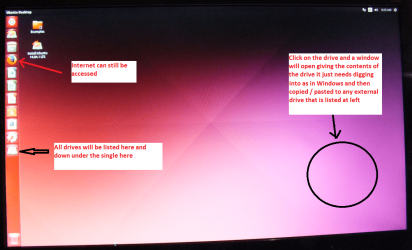
When it is finished - it takes very little time you will get a screen like in the pic .
Open the drive you want > User and dig down until you get to the data / settings you may be able to copy / paste the material you want to an external source or other installed drive doing this.
I am not sure if it will but I have recovered tons of data etc using this method both on "dead" or just plain drives that you cannot get data from using Windows.
There is an alternative Linux based program that will do the same thing but I prefer the Ubuntu - I find it easier to set up. Emergency Kit - save your files from a dead OS
 

Attachments

  • UBUNTU SCREEN X2.PNG
    UBUNTU SCREEN X2.PNG
    272.7 KB · Views: 1

My Computer My Computer

At a glance

Desk1 7 Home Prem / Desk2 10 Pro / Main lap A...Desk1 i5 3750K / Laptop i7 GTX 860M / Desk2 i...Desk1 8GB (1866) / Desk2 16GB (1333) / Laptop...Desk 1& 2NVidia GTX 650 & Laptops on board Intel
Computer type
PC/Desktop
Computer Manufacturer/Model Number
Own build (new) Desk1 / Asus ROG Win 7 / Desk2 1st build
OS
Desk1 7 Home Prem / Desk2 10 Pro / Main lap Asus ROG 10 Pro 2 laptop Toshiba 7 Pro Asus P2520 7 & 10
CPU
Desk1 i5 3750K / Laptop i7 GTX 860M / Desk2 i5 2500
Motherboard
Desk1 Asus P877-V / Desk2 Gigabyte H67 UD3H / Laptop ?
Memory
Desk1 8GB (1866) / Desk2 16GB (1333) / Laptop 8Gb DDR3
Graphics Card(s)
Desk 1& 2NVidia GTX 650 & Laptops on board Intel
Sound Card
Desk 1 & 2 -XONAR DG Realtek High Def audio Laptop
Monitor(s) Displays
Desk 1 Benq HD 2450 / Desk2 Philips 24" / Laptop 17.5"
Screen Resolution
1920x1080 D1 & D2 & Laptop 1
Hard Drives
Desk1 Samsung 120GB 830 SSD
Asus ROG 256GB 850 Pro SSD
Desk2 Samsung 840 256 SSD
Toshiba 120GB EVO
PSU
Desk 1 Corsair HX 1050/ Laptop ? / Desk 2 Corsair HX 650
Case
Desk 1 Cooler HAF XM ? Toshiba laptop / Desk2 Coolermaster
Cooling
Fans on all Desk1 -2 Desk2 - all Coolermasters 5 Laptop ?
Keyboard
Desk 1 MS Sidewinder X6 Desk 2 MS Sidewinder X 4
Mouse
Desk 1&2 - Gigabyte MS 900 gamer - laptop - Logitec wireless
Internet Speed
ADSL2+
Other Info
One other Desktop (tester) and spare Toshba laptop both with SSD's
Running Kaspersky 2016 ISS on all machines config'd identically
Logitec audio stereo systems on each machine (x3)
Canon MG5250MFC
Router/modem TP-Link running WPA2SK
Type ‘diskmgmt.msc‘ to have a view of the active and lost partition
2. Note the partition size and open the command prompt as admin. Enter ‘diskpart‘ to get into diskpart tool.
3. Now enter ‘list disk‘ to see the disks active and type ‘select disk 0‘ (0 was assigned for my entire hdd)
4. If you have used ‘clean‘ command here before, type ‘assign letter=D‘ (D is the example drive name) & surprise your drive will be alive without any data loss.
5. In-case like me you have used ‘clean‘ command for a specific partition, you have to type ‘list partition‘ to see the available partition n select that partition using ‘select partition 3‘ (3 is the example #). Now type ‘assign letter=D‘ and you will get your partition back.
6. Type ‘exit‘ to leave diskpart.
 

My Computer My Computer

At a glance

win 8 32 bit
Computer type
PC/Desktop
OS
win 8 32 bit
Back
Top