Need some help on cmd batch file.

illusions

New member
Local time
2:33 PM
Messages
21
Hi,

I would like to a batchfile that will work on both windows 7 and xp to do the following

copy /Y d:\document\folder1\file.ini d:\document\folder2\file.ini

however in xp it is my document, win7 is document


the shell command in win7
%windir%\explorer.exe shell:::{450d8fba-ad25-11d0-98a8-0800361b1103}\folder1
%windir%\explorer.exe shell:::{450d8fba-ad25-11d0-98a8-0800361b1103}\folder2
will provide the right path

how can I export that path to the copy command above ?
 

My Computer

OS
Windows 7 Ultimate x64
Welcome to the Seven Forums.

This works for me on both operating systems:
Code:
copy "%userprofile%\my documents\folder1\file.ini" "%userprofile%\my documents\folder2\file.ini"
pause

That is why these hidden links exist...

my docs.png

...so that programs (and batch files) can make use of them.
 

My Computer

Computer type
Laptop
Computer Manufacturer/Model Number
Employer provided Dell Latitude
OS
W7 Pro SP1 64bit
CPU
i7
Memory
8GB
Graphics Card(s)
Intel HD Graphics
Hard Drives
crappy SSD
Antivirus
Employer mandated Symantec Endpoint Protection
Browser
Pale Moon 64bit, IE11 64bit & Chrome 64bit
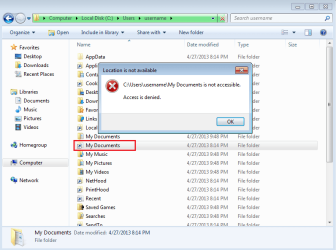
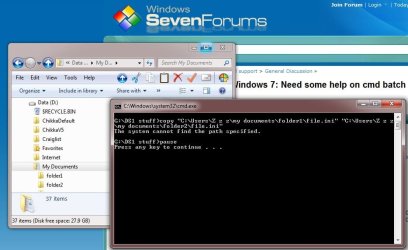
Thanks UsernameIssues for the suggestion but when I tried it I got error message please refer to the picture.
 

Attachments

  • error.jpg
    error.jpg
    60.8 KB · Views: 3

My Computer

OS
Windows 7 Ultimate x64
I was hoping that you had moved the entire profile to the D drive per this procedure:
http://www.sevenforums.com/tutorials/87555-user-profile-change-default-location.html
That makes the %userprofile% variable point to the correct folder... it should work on XP as well.


Try
Code:
IF EXIST "d:\document\folder1" copy "d:\document\folder1\file.ini" "d:\document\folder2\file.ini" /Y
IF EXIST "d:\my document\folder1" copy "d:\my document\folder1\file.ini" "d:\my document\folder2\file.ini" /Y
 

My Computer

Computer type
Laptop
Computer Manufacturer/Model Number
Employer provided Dell Latitude
OS
W7 Pro SP1 64bit
CPU
i7
Memory
8GB
Graphics Card(s)
Intel HD Graphics
Hard Drives
crappy SSD
Antivirus
Employer mandated Symantec Endpoint Protection
Browser
Pale Moon 64bit, IE11 64bit & Chrome 64bit
Thanks the if exist method does the job.

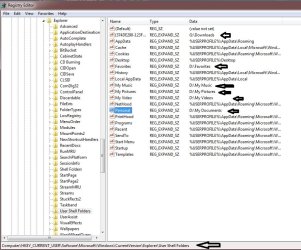
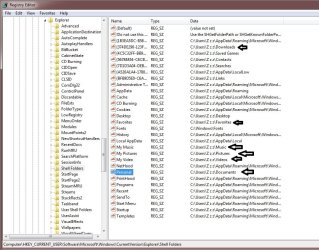
When I first installed win7, I only change the following folders to d drive (favorites, documents, music, video), to g drive (download folder).

Using this method #2
http://www.sevenforums.com/tutorials/18629-user-folders-change-default-location.html

Instead of moving the whole default location of User Profile.

I guess that is why %userprofile% environmental variable does not provide the right path.

Refer to this 2 registry info.
 

Attachments

  • pic1.jpg
    pic1.jpg
    113.4 KB · Views: 5
  • pic2.jpg
    pic2.jpg
    131.5 KB · Views: 3

My Computer

OS
Windows 7 Ultimate x64
Glad that you got it working... and yes, changing folders that way is why the OS variable does not work for you. The funny thing is: I had constructed my first post in this thread using the IF EXIST code... but then I got to wondering if you had a lot of different files/folders to be copied - so I changed it to use that OS variable.
 

My Computer

Computer type
Laptop
Computer Manufacturer/Model Number
Employer provided Dell Latitude
OS
W7 Pro SP1 64bit
CPU
i7
Memory
8GB
Graphics Card(s)
Intel HD Graphics
Hard Drives
crappy SSD
Antivirus
Employer mandated Symantec Endpoint Protection
Browser
Pale Moon 64bit, IE11 64bit & Chrome 64bit
Back
Top