Solved Need to access recovery partition - replaced HDD

diverdi

New member
Local time
9:03 AM
Messages
7
Hi. My "google-fu" isn't giving me a solution so I hope someone here can help.
About a year ago my laptop's HDD started giving errors so I replaced it. As far as I can recall, I did it by cloning the drive (but I can't remember using which program). I got everything working just dandy at the time but recently I've been getting daily BSOD related to ntoskrnl and from what I've read the solution to this is to re-install Windows.

But that's where my problem comes in. When I try to run recovery I get a message saying
"Restore failed - can not find image
path:M:\D2D\Images\*SWM"

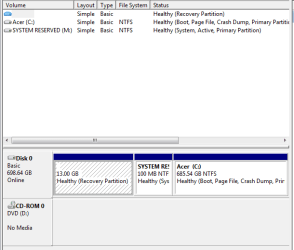
I've attached a pic of my disks diskman showing I have a 13Gb recovery partition, Acer (C) and System Reserved (which I gave a drive number to try and access).

The system reserved shows as having 62.5Mb free of 99.9Mb (so its not empty), but if I "explore" it shows "folder is empty".

So how can I get to the recovery file?


FWIW, D2D is enabled in bios, and I've tried Alt-F10 - the computer just beeps continuously until I let go then starts up normally.

Also FWIW, I do have my old HDD in an enclosure so I can "pull" data off that if necessary (but that system reserved also shows golder empty despite using up space).

Lastly I do have some recovery disks BUT I suspect they are from my previous Acer (had a OOB failure so I returned it for an upgraded machine so I'm not sure how valid they are and the Windows 7 serial I have will most likely not match so I'm really hesitant to use them).

Thanks in advance...
 

Attachments
  • diskman.PNG
    diskman.PNG
    8.8 KB · Views: 25

My Computer My Computer

At a glance

Windows 7 Home Premium x64i5-450M4 GbATI HD5650
Computer type
Laptop
Computer Manufacturer/Model Number
Acer 5820TG
OS
Windows 7 Home Premium x64
CPU
i5-450M
Memory
4 Gb
Graphics Card(s)
ATI HD5650
Hard Drives
WD 750 Black
Antivirus
Avast
Browser
Firefox
It does not appear that the recovery partition has been formatted, so no recovery was placed there. The system reserved is boot info from the OS install, you can't access it.
 

My Computer My Computer

At a glance

Win7 Home Premium x64 W10Pro&HomeA12 9720p 4+8 TurionII M5206GB 8GBR7
Computer type
Laptop
Computer Manufacturer/Model Number
HP 17-ak0xx, dv7 3173nr
OS
Win7 Home Premium x64 W10Pro&Home
CPU
A12 9720p 4+8 TurionII M520
Motherboard
HP 3839
Memory
6GB 8GB
Graphics Card(s)
R7
Monitor(s) Displays
24" sa550
Screen Resolution
1600x900 1920x1080
Mouse
Logitechx2
Internet Speed
120Mb/s down 12up
Hi DMHolt57.
So you're saying I can't get anything off this drive?
What about off the old drive? Although I've just plugged it in and it appears exactly like the current drive in that no "file system" shows up (I assume that's what you are referring to when you say it doesn't appear to be formatted?)
 

My Computer My Computer

At a glance

Windows 7 Home Premium x64i5-450M4 GbATI HD5650
Computer type
Laptop
Computer Manufacturer/Model Number
Acer 5820TG
OS
Windows 7 Home Premium x64
CPU
i5-450M
Memory
4 Gb
Graphics Card(s)
ATI HD5650
Hard Drives
WD 750 Black
Antivirus
Avast
Browser
Firefox

My Computer My Computer

At a glance

Vista, Windows7, Mint Mate, Zorin, Windows 8from 1.6GHz Duo to i7
Computer Manufacturer/Model Number
HP, Dell, Gateway, Toshiba - 4 laptops and 2 desktops
OS
Vista, Windows7, Mint Mate, Zorin, Windows 8
CPU
from 1.6GHz Duo to i7
Monitor(s) Displays
2x HP w2207
Hard Drives
5x HDD, 7x SSD, 12x Externals
Keyboard
with trackball - no mices
Mouse
Trackball mice
Internet Speed
DSL 6000
Hi whs.
I'll give that a try... I'll have to wait until I can access enough bandwidth so I won't mark it as solved yet...
 

My Computer My Computer

At a glance

Windows 7 Home Premium x64i5-450M4 GbATI HD5650
Computer type
Laptop
Computer Manufacturer/Model Number
Acer 5820TG
OS
Windows 7 Home Premium x64
CPU
i5-450M
Memory
4 Gb
Graphics Card(s)
ATI HD5650
Hard Drives
WD 750 Black
Antivirus
Avast
Browser
Firefox
You'll get a nice, clean system.
 

My Computer My Computer

At a glance

Vista, Windows7, Mint Mate, Zorin, Windows 8from 1.6GHz Duo to i7
Computer Manufacturer/Model Number
HP, Dell, Gateway, Toshiba - 4 laptops and 2 desktops
OS
Vista, Windows7, Mint Mate, Zorin, Windows 8
CPU
from 1.6GHz Duo to i7
Monitor(s) Displays
2x HP w2207
Hard Drives
5x HDD, 7x SSD, 12x Externals
Keyboard
with trackball - no mices
Mouse
Trackball mice
Internet Speed
DSL 6000
Check your Recovery Partition with Partition Wizard "Explore Partition". You'll probably find everything is there. The PW installed mini Tool is fine for this. I'm running an ACER OEM Windows 7 on one PC and didn't have a problem getting rid of the junk.
Imaging the recovery partition with Macrium works fine and you can restore to the existing drive or a new one. Then do a factory restore using the alt F10 key presses.
 
Last edited:

My Computer My Computer

At a glance

Windows 7x64 Home Premium SP1Intel i7 2600kG.Skill Ripjaws (DDR3-1600) 2x4GBNvidia GeForce GTS 450; Intel HD Graphics 300...
Computer type
PC/Desktop
Computer Manufacturer/Model Number
Own build
OS
Windows 7x64 Home Premium SP1
CPU
Intel i7 2600k
Motherboard
ASUS P8Z68 Deluxe
Memory
G.Skill Ripjaws (DDR3-1600) 2x4GB
Graphics Card(s)
Nvidia GeForce GTS 450; Intel HD Graphics 3000(GT2+)
Monitor(s) Displays
Dell Ultrasharp IPS panel U2311H, Samsung SyncMaster P2350
Screen Resolution
1920x1080
Hard Drives
Samsung 850 Pro SSD 256GB, Samsung SSD 840 120GB, Seagates 1TB Barracuda ST31000528AS x2
PSU
Seasonic M12II 520W
Case
Lian Li Lancool PC-K60
Cooling
Case: 1x120mm, 3x140mm CPU: Hyper 212+
Keyboard
Logitech MK520 (wireless)
Mouse
Logitech MK520
Internet Speed
6-7 Mbps
Antivirus
Norton Security Premium, Malwarebytes on 2 (MSE on 3rd PC)
Browser
FireFox
Other Info
Audio: Logitech Z523 2.1
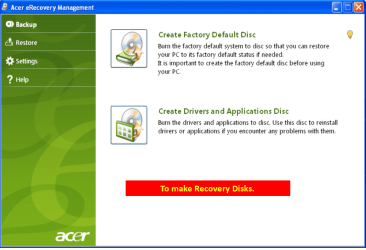
Did you make your ACER Recovery disks?

Acer001-11.PNG
 

My Computer My Computer

At a glance

ME/XP/Vista/Win7
OS
ME/XP/Vista/Win7
@ mjf - thank you, I'm going to check out that program NOW!
@ theog - as briefly mentioned in the OP, I made recovery disks BUT I'm not 100% sure they are from this Acer or from a previous one that had an issue soon after I got it and was returned for an upgraded machine - hence I'm not sure how valid they and so I'm hesitant to use them...
 

My Computer My Computer

At a glance

Windows 7 Home Premium x64i5-450M4 GbATI HD5650
Computer type
Laptop
Computer Manufacturer/Model Number
Acer 5820TG
OS
Windows 7 Home Premium x64
CPU
i5-450M
Memory
4 Gb
Graphics Card(s)
ATI HD5650
Hard Drives
WD 750 Black
Antivirus
Avast
Browser
Firefox
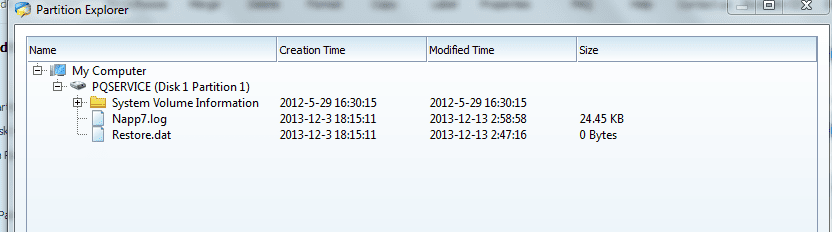
Ok, I have downloaded and run partition wizard as per mjf's suggestion - it doesn't look like there's anything much in the recovery partition of the current HDD..
However in the original drive there is a bunch of stuff!
So I suppose the trick now is to ?? use PW to copy the stuff from the old to the new??
 

Attachments

  • PQ.PNG
    PQ.PNG
    12.6 KB · Views: 2
  • Old PQ.PNG
    Old PQ.PNG
    31 KB · Views: 3

My Computer My Computer

At a glance

Windows 7 Home Premium x64i5-450M4 GbATI HD5650
Computer type
Laptop
Computer Manufacturer/Model Number
Acer 5820TG
OS
Windows 7 Home Premium x64
CPU
i5-450M
Memory
4 Gb
Graphics Card(s)
ATI HD5650
Hard Drives
WD 750 Black
Antivirus
Avast
Browser
Firefox
Ok, I have downloaded and run partition wizard as per mjf's suggestion - it doesn't look like there's anything much in the recovery partition of the current HDD..
Why do you say this? Have a look in "Sources" - this is where the core build files are placed. Also check out the overall size of the partition using PW it should be ~7GB.
 

My Computer My Computer

At a glance

Windows 7x64 Home Premium SP1Intel i7 2600kG.Skill Ripjaws (DDR3-1600) 2x4GBNvidia GeForce GTS 450; Intel HD Graphics 300...
Computer type
PC/Desktop
Computer Manufacturer/Model Number
Own build
OS
Windows 7x64 Home Premium SP1
CPU
Intel i7 2600k
Motherboard
ASUS P8Z68 Deluxe
Memory
G.Skill Ripjaws (DDR3-1600) 2x4GB
Graphics Card(s)
Nvidia GeForce GTS 450; Intel HD Graphics 3000(GT2+)
Monitor(s) Displays
Dell Ultrasharp IPS panel U2311H, Samsung SyncMaster P2350
Screen Resolution
1920x1080
Hard Drives
Samsung 850 Pro SSD 256GB, Samsung SSD 840 120GB, Seagates 1TB Barracuda ST31000528AS x2
PSU
Seasonic M12II 520W
Case
Lian Li Lancool PC-K60
Cooling
Case: 1x120mm, 3x140mm CPU: Hyper 212+
Keyboard
Logitech MK520 (wireless)
Mouse
Logitech MK520
Internet Speed
6-7 Mbps
Antivirus
Norton Security Premium, Malwarebytes on 2 (MSE on 3rd PC)
Browser
FireFox
Other Info
Audio: Logitech Z523 2.1
Ok, I have downloaded and run partition wizard as per mjf's suggestion - it doesn't look like there's anything much in the recovery partition of the current HDD..
Why do you say this? Have a look in "Sources" - this is where the core build files are placed. Also check out the overall size of the partition using PW it should be ~7GB.
The pic showing Sources is from the old HDD which was removed. The current, in-use HDD only has the napp7.log in it.. no "sources" folder.
That's why I say I figure I need to copy from the old HDD to the current HDD....
 

My Computer My Computer

At a glance

Windows 7 Home Premium x64i5-450M4 GbATI HD5650
Computer type
Laptop
Computer Manufacturer/Model Number
Acer 5820TG
OS
Windows 7 Home Premium x64
CPU
i5-450M
Memory
4 Gb
Graphics Card(s)
ATI HD5650
Hard Drives
WD 750 Black
Antivirus
Avast
Browser
Firefox
OK. I see.
Can you perform a Macrium image of the recovery partition from the old HDD? If so then I'd do that.
 

My Computer My Computer

At a glance

Windows 7x64 Home Premium SP1Intel i7 2600kG.Skill Ripjaws (DDR3-1600) 2x4GBNvidia GeForce GTS 450; Intel HD Graphics 300...
Computer type
PC/Desktop
Computer Manufacturer/Model Number
Own build
OS
Windows 7x64 Home Premium SP1
CPU
Intel i7 2600k
Motherboard
ASUS P8Z68 Deluxe
Memory
G.Skill Ripjaws (DDR3-1600) 2x4GB
Graphics Card(s)
Nvidia GeForce GTS 450; Intel HD Graphics 3000(GT2+)
Monitor(s) Displays
Dell Ultrasharp IPS panel U2311H, Samsung SyncMaster P2350
Screen Resolution
1920x1080
Hard Drives
Samsung 850 Pro SSD 256GB, Samsung SSD 840 120GB, Seagates 1TB Barracuda ST31000528AS x2
PSU
Seasonic M12II 520W
Case
Lian Li Lancool PC-K60
Cooling
Case: 1x120mm, 3x140mm CPU: Hyper 212+
Keyboard
Logitech MK520 (wireless)
Mouse
Logitech MK520
Internet Speed
6-7 Mbps
Antivirus
Norton Security Premium, Malwarebytes on 2 (MSE on 3rd PC)
Browser
FireFox
Other Info
Audio: Logitech Z523 2.1
What is in the \D2D\images folder?
 

My Computer My Computer

At a glance

Microsoft Windows 7 Home Premium 64-bits 7601...Intel(R) Core(TM) i3 CPU M 370 @ 2.40GHz4,00 GBATI Mobility Radeon HD 5400 Series
Computer type
Laptop
Computer Manufacturer/Model Number
ACER ASPIRE 5742G
OS
Microsoft Windows 7 Home Premium 64-bits 7601 Multiprocessor Free Service Pack 1
CPU
Intel(R) Core(TM) i3 CPU M 370 @ 2.40GHz
Motherboard
Acer Aspire 5742G
Memory
4,00 GB
Graphics Card(s)
ATI Mobility Radeon HD 5400 Series
Sound Card
(1) AMD High Definition Audio Device (2) Realtek High Defi
Screen Resolution
1366 x 768 x 32 bits (4294967296 colors) @ 60 Hz
Hard Drives
WDC WD5000BEVT-22ZAT0
Hi guys. @Kaktussoft - D2D should have been the factory restore info for my system. @ mjf - I used PW to copy the partition containing pqservice etc from the old drive to the current. (Got this to work). However when I tried to restore the computer to factory set-up if still give me the "can't find D2d image" error. So I gave up and did the 'fresh installation' route which whs proposed (by then my slow internet connection had finally completed the 3+Gigs of download). So I'm in the process of restoring my system now - the fact that I can send this shows head way is being made! Thanks to everyone who contributed - I'm going to mark this solved...
 

My Computer My Computer

At a glance

Windows 7 Home Premium x64i5-450M4 GbATI HD5650
Computer type
Laptop
Computer Manufacturer/Model Number
Acer 5820TG
OS
Windows 7 Home Premium x64
CPU
i5-450M
Memory
4 Gb
Graphics Card(s)
ATI HD5650
Hard Drives
WD 750 Black
Antivirus
Avast
Browser
Firefox
Back
Top