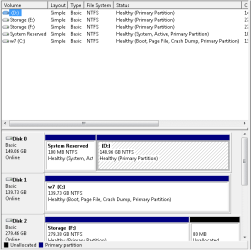
Solved Need to change boot to remove 2 hd and make it boot to partition 1

r2l25b

New member
Local time
2:30 AM
Messages
36
setup is. my pc has been crashing lately (random blue screens and non blue screens). I ran Hd Sentential and it said that 1 of my hd's has 1 bad sector on the raid setup, so I got win7 installed on my 150gb raptor drive. It still crashes, but I want to remove the 2 other hds to see if that fixes my crashing problem.

The problem is the raptor drive is partition 2. so msconfig is set to partition 2. I need to edit it so it boots from partition 1 and i don't have to reinstall.

The kicker. I try to used the windows 7 disc to use their repair section of the disc, BUT my raid drivers always seem to fail. It works fine for installing, but not for this operation. Why i don't know i get a long list of the same named driver and none of them (haven't tried them all) seem to work.

Weird. AND EASYBDCD BLOWS for what i need done.
 

My Computer My Computer

At a glance

7 32 bitp4 3.0 @3.4 512kb cache3.0 (2x 1gb corsair) (2x 512mb kingston)ati 3850 hd 512mb 256-bit ddr3 agp
Computer Manufacturer/Model Number
me
OS
7 32 bit
CPU
p4 3.0 @3.4 512kb cache
Motherboard
abit ic7
Memory
3.0 (2x 1gb corsair) (2x 512mb kingston)
Graphics Card(s)
ati 3850 hd 512mb 256-bit ddr3 agp
Sound Card
on-board AND plantronics DSP-500
Monitor(s) Displays
viewsonic g220fb
Hard Drives
(2x 80gb Fujitsu)
(1x 150gb WDC raptor)
(2x 300gb Seagate barracuda)
PSU
650 antec
Case
it's chill
Cooling
3 exhuast 2 intake 80mm
You've got the right idea to remove RAID as we see nothing but problem with it and Win7. Reinstalling to a single HD set to boot first in BIOS setup is a good start. I'd remove RAID and wipe the other HD's to use as storage.

But your description is unclear so please post back a screenshot of your maximized Disk Management drive map with listings, using the Snipping Tool in Start Menu. Tell us what is on each partition and what you want to do in a clear concise list. We will give you the steps to get it done easiest.
 
I need to make my mcsonfig be set to PARTITION 1; NOT PARTITION 2. But the new msconfig doesn't allow you to see that "code" like with windows xp nor edit it.
 

My Computer My Computer

At a glance

7 32 bitp4 3.0 @3.4 512kb cache3.0 (2x 1gb corsair) (2x 512mb kingston)ati 3850 hd 512mb 256-bit ddr3 agp
Computer Manufacturer/Model Number
me
OS
7 32 bit
CPU
p4 3.0 @3.4 512kb cache
Motherboard
abit ic7
Memory
3.0 (2x 1gb corsair) (2x 512mb kingston)
Graphics Card(s)
ati 3850 hd 512mb 256-bit ddr3 agp
Sound Card
on-board AND plantronics DSP-500
Monitor(s) Displays
viewsonic g220fb
Hard Drives
(2x 80gb Fujitsu)
(1x 150gb WDC raptor)
(2x 300gb Seagate barracuda)
PSU
650 antec
Case
it's chill
Cooling
3 exhuast 2 intake 80mm
bump.
 

My Computer My Computer

At a glance

7 32 bitp4 3.0 @3.4 512kb cache3.0 (2x 1gb corsair) (2x 512mb kingston)ati 3850 hd 512mb 256-bit ddr3 agp
Computer Manufacturer/Model Number
me
OS
7 32 bit
CPU
p4 3.0 @3.4 512kb cache
Motherboard
abit ic7
Memory
3.0 (2x 1gb corsair) (2x 512mb kingston)
Graphics Card(s)
ati 3850 hd 512mb 256-bit ddr3 agp
Sound Card
on-board AND plantronics DSP-500
Monitor(s) Displays
viewsonic g220fb
Hard Drives
(2x 80gb Fujitsu)
(1x 150gb WDC raptor)
(2x 300gb Seagate barracuda)
PSU
650 antec
Case
it's chill
Cooling
3 exhuast 2 intake 80mm
I need to make the C drive, Partition 1, in MSCONFIG. AT the moment it's partition 2.
 

Attachments

  • Untitled.png
    Untitled.png
    8.1 KB · Views: 9

My Computer My Computer

At a glance

7 32 bitp4 3.0 @3.4 512kb cache3.0 (2x 1gb corsair) (2x 512mb kingston)ati 3850 hd 512mb 256-bit ddr3 agp
Computer Manufacturer/Model Number
me
OS
7 32 bit
CPU
p4 3.0 @3.4 512kb cache
Motherboard
abit ic7
Memory
3.0 (2x 1gb corsair) (2x 512mb kingston)
Graphics Card(s)
ati 3850 hd 512mb 256-bit ddr3 agp
Sound Card
on-board AND plantronics DSP-500
Monitor(s) Displays
viewsonic g220fb
Hard Drives
(2x 80gb Fujitsu)
(1x 150gb WDC raptor)
(2x 300gb Seagate barracuda)
PSU
650 antec
Case
it's chill
Cooling
3 exhuast 2 intake 80mm
What I would do is absorb the System boot files into Win7 partition C and then delete System Reserved.

Do this by booting into System Recovery Options on Win7 DVD or System Repair Disk, open a Command Line, mark C Active and then mark System Reserved Inactive.
Partition - Mark as Active (Method Two)
Partition - Mark as Inactive - Windows 7 Forums

Close the Command box, shut down computer, unplug Disk0, plugs it's cable into Windows 7 HD so it becomes Disk0, make sure it remains HD set to boot first in BIOS setup.

Now boot back into DVD Repair console or Repair CD to run Startup Repair 3 Separate Times
until Win7 boots on its own and holds the System Active flags.

You can now power down to plug the other HD into Disk 1 cable, delete System Reserved in Disk Mgmt or using Diskpart Delete Partition Override command. Or if you want to recover its space into the adjacent partition, use free Partition Wizard bootable CD'S Delete then Resize functions.
 
I have hirens boot 14, 15.0 15.1. I thought i found a program but they still focused on windows xp for their repair programs.
I was hoping that the 15.1 disc with this program
-EditBINI 1.01
to Edit boot.ini on NTFS Partition.
but it failed b/c i think the program is focused for xp :(.
 

My Computer My Computer

At a glance

7 32 bitp4 3.0 @3.4 512kb cache3.0 (2x 1gb corsair) (2x 512mb kingston)ati 3850 hd 512mb 256-bit ddr3 agp
Computer Manufacturer/Model Number
me
OS
7 32 bit
CPU
p4 3.0 @3.4 512kb cache
Motherboard
abit ic7
Memory
3.0 (2x 1gb corsair) (2x 512mb kingston)
Graphics Card(s)
ati 3850 hd 512mb 256-bit ddr3 agp
Sound Card
on-board AND plantronics DSP-500
Monitor(s) Displays
viewsonic g220fb
Hard Drives
(2x 80gb Fujitsu)
(1x 150gb WDC raptor)
(2x 300gb Seagate barracuda)
PSU
650 antec
Case
it's chill
Cooling
3 exhuast 2 intake 80mm
I gave you the steps above using the modern automated methods for Win7.

Follow them exactly to avoid further problems. Ask back if you have any questions.
 
awww man you didn't read. my drivers for my raid f me over. A list with at least 50 of the same named drivers)
I try 1 and it just fails normally than i try another and it says instillation error for the driver.
I need a non windows 7 disc fix. b/c my sata raid card is a SOB!
 

My Computer My Computer

At a glance

7 32 bitp4 3.0 @3.4 512kb cache3.0 (2x 1gb corsair) (2x 512mb kingston)ati 3850 hd 512mb 256-bit ddr3 agp
Computer Manufacturer/Model Number
me
OS
7 32 bit
CPU
p4 3.0 @3.4 512kb cache
Motherboard
abit ic7
Memory
3.0 (2x 1gb corsair) (2x 512mb kingston)
Graphics Card(s)
ati 3850 hd 512mb 256-bit ddr3 agp
Sound Card
on-board AND plantronics DSP-500
Monitor(s) Displays
viewsonic g220fb
Hard Drives
(2x 80gb Fujitsu)
(1x 150gb WDC raptor)
(2x 300gb Seagate barracuda)
PSU
650 antec
Case
it's chill
Cooling
3 exhuast 2 intake 80mm
Oh Damnit. I need to make a new system reserved partition, but this time on the raptor. SHIP!
 

My Computer My Computer

At a glance

7 32 bitp4 3.0 @3.4 512kb cache3.0 (2x 1gb corsair) (2x 512mb kingston)ati 3850 hd 512mb 256-bit ddr3 agp
Computer Manufacturer/Model Number
me
OS
7 32 bit
CPU
p4 3.0 @3.4 512kb cache
Motherboard
abit ic7
Memory
3.0 (2x 1gb corsair) (2x 512mb kingston)
Graphics Card(s)
ati 3850 hd 512mb 256-bit ddr3 agp
Sound Card
on-board AND plantronics DSP-500
Monitor(s) Displays
viewsonic g220fb
Hard Drives
(2x 80gb Fujitsu)
(1x 150gb WDC raptor)
(2x 300gb Seagate barracuda)
PSU
650 antec
Case
it's chill
Cooling
3 exhuast 2 intake 80mm
I do not see RAID on the current config. Where is it?

How many installed HD's and what is the size of each?

Look in BIOS setup to see what the SATA controller setting is. If it's AHCI or IDE you do not have RAID on Win7.
 
So far i am thinking it's going to take less time reinstalling, than it would be for me to find the "right" driver to get the repair disc to work like i need it to.
 

My Computer My Computer

At a glance

7 32 bitp4 3.0 @3.4 512kb cache3.0 (2x 1gb corsair) (2x 512mb kingston)ati 3850 hd 512mb 256-bit ddr3 agp
Computer Manufacturer/Model Number
me
OS
7 32 bit
CPU
p4 3.0 @3.4 512kb cache
Motherboard
abit ic7
Memory
3.0 (2x 1gb corsair) (2x 512mb kingston)
Graphics Card(s)
ati 3850 hd 512mb 256-bit ddr3 agp
Sound Card
on-board AND plantronics DSP-500
Monitor(s) Displays
viewsonic g220fb
Hard Drives
(2x 80gb Fujitsu)
(1x 150gb WDC raptor)
(2x 300gb Seagate barracuda)
PSU
650 antec
Case
it's chill
Cooling
3 exhuast 2 intake 80mm
Read my specs. I had to buy a Rosewill RC-209ex raid card.
 

My Computer My Computer

At a glance

7 32 bitp4 3.0 @3.4 512kb cache3.0 (2x 1gb corsair) (2x 512mb kingston)ati 3850 hd 512mb 256-bit ddr3 agp
Computer Manufacturer/Model Number
me
OS
7 32 bit
CPU
p4 3.0 @3.4 512kb cache
Motherboard
abit ic7
Memory
3.0 (2x 1gb corsair) (2x 512mb kingston)
Graphics Card(s)
ati 3850 hd 512mb 256-bit ddr3 agp
Sound Card
on-board AND plantronics DSP-500
Monitor(s) Displays
viewsonic g220fb
Hard Drives
(2x 80gb Fujitsu)
(1x 150gb WDC raptor)
(2x 300gb Seagate barracuda)
PSU
650 antec
Case
it's chill
Cooling
3 exhuast 2 intake 80mm
I read your specs. Why won't you answer my questions?

I do not see RAID on the current config. Where is it?

How many installed HD's and what is the size of each?

Look in BIOS setup to see what the SATA controller setting is. If it's AHCI or IDE you do not have RAID on Win7.

You do not need a driver to get the repair disk to work correctly. What exactly happens when you try to boot it?

You said that you reinstalled to one HD without RAID. I gave you the steps to recover the System boot files into it without needing SysReserved partition. How is RAID involved here?
 
You do not need a driver to get the repair disk to work correctly. Wrong.
Without the driver windows 7 can't find my hd.
Raid was for the 2 80's.
the raptor is on the same raid controller.
I NEED A NON WINDOWS 7 DISC FIX.
 

My Computer My Computer

At a glance

7 32 bitp4 3.0 @3.4 512kb cache3.0 (2x 1gb corsair) (2x 512mb kingston)ati 3850 hd 512mb 256-bit ddr3 agp
Computer Manufacturer/Model Number
me
OS
7 32 bit
CPU
p4 3.0 @3.4 512kb cache
Motherboard
abit ic7
Memory
3.0 (2x 1gb corsair) (2x 512mb kingston)
Graphics Card(s)
ati 3850 hd 512mb 256-bit ddr3 agp
Sound Card
on-board AND plantronics DSP-500
Monitor(s) Displays
viewsonic g220fb
Hard Drives
(2x 80gb Fujitsu)
(1x 150gb WDC raptor)
(2x 300gb Seagate barracuda)
PSU
650 antec
Case
it's chill
Cooling
3 exhuast 2 intake 80mm
This is why I suggested you disable RAID and install to one HD using the onboard controller, which is what I thought you had done.

We have never had a reported case of the Repair CD not seeing the HD if it is burned correctly, and I've never heard of a driver needing to be provided for Repair CD. That's not to say it couldn't happen if you have a very obscure RAID card.

Why are you not willing to let go of RAID? It would be so much easier. We see nothing but problems here with Win7 and RAID.
 
That card allows for e-sata also.
Lazy. I was hoping to just unplug 2 hds, and have windows 7 work on my raptor.
Great looks like i have to try EACH driver. The gay thing is i have to restart the repair option AFTER every try of the drivers.
The Raid is gone, i just don't want to touch the inside of my case, b/c well i am lazy and don't want the risk of more BULL happening to this dinosaur.
Thanks for your "advice" so far, but it looks like i have to reinstall again.
If i knew how to make a ss during the repair phase i would take some and post them but, i don't.
 

My Computer My Computer

At a glance

7 32 bitp4 3.0 @3.4 512kb cache3.0 (2x 1gb corsair) (2x 512mb kingston)ati 3850 hd 512mb 256-bit ddr3 agp
Computer Manufacturer/Model Number
me
OS
7 32 bit
CPU
p4 3.0 @3.4 512kb cache
Motherboard
abit ic7
Memory
3.0 (2x 1gb corsair) (2x 512mb kingston)
Graphics Card(s)
ati 3850 hd 512mb 256-bit ddr3 agp
Sound Card
on-board AND plantronics DSP-500
Monitor(s) Displays
viewsonic g220fb
Hard Drives
(2x 80gb Fujitsu)
(1x 150gb WDC raptor)
(2x 300gb Seagate barracuda)
PSU
650 antec
Case
it's chill
Cooling
3 exhuast 2 intake 80mm
Thank you for honestly acknowledging laziness as we often suspect it but can't really be sure.

I'm not sure you'll have to reinstall if you enter BIOS setup at boot to disable the RAID card and re-enable or default to onboard controller. Only if the single HD was installed in IDE mode and onboard is set to AHCI will it require working around. Maybe you can set the card to SATA mode rather than RAID.

I also think you can load multiple drivers so try that. But I've never heard of drivers needing loading to run a Repair disk so your card may be the problem.

You can use the Snipping Tool in the Start Menu to easily make screenshots, attach using paper clip in Reply box.
 
Your thinking i have a sick mobo with all these CRAZY insane options. Nope. my mobo BIOS is simple. I know a shit load about these things. This was a last resort.
I wish the repair disc would load drivers like when i do the install, but it doesn't.
Time to waste another 2-3 hours for reinstalling. Just b/c microsoft MADE us use that system revere BULL!!
 

My Computer My Computer

At a glance

7 32 bitp4 3.0 @3.4 512kb cache3.0 (2x 1gb corsair) (2x 512mb kingston)ati 3850 hd 512mb 256-bit ddr3 agp
Computer Manufacturer/Model Number
me
OS
7 32 bit
CPU
p4 3.0 @3.4 512kb cache
Motherboard
abit ic7
Memory
3.0 (2x 1gb corsair) (2x 512mb kingston)
Graphics Card(s)
ati 3850 hd 512mb 256-bit ddr3 agp
Sound Card
on-board AND plantronics DSP-500
Monitor(s) Displays
viewsonic g220fb
Hard Drives
(2x 80gb Fujitsu)
(1x 150gb WDC raptor)
(2x 300gb Seagate barracuda)
PSU
650 antec
Case
it's chill
Cooling
3 exhuast 2 intake 80mm
Did you even read my post?

I made no comment on your mobo, in fact suggested to default to it's onboard SATA.

There is never a reason to load drivers to the Win7 installer or Repair CD as all modern SATA drivers and most RAID are in it. If it prompts for drivers it is because of another reason, most commonly bad ISO or burn.

Have you even tried disabling your dodgy RAID card to default to onboard SATA or IDE controller in BIOS Setup?
 
Back
Top