Solved Need to change boot to remove 2 hd and make it boot to partition 1

I wish i knew what you were ranting about.
"I'm not sure you'll have to reinstall if you enter BIOS setup"
 

My Computer My Computer

At a glance

7 32 bitp4 3.0 @3.4 512kb cache3.0 (2x 1gb corsair) (2x 512mb kingston)ati 3850 hd 512mb 256-bit ddr3 agp
Computer Manufacturer/Model Number
me
OS
7 32 bit
CPU
p4 3.0 @3.4 512kb cache
Motherboard
abit ic7
Memory
3.0 (2x 1gb corsair) (2x 512mb kingston)
Graphics Card(s)
ati 3850 hd 512mb 256-bit ddr3 agp
Sound Card
on-board AND plantronics DSP-500
Monitor(s) Displays
viewsonic g220fb
Hard Drives
(2x 80gb Fujitsu)
(1x 150gb WDC raptor)
(2x 300gb Seagate barracuda)
PSU
650 antec
Case
it's chill
Cooling
3 exhuast 2 intake 80mm
I am hardly ranting but giving you straightforward steps to proceed. If you want to work with me and focus on these steps then we can proceed.

You said that you have a RAID card installed which is providing both RAID and SATA controllers for your current install and data drives, correct?

But this card is apparently causing problems not allowing the HD to be seen from Repair CD without prompting for drivers, correct?

My suggestion is to enter BIOS setup to disable the RAID card, then re-enable the onboard storage controller to proceed with Repairs given.

If you don't have a storage controller on the mobo, or it doesn't work, or you are not sure how to do this, then ask back but don't refer to my plainly stated steps as ranting as you'll not last long here.
 
Hiya Greg,

How's it going?
 

My Computers My Computers

  • At a glance

    7 X64i5 84002x8gb 3200mhz
    Computer type
    PC/Desktop
    OS
    7 X64
    CPU
    i5 8400
    Motherboard
    gigabyte b365m ds3h
    Memory
    2x8gb 3200mhz
    Hard Drives
    various
    PSU
    pure power 11 400w cm
    Case
    Coolermaster
    Cooling
    cryorig m9i
  • At a glance

    7x64g54008gb ddr4 2400
    Computer type
    PC/Desktop
    OS
    7x64
    CPU
    g5400
    Motherboard
    ga b365m ds3h
    Memory
    8gb ddr4 2400
    PSU
    xfx pro 450w
Good Si. :geek: Have been missing you around here!

What do you think is up here with his RAID card? Am I missing something?
 
No idea - the OP's posts are not clear to me.

If he can't get the repair disc to load - then just fix it from within windows by marking the current system partition inactive- then making his o/s drive system as well as boot.
 

My Computers My Computers

  • At a glance

    7 X64i5 84002x8gb 3200mhz
    Computer type
    PC/Desktop
    OS
    7 X64
    CPU
    i5 8400
    Motherboard
    gigabyte b365m ds3h
    Memory
    2x8gb 3200mhz
    Hard Drives
    various
    PSU
    pure power 11 400w cm
    Case
    Coolermaster
    Cooling
    cryorig m9i
  • At a glance

    7x64g54008gb ddr4 2400
    Computer type
    PC/Desktop
    OS
    7x64
    CPU
    g5400
    Motherboard
    ga b365m ds3h
    Memory
    8gb ddr4 2400
    PSU
    xfx pro 450w
I DO NOT WANT TO TOUCH A THING IN MY PC.
All I want to do is unplug 2 hds and be happy.
Now your suggesting me to redo my whole sata setup. no thanks.
ALSO it doesn't even see my 2 storage drives when i do that. so either way i have to have some for of driver.
 

My Computer My Computer

At a glance

7 32 bitp4 3.0 @3.4 512kb cache3.0 (2x 1gb corsair) (2x 512mb kingston)ati 3850 hd 512mb 256-bit ddr3 agp
Computer Manufacturer/Model Number
me
OS
7 32 bit
CPU
p4 3.0 @3.4 512kb cache
Motherboard
abit ic7
Memory
3.0 (2x 1gb corsair) (2x 512mb kingston)
Graphics Card(s)
ati 3850 hd 512mb 256-bit ddr3 agp
Sound Card
on-board AND plantronics DSP-500
Monitor(s) Displays
viewsonic g220fb
Hard Drives
(2x 80gb Fujitsu)
(1x 150gb WDC raptor)
(2x 300gb Seagate barracuda)
PSU
650 antec
Case
it's chill
Cooling
3 exhuast 2 intake 80mm
It's academic,anyhow.

The Op has completely misunderstood.

Code:
Now your suggesting me to redo my whole sata setup. no thanks.

Huh?
 

My Computers My Computers

  • At a glance

    7 X64i5 84002x8gb 3200mhz
    Computer type
    PC/Desktop
    OS
    7 X64
    CPU
    i5 8400
    Motherboard
    gigabyte b365m ds3h
    Memory
    2x8gb 3200mhz
    Hard Drives
    various
    PSU
    pure power 11 400w cm
    Case
    Coolermaster
    Cooling
    cryorig m9i
  • At a glance

    7x64g54008gb ddr4 2400
    Computer type
    PC/Desktop
    OS
    7x64
    CPU
    g5400
    Motherboard
    ga b365m ds3h
    Memory
    8gb ddr4 2400
    PSU
    xfx pro 450w
I think you want to help me, but your guys pcs are so new your not thinking back in the 90's tech.
Are you saying i don't need that system revere partition?

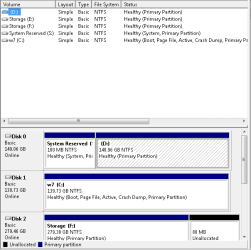
DISKPART> list disk

Disk ### Status Size Free Dyn Gpt
-------- ------------- ------- ------- --- ---
Disk 0 Online 149 GB 0 B
Disk 1 Online 139 GB 0 B
Disk 2 Online 279 GB 79 MB
Disk 3 Online 279 GB 1024 KB

DISKPART>
 

My Computer My Computer

At a glance

7 32 bitp4 3.0 @3.4 512kb cache3.0 (2x 1gb corsair) (2x 512mb kingston)ati 3850 hd 512mb 256-bit ddr3 agp
Computer Manufacturer/Model Number
me
OS
7 32 bit
CPU
p4 3.0 @3.4 512kb cache
Motherboard
abit ic7
Memory
3.0 (2x 1gb corsair) (2x 512mb kingston)
Graphics Card(s)
ati 3850 hd 512mb 256-bit ddr3 agp
Sound Card
on-board AND plantronics DSP-500
Monitor(s) Displays
viewsonic g220fb
Hard Drives
(2x 80gb Fujitsu)
(1x 150gb WDC raptor)
(2x 300gb Seagate barracuda)
PSU
650 antec
Case
it's chill
Cooling
3 exhuast 2 intake 80mm
This is what I've been trying to help you do for the past 3 hours:

What I would do is absorb the System boot files into Win7 partition C and then delete System Reserved.

Do this by booting into System Recovery Options on Win7 DVD or System Repair Disk, open a Command Line, mark C Active and then mark System Reserved Inactive.
Partition - Mark as Active (Method Two)
Partition - Mark as Inactive - Windows 7 Forums

Close the Command box, shut down computer, unplug Disk0, plugs it's cable into Windows 7 HD so it becomes Disk0, make sure it remains HD set to boot first in BIOS setup.

Now boot back into DVD Repair console or Repair CD to run Startup Repair 3 Separate Times
until Win7 boots on its own and holds the System Active flags.

You can now power down to plug the other HD into Disk 1 cable, delete System Reserved in Disk Mgmt or using Diskpart Delete Partition Override command. Or if you want to recover its space into the adjacent partition, use free Partition Wizard bootable CD'S Delete then Resize functions.


Do you really want System Reserved on another HD?
 
You don't need a seprate system reserved partition, I don't have one.

You do need a system partition - it can be the same as the boot partition - it doesn't have to be separate for mbr partition style.
 

My Computers My Computers

  • At a glance

    7 X64i5 84002x8gb 3200mhz
    Computer type
    PC/Desktop
    OS
    7 X64
    CPU
    i5 8400
    Motherboard
    gigabyte b365m ds3h
    Memory
    2x8gb 3200mhz
    Hard Drives
    various
    PSU
    pure power 11 400w cm
    Case
    Coolermaster
    Cooling
    cryorig m9i
  • At a glance

    7x64g54008gb ddr4 2400
    Computer type
    PC/Desktop
    OS
    7x64
    CPU
    g5400
    Motherboard
    ga b365m ds3h
    Memory
    8gb ddr4 2400
    PSU
    xfx pro 450w
what i want is to unplug 2 hd's. then edit the boot so it boots to hard 2 and not 1. because windows installed the boot to the C drive (hard drive 1) or 0 on the cmd info. I say hard drive 2 b/c there are 3 hds plugged in to the card.
SI you think windows is going to let me rename my c drive to s? WHAT?
 

My Computer My Computer

At a glance

7 32 bitp4 3.0 @3.4 512kb cache3.0 (2x 1gb corsair) (2x 512mb kingston)ati 3850 hd 512mb 256-bit ddr3 agp
Computer Manufacturer/Model Number
me
OS
7 32 bit
CPU
p4 3.0 @3.4 512kb cache
Motherboard
abit ic7
Memory
3.0 (2x 1gb corsair) (2x 512mb kingston)
Graphics Card(s)
ati 3850 hd 512mb 256-bit ddr3 agp
Sound Card
on-board AND plantronics DSP-500
Monitor(s) Displays
viewsonic g220fb
Hard Drives
(2x 80gb Fujitsu)
(1x 150gb WDC raptor)
(2x 300gb Seagate barracuda)
PSU
650 antec
Case
it's chill
Cooling
3 exhuast 2 intake 80mm
If you ever dealt with windows xp. theres a bit of code that tells windows to boot from partition(#). that is all i need to do. Is edit that.
 

My Computer My Computer

At a glance

7 32 bitp4 3.0 @3.4 512kb cache3.0 (2x 1gb corsair) (2x 512mb kingston)ati 3850 hd 512mb 256-bit ddr3 agp
Computer Manufacturer/Model Number
me
OS
7 32 bit
CPU
p4 3.0 @3.4 512kb cache
Motherboard
abit ic7
Memory
3.0 (2x 1gb corsair) (2x 512mb kingston)
Graphics Card(s)
ati 3850 hd 512mb 256-bit ddr3 agp
Sound Card
on-board AND plantronics DSP-500
Monitor(s) Displays
viewsonic g220fb
Hard Drives
(2x 80gb Fujitsu)
(1x 150gb WDC raptor)
(2x 300gb Seagate barracuda)
PSU
650 antec
Case
it's chill
Cooling
3 exhuast 2 intake 80mm
Lets hope a new head pops in.
 

My Computer My Computer

At a glance

7 32 bitp4 3.0 @3.4 512kb cache3.0 (2x 1gb corsair) (2x 512mb kingston)ati 3850 hd 512mb 256-bit ddr3 agp
Computer Manufacturer/Model Number
me
OS
7 32 bit
CPU
p4 3.0 @3.4 512kb cache
Motherboard
abit ic7
Memory
3.0 (2x 1gb corsair) (2x 512mb kingston)
Graphics Card(s)
ati 3850 hd 512mb 256-bit ddr3 agp
Sound Card
on-board AND plantronics DSP-500
Monitor(s) Displays
viewsonic g220fb
Hard Drives
(2x 80gb Fujitsu)
(1x 150gb WDC raptor)
(2x 300gb Seagate barracuda)
PSU
650 antec
Case
it's chill
Cooling
3 exhuast 2 intake 80mm
It's different with nt6 o/s.

Follow instructions in greg's post here

Then you can unplug any drive you want - as long as you leave Disk1 in.

You give the system reserved partion a letter in Disk Management, e.g. S - it has no letter right now.

Then use the commands greg posted
 

My Computers My Computers

  • At a glance

    7 X64i5 84002x8gb 3200mhz
    Computer type
    PC/Desktop
    OS
    7 X64
    CPU
    i5 8400
    Motherboard
    gigabyte b365m ds3h
    Memory
    2x8gb 3200mhz
    Hard Drives
    various
    PSU
    pure power 11 400w cm
    Case
    Coolermaster
    Cooling
    cryorig m9i
  • At a glance

    7x64g54008gb ddr4 2400
    Computer type
    PC/Desktop
    OS
    7x64
    CPU
    g5400
    Motherboard
    ga b365m ds3h
    Memory
    8gb ddr4 2400
    PSU
    xfx pro 450w
C:\Users\r2l>diskpart

Microsoft DiskPart version 6.1.7601
Copyright (C) 1999-2008 Microsoft Corporation.
On computer: r2l

DISKPART> sel vol s

Volume 1 is the selected volume.

DISKPART> inact

DiskPart marked the current partition as inactive.

DISKPART> sel vol c

Volume 3 is the selected volume.

DISKPART> act

DiskPart marked the current partition as active.

DISKPART> exi

Leaving DiskPart...

C:\Users\r2l>bcdboot c:\windows
Failure when attempting to copy boot files.

C:\Users\r2l>
 

Attachments

  • Untitled1.png
    Untitled1.png
    7 KB · Views: 2

My Computer My Computer

At a glance

7 32 bitp4 3.0 @3.4 512kb cache3.0 (2x 1gb corsair) (2x 512mb kingston)ati 3850 hd 512mb 256-bit ddr3 agp
Computer Manufacturer/Model Number
me
OS
7 32 bit
CPU
p4 3.0 @3.4 512kb cache
Motherboard
abit ic7
Memory
3.0 (2x 1gb corsair) (2x 512mb kingston)
Graphics Card(s)
ati 3850 hd 512mb 256-bit ddr3 agp
Sound Card
on-board AND plantronics DSP-500
Monitor(s) Displays
viewsonic g220fb
Hard Drives
(2x 80gb Fujitsu)
(1x 150gb WDC raptor)
(2x 300gb Seagate barracuda)
PSU
650 antec
Case
it's chill
Cooling
3 exhuast 2 intake 80mm
This is why we use Startup Repair automated method which covers all unknown possiblities.

Reboot and tap the F8 key to access System Recovery Options

Run Startup Repair 3 times until Win7 writes the System boot files to the Active partition.

You may have to unplug DISK0 to keep it from placing Sys files there although it should write to the Active partition.
 
Try bcdboot c:\windows /s c:

otherwise, there is a long series of commands to do the job
 

My Computers My Computers

  • At a glance

    7 X64i5 84002x8gb 3200mhz
    Computer type
    PC/Desktop
    OS
    7 X64
    CPU
    i5 8400
    Motherboard
    gigabyte b365m ds3h
    Memory
    2x8gb 3200mhz
    Hard Drives
    various
    PSU
    pure power 11 400w cm
    Case
    Coolermaster
    Cooling
    cryorig m9i
  • At a glance

    7x64g54008gb ddr4 2400
    Computer type
    PC/Desktop
    OS
    7x64
    CPU
    g5400
    Motherboard
    ga b365m ds3h
    Memory
    8gb ddr4 2400
    PSU
    xfx pro 450w
F8 doesn't work for me (i am on my laptop). I first tapped f8 at the first boot screen. FAIL. then i kept pressing it till it passed my second bios screen. FAIL.
I am at BOOTMGR is missing
press crtl+atl+delete to restart.
 

My Computer My Computer

At a glance

7 32 bitp4 3.0 @3.4 512kb cache3.0 (2x 1gb corsair) (2x 512mb kingston)ati 3850 hd 512mb 256-bit ddr3 agp
Computer Manufacturer/Model Number
me
OS
7 32 bit
CPU
p4 3.0 @3.4 512kb cache
Motherboard
abit ic7
Memory
3.0 (2x 1gb corsair) (2x 512mb kingston)
Graphics Card(s)
ati 3850 hd 512mb 256-bit ddr3 agp
Sound Card
on-board AND plantronics DSP-500
Monitor(s) Displays
viewsonic g220fb
Hard Drives
(2x 80gb Fujitsu)
(1x 150gb WDC raptor)
(2x 300gb Seagate barracuda)
PSU
650 antec
Case
it's chill
Cooling
3 exhuast 2 intake 80mm
Which HD is set first to boot in BIOS setup?

While there look at the SATA controller setting, whether you have the ability to default to onboard SATA so you can possibly boot the Repair CD.

Is this a Repair CD you've used before, as it should not prompt for drivers unless it's a bad ISO or burn.
 
Back
Top