need to migrate Win7 64bit from one SSD to another SSD

stasvernon

New member
Local time
11:30 AM
Messages
3
Hey guys, I need to migrate Win7 64bit from one SSD to another SSD, but the original drive has MBR and I want GPT on the destination drive.
Anybody knows a free or with trial period utility that can do this?
I don't care about data on destination drive (its new). I have acronis true image HD 2015 license from crucial, but its very limited in functionality (several functions are locked, e.g. "Acronis universal restore" not available).
Thank you.
 

My Computer My Computer

At a glance

Windows 7 Home Premium 64bit
Computer type
Laptop
Computer Manufacturer/Model Number
Lenovo T430s
OS
Windows 7 Home Premium 64bit
You haven't mentioned if you have a Laptop or Desktop. To use GPT your BIOS MUST be UEFI and Win MUST be 64 bits.
Always make a BACKUP of your data files before playing with your running disk.
I never done it before, so I don't guarantee it will work. Try this:
Detach all other HDD and SSD and leave only the new SSD.
On BIOS set:
- SATA=AHCI (Or RAID if you have a RAID array)
- OS=Other
- Storage Boot and PCI device to UEFI only
- XHCI Hand off to disabled
- Fast boot to disable

- Boot your Win 7 64 installation on UEFI mode (important), go to install, custom, advanced, delete all partitions, create a new one (Win will create 3 partitions) and ABORT (don't proceed). You have created a GPT disk with 3 partitions. One UEFI -100M FAT32, one MSR - 120M raw and one large NTFS partition.
Now you have to copy your C: drive to the new disk on the large partition.
To do so you can do an image of C: drive and restore it to the new drive.
Once restored, detach all other HDD and SSD and leave only the new SSD.
Boot your Win 7 64 installation on UEFI mode (important), and launch start up repair.
 
Last edited:

My Computers My Computers

  • At a glance

    Windows 7 HP 64i5 6600K - 800MHz to 4200MHz4+4G GSkill DDR4 3000IG - Intel 530
    Computer type
    PC/Desktop
    Computer Manufacturer/Model Number
    custom build
    OS
    Windows 7 HP 64
    CPU
    i5 6600K - 800MHz to 4200MHz
    Motherboard
    GA-Z170-HD3P
    Memory
    4+4G GSkill DDR4 3000
    Graphics Card(s)
    IG - Intel 530
    Monitor(s) Displays
    Samsung 226BW
    Screen Resolution
    1680x1050
    Hard Drives
    (1) -1 SM951 – 128GB M.2 AHCI PCIe SSD drive for Windows 7 and Lubuntu
    (2) -1 WD SATA 3 - 1T for Data
    (3) -1 WD SATA 3 - 1T for backup
    PSU
    Thermaltake 450W TR2 gold
    Keyboard
    Old and good Chicony mechanical keyboard
    Mouse
    Logitech mX performance - 9 buttons (had to disable some)
    Internet Speed
    500Mb/s
    Browser
    Firefox 64
    Other Info
    TinyWall firewall
  • At a glance

    Windows 7 Proi7-4500U 800MHz to 3.0GHz(4+4)G DDR3 1600IG intel 4400 + NVIDIA GeForce GT 745M
    Computer type
    Laptop
    System Manufacturer/Model Number
    Asus Q550LF
    OS
    Windows 7 Pro
    CPU
    i7-4500U 800MHz to 3.0GHz
    Motherboard
    Asus Q550LF
    Memory
    (4+4)G DDR3 1600
    Graphics Card(s)
    IG intel 4400 + NVIDIA GeForce GT 745M
    Sound Card
    Realtek
    Monitor(s) Displays
    LG Display LP156WF4-SPH1
    Screen Resolution
    1920 x 1080
    Hard Drives
    BX500 120G SSD for Windows and programs +
    1T HDD for data
    Internet Speed
    500 Mb/s
    Browser
    Firefox
    Other Info
    TinyWall firewall
Thank you!
Its a laptop, don't really see why it is important.
It does support UEFI. Its Windows 7 Home Premium 64bit.

- XHCI Hand off to disabled

do you mean AHCI?
 

My Computer My Computer

At a glance

Windows 7 Home Premium 64bit
Computer type
Laptop
Computer Manufacturer/Model Number
Lenovo T430s
OS
Windows 7 Home Premium 64bit
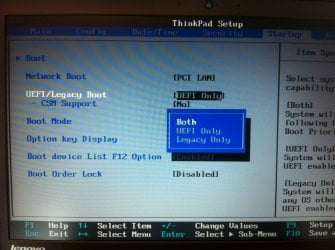
The following copied from the Lenovo T430s manual.

How to install Windows 7 64-bit in Legacy BIOS mode (MBR disk)

- Startup > UEFI/Legacy Boot > Legacy Only

How to install Windows 7 64-bit in UEFI mode (GPT disk)

- Startup > UEFI/Legacy Boot > UEFI Only

2013-07-08-10_46_31.jpg
 

My Computer My Computer

At a glance

Windows 7/10
Computer type
PC/Desktop
OS
Windows 7/10
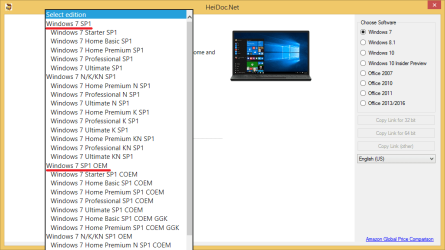
How to download Windows 7 SP1 ISO.

- You can use either Retail or OEM disks to install Windows 7 (with Retail and OEM licenses), it doesn't matter which one you choose.

https://www.heidoc.net/joomla/technology-science/microsoft/67-microsoft-windows-iso-download-tool

Windows 7 ISO.png

How to use Rufus to create bootable Window 7 USB for Legacy BIOS or UEFI.

USB Flash Drive - Create to Install Windows 10 - Windows 10 Forums

Option Two: Use "Rufus" to create Bootable Window 10 USB for Legacy BIOS and UEFI

6. To Create Bootable UEFI USB Flash Drive for Installing Windows 10 with UEFI

7. To Create Bootable USB Flash Drive for Installing Windows 10 using Legacy BIOS (without UEFI)
 

My Computer My Computer

At a glance

Windows 7/10
Computer type
PC/Desktop
OS
Windows 7/10
The following copied from the Lenovo T430s manual.

How to install Windows 7 64-bit in Legacy BIOS mode (MBR disk)

Thank you. The thing is I don't want to reinstall it from scratch. I need to do migration to new SSD.
 

My Computer My Computer

At a glance

Windows 7 Home Premium 64bit
Computer type
Laptop
Computer Manufacturer/Model Number
Lenovo T430s
OS
Windows 7 Home Premium 64bit

My Computer My Computer

At a glance

Windows 7 Home Premium SP1, 64-bitIntel Skylake i5-6600K, not overclocked8 GB HyperX DDR4-2666 (2 x 4 GB)none; graphics are integrated on CPU
Computer type
PC/Desktop
Computer Manufacturer/Model Number
Ignatz Special; 4 speed manual gearbox; factory air conditioning; one of one
OS
Windows 7 Home Premium SP1, 64-bit
CPU
Intel Skylake i5-6600K, not overclocked
Motherboard
AsRock Z170M Extreme 4, micro ATX
Memory
8 GB HyperX DDR4-2666 (2 x 4 GB)
Graphics Card(s)
none; graphics are integrated on CPU
Sound Card
onboard: Realtek ALC1150; external: USB Behringer UF0-202
Monitor(s) Displays
Dell S2340M 23 inch IPS
Screen Resolution
1600 x 900
Hard Drives
System: Crucial MX100 series SSD, 128 GB;
Data: Samsung Spinpoint 103SJ, 1 TB;
Backup: WD Caviar Green WD30EZRX-00D8PB0, 3 TB
PSU
Rosewill SilentNight 500 watt fanless, semi-modular
Case
Antec Solo II
Cooling
Noctua NH-U12S; Noctua F12 intake, Noctua S12A exhaust
Keyboard
Microsoft 200 6JH-00001 USB
Mouse
Dell or Microsoft optical wired; USB
Antivirus
Microsoft Security Essentials and Malwarebytes Premium
Browser
Pale Moon
Other Info
All fans PWM; speeds at idle: CPU circa 500 rpm; intake circa 600 rpm; exhaust circa 600 rpm; CPU temps 27 idle and 47 C load in a warm room (27 C/81 F) when running Intel Extreme Tuning Utility stress test.
Hi and welcome to SevenForums,
I don't see how you can avoid not clean installing going to gpt

http://www.sevenforums.com/tutorials/2432-usb-windows-7-installation-key-drive-create.html#option2

It's a lot easier to clean install these days with the unofficial sp2
There are essentially 3 updates needed for a clean install of windows that will get you updated through April of 2016

KB3020369 & KB3172605 & KB3125574 all can be downloaded from the M$ catalog using internet explorer
Microsoft Update Catalog

https://blogs.technet.microsoft.com...17/simplifying-updates-for-windows-7-and-8-1/
When manually installing updates you need to switch your update settings to Never check for updates and restart the machine first.

After restart you will need to ensure the built in windows update service is stopped and set to manual first or it will conflict with the stand alone installer.

Afterwards reset you windows updates service to what it was before and update settings to your preference and check for updates
Should be about 50 or so update left to install.
 

My Computer My Computer

At a glance

Win-7-Pro64bit 7-H-Prem-64biti7-5930K 2nd i9-9940x both water blocked VRM'...Trident-z 3200C14 2nd Trident-z 3600C16EVGA 1080ti ftw3 2nd Titan Xp both water blocked
Computer type
PC/Desktop
Computer Manufacturer/Model Number
Custom assembled by me :}
OS
Win-7-Pro64bit 7-H-Prem-64bit
CPU
i7-5930K 2nd i9-9940x both water blocked VRM's too
Motherboard
ASUS SABERTOOTH X99 2nd ASUS x299 Apex
Memory
Trident-z 3200C14 2nd Trident-z 3600C16
Graphics Card(s)
EVGA 1080ti ftw3 2nd Titan Xp both water blocked
Sound Card
Built-in Realtek
Monitor(s) Displays
1-AOC G2460PG 24"G-Sync 144Hz/ 2nd 1-ASUS VG248QE 24" 144Hz
Screen Resolution
1920 x 1080 144Hz
Hard Drives
2-Samsung M.2 Evo & Evo Plus
2-Samsung 850 EVO 500GB SSD's/ 3-2.5 W.D. Black 1tb-&3-1tb/3-3.5 WD Black 1tb hdd's
PSU
EVGA SuperNOVA 1000-P2 2nd 1200-P2
Case
2-Corsair Obsidian Series 450D Black ATX Mid Tower
Cooling
Custom water loops
Keyboard
Logitech G710+/ 2nd Logitech G910
Mouse
2-RedDragon M901 Perdition 16400 dpi Gaming mouse = wired
Internet Speed
Comcast Ping 19ms 89.31mbps download speed 6.12mbps upload
Antivirus
Malwarebytes Pro/ Superantispyware Pro
Browser
FireFox & Pale moon
Other Info
2nd ASUS X299 Apex/Intel i9-9940x with Custom water loop/7H-Prem-x64/Corsair 450D case/Ram Trident-z 3600C16 4x8gb / Samsung970Evo plus 500gb SSD/Dual ssd EZ swap evo/PSU EVGA SuperNova 1200w-P2 80+Platinum/GPU Titan Xp /8-ML-140 on push-pull on 2-280GTX rads
I've asked what kind of computer you have to see the tools that you have. With only a laptop it's much more difficult to transfer a working MBR SSD to another GPT SSD.
Do you have a desktop where you can attach the SSD's (Old an new)?
Do you have a external 2.5" enclosure?
A clean 1G (or bigger) flash drive?
 

My Computers My Computers

  • At a glance

    Windows 7 HP 64i5 6600K - 800MHz to 4200MHz4+4G GSkill DDR4 3000IG - Intel 530
    Computer type
    PC/Desktop
    Computer Manufacturer/Model Number
    custom build
    OS
    Windows 7 HP 64
    CPU
    i5 6600K - 800MHz to 4200MHz
    Motherboard
    GA-Z170-HD3P
    Memory
    4+4G GSkill DDR4 3000
    Graphics Card(s)
    IG - Intel 530
    Monitor(s) Displays
    Samsung 226BW
    Screen Resolution
    1680x1050
    Hard Drives
    (1) -1 SM951 – 128GB M.2 AHCI PCIe SSD drive for Windows 7 and Lubuntu
    (2) -1 WD SATA 3 - 1T for Data
    (3) -1 WD SATA 3 - 1T for backup
    PSU
    Thermaltake 450W TR2 gold
    Keyboard
    Old and good Chicony mechanical keyboard
    Mouse
    Logitech mX performance - 9 buttons (had to disable some)
    Internet Speed
    500Mb/s
    Browser
    Firefox 64
    Other Info
    TinyWall firewall
  • At a glance

    Windows 7 Proi7-4500U 800MHz to 3.0GHz(4+4)G DDR3 1600IG intel 4400 + NVIDIA GeForce GT 745M
    Computer type
    Laptop
    System Manufacturer/Model Number
    Asus Q550LF
    OS
    Windows 7 Pro
    CPU
    i7-4500U 800MHz to 3.0GHz
    Motherboard
    Asus Q550LF
    Memory
    (4+4)G DDR3 1600
    Graphics Card(s)
    IG intel 4400 + NVIDIA GeForce GT 745M
    Sound Card
    Realtek
    Monitor(s) Displays
    LG Display LP156WF4-SPH1
    Screen Resolution
    1920 x 1080
    Hard Drives
    BX500 120G SSD for Windows and programs +
    1T HDD for data
    Internet Speed
    500 Mb/s
    Browser
    Firefox
    Other Info
    TinyWall firewall
Back
Top