Need to stop Windows looking for damaged partition

thx1139

New member
Power User
Local time
11:03 AM
Messages
110
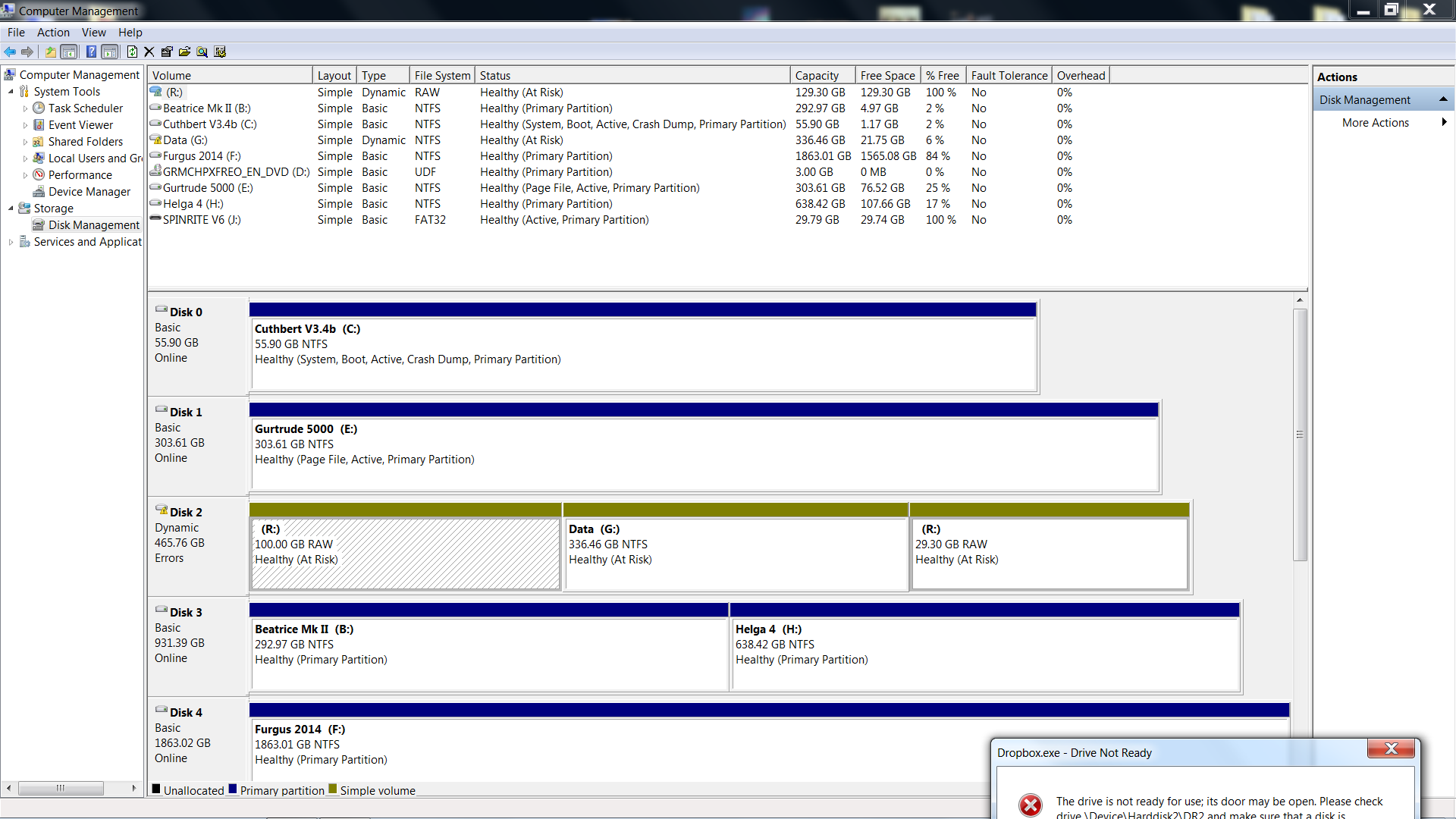
I have a drive with two partitions. One of the partitions is damaged in some way. That partition contained programs that I could not fit onto my SSD. The other partition I believe is fine but I cannot access it easily because if I start Windows with the drive connected, Windows is so slow as to be effectively unusable. Right now the drive is unplugged from the motherboard and so I can use Windows and the programs installed on the SSD. I'd like to now tell Windows not to look for partition R (even though many programs, including ones set to run at start-up are installed on it). This will allow me plug the drive back in and recover the data from the other partition before reformatting the drive. I have a back up of the data, but my suggested solution would be a lot quicker than retrieving that remote back up.

Superfluous information:
Incidentally, the partition in question showed as "at risk" in Disk Management but my attempts to uncover what that meant and how to resolve it had not succeeded. I actually had more than one computer problem at the same time and the other took presidency. Sometimes in the past two weeks the partition would disappear while Windows was running and restarting would get it back.
 

My Computer My Computer

OS
Win 7 Home Premium (OEM) - Install date: 02-2010
CPU
AMD X4 Phenom II 965
Motherboard
Gigabyte GA 790FXTA-UD5
Memory
OCZ Black Edition - 2x2GB DDR3-1600
Graphics Card(s)
Sapphire HD 5770 1GB GDDR5
Sound Card
Integrated
Monitor(s) Displays
Generic CRT
Screen Resolution
1024x7xx
Hard Drives
System: OCZ Vertex 2, 60 GB SSD
Data: Western Digital Caviar Black WD1002FAEX, 1TB HDD
PSU
Thermaltake w705 - 700 watt
Case
Fractal R2 Define
Cooling
Air
Keyboard
Generic
Mouse
Gigabyte Optical Gaming Mouse
Internet Speed
IDSL
I think you can disable drives in the BIOS or in Device Manager, but not partitions.

The best partition tool used around here is Partition Wizard.

http://www.partitionwizard.com/download.html

You might be able to run it and see if it finds issues with the partition.

Can you post a screen shot of Windows Disk Management with the problem drive connected? I'm wondering if any Windows components are installed on the problem partition?
 

My Computer My Computer

Computer type
PC/Desktop
Computer Manufacturer/Model Number
Ignatz Special; 4 speed manual gearbox; factory air conditioning; one of one
OS
Windows 7 Home Premium SP1, 64-bit
CPU
Intel Skylake i5-6600K, not overclocked
Motherboard
AsRock Z170M Extreme 4, micro ATX
Memory
8 GB HyperX DDR4-2666 (2 x 4 GB)
Graphics Card(s)
none; graphics are integrated on CPU
Sound Card
onboard: Realtek ALC1150; external: USB Behringer UF0-202
Monitor(s) Displays
Dell S2340M 23 inch IPS
Screen Resolution
1600 x 900
Hard Drives
System: Crucial MX100 series SSD, 128 GB;
Data: Samsung Spinpoint 103SJ, 1 TB;
Backup: WD Caviar Green WD30EZRX-00D8PB0, 3 TB
PSU
Rosewill SilentNight 500 watt fanless, semi-modular
Case
Antec Solo II
Cooling
Noctua NH-U12S; Noctua F12 intake, Noctua S12A exhaust
Keyboard
Microsoft 200 6JH-00001 USB
Mouse
Dell or Microsoft optical wired; USB
Antivirus
Microsoft Security Essentials and Malwarebytes Premium
Browser
Pale Moon
Other Info
All fans PWM; speeds at idle: CPU circa 500 rpm; intake circa 600 rpm; exhaust circa 600 rpm; CPU temps 27 idle and 47 C load in a warm room (27 C/81 F) when running Intel Extreme Tuning Utility stress test.
Hey. Thanks for your advice. Disk Management does not display the drive.

I'm going to try copying my data using a Kubuntu live DVD and then I'll look into fixing the partition or erasing the drive and reusing it (if it's knackered, it's still under warranty so I'll return it). If I'm unable to fix the partition, how can I get Windows to acknowledge those program installations are no longer available (and never will be) so I can move forward and start installing the lost programs again? If the answer involves reinstalling Windows, I'm running away and not coming back...
 

My Computer My Computer

OS
Win 7 Home Premium (OEM) - Install date: 02-2010
CPU
AMD X4 Phenom II 965
Motherboard
Gigabyte GA 790FXTA-UD5
Memory
OCZ Black Edition - 2x2GB DDR3-1600
Graphics Card(s)
Sapphire HD 5770 1GB GDDR5
Sound Card
Integrated
Monitor(s) Displays
Generic CRT
Screen Resolution
1024x7xx
Hard Drives
System: OCZ Vertex 2, 60 GB SSD
Data: Western Digital Caviar Black WD1002FAEX, 1TB HDD
PSU
Thermaltake w705 - 700 watt
Case
Fractal R2 Define
Cooling
Air
Keyboard
Generic
Mouse
Gigabyte Optical Gaming Mouse
Internet Speed
IDSL
Well Kubuntu reads the healthy partition just fine so I can copy my data across from within it. It is unable to mount the bad partition. I'm currently running Spinrite but there are many bad sectors so the process is slow. Perhaps it's worth noting that this is a refurbished Seagate drive which was sent to me to replace a failed Seagate drive which was still under warranty. I'm guessing that the original warranty period has now lapsed.
 

My Computer My Computer

OS
Win 7 Home Premium (OEM) - Install date: 02-2010
CPU
AMD X4 Phenom II 965
Motherboard
Gigabyte GA 790FXTA-UD5
Memory
OCZ Black Edition - 2x2GB DDR3-1600
Graphics Card(s)
Sapphire HD 5770 1GB GDDR5
Sound Card
Integrated
Monitor(s) Displays
Generic CRT
Screen Resolution
1024x7xx
Hard Drives
System: OCZ Vertex 2, 60 GB SSD
Data: Western Digital Caviar Black WD1002FAEX, 1TB HDD
PSU
Thermaltake w705 - 700 watt
Case
Fractal R2 Define
Cooling
Air
Keyboard
Generic
Mouse
Gigabyte Optical Gaming Mouse
Internet Speed
IDSL
Hey, after running Spinrite a while, I got the drive recognised in Disk Management whereupon I promptly deleted the partitions! Windows is now able to move on! I've used CCleaner to remove invalid registry entries but I still have mounds of shortcuts in my start menu that don't work!

After restarting the computer, the drive is no longer recognised. I'll look into why that is.

9bzIMwK.png
 

My Computer My Computer

OS
Win 7 Home Premium (OEM) - Install date: 02-2010
CPU
AMD X4 Phenom II 965
Motherboard
Gigabyte GA 790FXTA-UD5
Memory
OCZ Black Edition - 2x2GB DDR3-1600
Graphics Card(s)
Sapphire HD 5770 1GB GDDR5
Sound Card
Integrated
Monitor(s) Displays
Generic CRT
Screen Resolution
1024x7xx
Hard Drives
System: OCZ Vertex 2, 60 GB SSD
Data: Western Digital Caviar Black WD1002FAEX, 1TB HDD
PSU
Thermaltake w705 - 700 watt
Case
Fractal R2 Define
Cooling
Air
Keyboard
Generic
Mouse
Gigabyte Optical Gaming Mouse
Internet Speed
IDSL
Back
Top