NEED touchpad driver (VGN-FW 250J Laptop)

vmars316

New member
Local time
4:34 PM
Messages
24
:oNEED touchpad driver (VGN-FW 250J Laptop)

* Greetings,
I had to rebuild my Sony Vaio (VGN-FW 250J Laptop) Operating system,
from win7/64 UPGRADE disc (originally used for vista to win7) .
All went well, except that now I can no longer DISABLE TAP
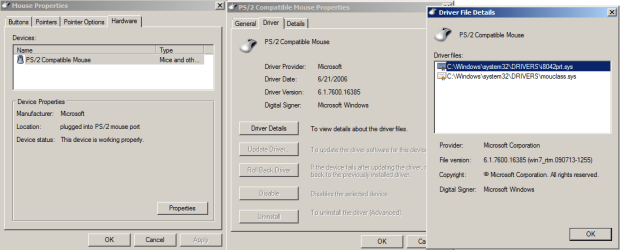
on the mouse/touchpad. (Driver = mouclass.sys)

Can someone PLEASE aim me at the correct driver, the exact name, and where I
can download it. I don't mind paying for it. But I do need to get the correct one.

Thank you very much...Vernon
 

My Computer My Computer

At a glance

windows 7 x64
OS
windows 7 x64
Hi,
You can go to manufacturer website and download the drivers for touch-pad ( it would be under pointing devices) also providing the link for reference: please select which version of windows 7 you have on the computer ( 32-bit or 64 bit)
Sony eSupport - VGN-FW250J - Drivers & Software
 

My Computer My Computer

At a glance

win7
OS
win7
Hi,
You can go to manufacturer website and download the drivers for touch-pad ( it would be under pointing devices) also providing the link for reference: please select which version of windows 7 you have on the computer ( 32-bit or 64 bit)
Sony eSupport - VGN-FW250J - Drivers & Software

Yes I have been to that same site many times.
Please note, that information is for Windows Vista® 64-bit
Applicable Products and Operating Systems (see full list...)
Model:VGN-FW250JOperating System:
Windows Vista® 64-bit

I am now running win7.
Are you suggesting that I should try the vista Driver on my win7 ?
If I try that, how will I get back to mouClass.sys ?
Won't I get stuck without ANY pointing Device ?

Thanks...Vernon
 

Attachments

  • PointingDevice.png
    PointingDevice.png
    20.5 KB · Views: 21

My Computer My Computer

At a glance

windows 7 x64
OS
windows 7 x64
I went to Sony Chat eSupport.
Free for the 1st 15 minutes.

Imagine that, it took them exactly 15mins to diagnose the prob,
but I would need to give them $89 to fix the prob.

Finally I ended up on the Sony supportForum.
And they actually helped me with the following Reply.


In order to restore your Touchpad options for Scroll and Tap, you must reinstall
the Shared Library ,

Sony eSupport - VGN-FW250J - Drivers & Software


the VAIO Event Service ,

Sony eSupport - VGN-FW250J - Drivers & Software


and the Notebook Control Utility ,

Sony eSupport - VGN-FW250J - Drivers & Software

these 3 drivers should restore the touchpad utility over the default windows USB mouse driver currently running.


if you still are encountering problems with windows 7 please review this guide:
Upgrade Instructions for Windows 7 ,

Sony eSupport - Electronics - Support Information


Hope this helps someone else too.
Thanks ALL...Vernon
 

My Computer My Computer

At a glance

windows 7 x64
OS
windows 7 x64
ALMOST SOLVED: driver (Sony Vaio VGN-FW 250J Laptop)

UGH:
Updates helped a bit.
But still have a prob with Selecting-Text.
When I select Text
holding down leftMouseButton and dragging finger across touchPad,
then letting go of leftMouseButton,
the drag is still in effect, mouse/touchpad won't let go
until I do a double leftMouseButton-click somewhere.

Actually, anywhere I 'leftMouseButton-click and drag' with touchPad
(ie., leftMouseButton-click & Drag on scrollBars),
the Drag won't let go.

Pls, Where can I find Driver updates ?

Current Drivers:
===============================
Alps pointing-device for Sony Vaio VGN-FW 250J Laptop
Apfiltr.sys 5.7.0.92 built by WinDDK
i8042prt.sys 6.1.7600.16835 (win7_rtm 090713-1255)
mouclass.sys 6.1.7600.16835 (win7_rtm 090713-1255)

Thanks...Vernon
 
Last edited:

My Computer My Computer

At a glance

windows 7 x64
OS
windows 7 x64
Back
Top