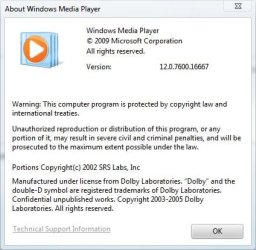
Need WMP 12 download

Lanthus20

New member
Power User
Local time
2:41 AM
Messages
185
Location
Canada
Hello, I stupidly downgraded to windows media player 11 because I needed it for a device I was using, but now I want 12 back. How can I do this? Is there anyplace to download it?
 

My Computer My Computer

Computer Manufacturer/Model Number
Seanix Desktop PC
OS
Windows 7 Ultimate 32 bit
CPU
Intel Core 2 Duo CPU E4500 2.20 GHz
Memory
1.99 GB
Graphics Card(s)
Intel G33/G31 Express Chipset Family (256 MB)
Sound Card
Realtek ALC888/1200
Monitor(s) Displays
DELL
Screen Resolution
1280 X 1024
Hard Drives
320GB Internal
200GB External
Case
Seanix
Keyboard
Seanix USB Keyboard
Mouse
Seanix USB Keyboard
Internet Speed
Broadband
Other Info
Getting close to 3 years old.

My Computer My Computer

Computer Manufacturer/Model Number
Blue Shards 1.0
OS
Windows 7 Ultimate 64bit
CPU
AMD Phenom II 555 Black Edition Quad Core OC'd to 4.0GHz
Motherboard
ASUS M4A88T-M
Memory
G Skill RipJaw 1333MHz 4GB
Graphics Card(s)
ATI raideon 4250 HD/XFX ATI Radeon 1GB HD4650
Sound Card
Realteck HD Audio
Monitor(s) Displays
2x 22" Widescreen HD Monitors
Hard Drives
500GB Sata 7500RPM
80GB IDE
PSU
850W OCUK Modular
Case
Antec Dark Fleet DF-30
Cooling
Titan Fenrir Pro (CPU)
Keyboard
Logitech Wireless
Mouse
Logitech Wireless
Internet Speed
24Meg
Other Info
Getting soon-
2TB 7200RPM HDD
+8GB RAM
30GB SSD
HD6950/70
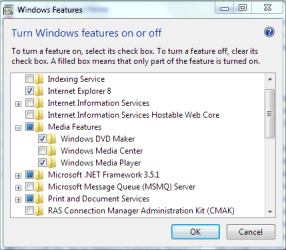
If you havent tried this already... Uninstall WMP 11. Goto Programs and Features, Turn Windows features on or off. Expand the Media Features category. Depending you will either follow A or B.

A) If WMP is unchecked, check it and reboot if needed.
Run WMP and go thru the first time run wizard.

B) If WMP is checked then uncheck it and reboot.
Go back into Programs and Features, Turn Windows features on/off.
Expand Media featuers and check WMP. Reboot if needed.
Run WMP and go thru the first time run wizard.

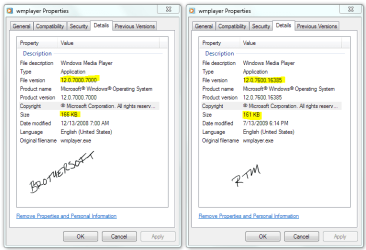
I havent been in your situation and this is mostly theory. In effect it should restore v12 since the files reside in the WinSXS folder.
 

Attachments

  • WMP.PNG
    WMP.PNG
    13.9 KB · Views: 147
  • WMP Versions.PNG
    WMP Versions.PNG
    18.3 KB · Views: 352

My Computer My Computer

Computer Manufacturer/Model Number
Dell Dimension E520
OS
Windows 7 Ultimate (x86)
CPU
Intel 2.20 Dual Core
Memory
4 GB
Graphics Card(s)
nVidia 9400 GT (512 MB)
Sound Card
Sigmatel C Major HD
Monitor(s) Displays
22" Samsung 2232 bw
Screen Resolution
1680x1050
Mouse
Microsoft Arc
Other Info
Wacom Graphire 4 (6x8) Tablet
I have the same exact issue. I've already tried this solution and it hasn't work. I think one reason may be the fact that down grading to WMP11 requires replacing some dll files in system32. If I could get my hands on those files my problem would've been solved by now.

It's either that or I have to delete those files and repair my installation. Which I really don't feel like doing.
 

My Computer My Computer

OS
WIndows 7 Ultimate x64
I have the same exact issue. I've already tried this solution and it hasn't work. I think one reason may be the fact that down grading to WMP11 requires replacing some dll files in system32. If I could get my hands on those files my problem would've been solved by now.

It's either that or I have to delete those files and repair my installation. Which I really don't feel like doing.

Have you tried this http://www.sevenforums.com/tutorials/1538-sfc-scannow-command-system-file-checker.html to repair those files?

It's definitely worth a try.

Or a http://www.sevenforums.com/tutorials/3413-repair-install.html if that doesn't fix it.
 

My Computer My Computer

Computer type
PC/Desktop
Computer Manufacturer/Model Number
Self Built
OS
Win 10 Pro x64
CPU
Intel I5-2500K @3.3GHz
Motherboard
Asrock P67 Extreme4
Memory
16GB G.Skill Ripjaws X (4x4GB)
Graphics Card(s)
EVGA GeForce 750 Ti SC 2GB
Sound Card
ASUS Xonar DG 5.1 Channels 24-bit 96KHz PCI Interface Sound
Monitor(s) Displays
auria eq2367
Screen Resolution
1920 x 1080
Hard Drives
250GB Samsung 850 EVO SSD
1TB WD Blue
1TB Hitachi
PSU
SeaSonic X 650W 80 Plus Gold
Case
Corsair Obsidian 750D
Cooling
Corsair H60, Three 140mm case fans
Keyboard
Logitech Wireless Keyboard K520
Mouse
Logitech Wireless Mouse M310
Internet Speed
Wave Broadband ~ 100 dn 5 up
Antivirus
Windows Defender, Malwarebytes Premium
Browser
Edge, IE11, Chrome
Other Info
Laptop specs: HP g7-1365dx /
CPU: AMD A6-3420M APU with Radeon(tm) HD Graphics /
RAM: Crucial 8Gb (2x4Gb) /
SSD: Crucial M4-CT128M4SSD2 ATA Device/ FW 000F /
GFX: AMD Radeon HD 6520G /
OS: Windows 10 Pro x64
I'm in the process of the scan right now but I don't see why it's necessary. I already know what's wrong. I had to backup the original files but I didn't.

These are the files that need to be replaced with Widnows 7 original files:
filesIneed.jpg


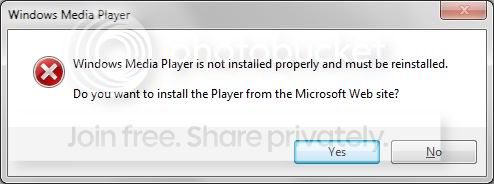
And here's the error message I'm getting:
mediaplayererror.jpg
 

My Computer My Computer

OS
WIndows 7 Ultimate x64
I'm in the process of the scan right now but I don't see why it's necessary. I already know what's wrong. I had to backup the original files but I didn't.

These are the files that need to be replaced with Widnows 7 original files:
filesIneed.jpg


And here's the error message I'm getting:
mediaplayererror.jpg

SFC will scan and try to fix corrupt files, that's why I suggested that.

I zipped up all those files in your screenshot from sys32 ans sysWOW64 and uploaded them to my skydrive if you want them, a repair install will fix that too which was my other suggestion.

Here's the link to the zipped .dll's, they are seperate downloads.

WMP.dll's - Windows Live
 

My Computer My Computer

Computer type
PC/Desktop
Computer Manufacturer/Model Number
Self Built
OS
Win 10 Pro x64
CPU
Intel I5-2500K @3.3GHz
Motherboard
Asrock P67 Extreme4
Memory
16GB G.Skill Ripjaws X (4x4GB)
Graphics Card(s)
EVGA GeForce 750 Ti SC 2GB
Sound Card
ASUS Xonar DG 5.1 Channels 24-bit 96KHz PCI Interface Sound
Monitor(s) Displays
auria eq2367
Screen Resolution
1920 x 1080
Hard Drives
250GB Samsung 850 EVO SSD
1TB WD Blue
1TB Hitachi
PSU
SeaSonic X 650W 80 Plus Gold
Case
Corsair Obsidian 750D
Cooling
Corsair H60, Three 140mm case fans
Keyboard
Logitech Wireless Keyboard K520
Mouse
Logitech Wireless Mouse M310
Internet Speed
Wave Broadband ~ 100 dn 5 up
Antivirus
Windows Defender, Malwarebytes Premium
Browser
Edge, IE11, Chrome
Other Info
Laptop specs: HP g7-1365dx /
CPU: AMD A6-3420M APU with Radeon(tm) HD Graphics /
RAM: Crucial 8Gb (2x4Gb) /
SSD: Crucial M4-CT128M4SSD2 ATA Device/ FW 000F /
GFX: AMD Radeon HD 6520G /
OS: Windows 10 Pro x64
Wow thank you so much, really appreciate it brotha. :) Let me give it a shot see if it works.
 

My Computer My Computer

OS
WIndows 7 Ultimate x64
Wow thank you so much, really appreciate it brotha. :) Let me give it a shot see if it works.

No problem, let us know either way, we'll get it fixed for you one way or another. ;)
 

My Computer My Computer

Computer type
PC/Desktop
Computer Manufacturer/Model Number
Self Built
OS
Win 10 Pro x64
CPU
Intel I5-2500K @3.3GHz
Motherboard
Asrock P67 Extreme4
Memory
16GB G.Skill Ripjaws X (4x4GB)
Graphics Card(s)
EVGA GeForce 750 Ti SC 2GB
Sound Card
ASUS Xonar DG 5.1 Channels 24-bit 96KHz PCI Interface Sound
Monitor(s) Displays
auria eq2367
Screen Resolution
1920 x 1080
Hard Drives
250GB Samsung 850 EVO SSD
1TB WD Blue
1TB Hitachi
PSU
SeaSonic X 650W 80 Plus Gold
Case
Corsair Obsidian 750D
Cooling
Corsair H60, Three 140mm case fans
Keyboard
Logitech Wireless Keyboard K520
Mouse
Logitech Wireless Mouse M310
Internet Speed
Wave Broadband ~ 100 dn 5 up
Antivirus
Windows Defender, Malwarebytes Premium
Browser
Edge, IE11, Chrome
Other Info
Laptop specs: HP g7-1365dx /
CPU: AMD A6-3420M APU with Radeon(tm) HD Graphics /
RAM: Crucial 8Gb (2x4Gb) /
SSD: Crucial M4-CT128M4SSD2 ATA Device/ FW 000F /
GFX: AMD Radeon HD 6520G /
OS: Windows 10 Pro x64
Unfortunately this did not solve the problem. I copied over the files, and did that repair thing again. Restarted and the problem still persists.

Isn't there any other way I could get this thing to work than having to reinstall windows? I heard repairing windows causes problems with the drivers.
 

My Computer My Computer

OS
WIndows 7 Ultimate x64
I've had the WMP no install problem and fixed it by accident when I chased down an error code from the Event Viewer. Is your event viewer working? It had something to do with permissions....
 

My Computer My Computer

Computer Manufacturer/Model Number
HB
OS
W7x64 Ult.
CPU
i7 975
Motherboard
P6T7 SC
Memory
12GB Corsair Dom
Graphics Card(s)
Evga GTX285
Sound Card
OB
Monitor(s) Displays
HP LP2475
Screen Resolution
1920x1200
Hard Drives
Velociraptors Raid0 BU
Crucial M4 OS
WD RE4 Data
PSU
PC Power & Cooling 950
Case
Chieftec Bravo
Cooling
Air 6 GentleTyphoon
Keyboard
Logitech Illuminated
Mouse
Logitech MX518
There is away to fix it by taking ownership of certain files. Glad that you sorted it.
 

My Computer My Computer

Computer Manufacturer/Model Number
Customised
OS
Windows 7 64Bit Ultimate Edition SP1
CPU
AMD Phenom II X5 955 @ 3200 Mhz
Motherboard
Asus M5A99X EVO
Memory
G.Skill 12GB DDR3 1333MHz
Graphics Card(s)
Palit GeForce GTX 550 Ti OC Sonic 1GB
Sound Card
Onboard
Monitor(s) Displays
LG 32" HDTV
Screen Resolution
1920x1080 @ 60Hz
Hard Drives
Internal 250GB SATA 3.0 Western Digital WDC WD25 00AAKX-001CA0

Internal 500GB SATA 2.0 Seagate ST350041 3AS

Internal 500GB SATA 2.0 Western Digital WDC WD50 00AAKS-00WWP

External 1TB USB 2.0 Western Digital

External 2TB USB 2.0 Buffalo
PSU
Colors-IT 750w BLACK 12CM Silent
Case
Xigamatek CPC-T45UB-U01 Asgard Chassis
Cooling
4 120mm Fans In Total
Keyboard
ADVENT Illuminated Keyboard
Mouse
Genius
Internet Speed
30MB
Other Info
CPU Cooler - Cooler Master Hyper 212 Plus Cooler
I looked in EventViewer, and I found:

"Service 'WMPNetworkSvc' did not start correctly because CoCreateInstance(WindowsMediaPlayer) encountered error '0x800700c1'. If possible, reinstall Windows Media Player."
 

My Computer My Computer

OS
WIndows 7 Ultimate x64
Go to %ProgramFiles% (and %ProgramFiles(x86)% for 64-bit OS) folder, and delete the Windows Media Player folder

Then go to
  1. Open Turn Windows features on or off again.
  2. Check (tick) the checkbox for Windows Media Player and/or Windows Media Center.
  3. Restart computer.
See if that helps.
 

My Computer My Computer

Computer type
PC/Desktop
Computer Manufacturer/Model Number
Evga X58
OS
Windows 7 Ultimate x64
CPU
Core i7 950 - 3.06 GHz
Motherboard
EVGA X58 SLI
Memory
Corsair XMS3 Dominator CMP12GX3M3A1600C9 12GB
Graphics Card(s)
eVGA GTX 550 TI-FPB 1GB
Sound Card
High Definition Audio
Monitor(s) Displays
ASUS VH242H 24 LCD
Screen Resolution
1920 X 1080
Hard Drives
2x - Seagate 1000GB Hard Drive SATA 3Gb/s 32MB Cache
Seagate 750GB Barracuda 7200.12 SATA II w/ 32MB Cache
WDC WD2500AAJB-00J3A0 ATA Device
PSU
OCZ ZX Series 1250W PSU
Case
ANTEC NINE HUNDRED TWO
Cooling
Zalman Reserator 3 MAX Dual CPU Cooler
Keyboard
Logitech
Mouse
Logitech
Other Info
2 x- HL-DT-ST DVDRAM GH24NS50 ATA Device
Unfortunately this did not solve the problem. I copied over the files, and did that repair thing again. Restarted and the problem still persists.

Isn't there any other way I could get this thing to work than having to reinstall windows? I heard repairing windows causes problems with the drivers.


I have never had a problem with drivers on windows 7, either repair or clean install, I've only had to update my gfx driver from nvidia.
 

My Computer My Computer

Computer type
PC/Desktop
Computer Manufacturer/Model Number
Self Built
OS
Win 10 Pro x64
CPU
Intel I5-2500K @3.3GHz
Motherboard
Asrock P67 Extreme4
Memory
16GB G.Skill Ripjaws X (4x4GB)
Graphics Card(s)
EVGA GeForce 750 Ti SC 2GB
Sound Card
ASUS Xonar DG 5.1 Channels 24-bit 96KHz PCI Interface Sound
Monitor(s) Displays
auria eq2367
Screen Resolution
1920 x 1080
Hard Drives
250GB Samsung 850 EVO SSD
1TB WD Blue
1TB Hitachi
PSU
SeaSonic X 650W 80 Plus Gold
Case
Corsair Obsidian 750D
Cooling
Corsair H60, Three 140mm case fans
Keyboard
Logitech Wireless Keyboard K520
Mouse
Logitech Wireless Mouse M310
Internet Speed
Wave Broadband ~ 100 dn 5 up
Antivirus
Windows Defender, Malwarebytes Premium
Browser
Edge, IE11, Chrome
Other Info
Laptop specs: HP g7-1365dx /
CPU: AMD A6-3420M APU with Radeon(tm) HD Graphics /
RAM: Crucial 8Gb (2x4Gb) /
SSD: Crucial M4-CT128M4SSD2 ATA Device/ FW 000F /
GFX: AMD Radeon HD 6520G /
OS: Windows 10 Pro x64
There is away to fix it by taking ownership of certain files. Glad that you sorted it.

It's been a while but I think I had to take ownership of some folder and reset its permissions. It fixed the Event viewer, MP, WMC and made it possible to start Defender automatically. I just wish I could remember the error code.......
 

My Computer My Computer

Computer Manufacturer/Model Number
HB
OS
W7x64 Ult.
CPU
i7 975
Motherboard
P6T7 SC
Memory
12GB Corsair Dom
Graphics Card(s)
Evga GTX285
Sound Card
OB
Monitor(s) Displays
HP LP2475
Screen Resolution
1920x1200
Hard Drives
Velociraptors Raid0 BU
Crucial M4 OS
WD RE4 Data
PSU
PC Power & Cooling 950
Case
Chieftec Bravo
Cooling
Air 6 GentleTyphoon
Keyboard
Logitech Illuminated
Mouse
Logitech MX518
I'm in the process of the scan right now but I don't see why it's necessary. I already know what's wrong. I had to backup the original files but I didn't.

These are the files that need to be replaced with Widnows 7 original files:
filesIneed.jpg


And here's the error message I'm getting:
mediaplayererror.jpg

Have you tried clicking yes to this message to download from microsoft?
 

My Computer My Computer

Computer type
PC/Desktop
Computer Manufacturer/Model Number
Self Built
OS
Win 10 Pro x64
CPU
Intel I5-2500K @3.3GHz
Motherboard
Asrock P67 Extreme4
Memory
16GB G.Skill Ripjaws X (4x4GB)
Graphics Card(s)
EVGA GeForce 750 Ti SC 2GB
Sound Card
ASUS Xonar DG 5.1 Channels 24-bit 96KHz PCI Interface Sound
Monitor(s) Displays
auria eq2367
Screen Resolution
1920 x 1080
Hard Drives
250GB Samsung 850 EVO SSD
1TB WD Blue
1TB Hitachi
PSU
SeaSonic X 650W 80 Plus Gold
Case
Corsair Obsidian 750D
Cooling
Corsair H60, Three 140mm case fans
Keyboard
Logitech Wireless Keyboard K520
Mouse
Logitech Wireless Mouse M310
Internet Speed
Wave Broadband ~ 100 dn 5 up
Antivirus
Windows Defender, Malwarebytes Premium
Browser
Edge, IE11, Chrome
Other Info
Laptop specs: HP g7-1365dx /
CPU: AMD A6-3420M APU with Radeon(tm) HD Graphics /
RAM: Crucial 8Gb (2x4Gb) /
SSD: Crucial M4-CT128M4SSD2 ATA Device/ FW 000F /
GFX: AMD Radeon HD 6520G /
OS: Windows 10 Pro x64
I remember when I was struggling with this I was trying to replace the dll's and discovered that the version number has to match the version number of the original file. There are a bunch of different version numbers so I ended up getting them from our secondary computer which had the same OS installed from the same disk as mine. It still did not solve the problem.
 

My Computer My Computer

Computer Manufacturer/Model Number
HB
OS
W7x64 Ult.
CPU
i7 975
Motherboard
P6T7 SC
Memory
12GB Corsair Dom
Graphics Card(s)
Evga GTX285
Sound Card
OB
Monitor(s) Displays
HP LP2475
Screen Resolution
1920x1200
Hard Drives
Velociraptors Raid0 BU
Crucial M4 OS
WD RE4 Data
PSU
PC Power & Cooling 950
Case
Chieftec Bravo
Cooling
Air 6 GentleTyphoon
Keyboard
Logitech Illuminated
Mouse
Logitech MX518
Have you tried clicking yes to this message to download from microsoft?
lol...Do I come off as stupid? Maybe it's my English.

Of course I have, there is no download link on their website.


Go to %ProgramFiles% (and %ProgramFiles(x86)% for 64-bit OS) folder, and delete the Windows Media Player folder

Then go to
  1. Open Turn Windows features on or off again.
  2. Check (tick) the checkbox for Windows Media Player and/or Windows Media Center.
  3. Restart computer.
See if that helps.

Tried that, did not work.

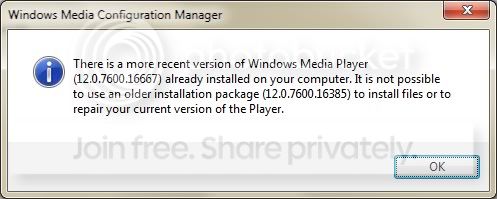
I tried running the setup_wm in the Windows Media Player folder after I restarted it back on, and I got this:

versionconflict.jpg
 

My Computer My Computer

OS
WIndows 7 Ultimate x64
Last edited:

My Computer My Computer

Computer type
PC/Desktop
Computer Manufacturer/Model Number
Self Built
OS
Win 10 Pro x64
CPU
Intel I5-2500K @3.3GHz
Motherboard
Asrock P67 Extreme4
Memory
16GB G.Skill Ripjaws X (4x4GB)
Graphics Card(s)
EVGA GeForce 750 Ti SC 2GB
Sound Card
ASUS Xonar DG 5.1 Channels 24-bit 96KHz PCI Interface Sound
Monitor(s) Displays
auria eq2367
Screen Resolution
1920 x 1080
Hard Drives
250GB Samsung 850 EVO SSD
1TB WD Blue
1TB Hitachi
PSU
SeaSonic X 650W 80 Plus Gold
Case
Corsair Obsidian 750D
Cooling
Corsair H60, Three 140mm case fans
Keyboard
Logitech Wireless Keyboard K520
Mouse
Logitech Wireless Mouse M310
Internet Speed
Wave Broadband ~ 100 dn 5 up
Antivirus
Windows Defender, Malwarebytes Premium
Browser
Edge, IE11, Chrome
Other Info
Laptop specs: HP g7-1365dx /
CPU: AMD A6-3420M APU with Radeon(tm) HD Graphics /
RAM: Crucial 8Gb (2x4Gb) /
SSD: Crucial M4-CT128M4SSD2 ATA Device/ FW 000F /
GFX: AMD Radeon HD 6520G /
OS: Windows 10 Pro x64
Back
Top