
Nef files thumbnails will not show

tommytinkroom

New member
Power User
Local time
2:35 PM
Messages
143
Hi,
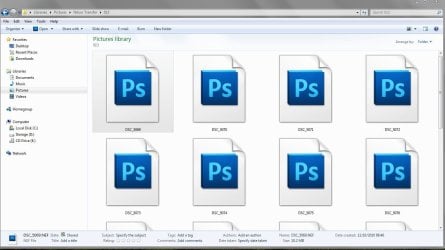
In windows explorer,all my nef files just show my photoshop icon in my picture folder.
I've tried the Nikon codec and every third party software you can think of fastpicture codec, ardfryer,etc etc.
I've also done the disk clean up and everything i can think of,i'v basically exhausted all
avenues,this forum is my last hope for a fix to this problem.
Here's a screenshot of the thumbnails.Even tried a system restore.
 

Attachments
  • 89.JPG
    89.JPG
    103.3 KB · Views: 17

My Computer

Computer type
Laptop
Computer Manufacturer/Model Number
Samsung NP300E5A-A02DX
OS
Windows 7 home premium 64bit sp1
CPU
Intel Core i5
Motherboard
Manufacturer SAMSUNG ELECTRONICS CO., LTD
Memory
8gb
Graphics Card(s)
Intel HD Graphics Family HD 3000
Sound Card
Realtek High Definition Audio
Monitor(s) Displays
Generic PnP Monitor on Intel HD Graphics Family
Screen Resolution
1920x1080 pixels
Hard Drives
SAMSUNG HM641JI
Keyboard
Logitech K400 wireless
Mouse
Logitech M570 trackball wireless
Internet Speed
75MB DL 16MB UL (Cooking with Gas)
Antivirus
Avast IS and MBAM Pro
Browser
Firefox
Have you tried to install ViewNX 2.1.1 from Nikon Software?

Nef are normally native in windows 7 but you'll have to install Windows Live Gallery in order to set as a default viewer.
 

My Computer

Computer type
PC/Desktop
Computer Manufacturer/Model Number
Custom Build
OS
Windows 7 Professional SP1 - x64 [Non-UEFI Boot]
CPU
Ivy Bridge Core i5 3570K (Delidded)
Motherboard
Asus P8Z77-V LE PLUS
Memory
G.Skill "Ares" DDR3 PC3-12800 - 1600MHz (16Gb)
Graphics Card(s)
Asus Dual-RX480-O4G
Sound Card
Creative Sound Blaster Z w/5.1 sound system
Monitor(s) Displays
Asus IPS 23"
Screen Resolution
16/9
Hard Drives
Internal:
500Go Sata 6Gb/s (x2)
500Go Sata 3Gb/s (x2)
SSD 60Go Sata 6Gb/s
PSU
In Win C 900W Series 80+ Platinum
Case
Thermaltake Chaser A71
Cooling
Custom Water Cooling Loop
Keyboard
Cooler Master QuickFire XTi
Mouse
Razer Imperator 2012 (4G)
Antivirus
MSE
Browser
IE 11.0.xxx Rtm
Other Info
"Raid0" with Intel Smart Response Technology (HDD/SSD)
Hi,
In windows explorer,all my nef files just show my photoshop icon in my picture folder.
I've tried the Nikon codec and every third party software you can think of fastpicture codec, ardfryer,etc etc.
I've also done the disk clean up and everything i can think of,i'v basically exhausted all
avenues,this forum is my last hope for a fix to this problem.
Here's a screenshot of the thumbnails.Even tried a system restore.

Hi tommytinkroom

All you need to do is download a copy of MysticThumbs Take a look at this program !!!!!!
It may not be free but this will fix all your problems
Good Luck :):):)
 

My Computer

Computer Manufacturer/Model Number
Alienware Aurora
OS
Win 7 Ultimate x64
CPU
Core I7 980X O.C. to 4.0 Ghz
Motherboard
Custom Intel mATX (Bios ver A10)
Memory
12GB 1600 mhz triple channel DDR3 - Kingston
Graphics Card(s)
ATI Radeon HD 5970 2GB Video Card
Sound Card
Creative Labs Titanium sound blaster
Monitor(s) Displays
30" Dell LCD
Screen Resolution
2560 x 1600
Hard Drives
240 GB OCZ Vertex 2 SSD
256 GB Samsung V2 SSD
2TB WD Black Caviar 7200 rpm SATA3
600GB WD Velociraptor 10,000 rpm SATA3
3TB WD MyBook Essential USB 3.0 7200 rpm External
PSU
850 Watt
Case
Alienware Aurora
Cooling
Water
Keyboard
Logitech G15 (original version)
Mouse
Logitech MX1000 Laser - Wireless
Internet Speed
Cable 22 Mb/sec download
Other Info
USB 3.0,
Blue Ray DVD Read/Writer
Bose Companion 3 Speakers
WRT54G Wireless Router
Hi,
In windows explorer,all my nef files just show my photoshop icon in my picture folder.
I've tried the Nikon codec and every third party software you can think of fastpicture codec, ardfryer,etc etc.
I've also done the disk clean up and everything i can think of,i'v basically exhausted all
avenues,this forum is my last hope for a fix to this problem.
Here's a screenshot of the thumbnails.Even tried a system restore.

Hi tommytinkroom

All you need to do is download a copy of MysticThumbs Take a look at this program !!!!!!
It may not be free but this will fix all your problems
Good Luck :):):)

Hi thehappyman,

Well what do you know! I can't believe it works.Thanks for the link i dl the trial and then bought it (£15).Wonder if i can get a refund from fastpicture codec.
What i like is the option to view the nef file after a right click,but i noticed it will only show image in landscape mode can't find an option to rotate it.Unless you know a way.
At last now i'm the happyman.:D:D:D
 
Last edited:

My Computer

Computer type
Laptop
Computer Manufacturer/Model Number
Samsung NP300E5A-A02DX
OS
Windows 7 home premium 64bit sp1
CPU
Intel Core i5
Motherboard
Manufacturer SAMSUNG ELECTRONICS CO., LTD
Memory
8gb
Graphics Card(s)
Intel HD Graphics Family HD 3000
Sound Card
Realtek High Definition Audio
Monitor(s) Displays
Generic PnP Monitor on Intel HD Graphics Family
Screen Resolution
1920x1080 pixels
Hard Drives
SAMSUNG HM641JI
Keyboard
Logitech K400 wireless
Mouse
Logitech M570 trackball wireless
Internet Speed
75MB DL 16MB UL (Cooking with Gas)
Antivirus
Avast IS and MBAM Pro
Browser
Firefox
SageThumbs is a powerful shell extension allowing to preview enormous amount of image formats directly in Windows Explorer

Support 162 image formats (224 extensions
Extended thumbnail image view of Explorer folder
External plugins supported

And the main think
It's completely FREE , from google

sagethumbs - SageThumbs 2.0.0.12 is a Windows Explorer extension allowing to preview many image formats. - Google Project Hosting

Thumbnail view
sagethumbs-after.png


Icon view
sagethumbs-icon-view.png


Context menu
sagethumbs-context-menu.png


Options
sagethumbs-options.png
 

My Computer

Computer Manufacturer/Model Number
ASUS
OS
Windows 7 Professional x64
CPU
Intel core2Due 2.7GHz
Motherboard
ASUS
Memory
4Gb DDR2
Graphics Card(s)
nVidia 1Gb DDR2
Sound Card
Realtek
Monitor(s) Displays
ASUS tek.
Hard Drives
Seagate
PSU
ASUS tek.
Case
ASUS tek.
Cooling
ASUS tek.
Back
Top