NET Framework 3.5 problems and errors

getaman

New member
Local time
5:35 AM
Messages
19
Hello,
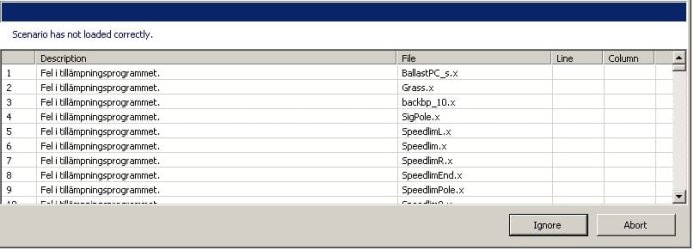
I have had some issues with Net Framework 3.5 lately. I installed a Japanese/English game called BVE Trainsim 5 which requires Net Framework 3.5. It works smoothly except for some rather odd error messages when loading some of the Train Routes. The developer says it must be due to Net Framework and I am quite sure I have installed the route files properly.

In the Activate Windows functions (from Programs and Functions in Control Panel) I see Net Framework 3.5 is active. I tried to update it to SP 1 but the installer wont even load even though I downloaded the full offline installer.

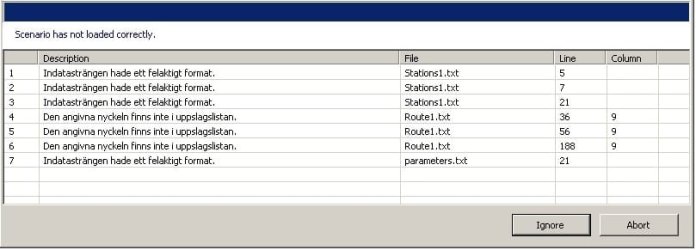
Unfortunately I use a Swedish system so the error messages are in Swedish, but I hope it make sense anyway, I tried making translations.

"Input string was not in a correct format" ("Indatasträngen hade ett felaktigt format")
"The key does not exist in the database " ("Den angivna nyckeln fanns inte i uppslagslistan")
"Error in the application" ("Fel i tillämpningsprogrammet")


Could it be due to it being a Japanese language game (it can be set to display in English)?


Thanks in advance!
 

Attachments
  • BVE Error.jpg
    BVE Error.jpg
    71 KB · Views: 0
  • BVE Error 2.jpg
    BVE Error 2.jpg
    70.1 KB · Views: 0

My Computer

Computer Manufacturer/Model Number
HP G62-112SO Laptop
OS
Windows 7 Home Premium 64bit
CPU
Intel Core i3 M 330 @ 2.13 GHz
Motherboard
"ACPI x64-based PC" (?)
Memory
4 GB
Graphics Card(s)
Intel Graphics Media Accelerator HD
Sound Card
Realtek High Definition Audio
Monitor(s) Displays
"PnP-Screen" (?)
Screen Resolution
1366 x 768
Hard Drives
Partition 1: 218 GB HDD (ST9250410AS)
Partition 2: 14,5 GB HDD
Partition 3: 99,1 MB HDD
PSU
AC Adapter 230 V
Keyboard
Standard keyboard PS/2 (Built-in)
Mouse
Synaptics PS/2 Port TouchPad / A4Tech USB-Optical Mouse
Internet Speed
0.5 MBit
Hello again,
Well as it seems I think the NET Framework is not able to read Japanese characters. I have with fail tried to install some kind of Japanese language support. As the Net Framework 3.5 is already in the system I cannot seem to install it, it just says I need to deactivate or activate it in the Programs and Features menu (Windows Installed programs) but it wont make any difference. The Net Framework cleanup tool did not work either since it cannot remove NET Framework 3.5... Help? :O
 

My Computer

Computer Manufacturer/Model Number
HP G62-112SO Laptop
OS
Windows 7 Home Premium 64bit
CPU
Intel Core i3 M 330 @ 2.13 GHz
Motherboard
"ACPI x64-based PC" (?)
Memory
4 GB
Graphics Card(s)
Intel Graphics Media Accelerator HD
Sound Card
Realtek High Definition Audio
Monitor(s) Displays
"PnP-Screen" (?)
Screen Resolution
1366 x 768
Hard Drives
Partition 1: 218 GB HDD (ST9250410AS)
Partition 2: 14,5 GB HDD
Partition 3: 99,1 MB HDD
PSU
AC Adapter 230 V
Keyboard
Standard keyboard PS/2 (Built-in)
Mouse
Synaptics PS/2 Port TouchPad / A4Tech USB-Optical Mouse
Internet Speed
0.5 MBit

My Computer

Computer type
Laptop
Computer Manufacturer/Model Number
Toshiba Sattelite A665-S6092
OS
Windows 7 Ultimate x64
CPU
Intel Core i7-740QM
Memory
8 GB DDR3
Graphics Card(s)
NVIDIA GeForce 330GT
Screen Resolution
1366x768
Hard Drives
Samsung 840 SSD 500GB
1TB USB3 external HD
Cooling
Coolermaster Notepal U3 notebook cooling pad
Internet Speed
3mbps ASDL
Antivirus
ClamWin 0.98.7
Browser
Opera 12.17 x86 (main), Firefox 38 (sec), IE11 (last resort)
Thank you for the reply. The game itself can onlt be set to Japanese or English. I figured the problem occured because non english or swedish characters were in the folder name for the train routes not being loaded correctly (and with errors). As when I changed the name of the folder to something plain like "test" then no errors like "input strings". So I hoped there would be a Japanese language pack that would work but could not install what I found.

So if I install the Net Framework 4.5 can I remove or completely deactivate 3.5?
 

My Computer

Computer Manufacturer/Model Number
HP G62-112SO Laptop
OS
Windows 7 Home Premium 64bit
CPU
Intel Core i3 M 330 @ 2.13 GHz
Motherboard
"ACPI x64-based PC" (?)
Memory
4 GB
Graphics Card(s)
Intel Graphics Media Accelerator HD
Sound Card
Realtek High Definition Audio
Monitor(s) Displays
"PnP-Screen" (?)
Screen Resolution
1366 x 768
Hard Drives
Partition 1: 218 GB HDD (ST9250410AS)
Partition 2: 14,5 GB HDD
Partition 3: 99,1 MB HDD
PSU
AC Adapter 230 V
Keyboard
Standard keyboard PS/2 (Built-in)
Mouse
Synaptics PS/2 Port TouchPad / A4Tech USB-Optical Mouse
Internet Speed
0.5 MBit
Hello once again.
I downloaded the installer of Net Framework 4.5 and installed. Deactivated 3.5 and restarted. Then I tried to run the BVE Trainsimulator game again but this time it complained about the Core 3.5 not being available or something like that. So back to square one I guess.

I might need something that makes the computer or Net Framework able to read Japanese named folders. I could rename them to latin letters but it is not possible with all of them unfortunately.
 

My Computer

Computer Manufacturer/Model Number
HP G62-112SO Laptop
OS
Windows 7 Home Premium 64bit
CPU
Intel Core i3 M 330 @ 2.13 GHz
Motherboard
"ACPI x64-based PC" (?)
Memory
4 GB
Graphics Card(s)
Intel Graphics Media Accelerator HD
Sound Card
Realtek High Definition Audio
Monitor(s) Displays
"PnP-Screen" (?)
Screen Resolution
1366 x 768
Hard Drives
Partition 1: 218 GB HDD (ST9250410AS)
Partition 2: 14,5 GB HDD
Partition 3: 99,1 MB HDD
PSU
AC Adapter 230 V
Keyboard
Standard keyboard PS/2 (Built-in)
Mouse
Synaptics PS/2 Port TouchPad / A4Tech USB-Optical Mouse
Internet Speed
0.5 MBit
Back
Top