Solved .NET Framework 4.7.2 rollback error

svnfrms2r

New member
Member
VIP
Local time
12:51 PM
Messages
106
Hi

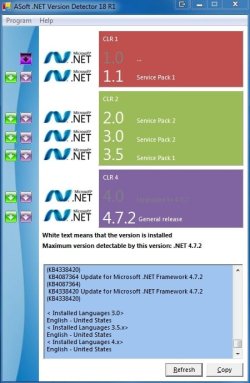
This the current state before the error occurs:
# windows fully updated (except .net framework 4.7.2)
# all drivers latest, signed, working
# sfc /scannow check done, no errors
# all .net framework versions installed, incl all security updates, except 4.7.2

Please see also attachment.

If anyone has some ideas, hints, tips or experience fixing this, that would be great!
Thank you :)
 

Attachments

  • AllDotNetFramworksInstalledExcept472.jpg
    AllDotNetFramworksInstalledExcept472.jpg
    41.8 KB · Views: 41
Last edited:

My Computer

Computer type
Laptop
Computer Manufacturer/Model Number
Dell, Inc.
OS
Windows 7 Ultimate x64 SP1, updated to latest Java and .NET
CPU
Mobile Intel Core i7-4800MQ, 8x 3500 MHz (35 x 100)
Motherboard
Dell Precision M4800
Memory
32 GB ie 4x 8GB SODIMM
Graphics Card(s)
AMD FirePro M5100 and Intel(R) HD Graphics 4600
Sound Card
Realtek Audio and AMD High Definition Audio Device
Monitor(s) Displays
Built-in 1080p, ext 2x 27" 1080p, ext 1x 55" 1080p
Screen Resolution
4x 1920 x 1080 x 32 bits
Hard Drives
2x 1 TB SSD
multiple external drives
PSU
210W for docking station & laptop
Case
Metal
Cooling
2 Fans
Keyboard
US QWERTY
Mouse
touchpad, pointstick, ext mouse
Internet Speed
1Gbps Eth, 512Mbps cable
Antivirus
Avast latest
Browser
various
What is your question and what is the point of that screenshot? Just because Microsoft is offering .net 4.7 doesn't mean that you need to install it. Like other add ons or programs that M$ likes to offer (like silverlight or skype) your computer doesn't need it to operate however you may install a program that requires it. I wouldn't install it unless you install a program that tells you that it needs it.
 

My Computers

System One System Two

What is your question and what is the point of that screenshot? Just because Microsoft is offering .net 4.7 doesn't mean that you need to install it. Like other add ons or programs that M$ likes to offer (like silverlight or skype) your computer doesn't need it to operate however you may install a program that requires it. I wouldn't install it unless you install a program that tells you that it needs it.

The question is in the subject, as errors shall be fixed.
But to make it once more unmistakable: how can one install .NET Framework 4.7.2 (without any problems)?

The screen shots shows to some degree what is installed re .NET. If you know a better method, please do let me know.

Of course one does not need to install anything that is offered, just because it is offered. But if one wants to, it should work, after all, it is coming from the Windows 7 official update channel! Some programs even ask for v4.5.1, even thought they 'know' that v4.7.1 is already in place!
 

My Computer

Computer type
Laptop
Computer Manufacturer/Model Number
Dell, Inc.
OS
Windows 7 Ultimate x64 SP1, updated to latest Java and .NET
CPU
Mobile Intel Core i7-4800MQ, 8x 3500 MHz (35 x 100)
Motherboard
Dell Precision M4800
Memory
32 GB ie 4x 8GB SODIMM
Graphics Card(s)
AMD FirePro M5100 and Intel(R) HD Graphics 4600
Sound Card
Realtek Audio and AMD High Definition Audio Device
Monitor(s) Displays
Built-in 1080p, ext 2x 27" 1080p, ext 1x 55" 1080p
Screen Resolution
4x 1920 x 1080 x 32 bits
Hard Drives
2x 1 TB SSD
multiple external drives
PSU
210W for docking station & laptop
Case
Metal
Cooling
2 Fans
Keyboard
US QWERTY
Mouse
touchpad, pointstick, ext mouse
Internet Speed
1Gbps Eth, 512Mbps cable
Antivirus
Avast latest
Browser
various
You mention an error but you don't specify what it is. We need more information.
 

My Computers

System One System Two

thankssssssssssssssssssssssssssssss
 

My Computer

OS
Windows.7.Enterprise.x32
You mention an error but you don't specify what it is. We need more information.

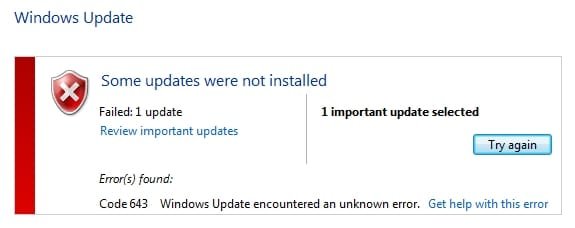
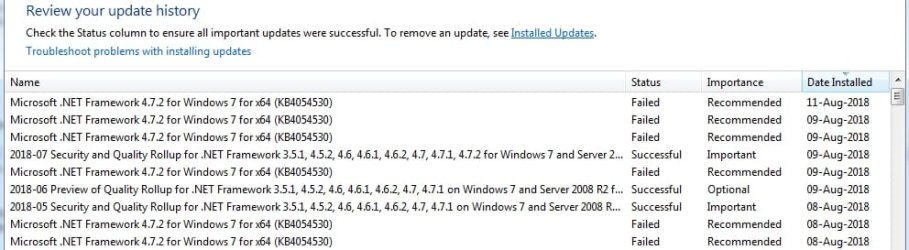
Please see attached, I hope this is useful.
If there is any other way to pull useful info, please let me know what/how.
Thank you :)
 

Attachments

  • w7u64_update_NETv472_error_code643.jpg
    w7u64_update_NETv472_error_code643.jpg
    13.2 KB · Views: 22
  • w7u64_UpdateHistoryErrors.jpg
    w7u64_UpdateHistoryErrors.jpg
    52.9 KB · Views: 0

My Computer

Computer type
Laptop
Computer Manufacturer/Model Number
Dell, Inc.
OS
Windows 7 Ultimate x64 SP1, updated to latest Java and .NET
CPU
Mobile Intel Core i7-4800MQ, 8x 3500 MHz (35 x 100)
Motherboard
Dell Precision M4800
Memory
32 GB ie 4x 8GB SODIMM
Graphics Card(s)
AMD FirePro M5100 and Intel(R) HD Graphics 4600
Sound Card
Realtek Audio and AMD High Definition Audio Device
Monitor(s) Displays
Built-in 1080p, ext 2x 27" 1080p, ext 1x 55" 1080p
Screen Resolution
4x 1920 x 1080 x 32 bits
Hard Drives
2x 1 TB SSD
multiple external drives
PSU
210W for docking station & laptop
Case
Metal
Cooling
2 Fans
Keyboard
US QWERTY
Mouse
touchpad, pointstick, ext mouse
Internet Speed
1Gbps Eth, 512Mbps cable
Antivirus
Avast latest
Browser
various

My Computers

System One System Two


Thanks for the link, while all done in it did not resolve it, it did stimulate further thinking.

So after reading the error log of the install, some peripheral thought occured, that not client 4.0 uninstall/reinstall is the issue, but the net.tcp service, which was one part (when switched off not in the way).

Further, there was a pesky reg key in the way, inaccessible, and could not be made accessible easily, but these two are helpful:
Error 1402. Could not open key UNKNOWN\Components\.... Verify that you have sufficient access to that key or contact your support personnel when installing Veritas System Recovery (SSR)
used part 3) to fix
and
Install Error 1402 (Could not open key: UNKNOWN\Components) [McNeel Wiki]
used part 2) to fix

After that, 4.7.2 installed, see attached.

Again, thank you :)
 

Attachments

  • w7u64_update_NETv472_installOK.jpg
    w7u64_update_NETv472_installOK.jpg
    45 KB · Views: 13
Last edited:

My Computer

Computer type
Laptop
Computer Manufacturer/Model Number
Dell, Inc.
OS
Windows 7 Ultimate x64 SP1, updated to latest Java and .NET
CPU
Mobile Intel Core i7-4800MQ, 8x 3500 MHz (35 x 100)
Motherboard
Dell Precision M4800
Memory
32 GB ie 4x 8GB SODIMM
Graphics Card(s)
AMD FirePro M5100 and Intel(R) HD Graphics 4600
Sound Card
Realtek Audio and AMD High Definition Audio Device
Monitor(s) Displays
Built-in 1080p, ext 2x 27" 1080p, ext 1x 55" 1080p
Screen Resolution
4x 1920 x 1080 x 32 bits
Hard Drives
2x 1 TB SSD
multiple external drives
PSU
210W for docking station & laptop
Case
Metal
Cooling
2 Fans
Keyboard
US QWERTY
Mouse
touchpad, pointstick, ext mouse
Internet Speed
1Gbps Eth, 512Mbps cable
Antivirus
Avast latest
Browser
various
Congrats.
 

My Computers

System One System Two

Back
Top