.net framework install failed

fruitberries

New member
Local time
1:50 PM
Messages
1
so i just reinstall windows and want to setup everything back again, i want to install net framework 4.8 but it gave me this message Imgur: The magic of the Internet

how do i fix this? please help because most of the programs i use need net for their framework
 

My Computer

Computer type
PC/Desktop
OS
Ultimate x64
As of 13 August 2019 Microsoft changed Microsoft Updates for Windows 7 to only being signed SHA2. (That would include the .NET 4.8 installer as being signed SHA2.) As you have just reinstalled Windows 7 you should know that the installer does not contain any update that will allow your system to read SHA2 signed files properly -- that capacity is only added to the system after you update your Windows installation. To get your system to do that you need to update windows.

So, update Windows first and, once that is done, then try again to install .NET 4.8.

If you have difficulty in getting Windows to update then read your way through this thread and apply what you find there: Single file with all updates - Simplix

You will have to read that thread to be able to update .NET 4.8 once you actually manage to get it installed.
 

My Computer

Computer type
PC/Desktop
OS
Windows 7 Pro. x64 SP1
I hope you are making routine full image backups of your OS partitions and data partitions, any time major WUs and/or Simplix operations are commenced, not always, however sometimes things can go wrong OS-wise.
 

My Computer

Computer type
PC/Desktop
Computer Manufacturer/Model Number
Antec desktop; Acer Aspire laptops
OS
Windows 7 Professional 64-bit
CPU
Desktop i5; Acers i5 & i7
Memory
desktop 16GB; 1 Acer 8GB & 1 Acer 16GB
Hard Drives
1TB split into 2 equal partitions [OS and data] usable by RJS
Internet Speed
AT&T DSL
Browser
FF, GChrome, msIE
Other Info
Windows 7 Firewall, Emsisoft AM/AV, MSE [scan-only], SpywareBlaster, Ruiware/BillP combine
If you did a clean re-install of Windows 7 SP1 and you do not plan to use the Simplix Update Pack immediately afterwards, you should install these updates first before trying to install Microsoft .NET Framework 4.8.

March 2019 servicing stack update (KB4490628)
Microsoft Update Catalog (32-bit)
Microsoft Update Catalog (64-bit)

September 2019 SHA-2 code update (KB4474419)
Microsoft Update Catalog (32-bit)
Microsoft Update Catalog (64-bit)

May 2016 convenience rollup update (KB3125574)
Microsoft Update Catalog (32-bit)
Microsoft Update Catalog (64-bit)

Install them in the order that they're listed, and restart your computer after installing each of them.
 

My Computer

Computer type
PC/Desktop
Computer Manufacturer/Model Number
Dell OptiPlex 9020
OS
Windows 7 Professional SP1 64-bit
CPU
Intel Core i7-4790 3.60 GHz
Memory
32 GB DDR3-1600 MHz
Graphics Card(s)
Integrated Intel HD Graphics 4600
Monitor(s) Displays
Viewsonic 32" LCD
Hard Drives
Kingston SATA 3 240 GB SSD
Internet Speed
Spectrum Internet 1000 Mbps
flavallee,

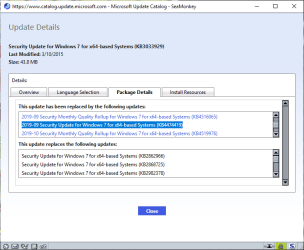
Regarding the SHA2 thing, was it not also essential to install KB3033929 I remember doing that on my own system to deal with SHA2. Microsoft Update Catalog

not anymore because the KB4474419 update (and several update rollups & a few newer security only updates from KB3185330 onward) supersede/replace KB3033929

see this attached pic

kb3033929supersededbykb4474419.png

KB4474419 include the KB3033929 fix. so just install KB4474419 (and skip KB3033929) and you're good to go
 

My Computer

Computer type
PC/Desktop
Computer Manufacturer/Model Number
Dell Inspiron 620
OS
Windows 7 SP1 Home Premium 64bit [x64]
CPU
Intel(R) Core(TM) i5-2310 CPU @ 2.90GHz
Memory
6 GB
Graphics Card(s)
Intel HD Graphics 2000
Sound Card
Conexant CX20641 HD Audio
Hard Drives
Western Digital 1TB (1024GB) WD10EALX-759BA1
Internet Speed
Spectrum Cable Internet up to 100Mbps
Back
Top