Netframework download failing

trinaz

New member
Member
VIP
Local time
12:27 PM
Messages
477
Location
Phoenix
Hopefully someone will still be running XP along with Win 7...have 2 laptops still using XP and have a problem that I hope someone here can help with.

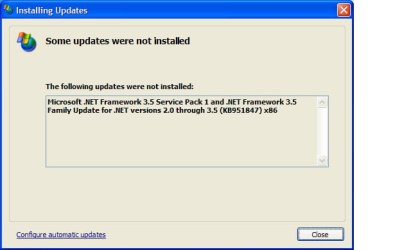
When running Windows Update..I get repeated errors on the attached (failed.jpg) Net Framework update. Have disabled a/v and firewall for attempts...but still fails ?

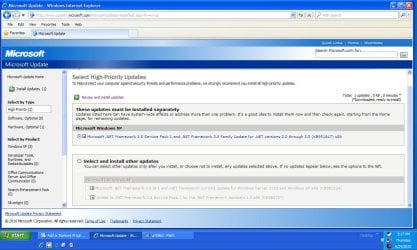
The second jpg (updates.jpg) shows the Windows Updates page and the 3 Net Framework updates waiting to be installed .

Any ideas on why this is happening and how to get Windows XP to install the Net Framework update ?

Thanks...TR
 

Attachments

  • failed.jpg
    failed.jpg
    21.9 KB · Views: 12
  • updates.jpg
    updates.jpg
    127.2 KB · Views: 13

My Computer My Computer

At a glance

Windows 7 Pro 64bit SP1AMD FX-6100 Six-Core Processor2ea Corsair-1333MHz-PC3-10666-240-pin-CMX4GX3...NVIDIA GeForce GT 630 - 1023MB (EVGA)
Computer type
PC/Desktop
Computer Manufacturer/Model Number
Self built
OS
Windows 7 Pro 64bit SP1
CPU
AMD FX-6100 Six-Core Processor
Motherboard
M5A78L-M LX PLUS
Memory
2ea Corsair-1333MHz-PC3-10666-240-pin-CMX4GX3M1A1333C9
Graphics Card(s)
NVIDIA GeForce GT 630 - 1023MB (EVGA)
Sound Card
OnBoard Via High Def Audio
Monitor(s) Displays
Samsung 204B main - ASUS VS228 secondary
Screen Resolution
1920x1080 main - 1920x1080 secondary
Hard Drives
Samsung SSD 840 128GB Win7 Pro 64bit - Western Digital WDC 465GB - Seagate 640GB Sata B/U - Maxtor 500GB Sata B/U - Maxtor 200GB Sata
PSU
Antec 650 watt
Cooling
Multiple case fans
Keyboard
MS USB dual Wireless Keyboard - IntelliType Pro
Mouse
MS USB dual Wireless Mouse - IntelliPoint
Internet Speed
Cox Cable
Antivirus
Bitdefender IS 2014
Browser
FireFox Primary - IE 11
Other Info
Hauppaguge Win TV HVR-1250 (Model 22xxx, Hybrid ATSC/QAM)
Samsung HD103SI USB 1TB Desktop Drive - Backup & Disk Image storage
Hopefully someone will still be running XP along with Win 7...have 2 laptops still using XP and have a problem that I hope someone here can help with.

When running Windows Update..I get repeated errors on the attached (failed.jpg) Net Framework update. Have disabled a/v and firewall for attempts...but still fails ?

The second jpg (updates.jpg) shows the Windows Updates page and the 3 Net Framework updates waiting to be installed .

Any ideas on why this is happening and how to get Windows XP to install the Net Framework update ?

Thanks...TR

Something had been corrupt. Try first run SFC/Scannow then retry.

I had the same issue on XP but unfortunatly i had to remove entirely the NetFramework from my computer, then reinstalled all since version 1 to 3,5!:(
 

My Computer My Computer

At a glance

Windows 7 Professional SP1 - x64 [Non-UEFI Boot]Ivy Bridge Core i5 3570K (Delidded)G.Skill "Ares" DDR3 PC3-12800 - 1600MHz (16Gb)Asus Dual-RX480-O4G
Computer type
PC/Desktop
Computer Manufacturer/Model Number
Custom Build
OS
Windows 7 Professional SP1 - x64 [Non-UEFI Boot]
CPU
Ivy Bridge Core i5 3570K (Delidded)
Motherboard
Asus P8Z77-V LE PLUS
Memory
G.Skill "Ares" DDR3 PC3-12800 - 1600MHz (16Gb)
Graphics Card(s)
Asus Dual-RX480-O4G
Sound Card
Creative Sound Blaster Z w/5.1 sound system
Monitor(s) Displays
Asus IPS 23"
Screen Resolution
16/9
Hard Drives
Internal:
500Go Sata 6Gb/s (x2)
500Go Sata 3Gb/s (x2)
SSD 60Go Sata 6Gb/s
PSU
In Win C 900W Series 80+ Platinum
Case
Thermaltake Chaser A71
Cooling
Custom Water Cooling Loop
Keyboard
Cooler Master QuickFire XTi
Mouse
Razer Imperator 2012 (4G)
Antivirus
MSE
Browser
IE 11.0.xxx Rtm
Other Info
"Raid0" with Intel Smart Response Technology (HDD/SSD)
Try this tool, Uninstall only the 3,5 Version of NetFramework, reboot, then try reinstall the ALL 3,5 version. This will keep you safe to reinstall the all lot! At the bottom of this page, there's an attached ZIP File for you.


.NET FRAMEWORK CLEANUP TOOL USER'S GUIDE
The latest version of this user's guide can be found at .NET Framework Cleanup Tool User's Guide - Aaron Stebner's WebLog - Site Home - MSDN Blogs.
-----------------------------------
INTRODUCTION
-----------------------------------
This .NET Framework cleanup tool is designed to automatically perform a set of steps to remove selected versions
of the .NET Framework from a computer. It will remove files, directories, registry keys and values and Windows
Installer product registration information for the .NET Framework. The tool is intended primarily to return your
system to a known (relatively clean) state in case you are encountering .NET Framework installation,
uninstallation, repair or patching errors so that you can try to install again.
There are a couple of very important caveats that you should review before using this tool to remove any version
of the .NET Framework from your system:
* This tool is designed as a last resort for cases where install, uninstall, repair or patch installation did not
succeed for unusual reasons. It is not a substitute for the standard uninstall procedure. You should try the
steps listed in this blog post before using this cleanup tool.

* This cleanup tool will delete shared files and registry keys used by other versions of the .NET Framework. If
you run the cleanup tool, you will need to perform a repair/re-install for all other versions of the .NET
Framework that are on your computer or they will not work correctly afterwards.
-----------------------------------
DOWNLOAD LOCATIONS
-----------------------------------
The .NET Framework cleanup tool is available for download at the following locations:
dotnetfx_cleanup_tool.zip - Windows Live
http://blogs.msdn.com/astebner/attachment/8904493.ashx
The .zip file that contains the tool also contains a file named history.txt that lists when the most recent version
of the tool was published and what changes have been made to the tool over time.
-----------------------------------
SUPPORTED PRODUCTS
-----------------------------------
The .NET Framework cleanup tool supports removing the following products:
* .NET Framework - All Versions
* .NET Framework - All Versions (Tablet PC and Media Center)
* .NET Framework - All Versions (Windows Server 2003)
* .NET Framework - All Versions (Windows Vista and Windows Server 2008)
* .NET Framework 1.0
* .NET Framework 1.1
* .NET Framework 2.0
* .NET Framework 3.0
* .NET Framework 3.5
Not all of the above products will appear in the UI for the .NET Framework cleanup tool on every operating system.
The cleanup tool contains logic so that if it is run on an OS version that includes the .NET Framework as an OS
component, it will not offer the option to clean it up. This means that running the cleanup tool on Windows XP
Media Center Edition or Tablet PC Edition will not offer the option to clean up the .NET Framework 1.0, running
it on Windows Server 2003 will not offer the option to clean up the .NET Framework 1.1 and running it on Windows
Vista or Windows Server 2008 will not offer the option to clean up the .NET Framework 2.0 or the .NET Framework 3.0.
When choosing to remove any of the above versions of the .NET Framework, the cleanup tool will also remove any
associated hotfixes and service packs. You do not need to run any separate steps to remove the service pack(s)
for a version of the .NET Framework.
-----------------------------------
SILENT MODE
-----------------------------------
The .NET Framework cleanup tool supports running in silent mode. In this mode, the tool will run without showing
any UI, and the user must pass in a version of the .NET Framework to remove as a command line parameter. To run
the cleanup tool in silent mode, you need to download the cleanup tool, extract the file cleanup_tool.exe from
the zip file, and then run it using syntax like the following:
cleanup_tool.exe /q:a /c:"cleanup.exe /p <name of product to remove>"
The value that you pass with the /p switch to replace <name of product to remove> in this example must exactly
match one of the products listed in the Supported products section above. For example, if you would like to run
the cleanup tool in silent mode and remove the .NET Framework 1.1, you would use a command line like the following:
cleanup_tool.exe /q:a /c:"cleanup.exe /p .NET Framework 1.1"
One important note – as indicated above, the cleanup tool will not allow you to remove a version of the .NET
Framework that is installed as part of the OS it is running on. That means that even if you try this example
command line on Windows Server 2003, the tool will exit with a failure return code and not allow you to remove
the .NET Framework 1.1 because it is a part of that OS.
Similarly, you cannot use the cleanup tool to remove the .NET Framework 1.0 from Windows XP Media Center Edition
or Windows XP Tablet PC Edition or remove the .NET Framework 2.0 or 3.0 from Windows Vista or Windows Server 2008.
In addition, if you run the cleanup tool on an OS that has any edition of the .NET Framework installed as a part
of the OS, it will prevent you from using the .NET Framework - All Versions option because there is at least one
version that it cannot remove.
If you are planning to run the cleanup tool in silent mode, you need to make sure to detect what OS it is running
on and not pass in a version of the .NET Framework with the /p switch that is a part of the OS or make sure that
you know how to handle the failure exit code that you will get back from the cleanup tool in that type of scenario.
-----------------------------------
UNATTENDED MODE
-----------------------------------
The .NET Framework cleanup tool supports running in silent mode. In this mode, the tool will run and only show a
progress dialog during removal, but will require no user interaction. Unattended mode requires the user to pass
in a version of the .NET Framework to remove as a command line parameter. To run the cleanup tool in unattended
mode, you need to download the cleanup tool, extract the file cleanup_tool.exe from the zip file, and then run it
using syntax like the following:
cleanup_tool.exe /q:a /c:"cleanup.exe /p <name of product to remove> /u"
For example, if you would like to run the cleanup tool in unattended mode and remove the .NET Framework 1.1, you
would use a command line like the following:
cleanup_tool.exe /q:a /c:"cleanup.exe /p .NET Framework 1.1 /u"
-----------------------------------
EXIT CODES
-----------------------------------
The cleanup tool can returns the following exit codes:
* 0 - cleanup completed successfully for the specified product
* 3010 - cleanup completed successfully for the specified product and a reboot is required to complete the
cleanup process
* 1 - cleanup tool requires administrative privileges on the machine
* 2 - the required file cleanup.ini was not found in the same path as cleanup.exe
* 3 - a product name was passed in that cannot be removed because it is a part of the OS on the system
that the cleanup tool is running on
* 4 - a product name was passed in that does not exist in cleanup.ini
* 100 - cleanup was able to start but failed during the cleanup process
* 1602 - cleanup was cancelled
-----------------------------------
LOG FILES
-----------------------------------
The cleanup tool creates the following log files:
* %temp%\cleanup_main.log - a log of all activity during each run of the cleanup tool; this is a superset
of the logs listed below as well as some additional information
* %temp%\cleanup_actions.log - a log of actions taken during removal of each product; it will list files that
it finds and removes, product codes it tries to remove, registry entries it
tries to remove, etc.
* %temp%\cleanup_errors.log - a log of errors and warnings encountered during each run of the cleanup tool

 

Attachments

My Computer My Computer

At a glance

Windows 7 Professional SP1 - x64 [Non-UEFI Boot]Ivy Bridge Core i5 3570K (Delidded)G.Skill "Ares" DDR3 PC3-12800 - 1600MHz (16Gb)Asus Dual-RX480-O4G
Computer type
PC/Desktop
Computer Manufacturer/Model Number
Custom Build
OS
Windows 7 Professional SP1 - x64 [Non-UEFI Boot]
CPU
Ivy Bridge Core i5 3570K (Delidded)
Motherboard
Asus P8Z77-V LE PLUS
Memory
G.Skill "Ares" DDR3 PC3-12800 - 1600MHz (16Gb)
Graphics Card(s)
Asus Dual-RX480-O4G
Sound Card
Creative Sound Blaster Z w/5.1 sound system
Monitor(s) Displays
Asus IPS 23"
Screen Resolution
16/9
Hard Drives
Internal:
500Go Sata 6Gb/s (x2)
500Go Sata 3Gb/s (x2)
SSD 60Go Sata 6Gb/s
PSU
In Win C 900W Series 80+ Platinum
Case
Thermaltake Chaser A71
Cooling
Custom Water Cooling Loop
Keyboard
Cooler Master QuickFire XTi
Mouse
Razer Imperator 2012 (4G)
Antivirus
MSE
Browser
IE 11.0.xxx Rtm
Other Info
"Raid0" with Intel Smart Response Technology (HDD/SSD)
Thanks guys....uninstall of just 3.5 did not allow me to reinstall...so I went with a complete uninstall...worked perfect !!

I have only installed NF1.1x to current up to date status. This is my GF's laptop...and she doesn't do a whole lot with it...any harm in just leaveing NF at this 1,1x level...?

What does 3.5x actually do/add for Win 7...and if any of her apps or new apps should need 3.5x...would they not ask for it to be installed ?

Thanks....TR
 

My Computer My Computer

At a glance

Windows 7 Pro 64bit SP1AMD FX-6100 Six-Core Processor2ea Corsair-1333MHz-PC3-10666-240-pin-CMX4GX3...NVIDIA GeForce GT 630 - 1023MB (EVGA)
Computer type
PC/Desktop
Computer Manufacturer/Model Number
Self built
OS
Windows 7 Pro 64bit SP1
CPU
AMD FX-6100 Six-Core Processor
Motherboard
M5A78L-M LX PLUS
Memory
2ea Corsair-1333MHz-PC3-10666-240-pin-CMX4GX3M1A1333C9
Graphics Card(s)
NVIDIA GeForce GT 630 - 1023MB (EVGA)
Sound Card
OnBoard Via High Def Audio
Monitor(s) Displays
Samsung 204B main - ASUS VS228 secondary
Screen Resolution
1920x1080 main - 1920x1080 secondary
Hard Drives
Samsung SSD 840 128GB Win7 Pro 64bit - Western Digital WDC 465GB - Seagate 640GB Sata B/U - Maxtor 500GB Sata B/U - Maxtor 200GB Sata
PSU
Antec 650 watt
Cooling
Multiple case fans
Keyboard
MS USB dual Wireless Keyboard - IntelliType Pro
Mouse
MS USB dual Wireless Mouse - IntelliPoint
Internet Speed
Cox Cable
Antivirus
Bitdefender IS 2014
Browser
FireFox Primary - IE 11
Other Info
Hauppaguge Win TV HVR-1250 (Model 22xxx, Hybrid ATSC/QAM)
Samsung HD103SI USB 1TB Desktop Drive - Backup & Disk Image storage
Thanks guys....uninstall of just 3.5 did not allow me to reinstall...so I went with a complete uninstall...worked perfect !!

I have only installed NF1.1x to current up to date status. This is my GF's laptop...and she doesn't do a whole lot with it...any harm in just leaveing NF at this 1,1x level...?

What does 3.5x actually do/add for Win 7...and if any of her apps or new apps should need 3.5x...would they not ask for it to be installed ?

Thanks....TR

You better go at least to version 2 because manies Apps depend of it. And sometimes installer does....

But i suggest you to windows update, now

StartMenu=>Programs=>Microsoft Update....
click "personalized"


Choose to install before all related to version 2....reboot when demanding and repeat this until you have update to the last NetFramework version.


Microsoft update will constantly ask you to update unless you decide to hide those downloads.

I know it is a bit of a hassle but....
 

My Computer My Computer

At a glance

Windows 7 Professional SP1 - x64 [Non-UEFI Boot]Ivy Bridge Core i5 3570K (Delidded)G.Skill "Ares" DDR3 PC3-12800 - 1600MHz (16Gb)Asus Dual-RX480-O4G
Computer type
PC/Desktop
Computer Manufacturer/Model Number
Custom Build
OS
Windows 7 Professional SP1 - x64 [Non-UEFI Boot]
CPU
Ivy Bridge Core i5 3570K (Delidded)
Motherboard
Asus P8Z77-V LE PLUS
Memory
G.Skill "Ares" DDR3 PC3-12800 - 1600MHz (16Gb)
Graphics Card(s)
Asus Dual-RX480-O4G
Sound Card
Creative Sound Blaster Z w/5.1 sound system
Monitor(s) Displays
Asus IPS 23"
Screen Resolution
16/9
Hard Drives
Internal:
500Go Sata 6Gb/s (x2)
500Go Sata 3Gb/s (x2)
SSD 60Go Sata 6Gb/s
PSU
In Win C 900W Series 80+ Platinum
Case
Thermaltake Chaser A71
Cooling
Custom Water Cooling Loop
Keyboard
Cooler Master QuickFire XTi
Mouse
Razer Imperator 2012 (4G)
Antivirus
MSE
Browser
IE 11.0.xxx Rtm
Other Info
"Raid0" with Intel Smart Response Technology (HDD/SSD)
Back
Top