Solved Netgear N300 Wireless Adapter Default Gateway is not Available

Chimpvanzee

New member
Local time
2:02 AM
Messages
20
So I had just finished building and setting up my new rig yesterday and today I got a Netgear adapter. I installed everything and it went fine until it started going in and out giving me the "Default Gateway" error. I searched for what is now 4 hours and tried every solution possible, but I cannot seem to fix it. I will provide any information I can, just tell me what you need.
 

My Computer My Computer

At a glance

Windows 7 Home Premium 64bitAMD FX812
OS
Windows 7 Home Premium 64bit
CPU
AMD FX812
Motherboard
Gigabyte 990FXA-UD3
Welcome to Seven Forums,

When you installed the driver for your Netgear wireless adapter, did you download the latest driver from the Netgear's site?

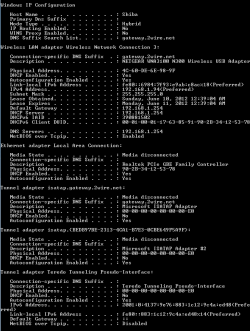
Please provide an ipconfig /all for review.
Click on Start button then type cmd , see on the top right click on it and choose Run as Administrator. From the black screen, type the word ipconfig /all and press enter. Right click on the black screen or Command prompt then choose Select All and Paste the results on your next post.
 

My Computer My Computer

At a glance

Win7 & Win8 64bitIntel i5
Computer Manufacturer/Model Number
Lenovo Desktop/Samsung Laptop
OS
Win7 & Win8 64bit
CPU
Intel i5
Internet Speed
Charter-20 Mbps
Antivirus
Avast
Browser
FF, IE9 and Chrome
I used the CD that came with the adapter, but when I went to use it I checked for updates and it said the CD was up to date (I was using a wired connection to my router at the time). I will try that now.
 

Attachments

  • Netgear.PNG
    Netgear.PNG
    13.1 KB · Views: 58

My Computer My Computer

At a glance

Windows 7 Home Premium 64bitAMD FX812
OS
Windows 7 Home Premium 64bit
CPU
AMD FX812
Motherboard
Gigabyte 990FXA-UD3
It might be viable to go to Netgear's site to find out the latest driver for your wireless adapter.
 

My Computer My Computer

At a glance

Win7 & Win8 64bitIntel i5
Computer Manufacturer/Model Number
Lenovo Desktop/Samsung Laptop
OS
Win7 & Win8 64bit
CPU
Intel i5
Internet Speed
Charter-20 Mbps
Antivirus
Avast
Browser
FF, IE9 and Chrome
I checked, I have the latest software.
 

My Computer My Computer

At a glance

Windows 7 Home Premium 64bitAMD FX812
OS
Windows 7 Home Premium 64bit
CPU
AMD FX812
Motherboard
Gigabyte 990FXA-UD3
Your ipconfig /all output looks great.

By any chance are you using a Wireless Manager to wireless connect to your router?

Have you tried to Power Cycle your devices?

Run the Network Troubleshooter tool from your Windows 7 computer.
Using the Network troubleshooter in Windows 7

If you have not done this yet, please remove all wireless profiles stored in your computer.
Easy Way to Delete Wireless Network Profile in Windows 7
Re add your SSID (wireless network) that you're trying to connect to with the correct encryption.
 

My Computer My Computer

At a glance

Win7 & Win8 64bitIntel i5
Computer Manufacturer/Model Number
Lenovo Desktop/Samsung Laptop
OS
Win7 & Win8 64bit
CPU
Intel i5
Internet Speed
Charter-20 Mbps
Antivirus
Avast
Browser
FF, IE9 and Chrome
I am using the Netgear Genie to connect to my router.
I have tried power cycling.
Troubleshooting cannot identify anything wrong, but when I diagnose I get the "Default Gateway is not Available" message, where it fixes it, only to have it go back to the same problem a minute later.
I deleted and re-added my network and my problem still persists, my connection will go especially fast if I try to download anything.
 

My Computer My Computer

At a glance

Windows 7 Home Premium 64bitAMD FX812
OS
Windows 7 Home Premium 64bit
CPU
AMD FX812
Motherboard
Gigabyte 990FXA-UD3
I set it up as best I could, but I do not know what to put for the alternate DNS address and I will most likely have to wait until daytime for when I can call my ISP for that address.
I am still experiencing the error, are there any other methods I could use to try and fix this in the meantime?
 

My Computer My Computer

At a glance

Windows 7 Home Premium 64bitAMD FX812
OS
Windows 7 Home Premium 64bit
CPU
AMD FX812
Motherboard
Gigabyte 990FXA-UD3
Things can be complicated sometimes and might take a while to resolve an issue. Can we try something else?

Log on to Safe Mode with Networking by restarting your computer, then tap F8 and select this option.
From here, uninstall the Netgear adapter from Device Manager, then reinstall it back.

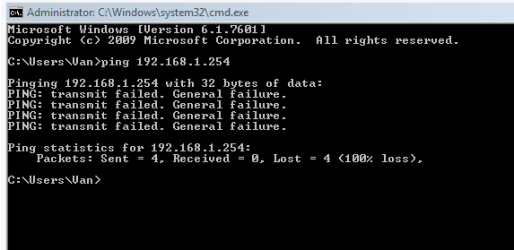
Then, open up a command prompt and type ping 192.168.1.254 then press enter and post the results on your next post.

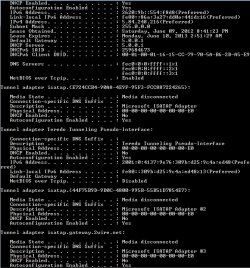
Also, is there another computer in your network that you may run the ipconfig /all command then post it here?
 

My Computer My Computer

At a glance

Win7 & Win8 64bitIntel i5
Computer Manufacturer/Model Number
Lenovo Desktop/Samsung Laptop
OS
Win7 & Win8 64bit
CPU
Intel i5
Internet Speed
Charter-20 Mbps
Antivirus
Avast
Browser
FF, IE9 and Chrome
Alright, I'll get started on the safe mode process.
I will grab my brother's laptop and use the ipconfig command on there and post it.
Thank you for being so patient, I really appreciate it.
 

My Computer My Computer

At a glance

Windows 7 Home Premium 64bitAMD FX812
OS
Windows 7 Home Premium 64bit
CPU
AMD FX812
Motherboard
Gigabyte 990FXA-UD3
Also, what type of AV or Security Software do you have installed?
 

My Computer My Computer

At a glance

Win7 & Win8 64bitIntel i5
Computer Manufacturer/Model Number
Lenovo Desktop/Samsung Laptop
OS
Win7 & Win8 64bit
CPU
Intel i5
Internet Speed
Charter-20 Mbps
Antivirus
Avast
Browser
FF, IE9 and Chrome
Here's the ipconfig, I'll have the ping results up in a second.
 

Attachments

  • ipconfig2.PNG
    ipconfig2.PNG
    11.8 KB · Views: 17
  • ipconfig.PNG
    ipconfig.PNG
    11.1 KB · Views: 16

My Computer My Computer

At a glance

Windows 7 Home Premium 64bitAMD FX812
OS
Windows 7 Home Premium 64bit
CPU
AMD FX812
Motherboard
Gigabyte 990FXA-UD3
Here's the ping results.
 

Attachments

  • ping.PNG
    ping.PNG
    5.1 KB · Views: 13

My Computer My Computer

At a glance

Windows 7 Home Premium 64bitAMD FX812
OS
Windows 7 Home Premium 64bit
CPU
AMD FX812
Motherboard
Gigabyte 990FXA-UD3
I am using AVG Free and I disabled Windows Firewall from blocking connections.
 

My Computer My Computer

At a glance

Windows 7 Home Premium 64bitAMD FX812
OS
Windows 7 Home Premium 64bit
CPU
AMD FX812
Motherboard
Gigabyte 990FXA-UD3
You should enable your Windows Firewall back for protection, AVG won't be a culprit as far as I know.
 

My Computer My Computer

At a glance

Win7 & Win8 64bitIntel i5
Computer Manufacturer/Model Number
Lenovo Desktop/Samsung Laptop
OS
Win7 & Win8 64bit
CPU
Intel i5
Internet Speed
Charter-20 Mbps
Antivirus
Avast
Browser
FF, IE9 and Chrome
Alright, Windows Firewall is back at recommended settings.
 

My Computer My Computer

At a glance

Windows 7 Home Premium 64bitAMD FX812
OS
Windows 7 Home Premium 64bit
CPU
AMD FX812
Motherboard
Gigabyte 990FXA-UD3
Did you ever try uninstall/reinstalling the device driver from Safe Mode in Networking?

Next task is resetting the winsock and TCP/IP stacks.
Click on Start=> All Programs => Accessories and right click on Command Prompt, select "Run as Administrator" to open a command prompt.
Reset IPv4 TCP/IP stack to installation defaults. netsh int ipv4 reset reset.log press enter
Reset IPv6 TCP/IP stack to installation defaults. netsh int ipv6 reset reset.log press enter
Reset WINSOCK entries to installation defaults: netsh winsock reset catalog press enter
Restart the computer after.

If that didn't work, try the sfc /scannow command by following Brink's Tutorial here.
 

My Computer My Computer

At a glance

Win7 & Win8 64bitIntel i5
Computer Manufacturer/Model Number
Lenovo Desktop/Samsung Laptop
OS
Win7 & Win8 64bit
CPU
Intel i5
Internet Speed
Charter-20 Mbps
Antivirus
Avast
Browser
FF, IE9 and Chrome
Oh jeez, my apologies, I skipped that step by accident. Computer repair at 3 AM probably isn't the best idea, but I really need to fix this.
 

My Computer My Computer

At a glance

Windows 7 Home Premium 64bitAMD FX812
OS
Windows 7 Home Premium 64bit
CPU
AMD FX812
Motherboard
Gigabyte 990FXA-UD3
It's easy to overlook things especially if there are quite of troubleshooting guides to follow, no worries. You're 3 hours ahead of me btw...:D

Please don't forget to install the latest driver.
 

My Computer My Computer

At a glance

Win7 & Win8 64bitIntel i5
Computer Manufacturer/Model Number
Lenovo Desktop/Samsung Laptop
OS
Win7 & Win8 64bit
CPU
Intel i5
Internet Speed
Charter-20 Mbps
Antivirus
Avast
Browser
FF, IE9 and Chrome
Back
Top