network 2?

yea umm im sorry i couldnt get a screenshot and also netsh int ip reset reset.log hit did not work
 

My Computer

OS
windows 7 ultimate 32
CPU
intel core 2 duo [email protected] Wolfdale 45nm Technology
Motherboard
Intel Corporation DG 45FC
That was supposed to say netsh winsock reset catalog for reset of winsock.

netsh int ip reset reset.log hit is to reset tcp/ip stack.

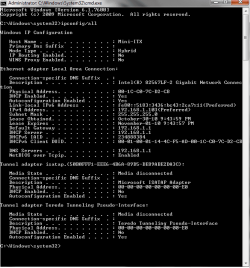
I need to see the ipconfig /all
 

My Computer

Computer type
PC/Desktop
Computer Manufacturer/Model Number
Home built
OS
Windows 7 Ult, Windows 8.1 Pro,
CPU
Q9650-4.275GHz, E8600 4.5GHz, E6750-3.8GHz
Motherboard
Evga 780i FTW
Memory
G.Skill PC2 9600 1200Mhz 5 5 5 15 2T
Graphics Card(s)
GTX480
Sound Card
Asus Xonar D2
Monitor(s) Displays
HannsG
Screen Resolution
1680X1050
Hard Drives
GSkill Phoenix Pro 120GB SSD
PSU
ThermalTake Toughpower 1000Watt modular
Case
ThermalTake XaserV
Cooling
Xigmatek S1283
Keyboard
Logitech G15
Mouse
Logitech G9
Internet Speed
T1
here is the ipconfig/all. sorry it took so long...
 

Attachments

  • vgd.png
    vgd.png
    50.9 KB · Views: 30
Last edited:

My Computer

OS
windows 7 ultimate 32
CPU
intel core 2 duo [email protected] Wolfdale 45nm Technology
Motherboard
Intel Corporation DG 45FC
does anybody know how to access network2??
 

My Computer

OS
windows 7 ultimate 32
CPU
intel core 2 duo [email protected] Wolfdale 45nm Technology
Motherboard
Intel Corporation DG 45FC
i figured it out you have to go to the network thing properties and check those boxes it will take you to public, the swich it back to home or whatever you want and for me it says network 2!!
 

My Computer

OS
windows 7 ultimate 32
CPU
intel core 2 duo [email protected] Wolfdale 45nm Technology
Motherboard
Intel Corporation DG 45FC
I only see one network there and it looks perfectly normal to me. :confused:

If something is showing as a second network it's probably just an unused network adaptor that needs to be disabled. Have you tried just using the "Home" network feature rather than public or private?
 
Last edited:

My Computer

Computer type
PC/Desktop
Computer Manufacturer/Model Number
Home built
OS
Windows 7 Ult, Windows 8.1 Pro,
CPU
Q9650-4.275GHz, E8600 4.5GHz, E6750-3.8GHz
Motherboard
Evga 780i FTW
Memory
G.Skill PC2 9600 1200Mhz 5 5 5 15 2T
Graphics Card(s)
GTX480
Sound Card
Asus Xonar D2
Monitor(s) Displays
HannsG
Screen Resolution
1680X1050
Hard Drives
GSkill Phoenix Pro 120GB SSD
PSU
ThermalTake Toughpower 1000Watt modular
Case
ThermalTake XaserV
Cooling
Xigmatek S1283
Keyboard
Logitech G15
Mouse
Logitech G9
Internet Speed
T1
I have a similar problem. I recently got a new computer with windows 7 64bit home premium. My network is called "network" and it is set up as a home network. It never works but if I disable my ethernet connection then re-enable it through network trouble shooter then a new working network appears called network 2. Where this network comes from I've no idea. It's ok as a work-around but it's hardly a long term solution. I've had a short look round the web for an explanation but have yet to find one.
 

My Computer

OS
Windows 7 Home Premium 64bit
Back
Top