network adapter dead?

yup, thats what i typed in the elevated cmd prompt

i also tried downloading and running that tool but it didnt work

Are you getting any errors?
 

My Computer

Computer type
PC/Desktop
Computer Manufacturer/Model Number
custom build
OS
Windows 7 Professional 64bit
CPU
Intel i7-5960X
Motherboard
EVGA X99 Classified
Memory
64GB Corsair Dominator 2400MHz
Graphics Card(s)
3 EVGA GTX980's
Sound Card
on board
Monitor(s) Displays
3 Dell E2715H 27"
Screen Resolution
1920x1080 (5760x1080)
Hard Drives
Samsung 950 Pro 1TB M.2 SSD,
Western Digital Black 2TB HDD's x5
Western Digital Black 1TB HDD's x3
PSU
Corsair AX1200i
Case
Corsair 750D
Cooling
Corsair H110i GT
Keyboard
Corsair K70
Mouse
Corsair M45
Internet Speed
250 down/10 up
Antivirus
Microsoft Security Essentials
Browser
IE 11, Google Chrome
Have you tried another cable? Have you tried the adapter in another computer?
The cable works on his laptop and the adapter is the onboard network port on the motherboard.
 

My Computer

Computer type
PC/Desktop
Computer Manufacturer/Model Number
custom build
OS
Windows 7 Professional 64bit
CPU
Intel i7-5960X
Motherboard
EVGA X99 Classified
Memory
64GB Corsair Dominator 2400MHz
Graphics Card(s)
3 EVGA GTX980's
Sound Card
on board
Monitor(s) Displays
3 Dell E2715H 27"
Screen Resolution
1920x1080 (5760x1080)
Hard Drives
Samsung 950 Pro 1TB M.2 SSD,
Western Digital Black 2TB HDD's x5
Western Digital Black 1TB HDD's x3
PSU
Corsair AX1200i
Case
Corsair 750D
Cooling
Corsair H110i GT
Keyboard
Corsair K70
Mouse
Corsair M45
Internet Speed
250 down/10 up
Antivirus
Microsoft Security Essentials
Browser
IE 11, Google Chrome

My Computer

Computer type
PC/Desktop
Computer Manufacturer/Model Number
Custom
OS
10 Pro x64
CPU
Ryzen 9 3900X
Motherboard
Asrock x370 Tachi
Memory
64GB(4x16GB) DDR4
Graphics Card(s)
EVGA 1080ti FTW3
Sound Card
ASUS Xonar Essence STX (V4 Bursons), ODAC rev B, NFB-11, O2
Monitor(s) Displays
3xASUS PB278Q/R, Optoma HD142X
Screen Resolution
3x1440p, 1080p
Hard Drives
512GB 850 EVO(OS, Programs)
4TB (Movies)
3TB (Downloads)
3TB (Programs)
1TB HDD (Games)
2x6TB R1 (videos)
PSU
AX760
Case
Fractal Define R5
Cooling
NH-D15S
Keyboard
Massdrop Ctrl with Box Navy's
Mouse
G903, Alioth XXL Mat
Internet Speed
280/40
Antivirus
MBAM, ESET
Browser
Canary 64 Bit
Other Info
I also own a Thinkpad P50 Xeon 4K, X220T, X1C5
Have you tried another cable? Have you tried the adapter in another computer?

i have not tried another cable, but i have plugged the same cable into my laptop and it worked just fine

i only have 1 port on my mobo and its soldered on the back
 

My Computer

Computer type
PC/Desktop
OS
Windows 7 Pro 64 bit
CPU
Intel i7 6700k
Motherboard
ASUS Z-170-A
Memory
Kingston HyperX Fury 16GB 2133MHz
Graphics Card(s)
EVGA GTX 1060 6GB
Sound Card
N/A
Monitor(s) Displays
Viewsonic VX2240w
Screen Resolution
1680 x 1050
Hard Drives
Sandisk Ultra II 480GB SSD,
WD Caviar Black 1TB
PSU
Corsair RM750x
Case
Corsair 550D
Cooling
CoolerMaster Hyper 212
Keyboard
$20 Logitech El Cheapo
Mouse
Logitech G500s
Antivirus
avast! free antivirus
Browser
Google Chrome

My Computer

Computer type
PC/Desktop
OS
Windows 7 Pro 64 bit
CPU
Intel i7 6700k
Motherboard
ASUS Z-170-A
Memory
Kingston HyperX Fury 16GB 2133MHz
Graphics Card(s)
EVGA GTX 1060 6GB
Sound Card
N/A
Monitor(s) Displays
Viewsonic VX2240w
Screen Resolution
1680 x 1050
Hard Drives
Sandisk Ultra II 480GB SSD,
WD Caviar Black 1TB
PSU
Corsair RM750x
Case
Corsair 550D
Cooling
CoolerMaster Hyper 212
Keyboard
$20 Logitech El Cheapo
Mouse
Logitech G500s
Antivirus
avast! free antivirus
Browser
Google Chrome
I do understand you pulled the CMOS battery to reset the bios, but when you were in there did you check to make sure the boot setting for the network stack was set to disabled? The disabled setting will defeat any attempt to try and boot by using settings from a network.

z70 network boot.png

I know you're not having any boot up problems but if it is enabled it might be confusing the boot order.

If you go to the FAQS page for the Z170-A There are suggestions on page two and three respectively, for can't connect and irregular connections of a wired network, both links offer a way to set-up a new broadband (PPPoE) connection using the built-in win7 wizard. I offer this so you can make sure of the steps you've already taken, and a new connection may help.

In researching your problem I did see where others had the same file description as yours: "Intel(R) Ethernet Connection (2) I219-V" It has been my experience that a parentheses 2, 3 or 4 and so on means that, that file is a copy of the original file.
Your notice of other :warn: icons may be the root cause of your problem, if you want to take this further, make sure any instance of Intel(R) Ethernet Connection I219-V and Intel(R) Ethernet Connection (2) I219-V are removed from your machine before you go and try a re-install of Intel(R) Ethernet Connection I219-V. Try looking in and for a file similar to %systemroot%\system32\setupapi.dll
   Note
Try to correct the (2) situation before you create a new PPPoE connection as mentioned above.


Go to Device Manager and right click on the troublesome network adapter, I believe it is the Intel(R) Ethernet Connection (2) I219-V then properties >Advance tab; Look for Link Speed and Duplex in the property box, make sure the value is set to Auto-Negotiation, if that is not available then 100Mbps-Full duplex.


Related:

I created the above snip from the Z170-A Product page; Manual & Documents link, then found at the bottom of this link: https:// Version E10611 Description Z170-A User's manual (English) | www.asus.com If that is the wrong source please advise.

There was mention on one site, third post down, of having the Intel Serial IO driver before the network drivers, I am unsure in re-reading your posts if you have done this because their already installed, right? But, it may help to re-install it, then the network drivers. The order would be: IO driver, network drivers, new PPPoE connection.

As far as the 651 error, it looks like you've covered most of the steps in the link you provided except for #3 and creating a new PPPoE connection would cover that, then #4, 5, and possibly 7.

 
Last edited:

My Computer

Computer type
PC/Desktop
Computer Manufacturer/Model Number
Gateway DX4831-01e (Mid-Tower Desktop)
OS
Originally Win 7 Hm Prem x64 Ver 6.1.7600 Build 7601-SP1 | Upgraded to Windows 10 December 14, 2019
CPU
Intel i3 530 2.93GHz, 2933MHz 2 Cores 4 Logical Processors
Motherboard
Gateway H57M01 133 megahertz
Memory
6GB of 1,333MHz DDR3 SDRAM
Graphics Card(s)
32MB Intel Graphics Media Accelerator HD IGChip
Sound Card
Realtek High Definition Audio
Monitor(s) Displays
Gateway HX2000 20inch TFT active matrix TN
Screen Resolution
1600 x 900 x 59 hertz
Hard Drives
WDC WD10EADS-00M2B0 [HDD] (1000.20 GB) -- drive 0,
HL-DT-ST DVDRAM GH41N [CD-ROM dr]
Four card readers, and Four USB 2.0
PSU
300watts.
Case
Mid-Tower Desktop
Cooling
Stock from Gateway
Keyboard
Natural Ergonomic Keyboard 4000, see Other Info
Mouse
Orig. Gateway wore out now using Insignia USB wired optical
Internet Speed
Vz FIOS 10ms png 57.64Mbps down 65.53Mbps up Speedtest.org
Antivirus
Zamana Anti-logger with Anti-malware, MSE, Windows Firewall,
Browser
IE11.0.9600.19399-Upd ver11.0.135, Firefox 68.0.1 x64
Other Info
System Specs by Belarc.

BIOS: American Megatrends Inc. P01-A0 11/17/2009

Replaced the MS 'Natural' Standard PS/2 Enhanced 101-102 Keyboard with a new Natural Ergonomic Keyboard 4000 on August 1st 2014.

Canon Pixma MG3222 Printer.

Updated to IE11 on 12102015 | Fios Quantum Router g1100

Additional AV: SpywareBlaster, manual Mbam, SAS
My two cents worth you said you updated the driver for the LAN?? if not then try that Access Denied

In my pic can you check your board in the area marked and look for any signs of bad caps, scorching or dry joints on that Ethernet block - a gentle push to the side will find that.
 

My Computer

Computer type
PC/Desktop
Computer Manufacturer/Model Number
Own build (new) Desk1 / Asus ROG Win 7 / Desk2 1st build
OS
Desk1 7 Home Prem / Desk2 10 Pro / Main lap Asus ROG 10 Pro 2 laptop Toshiba 7 Pro Asus P2520 7 & 10
CPU
Desk1 i5 3750K / Laptop i7 GTX 860M / Desk2 i5 2500
Motherboard
Desk1 Asus P877-V / Desk2 Gigabyte H67 UD3H / Laptop ?
Memory
Desk1 8GB (1866) / Desk2 16GB (1333) / Laptop 8Gb DDR3
Graphics Card(s)
Desk 1& 2NVidia GTX 650 & Laptops on board Intel
Sound Card
Desk 1 & 2 -XONAR DG Realtek High Def audio Laptop
Monitor(s) Displays
Desk 1 Benq HD 2450 / Desk2 Philips 24" / Laptop 17.5"
Screen Resolution
1920x1080 D1 & D2 & Laptop 1
Hard Drives
Desk1 Samsung 120GB 830 SSD
Asus ROG 256GB 850 Pro SSD
Desk2 Samsung 840 256 SSD
Toshiba 120GB EVO
PSU
Desk 1 Corsair HX 1050/ Laptop ? / Desk 2 Corsair HX 650
Case
Desk 1 Cooler HAF XM ? Toshiba laptop / Desk2 Coolermaster
Cooling
Fans on all Desk1 -2 Desk2 - all Coolermasters 5 Laptop ?
Keyboard
Desk 1 MS Sidewinder X6 Desk 2 MS Sidewinder X 4
Mouse
Desk 1&2 - Gigabyte MS 900 gamer - laptop - Logitec wireless
Internet Speed
ADSL2+
Other Info
One other Desktop (tester) and spare Toshba laptop both with SSD's
Running Kaspersky 2016 ISS on all machines config'd identically
Logitec audio stereo systems on each machine (x3)
Canon MG5250MFC
Router/modem TP-Link running WPA2SK
"network stack" in BIOS is disabled

i'll have to try running ubuntu later, the CD isnt working right now =\

there is no exclamation mark when i go into device manager. in fact it tells me its working fine
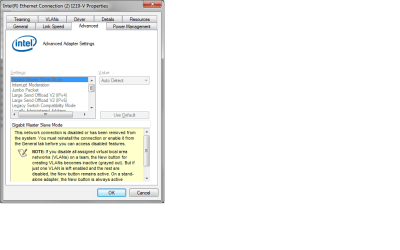
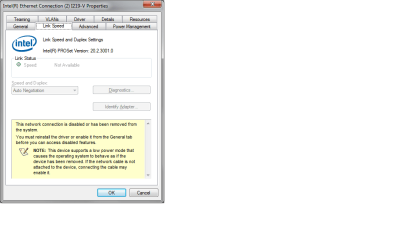
but when i go into the properties, i get 1 of 2 error messages
 

Attachments

  • 1.png
    1.png
    79.5 KB · Views: 1
  • 2.png
    2.png
    33.2 KB · Views: 1
  • 3.png
    3.png
    46.7 KB · Views: 2
  • Untitled.png
    Untitled.png
    40.8 KB · Views: 2

My Computer

Computer type
PC/Desktop
OS
Windows 7 Pro 64 bit
CPU
Intel i7 6700k
Motherboard
ASUS Z-170-A
Memory
Kingston HyperX Fury 16GB 2133MHz
Graphics Card(s)
EVGA GTX 1060 6GB
Sound Card
N/A
Monitor(s) Displays
Viewsonic VX2240w
Screen Resolution
1680 x 1050
Hard Drives
Sandisk Ultra II 480GB SSD,
WD Caviar Black 1TB
PSU
Corsair RM750x
Case
Corsair 550D
Cooling
CoolerMaster Hyper 212
Keyboard
$20 Logitech El Cheapo
Mouse
Logitech G500s
Antivirus
avast! free antivirus
Browser
Google Chrome
Thanks,
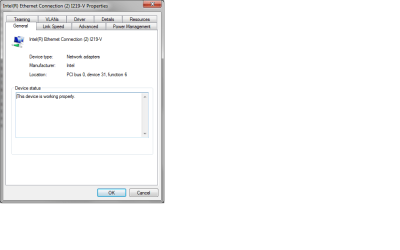
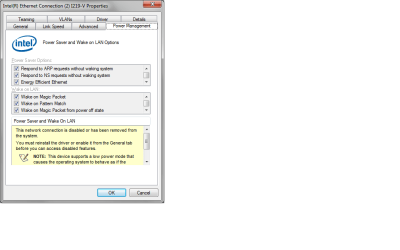
going into device manager and right clicking on the adapter, it says it is working properly under the "general" tab, but under any other tab, there is a yellow text box that reads
I was close, but no cigar. :p :( I see their different, there may be a clue in the wording.

I changed the wording in my note box and spacing before the next paragraph for clarification.
 

My Computer

Computer type
PC/Desktop
Computer Manufacturer/Model Number
Gateway DX4831-01e (Mid-Tower Desktop)
OS
Originally Win 7 Hm Prem x64 Ver 6.1.7600 Build 7601-SP1 | Upgraded to Windows 10 December 14, 2019
CPU
Intel i3 530 2.93GHz, 2933MHz 2 Cores 4 Logical Processors
Motherboard
Gateway H57M01 133 megahertz
Memory
6GB of 1,333MHz DDR3 SDRAM
Graphics Card(s)
32MB Intel Graphics Media Accelerator HD IGChip
Sound Card
Realtek High Definition Audio
Monitor(s) Displays
Gateway HX2000 20inch TFT active matrix TN
Screen Resolution
1600 x 900 x 59 hertz
Hard Drives
WDC WD10EADS-00M2B0 [HDD] (1000.20 GB) -- drive 0,
HL-DT-ST DVDRAM GH41N [CD-ROM dr]
Four card readers, and Four USB 2.0
PSU
300watts.
Case
Mid-Tower Desktop
Cooling
Stock from Gateway
Keyboard
Natural Ergonomic Keyboard 4000, see Other Info
Mouse
Orig. Gateway wore out now using Insignia USB wired optical
Internet Speed
Vz FIOS 10ms png 57.64Mbps down 65.53Mbps up Speedtest.org
Antivirus
Zamana Anti-logger with Anti-malware, MSE, Windows Firewall,
Browser
IE11.0.9600.19399-Upd ver11.0.135, Firefox 68.0.1 x64
Other Info
System Specs by Belarc.

BIOS: American Megatrends Inc. P01-A0 11/17/2009

Replaced the MS 'Natural' Standard PS/2 Enhanced 101-102 Keyboard with a new Natural Ergonomic Keyboard 4000 on August 1st 2014.

Canon Pixma MG3222 Printer.

Updated to IE11 on 12102015 | Fios Quantum Router g1100

Additional AV: SpywareBlaster, manual Mbam, SAS
"network stack" in BIOS is disabled

i'll have to try running ubuntu later, the CD isnt working right now =\

there is no exclamation mark when i go into device manager. in fact it tells me its working fine
but when i go into the properties, i get 1 of 2 error messages

It does make it sound like the adapter is asleep and since the port is dead it will not wake up when a cable is attached software wise. You said before that no lights even flashed with the cable in so that would fit this too.

Certainly interesting, if you want to make a usb instead I would do this. Pick disc image instead of a distro name and use the iso they you.
UNetbootin - Create Bootable Live Linux USB

Malcolm
 
Last edited:

My Computer

Computer type
PC/Desktop
Computer Manufacturer/Model Number
Custom
OS
10 Pro x64
CPU
Ryzen 9 3900X
Motherboard
Asrock x370 Tachi
Memory
64GB(4x16GB) DDR4
Graphics Card(s)
EVGA 1080ti FTW3
Sound Card
ASUS Xonar Essence STX (V4 Bursons), ODAC rev B, NFB-11, O2
Monitor(s) Displays
3xASUS PB278Q/R, Optoma HD142X
Screen Resolution
3x1440p, 1080p
Hard Drives
512GB 850 EVO(OS, Programs)
4TB (Movies)
3TB (Downloads)
3TB (Programs)
1TB HDD (Games)
2x6TB R1 (videos)
PSU
AX760
Case
Fractal Define R5
Cooling
NH-D15S
Keyboard
Massdrop Ctrl with Box Navy's
Mouse
G903, Alioth XXL Mat
Internet Speed
280/40
Antivirus
MBAM, ESET
Browser
Canary 64 Bit
Other Info
I also own a Thinkpad P50 Xeon 4K, X220T, X1C5
Control panel > Network and sharing center > Change adapter settings. Right click on the device and select Properties. On the next window click on configure. Click on the power management tab and make sure the box beside "allow the computer to turn off the device to conserve power" is unchecked. Then I would reboot. Also I second the suggestion to try a bootable linux distribution such as knoppix or ubuntu. You might also uninstall the device from device manager and rebooting. Does that computer have a wireless adapter? If so is it working? You might also go through the bios settings and make sure that it isn't disabling the network adapter or putting it to sleep. You could also reset the bios settings.
 

My Computers

System One System Two

Control panel > Network and sharing center > Change adapter settings. Right click on the device and select Properties. On the next window click on configure. Click on the power management tab and make sure the box beside "allow the computer to turn off the device to conserve power" is unchecked. Then I would reboot. Also I second the suggestion to try a bootable linux distribution such as knoppix or ubuntu. You might also uninstall the device from device manager and rebooting. Does that computer have a wireless adapter? If so is it working? You might also go through the bios settings and make sure that it isn't disabling the network adapter or putting it to sleep. You could also reset the bios settings.

it says the device is working properly in the general tab, but when i go into any other tab, i get 1 of 2 error messages

specifically for power management, it says this

ps. it doesnt have a wireless adapter
 

Attachments

  • 1.png
    1.png
    44 KB · Views: 1
  • 2.png
    2.png
    38.9 KB · Views: 1

My Computer

Computer type
PC/Desktop
OS
Windows 7 Pro 64 bit
CPU
Intel i7 6700k
Motherboard
ASUS Z-170-A
Memory
Kingston HyperX Fury 16GB 2133MHz
Graphics Card(s)
EVGA GTX 1060 6GB
Sound Card
N/A
Monitor(s) Displays
Viewsonic VX2240w
Screen Resolution
1680 x 1050
Hard Drives
Sandisk Ultra II 480GB SSD,
WD Caviar Black 1TB
PSU
Corsair RM750x
Case
Corsair 550D
Cooling
CoolerMaster Hyper 212
Keyboard
$20 Logitech El Cheapo
Mouse
Logitech G500s
Antivirus
avast! free antivirus
Browser
Google Chrome
It does make it sound like the adapter is asleep and since the port is dead it will not wake up when a cable is attached software wise. You said before that no lights even flashed with the cable in so that would fit this too.

Certainly interesting, if you want to make a usb instead I would do this. Pick disc image instead of a distro name and use the iso they you.
UNetbootin - Create Bootable Live Linux USB

Malcolm

ok i just tried booting the ubuntu live CD and i couldnt even get in
i tried using both the UEFI and non-UEFI options in the boot menu, but after the initial loading screen and 20min later, i would get a flashing underscore in the top left and a flash of color across the screen and back to the blinking underscore

i think this may have something to do with UEFI not playing nice

i could try a tor CD and see if that gives me any luck......
 

My Computer

Computer type
PC/Desktop
OS
Windows 7 Pro 64 bit
CPU
Intel i7 6700k
Motherboard
ASUS Z-170-A
Memory
Kingston HyperX Fury 16GB 2133MHz
Graphics Card(s)
EVGA GTX 1060 6GB
Sound Card
N/A
Monitor(s) Displays
Viewsonic VX2240w
Screen Resolution
1680 x 1050
Hard Drives
Sandisk Ultra II 480GB SSD,
WD Caviar Black 1TB
PSU
Corsair RM750x
Case
Corsair 550D
Cooling
CoolerMaster Hyper 212
Keyboard
$20 Logitech El Cheapo
Mouse
Logitech G500s
Antivirus
avast! free antivirus
Browser
Google Chrome
Hmm I wouldn't have thought the EUFI would have made any difference to be honest as it is booting from a disk or stick that is. Having said that I have never tried it on a EUFI machine and perhaps now is the time I ought to try suppose to see what happens. Thanks for the headsup:)


I might have a dig around to see what the go is with that setup.

Edit: Well I went looking and came up with this although right now I am banged up in hospital and don't have access to my other machines to try it out but it sounds like disabling Secure Boot might work.
How to Boot and Install Linux on a UEFI PC With Secure Boot
 

My Computer

Computer type
PC/Desktop
Computer Manufacturer/Model Number
Own build (new) Desk1 / Asus ROG Win 7 / Desk2 1st build
OS
Desk1 7 Home Prem / Desk2 10 Pro / Main lap Asus ROG 10 Pro 2 laptop Toshiba 7 Pro Asus P2520 7 & 10
CPU
Desk1 i5 3750K / Laptop i7 GTX 860M / Desk2 i5 2500
Motherboard
Desk1 Asus P877-V / Desk2 Gigabyte H67 UD3H / Laptop ?
Memory
Desk1 8GB (1866) / Desk2 16GB (1333) / Laptop 8Gb DDR3
Graphics Card(s)
Desk 1& 2NVidia GTX 650 & Laptops on board Intel
Sound Card
Desk 1 & 2 -XONAR DG Realtek High Def audio Laptop
Monitor(s) Displays
Desk 1 Benq HD 2450 / Desk2 Philips 24" / Laptop 17.5"
Screen Resolution
1920x1080 D1 & D2 & Laptop 1
Hard Drives
Desk1 Samsung 120GB 830 SSD
Asus ROG 256GB 850 Pro SSD
Desk2 Samsung 840 256 SSD
Toshiba 120GB EVO
PSU
Desk 1 Corsair HX 1050/ Laptop ? / Desk 2 Corsair HX 650
Case
Desk 1 Cooler HAF XM ? Toshiba laptop / Desk2 Coolermaster
Cooling
Fans on all Desk1 -2 Desk2 - all Coolermasters 5 Laptop ?
Keyboard
Desk 1 MS Sidewinder X6 Desk 2 MS Sidewinder X 4
Mouse
Desk 1&2 - Gigabyte MS 900 gamer - laptop - Logitec wireless
Internet Speed
ADSL2+
Other Info
One other Desktop (tester) and spare Toshba laptop both with SSD's
Running Kaspersky 2016 ISS on all machines config'd identically
Logitec audio stereo systems on each machine (x3)
Canon MG5250MFC
Router/modem TP-Link running WPA2SK
ok i just tried booting the ubuntu live CD and i couldnt even get in
i tried using both the UEFI and non-UEFI options in the boot menu, but after the initial loading screen and 20min later, i would get a flashing underscore in the top left and a flash of color across the screen and back to the blinking underscore

i think this may have something to do with UEFI not playing nice

i could try a tor CD and see if that gives me any luck......
As John says definitely disable secure boot first to boot from uefi with that usb or cd. Also when the pc is booting since you have an asus board just spam F8 to get the boot menu to pick your usb or cd with or without UEFI.

Hmm I wouldn't have thought the EUFI would have made any difference to be honest as it is booting from a disk or stick that is. Having said that I have never tried it on a EUFI machine and perhaps now is the time I ought to try suppose to see what happens. Thanks for the headsup:)


I might have a dig around to see what the go is with that setup.

Edit: Well I went looking and came up with this although right now I am banged up in hospital and don't have access to my other machines to try it out but it sounds like disabling Secure Boot might work.
How to Boot and Install Linux on a UEFI PC With Secure Boot

Hope you feel better John that sounds rough.

Malcolm
 

My Computer

Computer type
PC/Desktop
Computer Manufacturer/Model Number
Custom
OS
10 Pro x64
CPU
Ryzen 9 3900X
Motherboard
Asrock x370 Tachi
Memory
64GB(4x16GB) DDR4
Graphics Card(s)
EVGA 1080ti FTW3
Sound Card
ASUS Xonar Essence STX (V4 Bursons), ODAC rev B, NFB-11, O2
Monitor(s) Displays
3xASUS PB278Q/R, Optoma HD142X
Screen Resolution
3x1440p, 1080p
Hard Drives
512GB 850 EVO(OS, Programs)
4TB (Movies)
3TB (Downloads)
3TB (Programs)
1TB HDD (Games)
2x6TB R1 (videos)
PSU
AX760
Case
Fractal Define R5
Cooling
NH-D15S
Keyboard
Massdrop Ctrl with Box Navy's
Mouse
G903, Alioth XXL Mat
Internet Speed
280/40
Antivirus
MBAM, ESET
Browser
Canary 64 Bit
Other Info
I also own a Thinkpad P50 Xeon 4K, X220T, X1C5
Hope you feel better John that sounds rough.

Thanks Malcolm yep it came at a time in life that I could do without but ti was down to my gung ho lifestyle:(

Anyway it will be good to see if the secure boot thing works eh?:)
 

My Computer

Computer type
PC/Desktop
Computer Manufacturer/Model Number
Own build (new) Desk1 / Asus ROG Win 7 / Desk2 1st build
OS
Desk1 7 Home Prem / Desk2 10 Pro / Main lap Asus ROG 10 Pro 2 laptop Toshiba 7 Pro Asus P2520 7 & 10
CPU
Desk1 i5 3750K / Laptop i7 GTX 860M / Desk2 i5 2500
Motherboard
Desk1 Asus P877-V / Desk2 Gigabyte H67 UD3H / Laptop ?
Memory
Desk1 8GB (1866) / Desk2 16GB (1333) / Laptop 8Gb DDR3
Graphics Card(s)
Desk 1& 2NVidia GTX 650 & Laptops on board Intel
Sound Card
Desk 1 & 2 -XONAR DG Realtek High Def audio Laptop
Monitor(s) Displays
Desk 1 Benq HD 2450 / Desk2 Philips 24" / Laptop 17.5"
Screen Resolution
1920x1080 D1 & D2 & Laptop 1
Hard Drives
Desk1 Samsung 120GB 830 SSD
Asus ROG 256GB 850 Pro SSD
Desk2 Samsung 840 256 SSD
Toshiba 120GB EVO
PSU
Desk 1 Corsair HX 1050/ Laptop ? / Desk 2 Corsair HX 650
Case
Desk 1 Cooler HAF XM ? Toshiba laptop / Desk2 Coolermaster
Cooling
Fans on all Desk1 -2 Desk2 - all Coolermasters 5 Laptop ?
Keyboard
Desk 1 MS Sidewinder X6 Desk 2 MS Sidewinder X 4
Mouse
Desk 1&2 - Gigabyte MS 900 gamer - laptop - Logitec wireless
Internet Speed
ADSL2+
Other Info
One other Desktop (tester) and spare Toshba laptop both with SSD's
Running Kaspersky 2016 ISS on all machines config'd identically
Logitec audio stereo systems on each machine (x3)
Canon MG5250MFC
Router/modem TP-Link running WPA2SK
ICIT2LOL
ouch, what happened?

rvcjew
secure boot has always been "disabled" or set to "other OS" in the UEFI
i dont think it should make a difference tbh, since its a live CD and its not installing anything =\
 

My Computer

Computer type
PC/Desktop
OS
Windows 7 Pro 64 bit
CPU
Intel i7 6700k
Motherboard
ASUS Z-170-A
Memory
Kingston HyperX Fury 16GB 2133MHz
Graphics Card(s)
EVGA GTX 1060 6GB
Sound Card
N/A
Monitor(s) Displays
Viewsonic VX2240w
Screen Resolution
1680 x 1050
Hard Drives
Sandisk Ultra II 480GB SSD,
WD Caviar Black 1TB
PSU
Corsair RM750x
Case
Corsair 550D
Cooling
CoolerMaster Hyper 212
Keyboard
$20 Logitech El Cheapo
Mouse
Logitech G500s
Antivirus
avast! free antivirus
Browser
Google Chrome
ouch, what happened?

Hmm 27th December just tidying up for the kids to come next day and in my usual do it first before really thinking about it / gung ho way - was putting up some curtains I just washed went to get down of a small step ladder lost my balance tried to steady myself by grabbing the curtain rail - it came out of the wall - the rest is history:(.

The crawl across the floor to get my phone was the worst bit and for a couple of weeks after in an ocean of pain until I finally got onto the right pain control..
 

My Computer

Computer type
PC/Desktop
Computer Manufacturer/Model Number
Own build (new) Desk1 / Asus ROG Win 7 / Desk2 1st build
OS
Desk1 7 Home Prem / Desk2 10 Pro / Main lap Asus ROG 10 Pro 2 laptop Toshiba 7 Pro Asus P2520 7 & 10
CPU
Desk1 i5 3750K / Laptop i7 GTX 860M / Desk2 i5 2500
Motherboard
Desk1 Asus P877-V / Desk2 Gigabyte H67 UD3H / Laptop ?
Memory
Desk1 8GB (1866) / Desk2 16GB (1333) / Laptop 8Gb DDR3
Graphics Card(s)
Desk 1& 2NVidia GTX 650 & Laptops on board Intel
Sound Card
Desk 1 & 2 -XONAR DG Realtek High Def audio Laptop
Monitor(s) Displays
Desk 1 Benq HD 2450 / Desk2 Philips 24" / Laptop 17.5"
Screen Resolution
1920x1080 D1 & D2 & Laptop 1
Hard Drives
Desk1 Samsung 120GB 830 SSD
Asus ROG 256GB 850 Pro SSD
Desk2 Samsung 840 256 SSD
Toshiba 120GB EVO
PSU
Desk 1 Corsair HX 1050/ Laptop ? / Desk 2 Corsair HX 650
Case
Desk 1 Cooler HAF XM ? Toshiba laptop / Desk2 Coolermaster
Cooling
Fans on all Desk1 -2 Desk2 - all Coolermasters 5 Laptop ?
Keyboard
Desk 1 MS Sidewinder X6 Desk 2 MS Sidewinder X 4
Mouse
Desk 1&2 - Gigabyte MS 900 gamer - laptop - Logitec wireless
Internet Speed
ADSL2+
Other Info
One other Desktop (tester) and spare Toshba laptop both with SSD's
Running Kaspersky 2016 ISS on all machines config'd identically
Logitec audio stereo systems on each machine (x3)
Canon MG5250MFC
Router/modem TP-Link running WPA2SK
Sounds like me after my back surgery. Bent down to pick up a shirt as I was folding laundry. Fell to the floor in sooo much pain. Couldn't walk for two days.
 

My Computer

Computer type
PC/Desktop
Computer Manufacturer/Model Number
custom build
OS
Windows 7 Professional 64bit
CPU
Intel i7-5960X
Motherboard
EVGA X99 Classified
Memory
64GB Corsair Dominator 2400MHz
Graphics Card(s)
3 EVGA GTX980's
Sound Card
on board
Monitor(s) Displays
3 Dell E2715H 27"
Screen Resolution
1920x1080 (5760x1080)
Hard Drives
Samsung 950 Pro 1TB M.2 SSD,
Western Digital Black 2TB HDD's x5
Western Digital Black 1TB HDD's x3
PSU
Corsair AX1200i
Case
Corsair 750D
Cooling
Corsair H110i GT
Keyboard
Corsair K70
Mouse
Corsair M45
Internet Speed
250 down/10 up
Antivirus
Microsoft Security Essentials
Browser
IE 11, Google Chrome
Sounds like me after my back surgery. Bent down to pick up a shirt as I was folding laundry. Fell to the floor in sooo much pain. Couldn't walk for two days.

Yep I know mate it can be something as simple as that my son who is a lot taller than me ( in general I find taller people are more prone to back injuries) is prone to doing simple things just like you did. Only thing is I am used to be up and doing things and being stuck like this is not only boring but seems to have no ending - thank heavens for computers eh;).
 

My Computer

Computer type
PC/Desktop
Computer Manufacturer/Model Number
Own build (new) Desk1 / Asus ROG Win 7 / Desk2 1st build
OS
Desk1 7 Home Prem / Desk2 10 Pro / Main lap Asus ROG 10 Pro 2 laptop Toshiba 7 Pro Asus P2520 7 & 10
CPU
Desk1 i5 3750K / Laptop i7 GTX 860M / Desk2 i5 2500
Motherboard
Desk1 Asus P877-V / Desk2 Gigabyte H67 UD3H / Laptop ?
Memory
Desk1 8GB (1866) / Desk2 16GB (1333) / Laptop 8Gb DDR3
Graphics Card(s)
Desk 1& 2NVidia GTX 650 & Laptops on board Intel
Sound Card
Desk 1 & 2 -XONAR DG Realtek High Def audio Laptop
Monitor(s) Displays
Desk 1 Benq HD 2450 / Desk2 Philips 24" / Laptop 17.5"
Screen Resolution
1920x1080 D1 & D2 & Laptop 1
Hard Drives
Desk1 Samsung 120GB 830 SSD
Asus ROG 256GB 850 Pro SSD
Desk2 Samsung 840 256 SSD
Toshiba 120GB EVO
PSU
Desk 1 Corsair HX 1050/ Laptop ? / Desk 2 Corsair HX 650
Case
Desk 1 Cooler HAF XM ? Toshiba laptop / Desk2 Coolermaster
Cooling
Fans on all Desk1 -2 Desk2 - all Coolermasters 5 Laptop ?
Keyboard
Desk 1 MS Sidewinder X6 Desk 2 MS Sidewinder X 4
Mouse
Desk 1&2 - Gigabyte MS 900 gamer - laptop - Logitec wireless
Internet Speed
ADSL2+
Other Info
One other Desktop (tester) and spare Toshba laptop both with SSD's
Running Kaspersky 2016 ISS on all machines config'd identically
Logitec audio stereo systems on each machine (x3)
Canon MG5250MFC
Router/modem TP-Link running WPA2SK
Back
Top