Network adapter driver problem

Neverin

New member
Local time
8:07 AM
Messages
3
Hello,
Im Neverin
And I have a problem with my laptop because I cant find the proper driver
for my network adapter. Im using Windows 7 as OS.
I dont know where the problem is in the software or in the hardware, but Im pretty sure that the network adapter worked on my previous OS - XP - with no problem . So I think the problem is the driver I have to find.
I tried to find the proper driver, but I didnt succed.
So I need professional help - help from you.
If anyone can help, I would be pleased.
I know the name of the unknown device is Ethernal Controller, but Im not sure if the network adapter is attached to my mainboard ( Sorry, I dont know the expression ). Anyone can tell how I can see that ?
And BTW my mainboards name is ASUSTeK Computer Inc. A4GA .
I would be glad If anyone could help.

Greetings from Croatia :D
 

My Computer

OS
Windows 7
Hello,
Im Neverin
And I have a problem with my laptop because I cant find the proper driver
for my network adapter. Im using Windows 7 as OS.
I dont know where the problem is in the software or in the hardware, but Im pretty sure that the network adapter worked on my previous OS - XP - with no problem . So I think the problem is the driver I have to find.
I tried to find the proper driver, but I didnt succed.
So I need professional help - help from you.
If anyone can help, I would be pleased.
I know the name of the unknown device is Ethernal Controller, but Im not sure if the network adapter is attached to my mainboard ( Sorry, I dont know the expression ). Anyone can tell how I can see that ?
And BTW my mainboards name is ASUSTeK Computer Inc. A4GA .
I would be glad If anyone could help.

Greetings from Croatia :D
Hi neverin and welcome to sevenforums

You obviously need a driver and if you go here ASUSTeK Computer Inc.-Support- they will walk you thru to find the correct drivers for your model. If that doesn't work let us know and we will be happy to help

Ken
 

My Computer

Computer Manufacturer/Model Number
HP Pavillion dv-7 1005 Tx
OS
Win 8 Release candidate 8400
CPU
[email protected]
Memory
4 gigs
Graphics Card(s)
Nvidia 9600M
Sound Card
HD built-in
Monitor(s) Displays
17" Wxga
Screen Resolution
1440x900
Cooling
none
Internet Speed
45Mb down 5Mb up
Im really stuck right know because ;
I dont know what I have to choose : motherboard or networking adapter.

I cant find my motherboard there because I do not know the name of it .
Im using PcWizard 2009 to see my motherboards name and type and that dooesnt match with the ASUS list.
Maybe I doing something wrong.
 

My Computer

OS
Windows 7
Hello,
Im Neverin
And I have a problem with my laptop because I cant find the proper driver
for my network adapter. Im using Windows 7 as OS.
I dont know where the problem is in the software or in the hardware, but Im pretty sure that the network adapter worked on my previous OS - XP - with no problem . So I think the problem is the driver I have to find.
I tried to find the proper driver, but I didnt succed.
So I need professional help - help from you.
If anyone can help, I would be pleased.
I know the name of the unknown device is Ethernal Controller, but Im not sure if the network adapter is attached to my mainboard ( Sorry, I dont know the expression ). Anyone can tell how I can see that ?
And BTW my mainboards name is ASUSTeK Computer Inc. A4GA .
I would be glad If anyone could help.

Greetings from Croatia :D


Ok so what i could gather from your post is that you have an ASUS A4Ga Notebook, and in Windows 7 you do not have a driver for your ethernet (LAN) adapter.
This adaprer used to work in Xp, but doesn't in Win 7, and you think that the driver is the problem. You are correct.

First thing I did was go to this page
ASUSTeK Computer Inc.-Support-

and then choose the appropriate options

asus drivers search.JPG

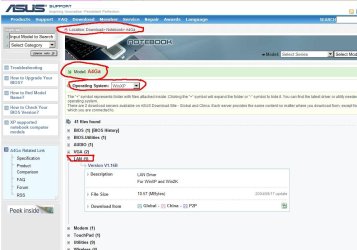
and then i got this

asus A4Ga notebook drivers.JPG

i chose to view drivers for xp, since i wanted to find out which lan chipset is used with your adapter, and because you said the adapter worked in xp.

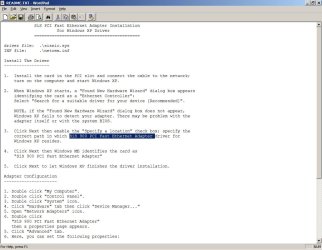
I then downloaded the xp driver, and unpacked it, and looked inside the unpacked driver package, especially in the WinXp driver folder to see whether i could find any info on the chipset.

This is what i found :

sis driver for xp readme.JPG

So assuming that im on the right track so far, and the chipset in question is SiS900,
I searched the internet for SiS website, to see whether they have a newer driver that you would be able to download and install in Windows 7.

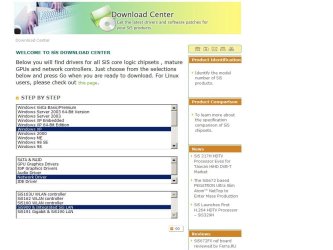
http://www.sis.com/download/

sis driver download xp.JPG

sis drivers download vista.JPG


But here is the problem, as you can see in the 2 screenshots above, when i choose to download a SiS network driver for xp, there is an option to download a driver for the SiS900 chipset, but when i choose Vista as an OS that i want to download drivers for (there are no Win 7 drivers, Vista is the latest OS they have drivers for), there is no option for that chipset, only for SiS163U WLAN and SiS190LAN and SiS191 Gigabit LAN.


Then i googled for "sis 900 windows 7"
and found this link

SiS 900-Based PCI Fast Ethernet Adapter

Pay attention to the second post and last post on that page, and hopefully that will solve your problem.
 

My Computer

Computer Manufacturer/Model Number
custom built
OS
Windows 7 Home Basic 64bit
CPU
Intel Core 2 Duo 6420 (2.13 Ghz)
Motherboard
Asus P5B-E Plus
Memory
2x1 GB Kingston KVR DDR2 800Mhz
Graphics Card(s)
Saphire ATI HD4870 512MB
Sound Card
Creative Audigy 4 PCI
Monitor(s) Displays
Samsung SyncMaster T220
Screen Resolution
1680x1050
Hard Drives
WD 320GB (Sata2)
Maxtor 250GB (ATA133)
Maxtor 80GB (ATA133)
PSU
Coolermaster Silent Pro 700Watt
Case
Chieftec midi tower case
Cooling
stock cpu cooler/fan
Keyboard
Logitech UltraX Premium Keyboard (usb 2.0)
Mouse
Logitech MX518 gaming grade optical mouse 1800dpi(usb2.0)
I have read your post !
I did something else, and it took some time to do it and it seems it is was the hard way .
I reinstalled XP on my laptop and I have installed all the drivers, and I found a program that updates my drives , but it also it backups them . I did that and installed 7 again.
It was a little tricky because at the first it wouldnt accept it ( dont know why ) and then i had to delete the driver and restart the computer. After restarting it installed the network adapter driver automatically .
I did that before you posted . But Im going to thank you and test your sollution in the future. Now Im too afraid to do something because I think I will mess something up :) . I was on that site called " Microsoft catalog update " and I saw that there where the right drivers to do it. I will use it for other things.
I see there is no proper sollution to install that driver on 7 .
Thank you for helping me! All of you!
 

My Computer

OS
Windows 7
Back
Top