Kieran28
New member
I recently bought a new CPU (core i7-3770k) which required an update to the BIOS. That caused some problems (documented in some of my other recent posts) and I decided to do a clean install of my OS (W7Ultimate). Since then the system has been mildly problematic. I have not yet installed the new cpu, because I don't want to introduce another variable into the mix, wanted to get it working great then change the cpu.
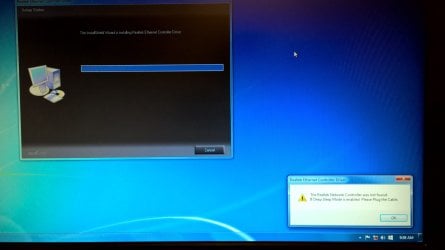
So, I was just about there, when the other day the system wouldn't connect to the LAN. I tried trouble shooting the wiring, the router, the modem. Plugged in another computer (work laptop) and the LAN worked fine. So it was something with my desktop. I tried a couple of steps suggested on Windows.com to no avail. Most of them had me trying to disable and re-enable the network adapter, but here's the problem: the network adapter isn't there! When I go to device manager, the entire group for Network adapters is missing! I've tried rolling back my chipset drivers and my LAN drivers, neither of which did anything. Attached is a screenshot from my last attempt at trying to re-install the LAN drivers.
I'm at a loss. Any suggestions here? Buy a new motherboard? Could this be a virus? I use MSE, and it has found nothing.
Thanks for any help...
So, I was just about there, when the other day the system wouldn't connect to the LAN. I tried trouble shooting the wiring, the router, the modem. Plugged in another computer (work laptop) and the LAN worked fine. So it was something with my desktop. I tried a couple of steps suggested on Windows.com to no avail. Most of them had me trying to disable and re-enable the network adapter, but here's the problem: the network adapter isn't there! When I go to device manager, the entire group for Network adapters is missing! I've tried rolling back my chipset drivers and my LAN drivers, neither of which did anything. Attached is a screenshot from my last attempt at trying to re-install the LAN drivers.
I'm at a loss. Any suggestions here? Buy a new motherboard? Could this be a virus? I use MSE, and it has found nothing.
Thanks for any help...
Attachments
Last edited:
My Computer
At a glance
Windows 7 UltimateIntel core i5-2500k8GB Patriot Signature PC3-12400 DDR3XFX HD-685X-ZCFC Radion HD 6850 1GB
- Computer type
- PC/Desktop
- Computer Manufacturer/Model Number
- self built
- OS
- Windows 7 Ultimate
- CPU
- Intel core i5-2500k
- Motherboard
- Gigabyte GA-Z68XP-UD3
- Memory
- 8GB Patriot Signature PC3-12400 DDR3
- Graphics Card(s)
- XFX HD-685X-ZCFC Radion HD 6850 1GB
- Sound Card
- On-board Realtek ALC889
- Monitor(s) Displays
- ASUS ASVS248HP
- Screen Resolution
- 1920x1080
- Hard Drives
- Crucial 128GB M4 SSD
Samsung 1TB green something or other
- PSU
- Corsair TX650 650W 80Plus-Bronze
- Case
- Bitfenix Outlaw
- Cooling
- Stock
- Keyboard
- Some random old HP thing from an old computer.
- Mouse
- Some random wireless Microsoft mouse. Has a blue light.
- Internet Speed
- ~20mbps comcast cable (they say I get 80-100mbps)
- Antivirus
- Windows Security Essentials
- Browser
- Chrome, IE11, rarely FF.
- Other Info
- Router = ASUS RT-N66U Gigabit 802.11n router
Also own and use a MS Surface Pro3 with 8GB ram, 256GB ssd. Love it. Not crazy about Win8.1, but overall love the Surface.