
I want to start by saying I have no business trying to fix this on my own but I am determined it has to be something simple! I can not pin point what I did to cause my Wi Fi to stop working or disable.
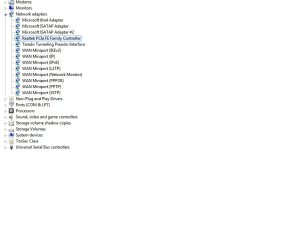
I have tried all the trouble shooting solutions but unfortunately my magic F8 button will not enable let alone show the option when ghosted! I took my keyboard off and verified the Realtek RTL8191SE is in fact there however next to Network adapters only the PCIe FE Family Controller is listed.
I recently tried to download the Fix offered by Toshiba and Windows, restarted my computer and it is still not recognizing my Wi Fi. Please tell me its an easy fix or just that I need to buy a new card!!! Any advice is greatly appreciated. But please give me the Windows for Dummies version because again I have no clue what I am doing.
Thanks again for any help offered!
Racheal
I included all "Hidden Devices" in the screen capture where usually only the Family Controller is listed!
I have tried all the trouble shooting solutions but unfortunately my magic F8 button will not enable let alone show the option when ghosted! I took my keyboard off and verified the Realtek RTL8191SE is in fact there however next to Network adapters only the PCIe FE Family Controller is listed.
I recently tried to download the Fix offered by Toshiba and Windows, restarted my computer and it is still not recognizing my Wi Fi. Please tell me its an easy fix or just that I need to buy a new card!!! Any advice is greatly appreciated. But please give me the Windows for Dummies version because again I have no clue what I am doing.
Thanks again for any help offered!
Racheal
I included all "Hidden Devices" in the screen capture where usually only the Family Controller is listed!
Attachments
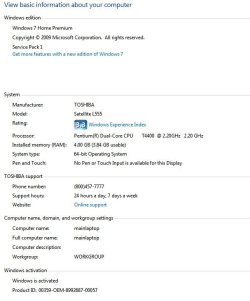
My Computer
At a glance
Win 07 Home Premium 64bit
- Computer Manufacturer/Model Number
- Toshiba Sat L555-S7001
- OS
- Win 07 Home Premium 64bit

