Network Adapter not detecting any wireless networks

ankitp

New member
Local time
7:51 AM
Messages
11
When I start up my laptop, the network icon in the lower right area of the task bar appears with a red cross, "Not Connected", despite the Wi-Fi switch on the laptop being in the ON position. And after a few restarts, when the icon does say "Connections available", it only shows Dial-up & VPN networks, and sometimes Mobile Broadband Networks. It doesn't detect any wireless networks. Sometimes, the icon turns into a dial-up icon with a red cross.

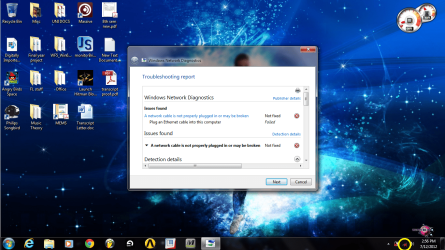
I use a BSNL Broadband modem with a NETGEAR wireless router. I haven't faced this problem before. I ran diagnostics, and it says "plug an ethernet adapter". Please help !!

I have attached an image with the diagnostics result, and the troublesome icon is circled in the lower right corner.
 

Attachments
  • network error.png
    network error.png
    327.1 KB · Views: 122

My Computer My Computer

OS
Windows 7 Home Premium x64
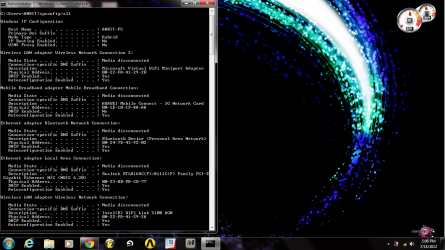
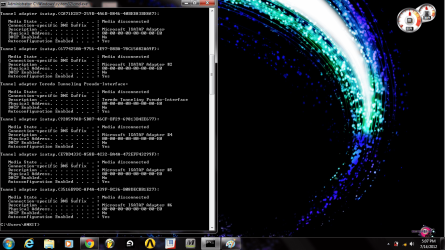
If you can post a screen shot of your ipconfig/all it would be helpful. :)
 

My Computer My Computer

Computer type
PC/Desktop
Computer Manufacturer/Model Number
Home built
OS
Windows 7 Ult, Windows 8.1 Pro,
CPU
Q9650-4.275GHz, E8600 4.5GHz, E6750-3.8GHz
Motherboard
Evga 780i FTW
Memory
G.Skill PC2 9600 1200Mhz 5 5 5 15 2T
Graphics Card(s)
GTX480
Sound Card
Asus Xonar D2
Monitor(s) Displays
HannsG
Screen Resolution
1680X1050
Hard Drives
GSkill Phoenix Pro 120GB SSD
PSU
ThermalTake Toughpower 1000Watt modular
Case
ThermalTake XaserV
Cooling
Xigmatek S1283
Keyboard
Logitech G15
Mouse
Logitech G9
Internet Speed
T1
I've attached the snaps. Also, I use a 3G USB stick, and it works fine.
 

Attachments

  • ipconfig1.png
    ipconfig1.png
    161.4 KB · Views: 53
  • ipconfig2.png
    ipconfig2.png
    158.8 KB · Views: 31

My Computer My Computer

OS
Windows 7 Home Premium x64
It is saying your wireless media is disconnected.

First before we go further can you please connect an ethernet cable from the affected computers ethernet port and the other end to one of the Lan ports of the router and confirm you have internet connectivity please.
 

My Computer My Computer

Computer Manufacturer/Model Number
HP Compaq 6715B
OS
Windows 7 Ultimate x64
CPU
AMD turion 64x2 TL-64 2.2Ghz
Motherboard
HC030
Memory
Sodimm DDR2 4GB
Graphics Card(s)
ATI Radeon 1250 128MB IGP
Hard Drives
Fujitsu Siemens 500GB sata 3.0 Gb/s
I've attached the snaps. Also, I use a 3G USB stick, and it works fine.

If you want to see the regular wireless networks in your area you will need to install the drivers for the Intel WiFi 5100 AGN.

The 3G dongle will only see those types of networks.
 

My Computer My Computer

Computer type
PC/Desktop
Computer Manufacturer/Model Number
Home built
OS
Windows 7 Ult, Windows 8.1 Pro,
CPU
Q9650-4.275GHz, E8600 4.5GHz, E6750-3.8GHz
Motherboard
Evga 780i FTW
Memory
G.Skill PC2 9600 1200Mhz 5 5 5 15 2T
Graphics Card(s)
GTX480
Sound Card
Asus Xonar D2
Monitor(s) Displays
HannsG
Screen Resolution
1680X1050
Hard Drives
GSkill Phoenix Pro 120GB SSD
PSU
ThermalTake Toughpower 1000Watt modular
Case
ThermalTake XaserV
Cooling
Xigmatek S1283
Keyboard
Logitech G15
Mouse
Logitech G9
Internet Speed
T1
Yes. I have internet connectivity when I connect the modem directly to the laptop using the cable. And the Intel Wifi link 5100 AGN is present.
 

My Computer My Computer

OS
Windows 7 Home Premium x64
It is the router i asked about not the modem please confirm is ok from the router also and ensure that wireless is enabled on the router.

Also please make sure you have the latest drivers installed on the intel wireless adapter by downloading them from intel's site.
 

My Computer My Computer

Computer Manufacturer/Model Number
HP Compaq 6715B
OS
Windows 7 Ultimate x64
CPU
AMD turion 64x2 TL-64 2.2Ghz
Motherboard
HC030
Memory
Sodimm DDR2 4GB
Graphics Card(s)
ATI Radeon 1250 128MB IGP
Hard Drives
Fujitsu Siemens 500GB sata 3.0 Gb/s
Yes. I have internet connectivity when I connect the modem directly to the laptop using the cable. And the Intel Wifi link 5100 AGN is present.

Just because it's present doesn't mean the drivers are installed. In general, if you can't see the your wireless network or the other in the area then the driver isn't installed. This assumes you have the router's wireless settings correct.

After the driver for the Intel adaptor is installed you might try disabling the 3G adaptor by going into Device Manager then network connections and disable the 3G. This should allow for a connection through the Intel adaptor.

The Intel driver for Windows 7 is the second one down on the list.

http://downloadcenter.intel.com/SearchResult.aspx?lang=eng&ProductFamily=Wireless+Networking&ProductLine=Intel%c2%ae+Centrino%c2%ae+Wi-Fi+Products&ProductProduct=Intel%c2%ae+WiFi+Link+5300+and+Intel%c2%ae+WiFi+Link+5100+products
 

My Computer My Computer

Computer type
PC/Desktop
Computer Manufacturer/Model Number
Home built
OS
Windows 7 Ult, Windows 8.1 Pro,
CPU
Q9650-4.275GHz, E8600 4.5GHz, E6750-3.8GHz
Motherboard
Evga 780i FTW
Memory
G.Skill PC2 9600 1200Mhz 5 5 5 15 2T
Graphics Card(s)
GTX480
Sound Card
Asus Xonar D2
Monitor(s) Displays
HannsG
Screen Resolution
1680X1050
Hard Drives
GSkill Phoenix Pro 120GB SSD
PSU
ThermalTake Toughpower 1000Watt modular
Case
ThermalTake XaserV
Cooling
Xigmatek S1283
Keyboard
Logitech G15
Mouse
Logitech G9
Internet Speed
T1
I connected the router to the laptop through the LAN port and its working, internet connectivity is there.
 

My Computer My Computer

OS
Windows 7 Home Premium x64
I guess I know the problem now. I installed HP wireless assistant, restarted the laptop, and the wireless was working fine. But when the icon turned yellow (limited access), I ran diagnostics and the problem was back. I checked the device manager, the wifi link 5100 AGN had a note ' the device is not working '. I did a scan for hardware changes, and it disappeared from the device manager ! I restarted the laptop again, and the the wireless assistant only shows the bluetooth device. Someone please help.
 

My Computer My Computer

OS
Windows 7 Home Premium x64
From what I'm reading at the HP site, you need to make sure the router's setting match the ones on the Windows wireless profile. There are also some other settings specific to using wireless N that may require some adjustments.

Lot's of people are having problems getting this adaptor to work so I wouldn't expect too much from it.

Second post down explains the required settings which are very specific.
Intel WiFi Link 5100 AGN not connecting - HP Support Forum
 

My Computer My Computer

Computer type
PC/Desktop
Computer Manufacturer/Model Number
Home built
OS
Windows 7 Ult, Windows 8.1 Pro,
CPU
Q9650-4.275GHz, E8600 4.5GHz, E6750-3.8GHz
Motherboard
Evga 780i FTW
Memory
G.Skill PC2 9600 1200Mhz 5 5 5 15 2T
Graphics Card(s)
GTX480
Sound Card
Asus Xonar D2
Monitor(s) Displays
HannsG
Screen Resolution
1680X1050
Hard Drives
GSkill Phoenix Pro 120GB SSD
PSU
ThermalTake Toughpower 1000Watt modular
Case
ThermalTake XaserV
Cooling
Xigmatek S1283
Keyboard
Logitech G15
Mouse
Logitech G9
Internet Speed
T1
Yes, but in that post, I am required to open up Network & Sharing -> Manage wireless networks, access the properties of the wireless adapter and make changes as necessary. How do I do that if the wireless adapter is nowhere to be seen ? I checked everywhere. How can I access its properties when it's not visible in the device manager and in network/sharing in the control panel ?
 

My Computer My Computer

OS
Windows 7 Home Premium x64
Yes, but in that post, I am required to open up Network & Sharing -> Manage wireless networks, access the properties of the wireless adapter and make changes as necessary. How do I do that if the wireless adapter is nowhere to be seen ? I checked everywhere. How can I access its properties when it's not visible in the device manager and in network/sharing in the control panel ?

You mentioned earlier that you could see the Intel adaptor and it's showing up in the ipconfig you posted earlier.

You might try going into Device Manager and disabling which ever connections you aren't using for now, I see Bluetooth, and 3G plus the Realtek Ethernet adaptor, none of which appear to be getting an IP from the router which should also be reset. Reboot the machine after disabling those and see if the 5100 shows up.

Be sure and disable the Microsoft virtual mini port adaptor because it causes connection problems all the time.
 

My Computer My Computer

Computer type
PC/Desktop
Computer Manufacturer/Model Number
Home built
OS
Windows 7 Ult, Windows 8.1 Pro,
CPU
Q9650-4.275GHz, E8600 4.5GHz, E6750-3.8GHz
Motherboard
Evga 780i FTW
Memory
G.Skill PC2 9600 1200Mhz 5 5 5 15 2T
Graphics Card(s)
GTX480
Sound Card
Asus Xonar D2
Monitor(s) Displays
HannsG
Screen Resolution
1680X1050
Hard Drives
GSkill Phoenix Pro 120GB SSD
PSU
ThermalTake Toughpower 1000Watt modular
Case
ThermalTake XaserV
Cooling
Xigmatek S1283
Keyboard
Logitech G15
Mouse
Logitech G9
Internet Speed
T1
Please post a screenshot of device manager with network adapters expanded and the wireless adapter expanded.
 

My Computer My Computer

Computer Manufacturer/Model Number
HP Compaq 6715B
OS
Windows 7 Ultimate x64
CPU
AMD turion 64x2 TL-64 2.2Ghz
Motherboard
HC030
Memory
Sodimm DDR2 4GB
Graphics Card(s)
ATI Radeon 1250 128MB IGP
Hard Drives
Fujitsu Siemens 500GB sata 3.0 Gb/s
Back
Top