rjazayerli
New member
- Local time
- 4:51 PM
- Messages
- 4
So I have a mystifying and aggravating problem...
I've owned my Dell XPS 13 for about 3 years, no significant issues, it's worked great. Just before leaving my office - I take my computer back and forth between my home and office - I stepped away from the computer for a few minutes. When I came back I noticed no web sites were loading, and then noticed that the networking icon in the lower right-hand icon had the caution triangle. I didn't think much of it - I was about to leave the office anyway, and figured there was just a temporary problem with the Internet.
But I got home and pulled out the computer and the same caution triangle was still there. So I clicked on the networking icon and the pop-up window indicated: "Currently connected to: Network - No Internet access". This was strange - my home network didn't show up at all. My home network is working fine - other computers in the house, my iPad and iPhone are connecting normally. But no network is showing up at all. Neither is my phone's hotspot, which I turned on to test it.
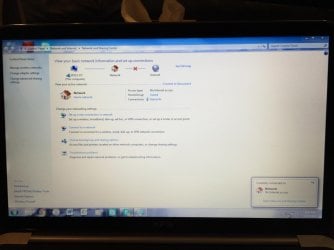
And nothing I do seems to matter. Opening the Network Sharing Center reveals only "Network", with the access type of "No internet access". I've rebooted the computer multiple times without any luck. It's not simply that my computer can't connect to any wireless networks - it can't *detect* any wireless networks. I'm hoping that I'm missing something really stupid and this is an easy fix. But I'm worried that this is a really serious problem. I've never had this kind of Internet connectivity problem before. Any advice anyone can provide me with would be greatly appreciated.
I've owned my Dell XPS 13 for about 3 years, no significant issues, it's worked great. Just before leaving my office - I take my computer back and forth between my home and office - I stepped away from the computer for a few minutes. When I came back I noticed no web sites were loading, and then noticed that the networking icon in the lower right-hand icon had the caution triangle. I didn't think much of it - I was about to leave the office anyway, and figured there was just a temporary problem with the Internet.
But I got home and pulled out the computer and the same caution triangle was still there. So I clicked on the networking icon and the pop-up window indicated: "Currently connected to: Network - No Internet access". This was strange - my home network didn't show up at all. My home network is working fine - other computers in the house, my iPad and iPhone are connecting normally. But no network is showing up at all. Neither is my phone's hotspot, which I turned on to test it.
And nothing I do seems to matter. Opening the Network Sharing Center reveals only "Network", with the access type of "No internet access". I've rebooted the computer multiple times without any luck. It's not simply that my computer can't connect to any wireless networks - it can't *detect* any wireless networks. I'm hoping that I'm missing something really stupid and this is an easy fix. But I'm worried that this is a really serious problem. I've never had this kind of Internet connectivity problem before. Any advice anyone can provide me with would be greatly appreciated.
My Computer
At a glance
Windows 7 Home Premium 64-bitIntel Core i5-2467M @ 1.60 GHz4.00 GB (3.33 usable)
- Computer type
- PC/Desktop
- Computer Manufacturer/Model Number
- Dell XPS 13 (L321X)
- OS
- Windows 7 Home Premium 64-bit
- CPU
- Intel Core i5-2467M @ 1.60 GHz
- Memory
- 4.00 GB (3.33 usable)