Network between 7 and XP lost?

Pauls898

New member
Local time
11:46 PM
Messages
18
Location
Worcestershire
I had a network set up between my Win 7 machine and a XP box, and was sharing whole HDD's ie M:/ D:/ and F:/ these are all data areas and not where either operating systems live. I had this set up using (Workgroups) on both machine and was able to read / write across machines in either direction with no problems.

Then after a while of use, I find first the one direction was blocked :mad:, now both are lost???? and I can't even "PING" my other machine?

Win 7 sees only ONE machine? itsself, on the network? from the XP end I get the two icons for the two machines, however clicking on the Win 7 machine brings back "Access Denied"

I have tried reseting my router to no avail, anybody know why this has just started to happen, and I didn't do or change anything? :(
 

My Computer

Computer Manufacturer/Model Number
Auss
OS
Windows 7
CPU
Intel
Motherboard
P5Q EPU
Memory
Kingston
Graphics Card(s)
Nvidia
Sound Card
HD Audio
Monitor(s) Displays
Dell + Panasonic PZ500 50inch
Hard Drives
2 x 1TB Cavalier Black
1 x 1TB Cavalier Green
PSU
Antec 450Watt Earthwatts
Case
Antec
Cooling
3 Case Fans Quite cool

My Computer

Computer Manufacturer/Model Number
Boxx
OS
Windows 7 Ultimate64
CPU
Intel Xeon X5355 @ 2.66Ghz (dual quad core)
Memory
8GB
Graphics Card(s)
Nvidia QuadroFX 4600
Sound Card
Sound Blaster X-Fi Xtreme Audio
Monitor(s) Displays
dual Dell 24 inch LCD
Hard Drives
single system/OS drive + Raid 0 dual drive
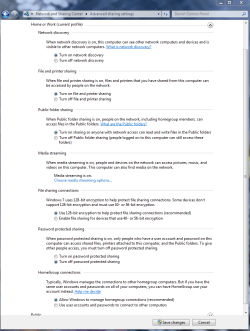
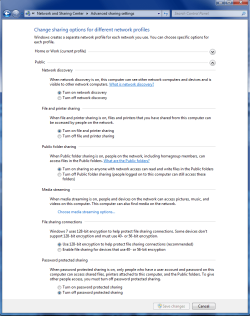
It might be worth checking under Advanced Sharing settings to see if anything changed. Those two Windows need to look like the pictures below.
 

Attachments

  • Home or work homegroup enable.PNG
    Home or work homegroup enable.PNG
    45 KB · Views: 150
  • public sharing enabled all.PNG
    public sharing enabled all.PNG
    39.7 KB · Views: 107

My Computer

Computer type
PC/Desktop
Computer Manufacturer/Model Number
Home built
OS
Windows 7 Ult, Windows 8.1 Pro,
CPU
Q9650-4.275GHz, E8600 4.5GHz, E6750-3.8GHz
Motherboard
Evga 780i FTW
Memory
G.Skill PC2 9600 1200Mhz 5 5 5 15 2T
Graphics Card(s)
GTX480
Sound Card
Asus Xonar D2
Monitor(s) Displays
HannsG
Screen Resolution
1680X1050
Hard Drives
GSkill Phoenix Pro 120GB SSD
PSU
ThermalTake Toughpower 1000Watt modular
Case
ThermalTake XaserV
Cooling
Xigmatek S1283
Keyboard
Logitech G15
Mouse
Logitech G9
Internet Speed
T1
Try checking your firewall.
 

My Computer

Computer Manufacturer/Model Number
Custom Built
OS
Windows 7 Ultimate 32bit
CPU
AMD Athlon II X2 250
Motherboard
ASRock N68C-S UCC
Memory
2GB DDR3
Graphics Card(s)
Intergrated GPU
Sound Card
Intergrated HD Audio
Monitor(s) Displays
Belinea
Screen Resolution
1024 by 768
Hard Drives
Maxtor S TM3320613AS SATA 320GB 7200RPM 3.5" HDD
PSU
Compaq 100W PSU (might upgrade to 500W for performance)
Case
iCute Server/Gaming Case
Cooling
AMD CPU Cooler included with CPU
Keyboard
Genius USB Keyboard
Mouse
Microsoft Basic Optical Mouse v2.0
Internet Speed
10MBps
Other Info
BELKIN G Wireless Router (no internet access but used for intranet).
I have those settings and my firewall is down. Doesn't fix it.
 

My Computer

Computer Manufacturer/Model Number
Boxx
OS
Windows 7 Ultimate64
CPU
Intel Xeon X5355 @ 2.66Ghz (dual quad core)
Memory
8GB
Graphics Card(s)
Nvidia QuadroFX 4600
Sound Card
Sound Blaster X-Fi Xtreme Audio
Monitor(s) Displays
dual Dell 24 inch LCD
Hard Drives
single system/OS drive + Raid 0 dual drive
Yes the same, I turned off Firewall and Anti Virus to no evail.

Funny thing is I can't even "Ping" my other machine, so something serious is blocking the traffic, although internet access is uneffected???
 

My Computer

Computer Manufacturer/Model Number
Auss
OS
Windows 7
CPU
Intel
Motherboard
P5Q EPU
Memory
Kingston
Graphics Card(s)
Nvidia
Sound Card
HD Audio
Monitor(s) Displays
Dell + Panasonic PZ500 50inch
Hard Drives
2 x 1TB Cavalier Black
1 x 1TB Cavalier Green
PSU
Antec 450Watt Earthwatts
Case
Antec
Cooling
3 Case Fans Quite cool
And I bet if you reboot your win7 machine, all is fine right?
 

My Computer

Computer Manufacturer/Model Number
Boxx
OS
Windows 7 Ultimate64
CPU
Intel Xeon X5355 @ 2.66Ghz (dual quad core)
Memory
8GB
Graphics Card(s)
Nvidia QuadroFX 4600
Sound Card
Sound Blaster X-Fi Xtreme Audio
Monitor(s) Displays
dual Dell 24 inch LCD
Hard Drives
single system/OS drive + Raid 0 dual drive
Sounds like the firewall is still blocking access to me. Once you toss a firewall and A/V into the mix problems will surely follow. Be suspecious of your A/V and firewall for they are surely the problem.
 

My Computer

Computer type
PC/Desktop
Computer Manufacturer/Model Number
Home built
OS
Windows 7 Ult, Windows 8.1 Pro,
CPU
Q9650-4.275GHz, E8600 4.5GHz, E6750-3.8GHz
Motherboard
Evga 780i FTW
Memory
G.Skill PC2 9600 1200Mhz 5 5 5 15 2T
Graphics Card(s)
GTX480
Sound Card
Asus Xonar D2
Monitor(s) Displays
HannsG
Screen Resolution
1680X1050
Hard Drives
GSkill Phoenix Pro 120GB SSD
PSU
ThermalTake Toughpower 1000Watt modular
Case
ThermalTake XaserV
Cooling
Xigmatek S1283
Keyboard
Logitech G15
Mouse
Logitech G9
Internet Speed
T1
did you install / uninstall anything prior to this issue? It could be a windows update that turned certain settings back 'on' automatically. simple file sharing turned off on your windows xp box? Same workgroup? ex: WORKGROUP Try sharing a single folder instead of entire drive? I'm not sure if you were attempting to access the "drive" by: \\computername\c$ or if you actually "shared" the drive itself (not secure btw)
 

My Computer

OS
7 Pro
This gets even more strange by the minute with no explaination I can think of?

I tried turning off the Norton Fire Wall and the Anti Virus - no joy

I tried Rebooting the router and ALL machines - No joy

Then

Turned off Win 7 machine and I simply un-pluged my network cable for 15 seconds, and reconected it....... re booted and ........

Working now ??????:p

Yes I share each "data" drive which contains my structured folders for Music, Photos, Videos and the like --- Thats the way I like to do it so its looks the same which ever machine I open them up on?

No keen on these Windows 7 Libraries, although I now also find those as well now listed on my XP box :mad:

Is there a way I can un-share those, but keep my shared drives?

Paul
 

My Computer

Computer Manufacturer/Model Number
Auss
OS
Windows 7
CPU
Intel
Motherboard
P5Q EPU
Memory
Kingston
Graphics Card(s)
Nvidia
Sound Card
HD Audio
Monitor(s) Displays
Dell + Panasonic PZ500 50inch
Hard Drives
2 x 1TB Cavalier Black
1 x 1TB Cavalier Green
PSU
Antec 450Watt Earthwatts
Case
Antec
Cooling
3 Case Fans Quite cool
The libraries are a bulk deal, share the library = all viewable. You'll have to manually unshare the library, then manually "share" (right click / sharing and security) the folder you wish to show.
 

My Computer

OS
7 Pro
Thanks

All sorted

Till Windows 7 decides to changes things again...... Because I certainaly didn't :mad:

We shall see ?
 

My Computer

Computer Manufacturer/Model Number
Auss
OS
Windows 7
CPU
Intel
Motherboard
P5Q EPU
Memory
Kingston
Graphics Card(s)
Nvidia
Sound Card
HD Audio
Monitor(s) Displays
Dell + Panasonic PZ500 50inch
Hard Drives
2 x 1TB Cavalier Black
1 x 1TB Cavalier Green
PSU
Antec 450Watt Earthwatts
Case
Antec
Cooling
3 Case Fans Quite cool
Wish I could share your joy...no deal for me.
 

My Computer

Computer Manufacturer/Model Number
Boxx
OS
Windows 7 Ultimate64
CPU
Intel Xeon X5355 @ 2.66Ghz (dual quad core)
Memory
8GB
Graphics Card(s)
Nvidia QuadroFX 4600
Sound Card
Sound Blaster X-Fi Xtreme Audio
Monitor(s) Displays
dual Dell 24 inch LCD
Hard Drives
single system/OS drive + Raid 0 dual drive
Back
Top