Network bridge issues.

trbewick

New member
Local time
10:41 AM
Messages
9
Location
Sacramento, CA
Hello, Sevenforums!
I'm having trouble with my internet connection on my desktop (with Windows 7). My desktop is pretty far away from my router so I have this old wireless PCI card installed on it. But I realized that I can use my laptop (with Vista) with a better wireless card (and overall better internet connection) as a network bridge to my desktop for a better connection (gaming, Youtube, etc.). It's worked out great for the past couple weeks that I've had my desktop back up and running, but now my desktop is showing that there is a local connection, but I cannot connect to the internet. I've restarted multiple times, reset the network bridge, reconnected to the internet entirely, and now the wireless card won't even connect to the internet anymore. Does anyone have any ideas? :confused:

Any help is much appreciated.
Thanks!
-trbewick
 

My Computer

OS
Windows 7
CPU
AMD Phenom II x4 925
Motherboard
MSI NF750-G55
Memory
4GB 1600 DDR3
Graphics Card(s)
NVIDIA GeForce GTS 250
Sound Card
Onboard sound
Monitor(s) Displays
Emprex Widescreen Monitor
Screen Resolution
1680 x 1050
Hard Drives
1TB Samsung SATA Hdd
160 GB Western Digital EIDE Hdd
PSU
~650 Watt (unknown brand)
Case
Cooler Master Elite Series
Cooling
2 120mm Fans
Keyboard
Saitek Cyborg Keyboard
Mouse
Microsoft Sidewinder v1
Internet Speed
SLOW.
I assume you used ICS on Vista to give internet access to the desktop? It is most likely just a small configuration to get your back up and going.
 

My Computer

OS
Windows 7
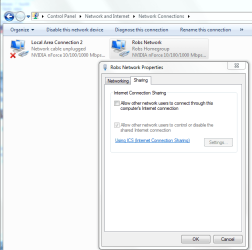
It sounds like you might need to have ICS enabled to share that bridged connection. I'm sure you checked here already?
 

Attachments

  • Enable ICS.PNG
    Enable ICS.PNG
    67 KB · Views: 292

My Computer

Computer type
PC/Desktop
Computer Manufacturer/Model Number
Home built
OS
Windows 7 Ult, Windows 8.1 Pro,
CPU
Q9650-4.275GHz, E8600 4.5GHz, E6750-3.8GHz
Motherboard
Evga 780i FTW
Memory
G.Skill PC2 9600 1200Mhz 5 5 5 15 2T
Graphics Card(s)
GTX480
Sound Card
Asus Xonar D2
Monitor(s) Displays
HannsG
Screen Resolution
1680X1050
Hard Drives
GSkill Phoenix Pro 120GB SSD
PSU
ThermalTake Toughpower 1000Watt modular
Case
ThermalTake XaserV
Cooling
Xigmatek S1283
Keyboard
Logitech G15
Mouse
Logitech G9
Internet Speed
T1
hi trbewick, how have you setup your desktop W7 to connect to the home network? If you want to use the laptop (which i assume has wireless working and internet access) to bridge the connections between, the desktop has to be connected to it. If you use cable, the instructions are in my sig. If you are using wireless for the desktop also, you need to first find a way to get ont he same network is the laptop. I canot remember enabling ICS during the time i made my tut in the sig though.
 

My Computer

Computer Manufacturer/Model Number
Lenovo ThinkPad T60
OS
Windows 7 Ultimate 64Bit
CPU
GenuineIntel Intel(R) Core(TM) DuoCore T2400 @ 1.83GHz
Motherboard
Intel(R) 82801G (ICH7 Family)
Memory
2.00 GB
Graphics Card(s)
Mobile Intel(R) 945 Express Chipset
Sound Card
SoundMAX Integrated Digital HD Audio
Monitor(s) Displays
ThinkPad Display
Screen Resolution
1400x1050
Hard Drives
100Gb SATA
Keyboard
Standard Keyboard
Mouse
HID-compliant Mouse
Internet Speed
Cable Broadband - 54Mbps
Other Info
Intel(R) PRO/1000 PL Network Connection
11a/b/g Wireless LAN Mini PCI Express Adapter
Hey guys, sorry for the late response. I have had ICS enabled already, and there's nothing. Last night I was messing around with settings and it worked after around 3 hours of tinkering.

EDIT:
But I turned on my computer and it wasn't working. :cry:
@aem:
I'm going to try your tutorial in a few seconds here, I'll post the results when I'm finished.
 

My Computer

OS
Windows 7
CPU
AMD Phenom II x4 925
Motherboard
MSI NF750-G55
Memory
4GB 1600 DDR3
Graphics Card(s)
NVIDIA GeForce GTS 250
Sound Card
Onboard sound
Monitor(s) Displays
Emprex Widescreen Monitor
Screen Resolution
1680 x 1050
Hard Drives
1TB Samsung SATA Hdd
160 GB Western Digital EIDE Hdd
PSU
~650 Watt (unknown brand)
Case
Cooler Master Elite Series
Cooling
2 120mm Fans
Keyboard
Saitek Cyborg Keyboard
Mouse
Microsoft Sidewinder v1
Internet Speed
SLOW.
Ok aem, I've done everything in your tutorial up until step 7. When I attempt to bridge the connection, there's a network error. Is this normal? Do I continue with the next step, or did I do something wrong? Thanks
 

My Computer

OS
Windows 7
CPU
AMD Phenom II x4 925
Motherboard
MSI NF750-G55
Memory
4GB 1600 DDR3
Graphics Card(s)
NVIDIA GeForce GTS 250
Sound Card
Onboard sound
Monitor(s) Displays
Emprex Widescreen Monitor
Screen Resolution
1680 x 1050
Hard Drives
1TB Samsung SATA Hdd
160 GB Western Digital EIDE Hdd
PSU
~650 Watt (unknown brand)
Case
Cooler Master Elite Series
Cooling
2 120mm Fans
Keyboard
Saitek Cyborg Keyboard
Mouse
Microsoft Sidewinder v1
Internet Speed
SLOW.
What did the error said?
 

My Computer

Computer Manufacturer/Model Number
Lenovo ThinkPad T60
OS
Windows 7 Ultimate 64Bit
CPU
GenuineIntel Intel(R) Core(TM) DuoCore T2400 @ 1.83GHz
Motherboard
Intel(R) 82801G (ICH7 Family)
Memory
2.00 GB
Graphics Card(s)
Mobile Intel(R) 945 Express Chipset
Sound Card
SoundMAX Integrated Digital HD Audio
Monitor(s) Displays
ThinkPad Display
Screen Resolution
1400x1050
Hard Drives
100Gb SATA
Keyboard
Standard Keyboard
Mouse
HID-compliant Mouse
Internet Speed
Cable Broadband - 54Mbps
Other Info
Intel(R) PRO/1000 PL Network Connection
11a/b/g Wireless LAN Mini PCI Express Adapter
Huh, I just tried it again and there was no error... So I guess I'll just keep going.
 

My Computer

OS
Windows 7
CPU
AMD Phenom II x4 925
Motherboard
MSI NF750-G55
Memory
4GB 1600 DDR3
Graphics Card(s)
NVIDIA GeForce GTS 250
Sound Card
Onboard sound
Monitor(s) Displays
Emprex Widescreen Monitor
Screen Resolution
1680 x 1050
Hard Drives
1TB Samsung SATA Hdd
160 GB Western Digital EIDE Hdd
PSU
~650 Watt (unknown brand)
Case
Cooler Master Elite Series
Cooling
2 120mm Fans
Keyboard
Saitek Cyborg Keyboard
Mouse
Microsoft Sidewinder v1
Internet Speed
SLOW.
Make sure you select the correct connections to bridge. The highlights in step 7 is not the correct two connections.
 

My Computer

Computer Manufacturer/Model Number
Lenovo ThinkPad T60
OS
Windows 7 Ultimate 64Bit
CPU
GenuineIntel Intel(R) Core(TM) DuoCore T2400 @ 1.83GHz
Motherboard
Intel(R) 82801G (ICH7 Family)
Memory
2.00 GB
Graphics Card(s)
Mobile Intel(R) 945 Express Chipset
Sound Card
SoundMAX Integrated Digital HD Audio
Monitor(s) Displays
ThinkPad Display
Screen Resolution
1400x1050
Hard Drives
100Gb SATA
Keyboard
Standard Keyboard
Mouse
HID-compliant Mouse
Internet Speed
Cable Broadband - 54Mbps
Other Info
Intel(R) PRO/1000 PL Network Connection
11a/b/g Wireless LAN Mini PCI Express Adapter
Well anyway, did the final step and it didn't connect, but I restarted and it works fine :D thanks!
 

My Computer

OS
Windows 7
CPU
AMD Phenom II x4 925
Motherboard
MSI NF750-G55
Memory
4GB 1600 DDR3
Graphics Card(s)
NVIDIA GeForce GTS 250
Sound Card
Onboard sound
Monitor(s) Displays
Emprex Widescreen Monitor
Screen Resolution
1680 x 1050
Hard Drives
1TB Samsung SATA Hdd
160 GB Western Digital EIDE Hdd
PSU
~650 Watt (unknown brand)
Case
Cooler Master Elite Series
Cooling
2 120mm Fans
Keyboard
Saitek Cyborg Keyboard
Mouse
Microsoft Sidewinder v1
Internet Speed
SLOW.
Make sure you select the correct connections to bridge. The highlights in step 7 is not the correct two connections.

Well I knew which ones to bridge seeing as I only had 2 connections: the wired and wireless ones :D
 

My Computer

OS
Windows 7
CPU
AMD Phenom II x4 925
Motherboard
MSI NF750-G55
Memory
4GB 1600 DDR3
Graphics Card(s)
NVIDIA GeForce GTS 250
Sound Card
Onboard sound
Monitor(s) Displays
Emprex Widescreen Monitor
Screen Resolution
1680 x 1050
Hard Drives
1TB Samsung SATA Hdd
160 GB Western Digital EIDE Hdd
PSU
~650 Watt (unknown brand)
Case
Cooler Master Elite Series
Cooling
2 120mm Fans
Keyboard
Saitek Cyborg Keyboard
Mouse
Microsoft Sidewinder v1
Internet Speed
SLOW.
Sometimes the cables or the ports gets jammed with cockoroaches' poo. I should have mentioned in the tut this, and will warrant a restart.

Solved it is :)
 

My Computer

Computer Manufacturer/Model Number
Lenovo ThinkPad T60
OS
Windows 7 Ultimate 64Bit
CPU
GenuineIntel Intel(R) Core(TM) DuoCore T2400 @ 1.83GHz
Motherboard
Intel(R) 82801G (ICH7 Family)
Memory
2.00 GB
Graphics Card(s)
Mobile Intel(R) 945 Express Chipset
Sound Card
SoundMAX Integrated Digital HD Audio
Monitor(s) Displays
ThinkPad Display
Screen Resolution
1400x1050
Hard Drives
100Gb SATA
Keyboard
Standard Keyboard
Mouse
HID-compliant Mouse
Internet Speed
Cable Broadband - 54Mbps
Other Info
Intel(R) PRO/1000 PL Network Connection
11a/b/g Wireless LAN Mini PCI Express Adapter
Back
Top