Network Controller Driver Not Working

MysteryGamer987

New member
Local time
10:13 PM
Messages
4
Network Controller Driver Not Working (Fixed)

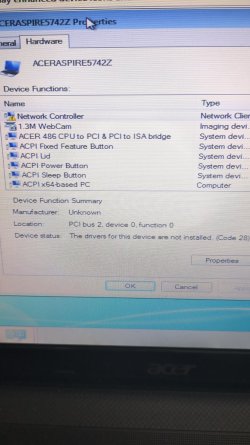
My Windows 7 Laptop Was Recently Updated To Windows 10, But Then Decided It Was Too Laggy On My Laptop So Clean Installed Windows 7 .But Now Can't Connect To The Internet As The Network Controller Driver ls Missing. I've Tried The Acer Website But It Gives Me Acer Updater Which Recognises Nothing Wrong. Also Tried Manually Installing Drivers But That Still Resulted In An Error. Ethernet Says It Works But Won't Let Me Search On Internet. Can Someone Please Help Me.

Laptop: Acer Aspire 5742Z
Windows Version: 7 Ultimate
eobe0fhcn8jd1.jpg
Devices List

vdsuopmcn8jd1.jpg
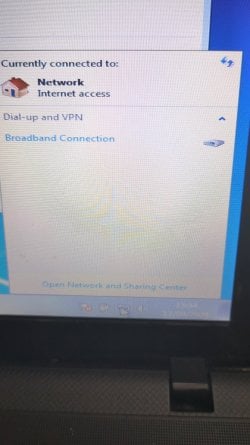
Showing Can't Connect To Network (Connected To Ethernet At That Moment In Time But IE Still Doesn't Work)
 
Last edited:

My Computers

System One System Two

  • OS
    Windows 7 Ultimate/Home Premium
  • Computer type
    PC/Desktop
You could try Snappy to see if it can find a driver for you. It is faster if you use the Lite version. If you can't because you don't have a network connection then you will have to download the Full version which is quite large.

Snappy Download
Download

Snappy versions:
Lite (5.1MB) - Network required
Full (35.0GB) - Offline
 

My Computers

System One System Two

  • Computer type
    PC/Desktop
    Computer Manufacturer/Model Number
    Custom build
    OS
    Windows 7 Home Premium 64-bits
    CPU
    AMD FX-8350
    Motherboard
    Gigabyte GA-990FXA-UD3 (AM3+)
    Memory
    GSKILL Ripjaw-X PC3 12800 8GB (2x4GB)
    Graphics Card(s)
    ASUS ROG STRIX GTX 1060 6GB
    Sound Card
    Integrated
    Monitor(s) Displays
    Asus VE228H (21.5-in)
    Screen Resolution
    1920x1080 60Hz
    Hard Drives
    SAMSUNG 870 EVO 2.5 Inch SATA SSD (1TB)
    SAMSUNG 870 EVO 2.5 Inch SATA SSD (1TB)
    SAMSUNG 870 EVO 2.5 Inch SATA SSD (1TB)
    PSU
    Corsair RM750x (750 watts)
    Case
    Corsair Carbide Series 200R
    Cooling
    Corsair Hydro Series H60 (CWCH60)
    Keyboard
    Logitech Elite
    Mouse
    Logitech M510 Wireless Mouse
    Internet Speed
    Comcast Gigabit Extra (1200Mbps down / 35Mbps up)
    Antivirus
    Malwarebytes
    Browser
    Firefox, Edge, Chrome
    Other Info
    ASUS DRW-24B1ST DVD-RW (24X) optical drive
    Seagate Expansion Desk (5TB) external SATA/USB HDD
    Comcast XB8 Internet Gateway
  • Computer type
    PC/Desktop
    System Manufacturer/Model Number
    Custom
    OS
    Windows 7 Pro (64-bit)
    CPU
    AMD Phenom II 960T X4
    Motherboard
    ASUS M4N82 Deluxe
    Memory
    Corsair XMS2 DDR2-800 8GB (4x2GB)
    Graphics Card(s)
    ASUS ENGTX560 DCII OC/2DI/1GD5 1GB
    Monitor(s) Displays
    Samsung 930B 19-inch LCD
    Screen Resolution
    1280x1024
    Hard Drives
    Samsung SSD 870 EVO 1000 GB (Windows 10)
    Seagate ST1000DM003 1000 GB (Windows 7)
    PSU
    Antec TruePower (new) TP-650
    Case
    Antec Three Hundred
    Cooling
    AMD stock cooler from FX8350
    Mouse
    Logitech M100
    Internet Speed
    Xfinity Gigabit Extra 1200/35 Mbps
You could try Snappy to see if it can find a driver for you. It is faster if you use the Lite version. If you can't because you don't have a network connection then you will have to download the Full version which is quite large.

Snappy Download
Download

Snappy versions:
Lite (5.1MB) - Network required
Full (35.0GB) - Offline

Thank You, Ethernet Now Works

- - - Updated - - -

Just Ran Windows Update Through Ethernet And It Fixed The Issue, Thanks For All The Help 👍
 

My Computers

System One System Two

  • OS
    Windows 7 Ultimate/Home Premium
  • Computer type
    PC/Desktop
Back
Top