Network error

pinniger

New member
Local time
5:08 AM
Messages
10
For some reason I am not able to transfer large files to my Windows Home Server (home build). The file will start to transfer then just stop and error out.

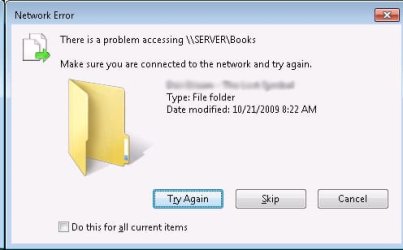
The error message says Network Error: There is a problem accessing \\server\folder.

This is on a wired connection so I dont know why it would just be dropping the connection. I can still surf the internet fine during this time.

Realtek RTL8169/8100 network cart, cat5e cable, 10/100 netgear 24 port unmanaged switch, WRT54GL router(tomato firmware). NICs are set to auto negotiate.

Any ideas what could be causing this?

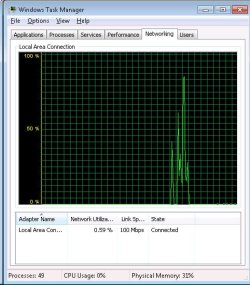
I attached a screen shot of the error message and network monitor.
 

Attachments

  • em.jpg
    em.jpg
    35.5 KB · Views: 51
  • tm.jpg
    tm.jpg
    73.7 KB · Views: 17

My Computer

Computer Manufacturer/Model Number
self built
OS
windows 7
CPU
q6600
Motherboard
abit IP35 pro
Memory
4 gig
Graphics Card(s)
GTS8600
Out of curiosity, rather than "pushing" the file from your computer to yoru server. Log into the server and try pulling the file from your workstation.

This will rule out several things!

Tom
 

My Computer

Computer Manufacturer/Model Number
HP EliteBook Mobile Workstation 8730W
OS
Windows 7 Ultimate x64 RTM
CPU
Core 2 Duo 2.8 GHz
Memory
4GB
Graphics Card(s)
Quadro FX 2700M
Monitor(s) Displays
17" WUXGA
Screen Resolution
1920 x 1200
Hard Drives
320GB
Ok, this is weird. I'm on the server "pulling" the files. It does *almost* the same thing.

It will sit at the "file copy dialog box" that says 5 min remaining for like 7-8 minutes. Then will start transferring for a few seconds, then stop again, the do the same thing over and over. It never gives me an error message though, like when I was on the windows 7 machine.

Another thing to note. I have transferred files fine using my windows xp laptop over a wireless connection. I mean, it took a while, but it was wireless, so i was expecting it.

Also, my WHS backups never fail either, and I believe that is transferring quite a bit of data.
 

My Computer

Computer Manufacturer/Model Number
self built
OS
windows 7
CPU
q6600
Motherboard
abit IP35 pro
Memory
4 gig
Graphics Card(s)
GTS8600
Are you running a software firewall on either your WHS machine or your Windows 7 one? If so try temporarily disabling these and see if this makes any difference. It's certainly a strange problem I will give you that!

How big are the files that you are trying to transfer?

Tom
 

My Computer

Computer Manufacturer/Model Number
HP EliteBook Mobile Workstation 8730W
OS
Windows 7 Ultimate x64 RTM
CPU
Core 2 Duo 2.8 GHz
Memory
4GB
Graphics Card(s)
Quadro FX 2700M
Monitor(s) Displays
17" WUXGA
Screen Resolution
1920 x 1200
Hard Drives
320GB
Something else to possibly try is to:

- Share the folder containing the file you want to transfer from your Windows 7 machine.

- Mount this share as a drive using WHS (give the share a dedicated drive letter).

- Try transfering the file from this network drive, and if that fails,
- Try to copy the file via the command line.

A little long winded I know but if any of this works, it may help to get a little bit closer to the ultimate solution to your problem.

Tom
 

My Computer

Computer Manufacturer/Model Number
HP EliteBook Mobile Workstation 8730W
OS
Windows 7 Ultimate x64 RTM
CPU
Core 2 Duo 2.8 GHz
Memory
4GB
Graphics Card(s)
Quadro FX 2700M
Monitor(s) Displays
17" WUXGA
Screen Resolution
1920 x 1200
Hard Drives
320GB
The only firewall I'm running is the one with windows 7. Disabling this was the first thing that I tried, didn't help though.

I'm also running Microsoft Security Essentials, I can't find an easy way to disable this, so I guess I'll try uninstalling it.

The windows home server is the default install with the exception of Whiis add-on and 2-1tb external usb 2.0 hard drives added.

I'm try to transfer an audio book. A folder of about 135 mp3s and they are all about 7.5 mb, so nothing to huge
 

My Computer

Computer Manufacturer/Model Number
self built
OS
windows 7
CPU
q6600
Motherboard
abit IP35 pro
Memory
4 gig
Graphics Card(s)
GTS8600
I'm by no means an expert at WHS so hopefully somebody else may be willing to advise you further if a problem with this is causing your copying issue.

I'll be interested to hear if MSE makes any difference once you have uninstalled it.

Are all of your network drivers etc up to date. Can't seem to figure this one out - really strange problem!

Tom
 

My Computer

Computer Manufacturer/Model Number
HP EliteBook Mobile Workstation 8730W
OS
Windows 7 Ultimate x64 RTM
CPU
Core 2 Duo 2.8 GHz
Memory
4GB
Graphics Card(s)
Quadro FX 2700M
Monitor(s) Displays
17" WUXGA
Screen Resolution
1920 x 1200
Hard Drives
320GB
ok, I tried copying the files via command line, from my win7 machine(pushing), and after a while it said, "The specified domain is no longer available".
 

My Computer

Computer Manufacturer/Model Number
self built
OS
windows 7
CPU
q6600
Motherboard
abit IP35 pro
Memory
4 gig
Graphics Card(s)
GTS8600
I would suggest a DNS error, but then one would think that once a file has started copying accross the network the DNS resolution is completed.

I don't know ANYTHING about Tomato firmware routers but could this be the issue? Try turning it off and on again - and yes, I hate myself for saying that :D
 

My Computer

Computer Manufacturer/Model Number
HP EliteBook Mobile Workstation 8730W
OS
Windows 7 Ultimate x64 RTM
CPU
Core 2 Duo 2.8 GHz
Memory
4GB
Graphics Card(s)
Quadro FX 2700M
Monitor(s) Displays
17" WUXGA
Screen Resolution
1920 x 1200
Hard Drives
320GB
I had updated all nic drivers, my pc has two nic cards, and I've tried both ports as well. I uninstalled MSE, rebooted my router.

still getting the "The specified domain is no longer available" via command line.

It must be the DNS I guess. I have both the WHS and win7 machine set as static IPs though.
 

My Computer

Computer Manufacturer/Model Number
self built
OS
windows 7
CPU
q6600
Motherboard
abit IP35 pro
Memory
4 gig
Graphics Card(s)
GTS8600
Can the Tomato firmware router act as a DHCP server? It may be enabled and shouldn't be.

I would leave a static IP on the WHS server, and install the DHCP service onto it. Then let your Windows 7 machine pick up it's IP address from your server.

I'm assuming here that WHS can act as a DHCP server - but as I said, It's not really my strongpoint at all!
 

My Computer

Computer Manufacturer/Model Number
HP EliteBook Mobile Workstation 8730W
OS
Windows 7 Ultimate x64 RTM
CPU
Core 2 Duo 2.8 GHz
Memory
4GB
Graphics Card(s)
Quadro FX 2700M
Monitor(s) Displays
17" WUXGA
Screen Resolution
1920 x 1200
Hard Drives
320GB
I have tried playing with pretty much all of my network settings, nothing seems to help. The log below was created with a program called "Performance Pinging". Its copying a 5Mbyte file to my WHS over and over. Does this help at all?

Oct27, 09:10:47, 463ms, 86.39 MBit/s
Oct27, 09:10:57, 459ms, 87.15 MBit/s
Oct27, 09:11:07, 459ms, 87.15 MBit/s
Oct27, 09:11:17, 459ms, 87.15 MBit/s
Oct27, 09:11:27, 459ms, 87.15 MBit/s
Oct27, 09:11:37, 459ms, 87.15 MBit/s
Oct27, 09:11:47, 521ms, 76.78 MBit/s
Oct27, 09:11:57, 459ms, 87.15 MBit/s
Oct27, 09:12:07, 459ms, 87.15 MBit/s
Oct27, 09:12:17, 458ms, 87.34 MBit/s
Oct27, 09:12:27, 459ms, 87.15 MBit/s
Oct27, 09:12:37, 459ms, 87.15 MBit/s
Oct27, 09:12:47, 459ms, 87.15 MBit/s
Oct27, 09:12:57, 459ms, 87.15 MBit/s
Oct27, 09:13:07, 459ms, 87.15 MBit/s
Oct27, 09:13:17, 458ms, 87.34 MBit/s
Oct27, 09:13:27, 458ms, 87.34 MBit/s
Oct27, 09:13:37, 459ms, 87.15 MBit/s
Oct27, 09:13:47, 458ms, 87.34 MBit/s
Oct27, 09:13:57, 532ms, 75.19 MBit/s
Oct27, 09:14:07, 563ms, 71.05 MBit/s
Oct27, 09:14:17, 579ms, 69.08 MBit/s
Oct27, 09:14:27, 23126ms, 1.73 MBit/s
Oct27, 09:14:51, 607ms, 65.9 MBit/s
Oct27, 09:14:57, 561ms, 71.3 MBit/s
Oct27, 09:15:07, 459ms, 87.15 MBit/s
Oct27, 09:15:17, 459ms, 87.15 MBit/s
Oct27, 09:15:27, 459ms, 87.15 MBit/s
Oct27, 09:15:37, 459ms, 87.15 MBit/s
Oct27, 09:15:47, 459ms, 87.15 MBit/s
Oct27, 09:15:57, 459ms, 87.15 MBit/s
Oct27, 09:16:07, 459ms, 87.15 MBit/s
Oct27, 09:16:17, 458ms, 87.34 MBit/s
Oct27, 09:16:27, 458ms, 87.34 MBit/s
Oct27, 09:16:37, 459ms, 87.15 MBit/s
Oct27, 09:16:47, 459ms, 87.15 MBit/s
Oct27, 09:16:57, 459ms, 87.15 MBit/s
Oct27, 09:17:07, 532ms, 75.19 MBit/s
Oct27, 09:17:17, 459ms, 87.15 MBit/s
Oct27, 09:17:27, 459ms, 87.15 MBit/s
Oct27, 09:17:37, 459ms, 87.15 MBit/s
Oct27, 09:17:47, 458ms, 87.34 MBit/s
Oct27, 09:17:57, 459ms, 87.15 MBit/s
Oct27, 09:18:07, 459ms, 87.15 MBit/s
Oct27, 09:18:17, 458ms, 87.34 MBit/s
Oct27, 09:18:27, 458ms, 87.34 MBit/s
Oct27, 09:18:37, 458ms, 87.34 MBit/s
Oct27, 09:18:47, 459ms, 87.15 MBit/s
Oct27, 09:18:57, 459ms, 87.15 MBit/s
Oct27, 09:19:07, 458ms, 87.34 MBit/s
Oct27, 09:19:17, 521ms, 76.78 MBit/s
Oct27, 09:19:27, 459ms, 87.15 MBit/s
Oct27, 09:19:37, 459ms, 87.15 MBit/s
Oct27, 09:19:47, 458ms, 87.34 MBit/s
Oct27, 09:19:57, 458ms, 87.34 MBit/s
Oct27, 09:20:07, 459ms, 87.15 MBit/s
Oct27, 09:20:17, 459ms, 87.15 MBit/s
Oct27, 09:20:27, 459ms, 87.15 MBit/s
Oct27, 09:20:37, 459ms, 87.15 MBit/s
Oct27, 09:20:47, 458ms, 87.34 MBit/s
Oct27, 09:20:57, 459ms, 87.15 MBit/s
Oct27, 09:21:07, 459ms, 87.15 MBit/s
Oct27, 09:21:17, 459ms, 87.15 MBit/s
Oct27, 09:21:27, 537ms, 74.49 MBit/s
Oct27, 09:21:37, 459ms, 87.15 MBit/s
Oct27, 09:21:47, 459ms, 87.15 MBit/s
Oct27, 09:21:57, 459ms, 87.15 MBit/s
Oct27, 09:22:07, 459ms, 87.15 MBit/s
Oct27, 09:22:17, 458ms, 87.34 MBit/s
Oct27, 09:22:27, 458ms, 87.34 MBit/s
Oct27, 09:22:37, 459ms, 87.15 MBit/s
Oct27, 09:22:47, 459ms, 87.15 MBit/s
Oct27, 09:22:57, 458ms, 87.34 MBit/s
Oct27, 09:23:07, 459ms, 87.15 MBit/s
Oct27, 09:23:17, 459ms, 87.15 MBit/s
Oct27, 09:23:27, 458ms, 87.34 MBit/s
Oct27, 09:23:37, 528ms, 75.76 MBit/s
Oct27, 09:23:47, 458ms, 87.34 MBit/s
Oct27, 09:23:57, 459ms, 87.15 MBit/s
Oct27, 09:24:07, 460ms, 86.96 MBit/s
Oct27, 09:24:17, 459ms, 87.15 MBit/s
Oct27, 09:24:27, 460ms, 86.96 MBit/s
Oct27, 09:24:37, 459ms, 87.15 MBit/s
Oct27, 09:24:47, 458ms, 87.34 MBit/s
Oct27, 09:24:57, 458ms, 87.34 MBit/s
Oct27, 09:25:07, 460ms, 86.96 MBit/s
Oct27, 09:25:17, 459ms, 87.15 MBit/s
Oct27, 09:25:27, 458ms, 87.34 MBit/s
Oct27, 09:25:37, 459ms, 87.15 MBit/s
Oct27, 09:25:47, 535ms, 74.77 MBit/s
Oct27, 09:25:57, 458ms, 87.34 MBit/s
Oct27, 09:26:07, 458ms, 87.34 MBit/s
Oct27, 09:26:17, 460ms, 86.96 MBit/s
Oct27, 09:26:27, 458ms, 87.34 MBit/s
Oct27, 09:26:37, 458ms, 87.34 MBit/s
Oct27, 09:26:47, 458ms, 87.34 MBit/s
Oct27, 09:26:57, 459ms, 87.15 MBit/s

 

My Computer

Computer Manufacturer/Model Number
self built
OS
windows 7
CPU
q6600
Motherboard
abit IP35 pro
Memory
4 gig
Graphics Card(s)
GTS8600
Ok, so I just figured out that I can copy a 3 gig file with no problems from the WHS to the client machine. But when I try to copy the same file from the client machine to the WHS, it errors.
 

My Computer

Computer Manufacturer/Model Number
self built
OS
windows 7
CPU
q6600
Motherboard
abit IP35 pro
Memory
4 gig
Graphics Card(s)
GTS8600
I replaced the NIC in the server last night. I'm still having the same problem. When I watch the the transfer with a packet sniffer (wireshark) it says there is a tcp offload error?
 

My Computer

Computer Manufacturer/Model Number
self built
OS
windows 7
CPU
q6600
Motherboard
abit IP35 pro
Memory
4 gig
Graphics Card(s)
GTS8600
For any Googlers out there, it was the switch.
 

My Computer

Computer Manufacturer/Model Number
self built
OS
windows 7
CPU
q6600
Motherboard
abit IP35 pro
Memory
4 gig
Graphics Card(s)
GTS8600
Same issues here.... was it the switch hardware or the switch's firmware?

Please let me know,
James
 

My Computer

OS
win7
I dont know, I'm having the same problem again. I've tried everything. Next step is replacing the primary hard drive in the WHS. But I havent had time to replace it yet.
 

My Computer

Computer Manufacturer/Model Number
self built
OS
windows 7
CPU
q6600
Motherboard
abit IP35 pro
Memory
4 gig
Graphics Card(s)
GTS8600
I dont know, I'm having the same problem again. I've tried everything. Next step is replacing the primary hard drive in the WHS. But I havent had time to replace it yet.

Couple of things....

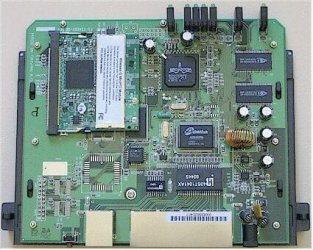
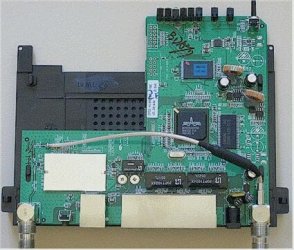
Yes, the Linksys WRT54G V5 Really Is a Lousy Router

A year and a half back I ended up replacing several of these, at my own expense, just to put an end to the mess they were making of people's home networks.


In your registry for every Win7 machine...

HKEY_LOCAL_MACHINE\system\currentcontrolset\services\lanmanserver\parameters

Set "Size" = 3

Otherwise there's some kind of bizarro cap on network file sizes... You wouldn't believe the havoc this caused with downloads, backups etc, until someone else tweaked me on to it.
 

My Computer

Computer Manufacturer/Model Number
Homebrew
OS
XP Pro SP3 X86 / Win7 Pro X86
CPU
Amd 64 x2 4200 (2.4ghz)
Motherboard
Asus M2N-MX SE Plus
Memory
Kingston DDR2 800 2gb
Graphics Card(s)
Nvidia GF-8400
Sound Card
Realtek on Motherboard
Monitor(s) Displays
Acer x-193bw
Screen Resolution
1440 x 900
Hard Drives
Western Digital 500g
PSU
350watt In-Win
Case
In-Win
Cooling
Air
Keyboard
yes
Mouse
yes
Internet Speed
5mpbs
Other Info
Also ASRock ION 330 as HTPC (on XP).
Acer Aspire as GP netbook (on XP).

My Computer

Computer Manufacturer/Model Number
Home built
OS
Windows 7 Ultimate 32 bit
CPU
Intel(R) Pentium(R) 4 CPU 3.00GHz
Motherboard
ASUS P4P800-VM Motherboard Chipset: Intel 865G + ICH5
Memory
2.50 GB RAM
Graphics Card(s)
NVIDIA GeForce 7600 GS
Sound Card
SoundMax Integrated Digital Audio (Chip)
Monitor(s) Displays
ViewSonic VX 1962 wm
Screen Resolution
1680 X 1050
Hard Drives
Seagate Barracuda 7200.10 80 GB
ST380215A ATA Device 18.6 GB
Western Digital "My Book" external hard drive 750 GB
Cooling
Fan based
Keyboard
Microsoft Comfort Curve Keyboard 2000 v10 USB
Mouse
Logitec optic USB
Internet Speed
3.01 Mb/s download 0.64 Mb/s upload

I was put onto it by a friend who's a ham radio operator... He tore one apart and found it to be totally unshielded with absolutely no rf bypassing anywhere. Thing was wiping him completely off the 2 meter local chat band... He was causing it to reboot every time he keyed his transmitter ... and no, they were not in the same house!

Tom's hardware panned it. This Small Network guy panned it.

Yet there are literally thousands of them in this area... thanks to big box stores selling them at $29.95 just before Christmas.

netproblem4.jpg

netproblem3.jpg
 

My Computer

Computer Manufacturer/Model Number
Homebrew
OS
XP Pro SP3 X86 / Win7 Pro X86
CPU
Amd 64 x2 4200 (2.4ghz)
Motherboard
Asus M2N-MX SE Plus
Memory
Kingston DDR2 800 2gb
Graphics Card(s)
Nvidia GF-8400
Sound Card
Realtek on Motherboard
Monitor(s) Displays
Acer x-193bw
Screen Resolution
1440 x 900
Hard Drives
Western Digital 500g
PSU
350watt In-Win
Case
In-Win
Cooling
Air
Keyboard
yes
Mouse
yes
Internet Speed
5mpbs
Other Info
Also ASRock ION 330 as HTPC (on XP).
Acer Aspire as GP netbook (on XP).
Back
Top