Network icon missing from system tray

EarlZ

New member
Member
VIP
Local time
4:22 AM
Messages
146
Sometimes when i reboot my PC the Network system tray icon would go missing, checking the notifications at control panel shows that network icon is unselectable and is at off, rebooting several times fixes the problem though, anyone know whats causing this ?
 

My Computer

OS
Windows 7 Ultimate X64 RTM
CPU
Q6600 @ 3.4Ghz
Motherboard
Abit IP35-E
Memory
8GB DDR2-800
Graphics Card(s)
GTX285 1GB
Sound Card
Creative X-Fi Extreme Music
Monitor(s) Displays
Samsung T220
Hard Drives
Samsung F1 Spinpoint 1TB
PSU
Silverstone Zues 750ZF
Case
Lian Li PC-P80
Cooling
Thermalright Ultra 120-Extreme
Will post a picture to show you how to restore it
 

My Computer

OS
OS
After click on a little triangle choose customize...
 
Last edited by a moderator:

My Computer

OS
OS
Just a heads up - you can drag and drop the icons in and out of the hidden/visible areas.
 
Reading the OP - hidden/shown is not the limit of concern - "checking the notifications at control panel shows that network icon is unselectable and is at off"

I do not exactly understand what that means. Can you clarify EarlZ?
 

My Computer

OS
Windows 7 Ultimate X64 RTM
CPU
Q6600 @ 3.4Ghz
Motherboard
Abit IP35-E
Memory
8GB DDR2-800
Graphics Card(s)
GTX285 1GB
Sound Card
Creative X-Fi Extreme Music
Monitor(s) Displays
Samsung T220
Hard Drives
Samsung F1 Spinpoint 1TB
PSU
Silverstone Zues 750ZF
Case
Lian Li PC-P80
Cooling
Thermalright Ultra 120-Extreme
Reading the OP - hidden/shown is not the limit of concern - "checking the notifications at control panel shows that network icon is unselectable and is at off"

I do not exactly understand what that means. Can you clarify EarlZ?


This is annoying, Ive done 3 reboots and it isnt back.. usually it gets fixed after a reboot.
 

My Computer

OS
Windows 7 Ultimate X64 RTM
CPU
Q6600 @ 3.4Ghz
Motherboard
Abit IP35-E
Memory
8GB DDR2-800
Graphics Card(s)
GTX285 1GB
Sound Card
Creative X-Fi Extreme Music
Monitor(s) Displays
Samsung T220
Hard Drives
Samsung F1 Spinpoint 1TB
PSU
Silverstone Zues 750ZF
Case
Lian Li PC-P80
Cooling
Thermalright Ultra 120-Extreme
Sometimes, that happens to me too. I just restart and the icon comes back. Anyway, even if the network icon is missing, you are still connected to the internet, and if you need to access the Network and Sharing Center, you can do so via Control Panel.
 

My Computer

Computer Manufacturer/Model Number
Toshiba Satellite M205-S4806
OS
Windows 7 Home Premium x64
CPU
Intel(R) Core(TM)2 Duo CPU T5450 @ 1.66GHz
Memory
4 GB Texas Instruments PCIxx12 Integrated FlashMedia Control
Graphics Card(s)
Mobile Intel(R) 965 Express Chipset Family
Sound Card
Realtek HD Audio
Monitor(s) Displays
Laptop Monitor
Screen Resolution
1280x800
Hard Drives
200 GB Hitachi HTS542520K9SA00 ATA Device
Keyboard
Laptop Keyboard
Mouse
Synaptics Touchpad
Internet Speed
Broadband, up to 1.2 MB/s
OP, are you using a Desktop, or Laptop? What model of network card is in there, and have you installed the latest card specific drivers?

~Lordbob
 

My Computer

Computer Manufacturer/Model Number
Hera
OS
Windows 7 Ultimate x64, Mint 9
CPU
Intel i5-2500k
Motherboard
ASUS P8P67 Pro
Memory
2x 4Gb Corsair VENGEANCE DDR3-1600
Graphics Card(s)
NVidia GeForce N260GTX Twin Frozr
Sound Card
Realtek HD OnBoard Audio
Monitor(s) Displays
ASUS 24" Monitor
Screen Resolution
1920x1080
Hard Drives
G.SKILL Phoenix Series 60GB SATA II MLC Internal Solid State Drive (SSD)
SAMSUNG Spinpoint F3R 1TB 7200 RPM 32MB Cache SATA II
PSU
Cooler Master Real Power Pro 750W
Case
Cooler Master Haf 932
Cooling
Fans
Keyboard
Razer Tarantula
Mouse
Razer Lachesis
Internet Speed
not fast enough
Sometimes, that happens to me too. I just restart and the icon comes back. Anyway, even if the network icon is missing, you are still connected to the internet, and if you need to access the Network and Sharing Center, you can do so via Control Panel.

you should still be connected it's just not showing the icon. i too have problems sometimes with icons not appearing (NOD32 especially) but even tho there's no icon, the program is still running
 

My Computer

Computer Manufacturer/Model Number
tw33k
OS
Windows 7 Ultimate (x64) SP1
CPU
Intel 3770k 4.6GHz
Motherboard
ASUS Maximus V Formula
Memory
8GB (2x 4GB) Crucial Ballistix
Graphics Card(s)
Sapphire 7950 (1060/1600)
Sound Card
On Board Realtek HD Audio
Monitor(s) Displays
27" Acer B273HU (via HDMI)
Screen Resolution
2048 x 1152
Hard Drives
Crucial M4 128GB
2TB WD Black
1TB Samsung F3 SATA
1TB WD Elite External
2TB WD USB 3.0
PSU
Corsair AX750 Gold
Case
Corsair Obsidian 800DW
Cooling
Corsair H100 (2x AP-121/2x UK-3000 push/pull)
Keyboard
Microsoft Wireless 5000
Mouse
Microsoft Wireless 5000
Internet Speed
5mb/s
Other Info
Logitech z-2300 2.1 speakers
Lamptron FC-5 v2

My Computer

Computer type
PC/Desktop
Computer Manufacturer/Model Number
Self built custom
OS
64-bit Windows 11 Pro for Workstations
CPU
Intel i7-8700K OC'd to 5 GHz
Motherboard
ASUS ROG Maximus XI Formula Z390
Memory
64 GB (4x16GB) G.SKILL TridentZ RGB DDR4 3600 MHz
Graphics Card(s)
ASUS ROG-STRIX-GTX1080TI-O11G-GAMING
Sound Card
Integrated
Monitor(s) Displays
2 x Samsung Odyssey G7 27"
Screen Resolution
2560x1440
Hard Drives
1TB Samsung 990 PRO M.2,
4TB Samsung 990 PRO PRO M.2,
TerraMaster F8 SSD Plus NAS
PSU
Seasonic Prime Titanium 850W
Case
Thermaltake Core P3
Cooling
Corsair Hydro H115i
Keyboard
Logitech wireless K800
Mouse
Logitech MX Master 4
Internet Speed
2 Gb/s Download and 100 Mb/s Upload
Antivirus
Malwarebyte Anti-Malware Premium
Browser
Google Chrome
Other Info
Logitech Z625 speaker system,
Logitech BRIO 4K Pro webcam,
HP Color LaserJet Pro MFP M477fdn,
APC SMART-UPS RT 1000 XL - SURT1000XLI,
Galaxy S23 Plus phone
OP, are you using a Desktop, or Laptop? What model of network card is in there, and have you installed the latest card specific drivers?

~Lordbob


Desktop, specs on the specs list. Yes I have the latest drivers that is specific for windows 7 on my LAN card.


you should still be connected it's just not showing the icon. i too have problems sometimes with icons not appearing (NOD32 especially) but even tho there's no icon, the program is still running

Yeah im connected, but some how i find this little bug annoying. I've also experienced the Nod32 icon gone missing once. None of these issues were present in vista though.


Everything is set to " Not Configured ". I'll change it to disabled for now and see if it prevents this bug from happening.
 

My Computer

OS
Windows 7 Ultimate X64 RTM
CPU
Q6600 @ 3.4Ghz
Motherboard
Abit IP35-E
Memory
8GB DDR2-800
Graphics Card(s)
GTX285 1GB
Sound Card
Creative X-Fi Extreme Music
Monitor(s) Displays
Samsung T220
Hard Drives
Samsung F1 Spinpoint 1TB
PSU
Silverstone Zues 750ZF
Case
Lian Li PC-P80
Cooling
Thermalright Ultra 120-Extreme
Desktop, specs on the specs list. Yes I have the latest drivers that is specific for windows 7 on my LAN card.
That does not tell me what your card is....
How does it connect to the desktop? Like, PCI, USB, what?

~Lordbob
 

My Computer

Computer Manufacturer/Model Number
Hera
OS
Windows 7 Ultimate x64, Mint 9
CPU
Intel i5-2500k
Motherboard
ASUS P8P67 Pro
Memory
2x 4Gb Corsair VENGEANCE DDR3-1600
Graphics Card(s)
NVidia GeForce N260GTX Twin Frozr
Sound Card
Realtek HD OnBoard Audio
Monitor(s) Displays
ASUS 24" Monitor
Screen Resolution
1920x1080
Hard Drives
G.SKILL Phoenix Series 60GB SATA II MLC Internal Solid State Drive (SSD)
SAMSUNG Spinpoint F3R 1TB 7200 RPM 32MB Cache SATA II
PSU
Cooler Master Real Power Pro 750W
Case
Cooler Master Haf 932
Cooling
Fans
Keyboard
Razer Tarantula
Mouse
Razer Lachesis
Internet Speed
not fast enough
That does not tell me what your card is....
How does it connect to the desktop? Like, PCI, USB, what?

~Lordbob

It does, Im using the onboard that comes with the Abit IP35-E its a Marvel 88E8056. Im not sure what this has to do with the LAN card though.
 

My Computer

OS
Windows 7 Ultimate X64 RTM
CPU
Q6600 @ 3.4Ghz
Motherboard
Abit IP35-E
Memory
8GB DDR2-800
Graphics Card(s)
GTX285 1GB
Sound Card
Creative X-Fi Extreme Music
Monitor(s) Displays
Samsung T220
Hard Drives
Samsung F1 Spinpoint 1TB
PSU
Silverstone Zues 750ZF
Case
Lian Li PC-P80
Cooling
Thermalright Ultra 120-Extreme
It went missing again ~_~
 

My Computer

OS
Windows 7 Ultimate X64 RTM
CPU
Q6600 @ 3.4Ghz
Motherboard
Abit IP35-E
Memory
8GB DDR2-800
Graphics Card(s)
GTX285 1GB
Sound Card
Creative X-Fi Extreme Music
Monitor(s) Displays
Samsung T220
Hard Drives
Samsung F1 Spinpoint 1TB
PSU
Silverstone Zues 750ZF
Case
Lian Li PC-P80
Cooling
Thermalright Ultra 120-Extreme
It does, Im using the onboard that comes with the Abit IP35-E its a Marvel 88E8056. Im not sure what this has to do with the LAN card though.
OK, you are not using wireless? Is it connected to a hard line, or is it a built in wireless?

~Lordbob
 

My Computer

Computer Manufacturer/Model Number
Hera
OS
Windows 7 Ultimate x64, Mint 9
CPU
Intel i5-2500k
Motherboard
ASUS P8P67 Pro
Memory
2x 4Gb Corsair VENGEANCE DDR3-1600
Graphics Card(s)
NVidia GeForce N260GTX Twin Frozr
Sound Card
Realtek HD OnBoard Audio
Monitor(s) Displays
ASUS 24" Monitor
Screen Resolution
1920x1080
Hard Drives
G.SKILL Phoenix Series 60GB SATA II MLC Internal Solid State Drive (SSD)
SAMSUNG Spinpoint F3R 1TB 7200 RPM 32MB Cache SATA II
PSU
Cooler Master Real Power Pro 750W
Case
Cooler Master Haf 932
Cooling
Fans
Keyboard
Razer Tarantula
Mouse
Razer Lachesis
Internet Speed
not fast enough
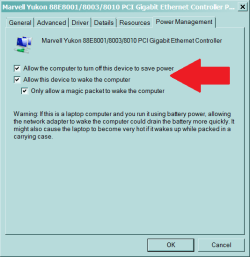
Disable both of these. Test. Reset if necessary.
 

Attachments

  • Capture.PNG
    Capture.PNG
    11.2 KB · Views: 236

My Computer

OS
Windows 7 Ultimate X64 RTM
CPU
Q6600 @ 3.4Ghz
Motherboard
Abit IP35-E
Memory
8GB DDR2-800
Graphics Card(s)
GTX285 1GB
Sound Card
Creative X-Fi Extreme Music
Monitor(s) Displays
Samsung T220
Hard Drives
Samsung F1 Spinpoint 1TB
PSU
Silverstone Zues 750ZF
Case
Lian Li PC-P80
Cooling
Thermalright Ultra 120-Extreme
Back
Top