Network icon taskbar slow boot

sachi89

New member
Member
Local time
8:15 PM
Messages
46
Location
Bengaluru
I'm using Win 7 Ultimate. When my latop starting, icon network on tray very slow load! This ring icon often frozen on two minute. Somone can hepl me fix this one! Thank for support!

i tried removin reinstalling network card drivers and changing "netsh interface tcp set global autotuninglevel" stuff too....
 

My Computer

Computer Manufacturer/Model Number
HP
OS
windows 7 home premium x64
CPU
[email protected]
Motherboard
hp 1658
Memory
6gb
Screen Resolution
1366*768
Hello,

Is this a wired or wireless connection issue?
 

My Computer

Computer Manufacturer/Model Number
Lenovo Desktop/Samsung Laptop
OS
Win7 & Win8 64bit
CPU
Intel i5
Internet Speed
Charter-20 Mbps
Antivirus
Avast
Browser
FF, IE9 and Chrome
of course its a weird network issue i guess!!!
 

My Computer

Computer Manufacturer/Model Number
HP
OS
windows 7 home premium x64
CPU
[email protected]
Motherboard
hp 1658
Memory
6gb
Screen Resolution
1366*768
I'd assume you meant wired network issue, typo? :D
of course its a weird network issue
Try unplugging the network cable from the router's ethernet port and plug it in to a different ethernet port.

Also, make sure that your LAN setting is set to auto IP configuration.
Change TCP/IP settings

Another update of your progress will be appreciated.
 

My Computer

Computer Manufacturer/Model Number
Lenovo Desktop/Samsung Laptop
OS
Win7 & Win8 64bit
CPU
Intel i5
Internet Speed
Charter-20 Mbps
Antivirus
Avast
Browser
FF, IE9 and Chrome
I'd assume you meant wired network issue, typo? :D
of course its a weird network issue
Try unplugging the network cable from the router's ethernet port and plug it in to a different ethernet port.

Also, make sure that your LAN setting is set to auto IP configuration.
Change TCP/IP settings

Another update of your progress will be appreciated.

its already set to automatic!!!sorry i meant wired.....is there something else we can do?the ring revolves around 5mins after the start up!!! :cry:
 

My Computer

Computer Manufacturer/Model Number
HP
OS
windows 7 home premium x64
CPU
[email protected]
Motherboard
hp 1658
Memory
6gb
Screen Resolution
1366*768
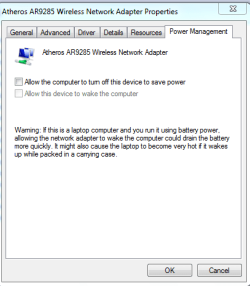
Try disabling the Network Adapter's Power Management from Device Manager, please see attached file. Have you also updated the driver to the latest?
 

Attachments

  • Power Management.PNG
    Power Management.PNG
    28.7 KB · Views: 3

My Computer

Computer Manufacturer/Model Number
Lenovo Desktop/Samsung Laptop
OS
Win7 & Win8 64bit
CPU
Intel i5
Internet Speed
Charter-20 Mbps
Antivirus
Avast
Browser
FF, IE9 and Chrome
Try disabling the Network Adapter's Power Management from Device Manager, please see attached file. Have you also updated the driver to the latest?

yes i did exactly as u said!!!driver is updated too...stil its d same...
 

My Computer

Computer Manufacturer/Model Number
HP
OS
windows 7 home premium x64
CPU
[email protected]
Motherboard
hp 1658
Memory
6gb
Screen Resolution
1366*768
Back
Top