Network map wrong after sleep

imaddicted2u

New member
Local time
8:38 PM
Messages
47
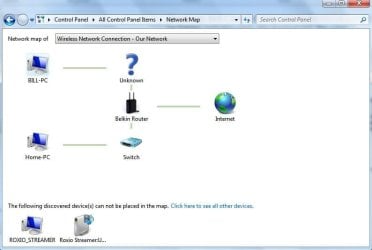
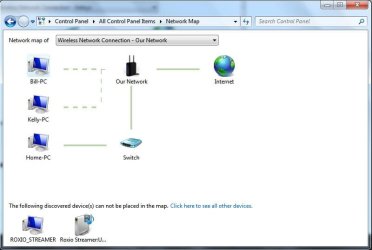
Network map is ok prior to pc sleep. After sleep map shows a ? mark and wireless pc shows as wired. Disable/reenable network adapter restores correct map until next sleep. See attachments. Can this be fixed?
 

Attachments
  • diasble enable wireless network adapter.JPG
    diasble enable wireless network adapter.JPG
    40.2 KB · Views: 14
  • aftersleep.JPG
    aftersleep.JPG
    37.4 KB · Views: 9

My Computer

Computer type
PC/Desktop
Computer Manufacturer/Model Number
HP DV5 Laptop
OS
Microsoft Windows 7 Ultimate 64-bit 7601 Multiprocessor Free Service Pack 1
CPU
AMD Turion(tm) X2 Ultra Dual-Core Mobile ZM-80
Motherboard
Quanta 3600
Memory
3.00 GB
Graphics Card(s)
ATI Mobility Radeon HD 3400 Series
Sound Card
(1) AMD High Definition Audio Device (2) Bluetooth Hands-f
Screen Resolution
1280 x 800 x 32 bits (4294967296 colors) @ 59 Hz
Hard Drives
(1) ST1000LM024 HN-M101MBB ATA Device (2) JMCR SD/MMC SCSI Disk Device
If you do a search around these forums, you'll find a lot of issues relating to Windows 7 and sleep mode. I would personally suggest simply shutting the machine down and powering it back on, rather than putting it to sleep.
 

My Computer

Computer Manufacturer/Model Number
HP 6000 Pro Micro Tower
OS
W7 Professional x64
CPU
Core 2 Duo 2.93
Memory
2 GB
Graphics Card(s)
ATI Radeon 4695
Monitor(s) Displays
Two HP 17's
Hard Drives
150GB Sata Drive
Case
Tiny. Kinda cute.
Keyboard
HP Supplied. Surprisingly nice.
Mouse
Gateway Mouse from an E2610D
Internet Speed
45 mbps
I never turn it off, it goes to sleep on its own and I'd like to keep it that way.
I just thought there would be a fix. It's not a big issue but bugs bug me.
 

My Computer

Computer type
PC/Desktop
Computer Manufacturer/Model Number
HP DV5 Laptop
OS
Microsoft Windows 7 Ultimate 64-bit 7601 Multiprocessor Free Service Pack 1
CPU
AMD Turion(tm) X2 Ultra Dual-Core Mobile ZM-80
Motherboard
Quanta 3600
Memory
3.00 GB
Graphics Card(s)
ATI Mobility Radeon HD 3400 Series
Sound Card
(1) AMD High Definition Audio Device (2) Bluetooth Hands-f
Screen Resolution
1280 x 800 x 32 bits (4294967296 colors) @ 59 Hz
Hard Drives
(1) ST1000LM024 HN-M101MBB ATA Device (2) JMCR SD/MMC SCSI Disk Device
For the general health of the machine, I would suggest turning it off from time to time, for extended periods of time (i.e: before you go to bed). In the long run, it's a lot easier on the hardware of the machine than leaving it continually running.

However, I'm afraid that, to the best of my knowledge there's no real solution to your predicament.
 

My Computer

Computer Manufacturer/Model Number
HP 6000 Pro Micro Tower
OS
W7 Professional x64
CPU
Core 2 Duo 2.93
Memory
2 GB
Graphics Card(s)
ATI Radeon 4695
Monitor(s) Displays
Two HP 17's
Hard Drives
150GB Sata Drive
Case
Tiny. Kinda cute.
Keyboard
HP Supplied. Surprisingly nice.
Mouse
Gateway Mouse from an E2610D
Internet Speed
45 mbps
Thanks, I'll keep looking.
 

My Computer

Computer type
PC/Desktop
Computer Manufacturer/Model Number
HP DV5 Laptop
OS
Microsoft Windows 7 Ultimate 64-bit 7601 Multiprocessor Free Service Pack 1
CPU
AMD Turion(tm) X2 Ultra Dual-Core Mobile ZM-80
Motherboard
Quanta 3600
Memory
3.00 GB
Graphics Card(s)
ATI Mobility Radeon HD 3400 Series
Sound Card
(1) AMD High Definition Audio Device (2) Bluetooth Hands-f
Screen Resolution
1280 x 800 x 32 bits (4294967296 colors) @ 59 Hz
Hard Drives
(1) ST1000LM024 HN-M101MBB ATA Device (2) JMCR SD/MMC SCSI Disk Device
Back
Top