Network not connecting with 3 bars

ivanyhy

New member
Local time
4:45 AM
Messages
6
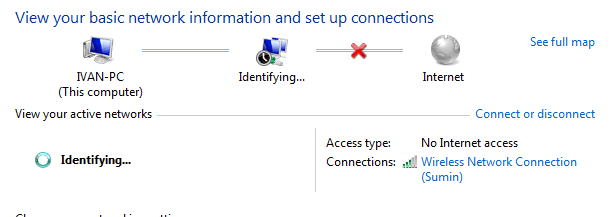
I recently upgraded my HP g60 notebook from vista home premium x64 to windows 7 home premium x64, and am experiencing network troubles. Before the upgrade my computer would connect to the internet fine from my room. However after the upgrade, I can barely connect from my room, most of the time not at all. The only way I cant connect to the internet is if I'm really close to the router. Also my room is about 35 to 40 feet from the router. I don't understand how this works, and network and sharing center says I have a fair connection (3 out of 5 bars). Can anyone help? I have some pictures as well.
 

Attachments
  • Capture.PNG
    Capture.PNG
    7.2 KB · Views: 5
  • Capture1.PNG
    Capture1.PNG
    15.5 KB · Views: 3
  • capture3.PNG
    capture3.PNG
    21.8 KB · Views: 7
  • Capture4.PNG
    Capture4.PNG
    15.8 KB · Views: 6
Last edited:

My Computer

OS
Windows 7 Home Premium x64
I recently upgraded my HP g60 notebook from vista home premium x64 to windows 7 home premium x64, and am experiencing network troubles. Before the upgrade my computer would connect to the internet fine from my room. However after the upgrade, I can barely connect from my room, most of the time not at all. The only way I cant connect to the internet is if I'm really close to the router. Also my room is about 35 to 40 feet from the router. I don't understand how this works, and network and sharing center says I have a fair connection (3 out of 5 bars). Can anyone help? I have some pictures as well.


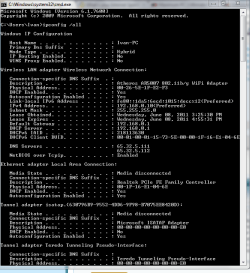
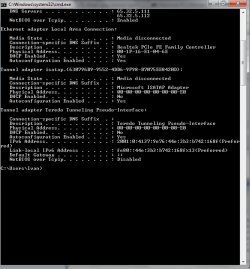
Please run ipconfig /all and upload the output.

Start>cmd>ipconfig /all
 

My Computer

Computer Manufacturer/Model Number
HP Pavillion dv-7 1005 Tx
OS
Win 8 Release candidate 8400
CPU
[email protected]
Memory
4 gigs
Graphics Card(s)
Nvidia 9600M
Sound Card
HD built-in
Monitor(s) Displays
17" Wxga
Screen Resolution
1440x900
Cooling
none
Internet Speed
45Mb down 5Mb up
I recently upgraded my HP g60 notebook from vista home premium x64 to windows 7 home premium x64, and am experiencing network troubles. Before the upgrade my computer would connect to the internet fine from my room. However after the upgrade, I can barely connect from my room, most of the time not at all. The only way I cant connect to the internet is if I'm really close to the router. Also my room is about 35 to 40 feet from the router. I don't understand how this works, and network and sharing center says I have a fair connection (3 out of 5 bars). Can anyone help? I have some pictures as well.


Please run ipconfig /all and upload the output.

Start>cmd>ipconfig /all

Done.
 

My Computer

OS
Windows 7 Home Premium x64
I recently upgraded my HP g60 notebook from vista home premium x64 to windows 7 home premium x64, and am experiencing network troubles. Before the upgrade my computer would connect to the internet fine from my room. However after the upgrade, I can barely connect from my room, most of the time not at all. The only way I cant connect to the internet is if I'm really close to the router. Also my room is about 35 to 40 feet from the router. I don't understand how this works, and network and sharing center says I have a fair connection (3 out of 5 bars). Can anyone help? I have some pictures as well.


Please run ipconfig /all and upload the output.

Start>cmd>ipconfig /all


Done.


And the output that we need to see?
 

My Computer

Computer Manufacturer/Model Number
HP Pavillion dv-7 1005 Tx
OS
Win 8 Release candidate 8400
CPU
[email protected]
Memory
4 gigs
Graphics Card(s)
Nvidia 9600M
Sound Card
HD built-in
Monitor(s) Displays
17" Wxga
Screen Resolution
1440x900
Cooling
none
Internet Speed
45Mb down 5Mb up

My Computer

Computer Manufacturer/Model Number
HP Pavillion dv-7 1005 Tx
OS
Win 8 Release candidate 8400
CPU
[email protected]
Memory
4 gigs
Graphics Card(s)
Nvidia 9600M
Sound Card
HD built-in
Monitor(s) Displays
17" Wxga
Screen Resolution
1440x900
Cooling
none
Internet Speed
45Mb down 5Mb up
sorry it should be done now.

Is the wifi encrypted?

do any other computers work on that network?

Yes wifi is encrypted, and other computers do work.

Turn off encryption to check

Is there a wifi driver installed in device manager?

Please go to start>search>type device manager. (for Win 7 and Vista)

Are there any "unknown devices" with yellow triangles on them?
Is you driver there , listed, and working?

If your driver is missing, or there is a yellow triangle on it, you will need to update it.
 

My Computer

Computer Manufacturer/Model Number
HP Pavillion dv-7 1005 Tx
OS
Win 8 Release candidate 8400
CPU
[email protected]
Memory
4 gigs
Graphics Card(s)
Nvidia 9600M
Sound Card
HD built-in
Monitor(s) Displays
17" Wxga
Screen Resolution
1440x900
Cooling
none
Internet Speed
45Mb down 5Mb up
Is the wifi encrypted?

do any other computers work on that network?

Yes wifi is encrypted, and other computers do work.

Turn off encryption to check

Is there a wifi driver installed in device manager?

Please go to start>search>type device manager. (for Win 7 and Vista)

Are there any "unknown devices" with yellow triangles on them?
Is you driver there , listed, and working?

If your driver is missing, or there is a yellow triangle on it, you will need to update it.

Everything is where it should be.
 

My Computer

OS
Windows 7 Home Premium x64
Yes wifi is encrypted, and other computers do work.

Turn off encryption to check

Is there a wifi driver installed in device manager?

Please go to start>search>type device manager. (for Win 7 and Vista)

Are there any "unknown devices" with yellow triangles on them?
Is you driver there , listed, and working?

If your driver is missing, or there is a yellow triangle on it, you will need to update it.

Everything is where it should be.

And encryption???? does it connect with it off? what malware app, what firewall?
 

My Computer

Computer Manufacturer/Model Number
HP Pavillion dv-7 1005 Tx
OS
Win 8 Release candidate 8400
CPU
[email protected]
Memory
4 gigs
Graphics Card(s)
Nvidia 9600M
Sound Card
HD built-in
Monitor(s) Displays
17" Wxga
Screen Resolution
1440x900
Cooling
none
Internet Speed
45Mb down 5Mb up
Super antispyware and avg free 2011. works without encryption
 

My Computer

OS
Windows 7 Home Premium x64
Hello,

Do you have the latest firmware for your router? If not, you may download it from the manufacturer's site, make sure to use a wired connection to install the firmware.

Also, please install and run Xirrus Wi-Fi Inspector.
Click on the 'Show Networks' to display all wireless networks on the xirrus icon on your desktop of if you have one running in a corner. Tap the Printscreen key on your keyboard, open up Paint then choose Edit from the Menu and select Paste, then SAVE it. Upload and attached it here.

An update will be nice.
 

My Computer

Computer Manufacturer/Model Number
Lenovo Desktop/Samsung Laptop
OS
Win7 & Win8 64bit
CPU
Intel i5
Internet Speed
Charter-20 Mbps
Antivirus
Avast
Browser
FF, IE9 and Chrome
Back
Top