
Network OK with cables, no network with wi-fi

TKoshta

New member
Local time
9:24 PM
Messages
3
Work just relocated and got a bunch more computers and equipment and a new internet provider so we couldn't use the simple wi-fi modem any more to connect us to each other and the internet.
The computers are all windows machines, and are running XP, 7, 8, and 10 systems.

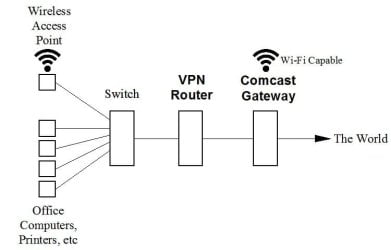
I am including a drawing of how the network is setup.

When we are connected by the building network cables, we can all see and access each other and the office equipment. The network is great.

When someone has to unplug and go wi-fi to use their computer somewhere in the building that doesn't have cables, they cannot see anything on the network but can see the internet fine. Doesn't matter if they use the Wireless Access Point or the Comcast wi-fi.

I have searched and searched and tried many things but cannot get anyone on wi-fi to see the network.

All networks are Work networks, and all computers are in the same Workgroup.

If anyone can help, thanks!
 

Attachments
  • Network1.JPG
    Network1.JPG
    19.6 KB · Views: 0

My Computer My Computer

Computer type
PC/Desktop
OS
Windows 7 Home 64 bit
That's because your WiFi is more than likely on a different subnet , You need your IT guy to share the WiFi with the Lan.
 

My Computer My Computer

Computer type
PC/Desktop
Computer Manufacturer/Model Number
Compac
OS
Microsoft Windows 7 Ultimate 32-bit 7601
CPU
Intel(R) Pentium(R) Dual CPU E2160 @ 1.80GHz
Motherboard
MSI Boston
Memory
4.00 GB
Graphics Card(s)
(1) VNC Mirror Driver (2) Intel(R) G33/G31 Express Chipset
Sound Card
Disabled
Monitor(s) Displays
Headless
Screen Resolution
1280 x 960 x 32 bits (4294967296 colors) @ 60 Hz
Hard Drives
ST3320820AS ATA Device
Keyboard
Headless
Mouse
Headless
Antivirus
Malwarebytes pro
Other Info
Also
Windows 8.1 Laptop and Desktop both Acer
What would that entail? Could you elaborate a bit more?
 

My Computer My Computer

Computer type
PC/Desktop
OS
Windows 7 Home 64 bit
What routers are you using, make and model

A business trying to save money by not properly protecting their network is a recipe for disaster, I honestly think you should hire someone that knows what they are doing.

When I say disaster it includes lost productivity or even worse someone hacking into your network and stealing every penny the company has.
 

My Computer My Computer

Computer type
PC/Desktop
Computer Manufacturer/Model Number
Compac
OS
Microsoft Windows 7 Ultimate 32-bit 7601
CPU
Intel(R) Pentium(R) Dual CPU E2160 @ 1.80GHz
Motherboard
MSI Boston
Memory
4.00 GB
Graphics Card(s)
(1) VNC Mirror Driver (2) Intel(R) G33/G31 Express Chipset
Sound Card
Disabled
Monitor(s) Displays
Headless
Screen Resolution
1280 x 960 x 32 bits (4294967296 colors) @ 60 Hz
Hard Drives
ST3320820AS ATA Device
Keyboard
Headless
Mouse
Headless
Antivirus
Malwarebytes pro
Other Info
Also
Windows 8.1 Laptop and Desktop both Acer
Thanks for the advice. Everything is good to go, we really just need to know what numbers need to match for the wi-fi to see the network.
Another discovery is that computers using the same wi-fi connection can see each other. They are like closed universes and we just need to know what numbers to match up to let them see everything.
 

My Computer My Computer

Computer type
PC/Desktop
OS
Windows 7 Home 64 bit
And again
What routers are you using, make and model

If you don't know the answer to that don't bother with a reply
 

My Computer My Computer

Computer type
PC/Desktop
Computer Manufacturer/Model Number
Compac
OS
Microsoft Windows 7 Ultimate 32-bit 7601
CPU
Intel(R) Pentium(R) Dual CPU E2160 @ 1.80GHz
Motherboard
MSI Boston
Memory
4.00 GB
Graphics Card(s)
(1) VNC Mirror Driver (2) Intel(R) G33/G31 Express Chipset
Sound Card
Disabled
Monitor(s) Displays
Headless
Screen Resolution
1280 x 960 x 32 bits (4294967296 colors) @ 60 Hz
Hard Drives
ST3320820AS ATA Device
Keyboard
Headless
Mouse
Headless
Antivirus
Malwarebytes pro
Other Info
Also
Windows 8.1 Laptop and Desktop both Acer
Back
Top