
- Local time
- 4:29 PM
- Messages
- 661
Every time I try to figure this out, I spent half an hour or more Googling, reading posts people have made - and give up, defeated. Maybe someone will be able to help me resolve this? (I think I posted here a long while ago on this subject, but cannot find the thread: it didn't sort things out in any case).
I have two PCs and a laptop linked on my home network. One PC ('PC 2') and the laptop see other each both ways without any password window popping up: I can share files.
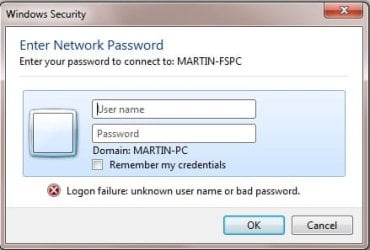
It's the other PC ('PC 1') which presents the problem: it can be seen by the PC 2 and the laptop, and I can transfer files that way; but if I try to access PC 2 from PC 1, I get a password box up, as below. If I access the laptop from PC 1 though, no password box comes up and again, I can access folders and files there. It's just PC 1 to PC 2 that doesn't work. I don't know which of the PCs is causing the 'blockage', either.
All three are on the same workgroup name. Problem also is, I have no idea what I am supposed to enter as the password and user name... lots of tutorials on the net saying you should look at this or that tab on Properties box or whatever, but those tabs or options don't seem to be there when I try (which I why I have always given up).
The two PCs multiboot: one between Windows 7 and Windows 10, the other Windows 7 and Windows XP. The laptop only has Windows 10. But the issue isn't with the different versions of Windows: the PC in question, PC 1, on Win7 or XP, links to the laptop (Win10) just fine, but it won't open folders on the PC 2, whether the latter is booted into Win7 or Win10.
All folders have correct sharing options set, with full permissions, and set for 'Everyone'.Also all computers set not to use passworded connections in the network options..
Maybe if I knew what to fill in in the window that appears...
Thanks for any help with this. Don't know what else to try.
Martin
I have two PCs and a laptop linked on my home network. One PC ('PC 2') and the laptop see other each both ways without any password window popping up: I can share files.
It's the other PC ('PC 1') which presents the problem: it can be seen by the PC 2 and the laptop, and I can transfer files that way; but if I try to access PC 2 from PC 1, I get a password box up, as below. If I access the laptop from PC 1 though, no password box comes up and again, I can access folders and files there. It's just PC 1 to PC 2 that doesn't work. I don't know which of the PCs is causing the 'blockage', either.
All three are on the same workgroup name. Problem also is, I have no idea what I am supposed to enter as the password and user name... lots of tutorials on the net saying you should look at this or that tab on Properties box or whatever, but those tabs or options don't seem to be there when I try (which I why I have always given up).
The two PCs multiboot: one between Windows 7 and Windows 10, the other Windows 7 and Windows XP. The laptop only has Windows 10. But the issue isn't with the different versions of Windows: the PC in question, PC 1, on Win7 or XP, links to the laptop (Win10) just fine, but it won't open folders on the PC 2, whether the latter is booted into Win7 or Win10.
All folders have correct sharing options set, with full permissions, and set for 'Everyone'.Also all computers set not to use passworded connections in the network options..
Maybe if I knew what to fill in in the window that appears...
Thanks for any help with this. Don't know what else to try.
Martin
Attachments
My Computer
At a glance
Windows 7 Home Premium SP1 64-bitIntel Core i7-4790K CPU @ 4.5GHz16GB KINGSTON HYPER-X FURY DUAL-DDR3 1600MHz8GB NVIDIA GEFORCE GTX 1070
- Computer type
- PC/Desktop
- Computer Manufacturer/Model Number
- Custom Build
- OS
- Windows 7 Home Premium SP1 64-bit
- CPU
- Intel Core i7-4790K CPU @ 4.5GHz
- Motherboard
- Asus H97I-PLUS
- Memory
- 16GB KINGSTON HYPER-X FURY DUAL-DDR3 1600MHz
- Graphics Card(s)
- 8GB NVIDIA GEFORCE GTX 1070
- Monitor(s) Displays
- HannsG 28" & Dell 24"
- Screen Resolution
- 1920x1200
- Hard Drives
- 1 x 2TB Samsung Evo 860 SSD
2 x 500GB Samsung Evo 850 SSD
- PSU
- CORSAIR 650W CS SERIES
- Case
- Thermaltake Core V1 Mini ITX Cube
- Cooling
- NOCTUA NH-L12
- Browser
- Firefox
- Other Info
- Custom PC used for X-Plane 11


