
Hello. I am new to this forum so please bear with me if I make a few mistakes. I have a problem that I have researched extensively online, but all the posts are quite old, so I will start a new one.
Basically, the situation is this: I have three computers on a Private home network – one Toshiba laptop running Vista, one HP desktop running Vista, and one HP laptop running Windows 7 Professional. All three are running Norton Security Suite and the firewalls are configured identically. All computers are set up with Network Discovery On and Public File Sharing On. Password Protection is turned off since I have the same User account and password on all three machines. All three computers were on the network, could see each other on the Network map and could access the shared Public folders.
Then I was having some problems with the Toshiba booting slowly and some applications hanging on startup. So, I took it in to the Geek Squad for repair. They removed some viruses, cleaned the registry, and installed some unspecified updates. When I picked up the computer, most of the issues I was having were improved (although not completely eliminated). However, there was one significant problem that had been introduced. That problem is summarized below:
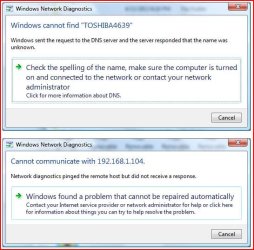
1. Even though Network Discovery is turned on with the Toshiba4639, the two other computers can see the Toshiba on the Network map, but they cannot ping the Toshiba IP address and when they try to open it to see the shared folders, they get following messages:

2. “Windows cannot find “Toshiba4639.
Windows sent the request to the DNS server and the server responded that the name was unknown. “
The Error Code is 0x80070035.
3. The Toshiba can see, ping, and access all shared folders on the other two computers.
4. I have checked all Services running on the three computers and all seem to be in order.
5. The Geek Squad has been out twice and have tried all their tricks including removing Norton Security Suite, replacing the router, and connecting the Toshiba directly to the router via Ethernet. Nothing has resolved the problem.
That is all the information I have. Hopefully someone out there has experienced this problem and has found a solution that works for me. Thanks for your help.
Basically, the situation is this: I have three computers on a Private home network – one Toshiba laptop running Vista, one HP desktop running Vista, and one HP laptop running Windows 7 Professional. All three are running Norton Security Suite and the firewalls are configured identically. All computers are set up with Network Discovery On and Public File Sharing On. Password Protection is turned off since I have the same User account and password on all three machines. All three computers were on the network, could see each other on the Network map and could access the shared Public folders.
Then I was having some problems with the Toshiba booting slowly and some applications hanging on startup. So, I took it in to the Geek Squad for repair. They removed some viruses, cleaned the registry, and installed some unspecified updates. When I picked up the computer, most of the issues I was having were improved (although not completely eliminated). However, there was one significant problem that had been introduced. That problem is summarized below:
1. Even though Network Discovery is turned on with the Toshiba4639, the two other computers can see the Toshiba on the Network map, but they cannot ping the Toshiba IP address and when they try to open it to see the shared folders, they get following messages:
2. “Windows cannot find “Toshiba4639.
Windows sent the request to the DNS server and the server responded that the name was unknown. “
The Error Code is 0x80070035.
3. The Toshiba can see, ping, and access all shared folders on the other two computers.
4. I have checked all Services running on the three computers and all seem to be in order.
5. The Geek Squad has been out twice and have tried all their tricks including removing Norton Security Suite, replacing the router, and connecting the Toshiba directly to the router via Ethernet. Nothing has resolved the problem.
That is all the information I have. Hopefully someone out there has experienced this problem and has found a solution that works for me. Thanks for your help.
My Computer
- Computer type
- Laptop
- Computer Manufacturer/Model Number
- HP Probook 4540
- OS
- Windows 7 Professional x64
- CPU
- Intel Core i7
- Memory
- 8 GB
- Monitor(s) Displays
- Generic PnP
- Screen Resolution
- 1366 x 768
- Hard Drives
- Hitachi HTS727575A9E364


