Network sharing

Joe Ciaravino

New member
Member
Local time
3:30 PM
Messages
70
On an old computer running XP, I have designated the entire C: drive as being shared. It is "seen" by my other computer running Win 7, and when I doubleclick on the network C: drive, all of its subfolders and files open and are shown by Explorer, as usual. However, when I try to view any of the subfolders, I get an "access not allowed" message.

This is a private network, accessible by me, the administrator. How can I fix this? I was of the understanding that if the root directory was shared, that all of the subdirectories would be shared as well.

Thanks in advance.
 

My Computer

Computer type
PC/Desktop
Computer Manufacturer/Model Number
custom build
OS
Win 7 64 bit Home Premium
CPU
AMD A6 6400K
Motherboard
Gigabyte
Memory
8 bg
Hard Drives
SSD plus HDD
It's generally bad practice to share the system drive. For one thing the XP All Users folder is already shared by default. Also attempts at modifying system files on the XP machine would likely trigger "file is already in use by another process" errors.

I usually get everything working copying files between the already shared folders. When that works as expected I share other folders. If I want to share the entire drive, say a USB external, I make a folder that contains all other folders, then share it.
 

My Computer

Computer Manufacturer/Model Number
HP Media Center
OS
Windows 7 32 bit
CPU
AMD 5200+ dual core
Memory
2 GB
Graphics Card(s)
NVidia GeForce 6150SE 128 MB
Monitor(s) Displays
CRT
Screen Resolution
1280x1024
Hard Drives
500 GB Sata internal :

SIIG USB 3.0 docking stations w/WD Caviar Black 6 Gb/s drives
Keyboard
PS/2
Mouse
PS/2 Wheel Mouse
Other Info
SIIG USB 3.0 PCIexpress card.
How to share the system drive between networked computers is the goal.
I am the sole user!!!
 

My Computer

Computer type
PC/Desktop
Computer Manufacturer/Model Number
custom build
OS
Win 7 64 bit Home Premium
CPU
AMD A6 6400K
Motherboard
Gigabyte
Memory
8 bg
Hard Drives
SSD plus HDD
How to share the system drive between networked computers is the goal.
I am the sole user!!!

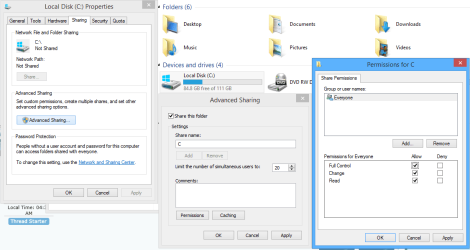
Yes to share the from the root of C drive you must enable sharing via the sharing tab/advanced and add check marks for full permissions as required via the Security tab as well. This isn't a safe way to share but it does free up the entire drive.

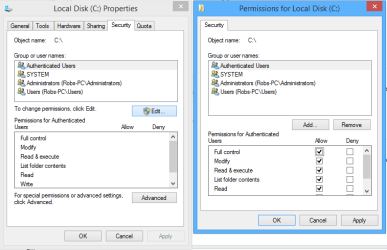
From the Security tab, Highlight the Authenticated Users "this may show as Everyone with Windows 7" then add check marks for the required permissions. After adding the check marks click apply ok etc.


The pictures should be helpful. :)
 

Attachments

  • C DRIVE ENABLE SHARING SHARING TAB.PNG
    C DRIVE ENABLE SHARING SHARING TAB.PNG
    70.9 KB · Views: 0
  • C drive add PERMISSIONS.PNG
    C drive add PERMISSIONS.PNG
    32 KB · Views: 0

My Computer

Computer type
PC/Desktop
Computer Manufacturer/Model Number
Home built
OS
Windows 7 Ult, Windows 8.1 Pro,
CPU
Q9650-4.275GHz, E8600 4.5GHz, E6750-3.8GHz
Motherboard
Evga 780i FTW
Memory
G.Skill PC2 9600 1200Mhz 5 5 5 15 2T
Graphics Card(s)
GTX480
Sound Card
Asus Xonar D2
Monitor(s) Displays
HannsG
Screen Resolution
1680X1050
Hard Drives
GSkill Phoenix Pro 120GB SSD
PSU
ThermalTake Toughpower 1000Watt modular
Case
ThermalTake XaserV
Cooling
Xigmatek S1283
Keyboard
Logitech G15
Mouse
Logitech G9
Internet Speed
T1
Thanks for the reply. I believe that I'd done that already, but will go back and check it.
I followed an earlier suggestion and created separate (duplicate) folders for system files. Created separate shares for them and now I have full access via the new folders.
 

My Computer

Computer type
PC/Desktop
Computer Manufacturer/Model Number
custom build
OS
Win 7 64 bit Home Premium
CPU
AMD A6 6400K
Motherboard
Gigabyte
Memory
8 bg
Hard Drives
SSD plus HDD
Thanks for the reply. I believe that I'd done that already, but will go back and check it.
I followed an earlier suggestion and created separate (duplicate) folders for system files. Created separate shares for them and now I have full access via the new folders.

It should not be required to make a copy of system files in order to gain access. There might have been some type of system corruption involved with those shares but that would be difficult to diagnose from here without more information.

The methods I posted for sharing the root of the drive are exactly what was requested and they do work perfectly I can assure you but if it was required to make copies just to gain access then the User account may have been corrupted.
 
Last edited:

My Computer

Computer type
PC/Desktop
Computer Manufacturer/Model Number
Home built
OS
Windows 7 Ult, Windows 8.1 Pro,
CPU
Q9650-4.275GHz, E8600 4.5GHz, E6750-3.8GHz
Motherboard
Evga 780i FTW
Memory
G.Skill PC2 9600 1200Mhz 5 5 5 15 2T
Graphics Card(s)
GTX480
Sound Card
Asus Xonar D2
Monitor(s) Displays
HannsG
Screen Resolution
1680X1050
Hard Drives
GSkill Phoenix Pro 120GB SSD
PSU
ThermalTake Toughpower 1000Watt modular
Case
ThermalTake XaserV
Cooling
Xigmatek S1283
Keyboard
Logitech G15
Mouse
Logitech G9
Internet Speed
T1
Thanks for the reply. I believe that I'd done that already, but will go back and check it.
I followed an earlier suggestion and created separate (duplicate) folders for system files. Created separate shares for them and now I have full access via the new folders.

It should not be required to make a copy of system files in order to gain access. There might have been some type of system corruption involved with those shares but that would be difficult to diagnose from here without more information.

The methods I posted for sharing the root of the drive are exactly what was requested and they do work perfectly I can assure you but if it was required to make copies just to gain access then the User account may have been corrupted.

Can not change permissions on the C drive! The user account is certainly screwed up.
TRIED and get a "SECURITY" message with red "X"
"Unable to save permission changes on C:.
The inherited access control list (ACL) or access control entity (ACE) could not be built.

Again.......this computer (the one I'm trying to access) runs XP. I hope that the methods, etc are similar.
 

My Computer

Computer type
PC/Desktop
Computer Manufacturer/Model Number
custom build
OS
Win 7 64 bit Home Premium
CPU
AMD A6 6400K
Motherboard
Gigabyte
Memory
8 bg
Hard Drives
SSD plus HDD
I need to be able to reset all permissions on C drive to default, remove some permissions as I probably have too many, or set the ACL buffer size to a larger amount (I think).

If I copy the entire C drive to a backup drive, then format the C drive on the computer I'm trying to fix, and then transfer the copied C drive back again, I don't know it that would solve anything since all the extraneous permissions would be recreated again, or worse, the computer would no longer boot.

Would "Safe mode" help me?

Is there something I can change in the registry?

At this point, I'll try anything.
 

My Computer

Computer type
PC/Desktop
Computer Manufacturer/Model Number
custom build
OS
Win 7 64 bit Home Premium
CPU
AMD A6 6400K
Motherboard
Gigabyte
Memory
8 bg
Hard Drives
SSD plus HDD
on win7 machine right click on "network/properties click change advance sharing settings

click on file sharing settings "enable file sharing for devices that use 40 -56 bit encryption.

this will allow xp pc to access win7 machine if all sharing settings are correct

If need to Turn off password protected sharing..
 

My Computer

OS
Windows 7 Ultimate 32bit
Back
Top