
Network Win7 and WinXP

Keithuk

New member
Member
VIP
Local time
3:53 PM
Messages
186
Hi guys.

I've searched this site for this problem but none of the fixed have worked.

For many years I have WinXP 2002 SP3 on my desktop computer and I had Vista Home Premium 32bit on the my laptop they would both connect to each other no problem. I've had problems with IE8 on Vista always crashing with no fix available so I install Windows 7 Ultimate SP1 32bit on the laptop and it still connects to my WinXP desktop. I can't access my laptop from WinXP even though both are set to WORKGROUP. Now on Win7 the same as I did on Vista I set every folder I wanted to share with an additional Guest user and set it to read/write. I also set each folder with Share with Homegroup (read/write).

On WinXP I have a shortcut on the desktop Fujitsu-AMILO which is the laptop name which worked before but when I double click now it says:

\\Fujitsu-amilo is not accessible. You might not have permission to use this network resource. Contact the Administrator of this server to find out if you have access permissions.

Logon failure: user acount restriction. Possible reason are blank passwords not allowed, login hour restrictions, or a policy restriction has been enforced.

There is no password set on either system. I can do a search for computers on WinXP and Fujitsu-AMILO shows up but it shows the same message when I double click it.

I've read and checked every option in this thread but the problem still exists.

Any suggestions will be appreciated?
 

Attachments
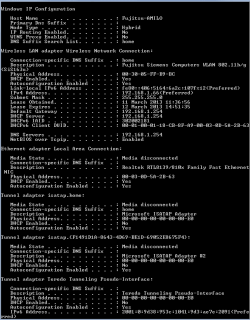
  • Ipconfig.png
    Ipconfig.png
    12.5 KB · Views: 5

My Computer

Computer type
Laptop
Computer Manufacturer/Model Number
Samsung won't charge Now Dell Inspiron 17 3793
OS
Windows 7 Professional 32bit SP1, Windows 10 Home 64-bit at the moment
CPU
Intel Pentium B970 @ 2.30GHz, DELL DELL Intel 3793 Core i5 1
Motherboard
DELL 0C9WH2
Memory
8GB
Graphics Card(s)
NVIDIA GeForce MX230 (Dell)
Sound Card
Realtek High Definition Audio
Monitor(s) Displays
17.3" HD+ LED Display
Screen Resolution
1920x1040
Hard Drives
99GB (RAID SHIT SSD), Seagate 1TB SATA III DATA

Seagate ST1000LM048-2E7172 (SATA III)
Mouse
USB remote
Antivirus
Avast Free Antivirus 20.10.2442
Browser
Internet Explorer 11, FireFox
Other Info
DELL shit Its the worst laptop design ever made the laptop battery is inbuilt who the hell makes a laptop battery inbuilt DELL shit does, can't wait until the 1TB HDD is replaced and RAID shit is removed
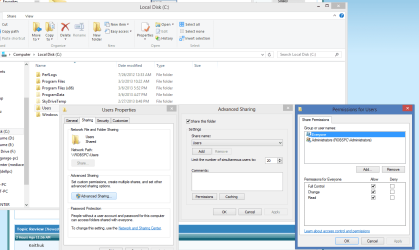
On the Windows 7 machine, you should first make sure that you are sharing the C:>Users folder which is a default setting which allows you to share folders which are inside of that particular folder. Picture below.

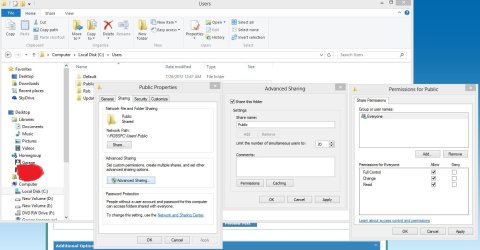
It may also be easier to put any files or folders you need to share with the XP machine inside the C:>Users>Public folders because the restrictions are eased up on these folders once you share them per the second picture. After that you can place a any file or folder into any of the Public folders on the Win7 machine and they will be shared out with the Workgroup machines.

I'm not sure why you would set permissions for a Homegroup because it's best not to have a Homegroup set up in this instance. :)
 

Attachments

  • CUsers shared.PNG
    CUsers shared.PNG
    41.7 KB · Views: 9
  • Sharing Public folder2.jpg
    Sharing Public folder2.jpg
    103 KB · Views: 5

My Computer

Computer type
PC/Desktop
Computer Manufacturer/Model Number
Home built
OS
Windows 7 Ult, Windows 8.1 Pro,
CPU
Q9650-4.275GHz, E8600 4.5GHz, E6750-3.8GHz
Motherboard
Evga 780i FTW
Memory
G.Skill PC2 9600 1200Mhz 5 5 5 15 2T
Graphics Card(s)
GTX480
Sound Card
Asus Xonar D2
Monitor(s) Displays
HannsG
Screen Resolution
1680X1050
Hard Drives
GSkill Phoenix Pro 120GB SSD
PSU
ThermalTake Toughpower 1000Watt modular
Case
ThermalTake XaserV
Cooling
Xigmatek S1283
Keyboard
Logitech G15
Mouse
Logitech G9
Internet Speed
T1
Cheers chev65 for the reply.

The C:\Users folders are set to share.

I shouldn't have to put all files and folders into C:\Users\Public folder as it worked perfectly on Vista.

I'm not sure why you would set permissions for a Homegroup because it's best not to have a Homegroup set up in this instance. :)

It set all folder to read/write in Homegroup because the conventional method didn't work I just thought its additional feature of Win7. I've since remove all share settings from Homegroup and it still doesn't work.
 

My Computer

Computer type
Laptop
Computer Manufacturer/Model Number
Samsung won't charge Now Dell Inspiron 17 3793
OS
Windows 7 Professional 32bit SP1, Windows 10 Home 64-bit at the moment
CPU
Intel Pentium B970 @ 2.30GHz, DELL DELL Intel 3793 Core i5 1
Motherboard
DELL 0C9WH2
Memory
8GB
Graphics Card(s)
NVIDIA GeForce MX230 (Dell)
Sound Card
Realtek High Definition Audio
Monitor(s) Displays
17.3" HD+ LED Display
Screen Resolution
1920x1040
Hard Drives
99GB (RAID SHIT SSD), Seagate 1TB SATA III DATA

Seagate ST1000LM048-2E7172 (SATA III)
Mouse
USB remote
Antivirus
Avast Free Antivirus 20.10.2442
Browser
Internet Explorer 11, FireFox
Other Info
DELL shit Its the worst laptop design ever made the laptop battery is inbuilt who the hell makes a laptop battery inbuilt DELL shit does, can't wait until the 1TB HDD is replaced and RAID shit is removed
Cheers chev65 for the reply.

The C:\Users folders are set to share.

I shouldn't have to put all files and folders into C:\Users\Public folder as it worked perfectly on Vista.

I'm not sure why you would set permissions for a Homegroup because it's best not to have a Homegroup set up in this instance. :)

It set all folder to read/write in Homegroup because the conventional method didn't work I just thought its additional feature of Win7. I've since remove all share settings from Homegroup and it still doesn't work.

If you created a Homegroup you will want to leave the Homegroup because it will cause sharing problems with XP. http://www.sevenforums.com/tutorials/43980-homegroup-leave.html

It may help to use the same user name and password on both the XP and Windows 7 machines, this should give you access without the password prompt.

You should also be able to access the Win 7 or XP machine by typing it's LAN IP address in the run box \\192.168.x.x

The Public folders were actually designed just for this type of sharing, that is why there are Public folders for just about every category, Pictures, Music, Documents etc. this is by far the safest and easiest way to share between newer Op systems and older ones. There are countless good reasons for sharing this way.
 

My Computer

Computer type
PC/Desktop
Computer Manufacturer/Model Number
Home built
OS
Windows 7 Ult, Windows 8.1 Pro,
CPU
Q9650-4.275GHz, E8600 4.5GHz, E6750-3.8GHz
Motherboard
Evga 780i FTW
Memory
G.Skill PC2 9600 1200Mhz 5 5 5 15 2T
Graphics Card(s)
GTX480
Sound Card
Asus Xonar D2
Monitor(s) Displays
HannsG
Screen Resolution
1680X1050
Hard Drives
GSkill Phoenix Pro 120GB SSD
PSU
ThermalTake Toughpower 1000Watt modular
Case
ThermalTake XaserV
Cooling
Xigmatek S1283
Keyboard
Logitech G15
Mouse
Logitech G9
Internet Speed
T1
I don't have any passwords on either machine.

I've remove all Homegroup share but it still doesn't work.

In my BT Home Hub Manager it shows my laptop is connected.
 

My Computer

Computer type
Laptop
Computer Manufacturer/Model Number
Samsung won't charge Now Dell Inspiron 17 3793
OS
Windows 7 Professional 32bit SP1, Windows 10 Home 64-bit at the moment
CPU
Intel Pentium B970 @ 2.30GHz, DELL DELL Intel 3793 Core i5 1
Motherboard
DELL 0C9WH2
Memory
8GB
Graphics Card(s)
NVIDIA GeForce MX230 (Dell)
Sound Card
Realtek High Definition Audio
Monitor(s) Displays
17.3" HD+ LED Display
Screen Resolution
1920x1040
Hard Drives
99GB (RAID SHIT SSD), Seagate 1TB SATA III DATA

Seagate ST1000LM048-2E7172 (SATA III)
Mouse
USB remote
Antivirus
Avast Free Antivirus 20.10.2442
Browser
Internet Explorer 11, FireFox
Other Info
DELL shit Its the worst laptop design ever made the laptop battery is inbuilt who the hell makes a laptop battery inbuilt DELL shit does, can't wait until the 1TB HDD is replaced and RAID shit is removed
I got fed up with Windows 7 so I put Vista back and it works perfectly, so newer OS are no better.
 

My Computer

Computer type
Laptop
Computer Manufacturer/Model Number
Samsung won't charge Now Dell Inspiron 17 3793
OS
Windows 7 Professional 32bit SP1, Windows 10 Home 64-bit at the moment
CPU
Intel Pentium B970 @ 2.30GHz, DELL DELL Intel 3793 Core i5 1
Motherboard
DELL 0C9WH2
Memory
8GB
Graphics Card(s)
NVIDIA GeForce MX230 (Dell)
Sound Card
Realtek High Definition Audio
Monitor(s) Displays
17.3" HD+ LED Display
Screen Resolution
1920x1040
Hard Drives
99GB (RAID SHIT SSD), Seagate 1TB SATA III DATA

Seagate ST1000LM048-2E7172 (SATA III)
Mouse
USB remote
Antivirus
Avast Free Antivirus 20.10.2442
Browser
Internet Explorer 11, FireFox
Other Info
DELL shit Its the worst laptop design ever made the laptop battery is inbuilt who the hell makes a laptop battery inbuilt DELL shit does, can't wait until the 1TB HDD is replaced and RAID shit is removed
Back
Top