
Network XP and Win7

Menessis

New member
Local time
10:03 AM
Messages
5
Well I have tried everything I have read on line to get the old XP system to "see" the Win7 machine.

There must be a logical step by step, start here guide or system to get this to work. It seems like most people give up and install Win7 on the old pc. I paid good money for that XP (twice!) and I'm not paying more to change it to Win7.

The sort of guide I'm looking for would start at the beginning. What's the first thing to check. Then check this and so on......

I have just one folder shared on the Win7 machine. XP doesn't even see the Win7 pc. Win7 see's the XP no problem since I added the patch on the XP machine

Here is my set up.

Thanks for any help.

Menessis
 

Attachments
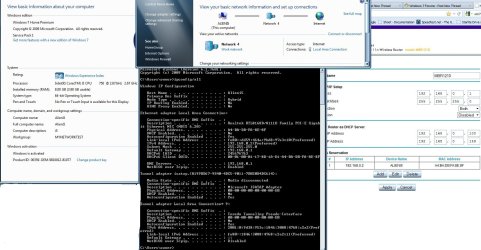
  • NetworkInfo.jpg
    NetworkInfo.jpg
    396.4 KB · Views: 363

My Computer

OS
Windows 7 Ultimate x64
Have you gone into the "Network and Sharing Center", clicked the link at the left for "Change advanced sharing settings" and set:

  • Turn on network discovery
  • Turn on File and Printer sharing
  • Turn on sharing so anyone with network access can read and write files in the Public folders
  • Enabled file sharing for devices that use 40- or 56-bit encryption
Ideally, both (all) computers should be in the same Workgroup and you should be logged in to all computers with the same Username/Password.

It seems like most people give up and install Win7 on the old pc.
I never had any problem networking XP and 7, so there's certainly no need to upgrade the XP PC.

If you haven't already done so, you should install the Link Layer Topology Discovery Responder in the XP PC:

Download: Link Layer Topology Discovery (LLTD) Responder (KB922120) - Microsoft Download Center - Download Details
 

My Computer

OS
Windows 7 & 8 64-bit, Mac OSX 10.8.2
The XP computer has to be set to "Homegroup". It's default is something else. I had this issue with someone trying to network a XP computer with a Vista computer.
 

My Computer

Computer type
PC/Desktop
Computer Manufacturer/Model Number
custom build
OS
Windows 7 Professional 64bit
CPU
Intel i7-5960X
Motherboard
EVGA X99 Classified
Memory
64GB Corsair Dominator 2400MHz
Graphics Card(s)
3 EVGA GTX980's
Sound Card
on board
Monitor(s) Displays
3 Dell E2715H 27"
Screen Resolution
1920x1080 (5760x1080)
Hard Drives
Samsung 950 Pro 1TB M.2 SSD,
Western Digital Black 2TB HDD's x5
Western Digital Black 1TB HDD's x3
PSU
Corsair AX1200i
Case
Corsair 750D
Cooling
Corsair H110i GT
Keyboard
Corsair K70
Mouse
Corsair M45
Internet Speed
250 down/10 up
Antivirus
Microsoft Security Essentials
Browser
IE 11, Google Chrome
The XP computer has to be set to "Homegroup". It's default is something else. I had this issue with someone trying to network a XP computer with a Vista computer.

The default Workgroup name is MSHOME for XP Home Edition and WORKGROUP for XP Pro; the default for Windows 7 is WORKGROUP. "Homegroup" networking is only supported in Windows 7 and 8 networks.

I have always used my own personal Workgroup name which has never caused a problem networking computers running XP, Win7, Windows 8 and Mac OSX. Windows XP does actually support connection to multiple Workgroups, although I'm not sure if later versions of Windows do.
 

My Computer

OS
Windows 7 & 8 64-bit, Mac OSX 10.8.2
Yes I did install the Link Layer Topology Discovery Responder on the XP machine MGMCC. That was the first thing I found I needed to do. I have the advanced sharing set like you suggest also.

On the XP machine there is a password that I log in with. No password on the Win7. The Win7 shows "network 4" when I hover the mouse over the icon in the task bar. The workgroup is "MYNETWORKTEST". On the XP machine the taskbar says "MyNetWorkTest" . This isn't case sensitive is it?

Keep in mind that the XP machine doesn't know the Win7 exists at this point. LOL

@HAVOC I don't know where to look for the "homegroup" setting in XP? But I am sure that when I set it up it asked for a Work Group name.

I think the problem is on the XP side of things.

Thanks for the help so far guys.

Menessis
 
Last edited:

My Computer

OS
Windows 7 Ultimate x64

My Computer

Computer type
PC/Desktop
Computer Manufacturer/Model Number
custom build
OS
Windows 7 Professional 64bit
CPU
Intel i7-5960X
Motherboard
EVGA X99 Classified
Memory
64GB Corsair Dominator 2400MHz
Graphics Card(s)
3 EVGA GTX980's
Sound Card
on board
Monitor(s) Displays
3 Dell E2715H 27"
Screen Resolution
1920x1080 (5760x1080)
Hard Drives
Samsung 950 Pro 1TB M.2 SSD,
Western Digital Black 2TB HDD's x5
Western Digital Black 1TB HDD's x3
PSU
Corsair AX1200i
Case
Corsair 750D
Cooling
Corsair H110i GT
Keyboard
Corsair K70
Mouse
Corsair M45
Internet Speed
250 down/10 up
Antivirus
Microsoft Security Essentials
Browser
IE 11, Google Chrome
What happens if you open Windows Explorer in XP and, in the address bar, type in the path to the Windows 7 PC either by its IP address or its name. Use the format:

\\192.168.1.2 (replace with its correct IP address)

\\computer_name

\\computer_name\shared_folder
 

My Computer

OS
Windows 7 & 8 64-bit, Mac OSX 10.8.2
OK I tried the IP trick. \\192.168.0.2 Is my static IP on the win7 machine. Nothing. I even used the search option.... search ......computers or people. Nothing.

How do you ping from one pc to the other?

Is there a way to tell a pc to be invisible? I have tried it with Win7 firewall off. If the firewall is off then the ports are open?? I was reading about the firewall settings and it said that if you use Home Group it set up the ports one way and if you used business group it set the ports a little different. Is there a way to look at what ports are open?

Could my router be "firewalling" it somehow? It's a Netgear MBR 1210.

Thanks

Menessis
 
Last edited:

My Computer

OS
Windows 7 Ultimate x64
How do you ping from one pc to the other?
In XP, open a Command Prompt window ("Start > Run", type cmd and click OK) and, at the prompt, type...

ping 192.168.0.2

...and press Enter. You should get a result something like this:


C:\Users\mgmcc>ping 192.168.5.22

Pinging 192.168.5.22 with 32 bytes of data:
Reply from 192.168.5.22: bytes=32 time<1ms TTL=64

Ping statistics for 192.168.5.22:
Packets: Sent = 4, Received = 4, Lost = 0 (0% loss),
Approximate round trip times in milli-seconds:
Minimum = 0ms, Maximum = 0ms, Average = 0ms

C:\Users\mgmcc>

Pic_03.jpg.html
 

My Computer

OS
Windows 7 & 8 64-bit, Mac OSX 10.8.2
LOL ya well mine just times out.

I have found out that I have other problems that may or may not have anything to do with this.

My firewall has stopped. The service is missing.

I'm on at GeekPolice to see what they can figure out.

If it's not one thing its something else.

BTW Mike....I'm Mike too. :)

I will let you all know what happens.

menessis
 

My Computer

OS
Windows 7 Ultimate x64
Compare the IP addresses from the XP machine and the W7 machine. The first 3 octets should be exactly the same for them to communicate.
 

My Computer

Computer type
PC/Desktop
Computer Manufacturer/Model Number
Skylake Special #666
OS
Windows 10 Pro x64
CPU
Intel Core i7 6700K
Motherboard
Asus Sabertooth Z170 Mark 1
Memory
GSkill TridentZ RGB 16GB 3600 16-16-16-36
Graphics Card(s)
EVGA GTX 980 Ti SC x2
Sound Card
Realtek High Definition
Monitor(s) Displays
AOC G2460PG
Screen Resolution
1920 x 1080 144Hz
Hard Drives
Samsung 860 Pro 256GB, Seagate Barracuda 4TB x2
PSU
EVGA 1000 P2, EVGA White Custom Braided Cables
Case
Corsair Vengeance C70 Gunmetal Black
Cooling
Corsair H100i v2, Corsair ML120 x2, Thermal Grizzly Kryonaut
Keyboard
Logitech G910 Orion Spectrum
Mouse
Logitech G700s
Internet Speed
Verizon Fios Quantum Gateway 75/75
Antivirus
Windows Defender, Malwarebytes Free 3.8.3
Browser
Chrome
Other Info
Corsair SP120 x4, LG Blu-ray Drive, Durabrand HT-395 100 Watt Dolby Digital Amp, Corsair H2100 Wireless 7.1 Headset
Ya all the numbers are right. The Win7 can see the XP. Just not the other way around. It may have to do with Win7 security. Even though it is supposed to open up when you use the Work network.

BTW I think I got rid of the virus problem. What a "PITA" !

Menessis
 

My Computer

OS
Windows 7 Ultimate x64
Back
Top