

Jango Fett
New member
Hi guys, hoping some of you can give me a bit of expert advice on a networking issue.
I have a Netgear NeoTV 350 media player rigged up to my TV and networked over the powerline with me PC (Windows 7 ultimate x64).
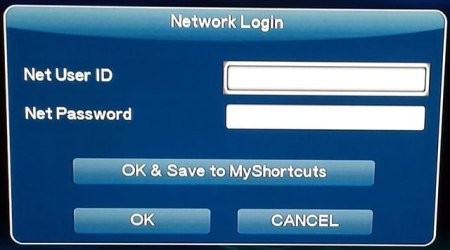
Since last week whenever I try to access a file on my computer I get a message saying I need to enter my network user Id and password (see attached). Never have had to do this in the two years I have had the media player.
So I have tried the following to try and rectify the issue –
· Switched off Firewall altogether – still getting issue
· Moved firewall from Bitdefender to windows firewall – still getting the issue
· Ensured all folders I am trying to access are available to share as read/write
· Ensured sharing and network discovery was turned on in the network and sharing centre.
· In the media streaming option I have allowed the media player access also.
· Factory re-set the media player in case that was the problem.
After all of the above, I am still getting the error message on the player when I try to access files on my PC. I have also entered my network ID and password when prompted to see if that would fix the issue but I still get a login failed notification.
I’m running out of options here as to how to fix this issue so if anyone has any advice I’d really appreciate the input before I fire the pc and player out the window !
JangoFett
I have a Netgear NeoTV 350 media player rigged up to my TV and networked over the powerline with me PC (Windows 7 ultimate x64).
Since last week whenever I try to access a file on my computer I get a message saying I need to enter my network user Id and password (see attached). Never have had to do this in the two years I have had the media player.
So I have tried the following to try and rectify the issue –
· Switched off Firewall altogether – still getting issue
· Moved firewall from Bitdefender to windows firewall – still getting the issue
· Ensured all folders I am trying to access are available to share as read/write
· Ensured sharing and network discovery was turned on in the network and sharing centre.
· In the media streaming option I have allowed the media player access also.
· Factory re-set the media player in case that was the problem.
After all of the above, I am still getting the error message on the player when I try to access files on my PC. I have also entered my network ID and password when prompted to see if that would fix the issue but I still get a login failed notification.
I’m running out of options here as to how to fix this issue so if anyone has any advice I’d really appreciate the input before I fire the pc and player out the window !
JangoFett
Attachments
My Computer
At a glance
Windows 7 Ultimate x64Intel Core 2 Duo E7400 2.80GHz Fsb1066Mhz 3M ...Kingston 2 GB DDR3 SDRAM (KVR1066D3N7/2G) x4Radeon ATI HD4650
- Computer type
- PC/Desktop
- Computer Manufacturer/Model Number
- Custom Build
- OS
- Windows 7 Ultimate x64
- CPU
- Intel Core 2 Duo E7400 2.80GHz Fsb1066Mhz 3M LGA775
- Motherboard
- Skyburg DP45SG Intel Desktop Board / iP45 / LGA775 / ATX Mot
- Memory
- Kingston 2 GB DDR3 SDRAM (KVR1066D3N7/2G) x4
- Graphics Card(s)
- Radeon ATI HD4650
- PSU
- CiT Silent Technology 750UB / 750W / PSU / Power Supply Unit
- Case
- Coolermaster Centurion 590 PC Case Ace Thermal Luxury
- Internet Speed
- 60mb Line
- Antivirus
- bitdefender Total Security 2013

