What I do not understand is why you are using a "Work" network location when a "Home" network location is better suited to your situation?
Cheers!
Robert
Hi Robert...
Well, that's pretty simple actually... I have Win7 on two machines --and FWIW I've discovered they both do the thing I'm trying to stop-- I have XP on my HTPC and my Netbook, my youngest is learning Ubuntu on his machine and we have a number of "guest in" computers that are XP and even a Mac. Homegroups, the new win7 thing do not play well with mixed operating systems, XP, Ubuntu and Mac can't follow the new features... so it's back to Workgroups and XP style by-folder sharing that everyone understands.
There's also the matter that many switches and routers do not play well with IPV6, they may pass it through based on the imbedded dotted quad, but they don't know the first thing about the new protocal... And Homegroups use IPv6... sooooooooo....
Anyway... a little progress report here...
I think I may be one step closer to understanding this...
It seems the problem is (in part) because of the highlighted part in the image...
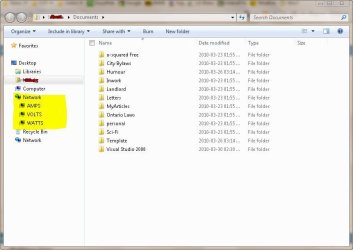
With network discovery (get list of computers) turned on and SSDP active (Find UPNP devices) and the Distributed Link Tracking client (track links over networks) running, simply opening a browser window will cause it to probe the network.... I currently have these services defeated and it's not waking everything up until I click on one of the host icons... (as it should be)... Odd thing is, even with network discovery off, it still finds the active computers on the net... ????
I'm wondering if someone can try a little test for me... Temporarily close your navigation pane (WE -> organize -> layout -> Nav. Pane) and see if opening a local folder that is shared wakes up other computers on your network.... I know it's a bit to ask but it would be really helpful at this point....
I currently have SSDP, Distributed links and Network discovery off... so far so good.
What a day!



 ) works shifts as does the better half and with me working from home now, my hours are all over the place... so there's never really a time when there isn't someone awake in the house.

