Networking question....

I am glad you found the solution. I checked the properties on my network adapters and I could not find that option. But mine is a desktop.

So's mine.... NVidia network adaptor, part of the chipset. I've never seen it on any other adaptor, either...
 

My Computer

Computer Manufacturer/Model Number
Homebrew
OS
XP Pro SP3 X86 / Win7 Pro X86
CPU
Amd 64 x2 4200 (2.4ghz)
Motherboard
Asus M2N-MX SE Plus
Memory
Kingston DDR2 800 2gb
Graphics Card(s)
Nvidia GF-8400
Sound Card
Realtek on Motherboard
Monitor(s) Displays
Acer x-193bw
Screen Resolution
1440 x 900
Hard Drives
Western Digital 500g
PSU
350watt In-Win
Case
In-Win
Cooling
Air
Keyboard
yes
Mouse
yes
Internet Speed
5mpbs
Other Info
Also ASRock ION 330 as HTPC (on XP).
Acer Aspire as GP netbook (on XP).
Interesting. And thanks for the response. Mine is a DLink card. My machine is too old to have a built in wi-fi adapter. :D
 

My Computer

Computer Manufacturer/Model Number
Home built
OS
Windows 7 Ultimate 32 bit
CPU
Intel(R) Pentium(R) 4 CPU 3.00GHz
Motherboard
ASUS P4P800-VM Motherboard Chipset: Intel 865G + ICH5
Memory
2.50 GB RAM
Graphics Card(s)
NVIDIA GeForce 7600 GS
Sound Card
SoundMax Integrated Digital Audio (Chip)
Monitor(s) Displays
ViewSonic VX 1962 wm
Screen Resolution
1680 X 1050
Hard Drives
Seagate Barracuda 7200.10 80 GB
ST380215A ATA Device 18.6 GB
Western Digital "My Book" external hard drive 750 GB
Cooling
Fan based
Keyboard
Microsoft Comfort Curve Keyboard 2000 v10 USB
Mouse
Logitec optic USB
Internet Speed
3.01 Mb/s download 0.64 Mb/s upload
Interesting. And thanks for the response. Mine is a DLink card. My machine is too old to have a built in wi-fi adapter. :D

Mine's not WiFi....

I hardwire as much as I can... There are jacks all over the house with "grab cables" strategically hidden in convenient places for guests and family to use....

(Grab Cable == Ethernet cable with a small metal disk attached so it sticks to a magnet in a convenient, but hidden, spot... behind an end table, on the side of the china cabinet, etc.)
 

My Computer

Computer Manufacturer/Model Number
Homebrew
OS
XP Pro SP3 X86 / Win7 Pro X86
CPU
Amd 64 x2 4200 (2.4ghz)
Motherboard
Asus M2N-MX SE Plus
Memory
Kingston DDR2 800 2gb
Graphics Card(s)
Nvidia GF-8400
Sound Card
Realtek on Motherboard
Monitor(s) Displays
Acer x-193bw
Screen Resolution
1440 x 900
Hard Drives
Western Digital 500g
PSU
350watt In-Win
Case
In-Win
Cooling
Air
Keyboard
yes
Mouse
yes
Internet Speed
5mpbs
Other Info
Also ASRock ION 330 as HTPC (on XP).
Acer Aspire as GP netbook (on XP).
I found it... and it only took me 4 hours....

In my network adaptor settings...

Control Panel-> Device Manager -> Network Adaptor -> Properties

there is a setting called "Device Sleep on Disconnect".
Disabling that seems to have stopped the problem.


FWIW... The sheer level of clarity with which these options are named, never ceases to amaze me. :sarc:

Well... that wasn't it!

I just opened my local downloads folder (D:\downloads) which is shared and my son, on the night shift this week, comes out of his bedroom, still half asleep, and yells ... "It just $#%$%^ did it again!"... and sure enough.... every machine in the house is spun up.
 

My Computer

Computer Manufacturer/Model Number
Homebrew
OS
XP Pro SP3 X86 / Win7 Pro X86
CPU
Amd 64 x2 4200 (2.4ghz)
Motherboard
Asus M2N-MX SE Plus
Memory
Kingston DDR2 800 2gb
Graphics Card(s)
Nvidia GF-8400
Sound Card
Realtek on Motherboard
Monitor(s) Displays
Acer x-193bw
Screen Resolution
1440 x 900
Hard Drives
Western Digital 500g
PSU
350watt In-Win
Case
In-Win
Cooling
Air
Keyboard
yes
Mouse
yes
Internet Speed
5mpbs
Other Info
Also ASRock ION 330 as HTPC (on XP).
Acer Aspire as GP netbook (on XP).
That is really a bummer. I hoped you had solved it.
 

My Computer

Computer Manufacturer/Model Number
Home built
OS
Windows 7 Ultimate 32 bit
CPU
Intel(R) Pentium(R) 4 CPU 3.00GHz
Motherboard
ASUS P4P800-VM Motherboard Chipset: Intel 865G + ICH5
Memory
2.50 GB RAM
Graphics Card(s)
NVIDIA GeForce 7600 GS
Sound Card
SoundMax Integrated Digital Audio (Chip)
Monitor(s) Displays
ViewSonic VX 1962 wm
Screen Resolution
1680 X 1050
Hard Drives
Seagate Barracuda 7200.10 80 GB
ST380215A ATA Device 18.6 GB
Western Digital "My Book" external hard drive 750 GB
Cooling
Fan based
Keyboard
Microsoft Comfort Curve Keyboard 2000 v10 USB
Mouse
Logitec optic USB
Internet Speed
3.01 Mb/s download 0.64 Mb/s upload
That is really a bummer. I hoped you had solved it.

Me too....

Trying with SSDP Service (UPNP Discovery) disabled now....

It's obvious something is sending a broadcast packet ... but what and why remain a mystery.
 

My Computer

Computer Manufacturer/Model Number
Homebrew
OS
XP Pro SP3 X86 / Win7 Pro X86
CPU
Amd 64 x2 4200 (2.4ghz)
Motherboard
Asus M2N-MX SE Plus
Memory
Kingston DDR2 800 2gb
Graphics Card(s)
Nvidia GF-8400
Sound Card
Realtek on Motherboard
Monitor(s) Displays
Acer x-193bw
Screen Resolution
1440 x 900
Hard Drives
Western Digital 500g
PSU
350watt In-Win
Case
In-Win
Cooling
Air
Keyboard
yes
Mouse
yes
Internet Speed
5mpbs
Other Info
Also ASRock ION 330 as HTPC (on XP).
Acer Aspire as GP netbook (on XP).
Maybe this is the same problem I am/was having...machines are fully powered off (by power outlet switch) when not used currently.

My kids machine would turn on for no reason and I could not figure it out. It seemed random. I will have to do some testing and see if the same thing is happening here.

After this afternoon's little episode... i would certainly be interested in whatever you discover....
 

My Computer

Computer Manufacturer/Model Number
Homebrew
OS
XP Pro SP3 X86 / Win7 Pro X86
CPU
Amd 64 x2 4200 (2.4ghz)
Motherboard
Asus M2N-MX SE Plus
Memory
Kingston DDR2 800 2gb
Graphics Card(s)
Nvidia GF-8400
Sound Card
Realtek on Motherboard
Monitor(s) Displays
Acer x-193bw
Screen Resolution
1440 x 900
Hard Drives
Western Digital 500g
PSU
350watt In-Win
Case
In-Win
Cooling
Air
Keyboard
yes
Mouse
yes
Internet Speed
5mpbs
Other Info
Also ASRock ION 330 as HTPC (on XP).
Acer Aspire as GP netbook (on XP).
I know this will sound obvious but couldn't you just turn all your PCs off at night when they're not being used?
Ditto. I could never understand why people leave their rigs running all the time. I turn mine off just to catch a 30 minute TV show, then fire it back up. I'm not a big fan of hibernation either. To each their own I guess.
 

My Computer

Computer Manufacturer/Model Number
NVIDIA
OS
Windows 7 Enterprise x64
CPU
AMD Athlon 64X2 Dual Core 3800+
Motherboard
GeForce 6100-M9
Memory
OCZ Platinum Dual Channel - 4x1Gb
Graphics Card(s)
NVIDIA GeForce 8800 GT PCI Express x16
Sound Card
Creative Audigy Sound Blaster Extreme PCI
Monitor(s) Displays
Compaq 7500
Screen Resolution
1024x768
Hard Drives
C: Seagate ST3250318AS SataII - 250Gb

D: Seagate ST3500418AS SataII - 500Gb
PSU
OCZ 600w Dual 12v Rails
Case
Thermaltake
Cooling
OCZ Heatsinks, Fans, and Thermal Paste on CPU & Chipsets
Keyboard
Logitech
Mouse
Radio Shack PS2
Internet Speed
Cable
Other Info
Dual Pioneer DVD/RW optical drives. LG CD/RW optical drive.
I know this will sound obvious but couldn't you just turn all your PCs off at night when they're not being used?
Ditto. I could never understand why people leave their rigs running all the time. I turn mine off just to catch a 30 minute TV show, then fire it back up. I'm not a big fan of hibernation either. To each their own I guess.

Thing is we aren't using centralized storage... We have a NAS for our movies but the rest of it is scattered all over the network... I have playlists get files from 3 different computers... Yes I know... build a freaking server already....

We're also a shiftwork house... My youngest (still at home :mad:) works shifts as does the better half and with me working from home now, my hours are all over the place... so there's never really a time when there isn't someone awake in the house.

So our machines will be on, usually with the monitors turned off, all the time so that we can get at files without having to sneak into each other's rooms and turn things on...
 

My Computer

Computer Manufacturer/Model Number
Homebrew
OS
XP Pro SP3 X86 / Win7 Pro X86
CPU
Amd 64 x2 4200 (2.4ghz)
Motherboard
Asus M2N-MX SE Plus
Memory
Kingston DDR2 800 2gb
Graphics Card(s)
Nvidia GF-8400
Sound Card
Realtek on Motherboard
Monitor(s) Displays
Acer x-193bw
Screen Resolution
1440 x 900
Hard Drives
Western Digital 500g
PSU
350watt In-Win
Case
In-Win
Cooling
Air
Keyboard
yes
Mouse
yes
Internet Speed
5mpbs
Other Info
Also ASRock ION 330 as HTPC (on XP).
Acer Aspire as GP netbook (on XP).
Trying with SSDP Service (UPNP Discovery) disabled now....

It's obvious something is sending a broadcast packet ... but what and why remain a mystery.

Nope... that wasn't it either....

Still open to suggestions here guys.....
 

My Computer

Computer Manufacturer/Model Number
Homebrew
OS
XP Pro SP3 X86 / Win7 Pro X86
CPU
Amd 64 x2 4200 (2.4ghz)
Motherboard
Asus M2N-MX SE Plus
Memory
Kingston DDR2 800 2gb
Graphics Card(s)
Nvidia GF-8400
Sound Card
Realtek on Motherboard
Monitor(s) Displays
Acer x-193bw
Screen Resolution
1440 x 900
Hard Drives
Western Digital 500g
PSU
350watt In-Win
Case
In-Win
Cooling
Air
Keyboard
yes
Mouse
yes
Internet Speed
5mpbs
Other Info
Also ASRock ION 330 as HTPC (on XP).
Acer Aspire as GP netbook (on XP).
Trying with SSDP Service (UPNP Discovery) disabled now....

It's obvious something is sending a broadcast packet ... but what and why remain a mystery.

Nope... that wasn't it either....

Still open to suggestions here guys.....
In your "Network and Sharing Center", "Advanced sharing settings", are you using either "Public folder sharing", or "Media streaming"?

Cheers!
Robert
 

My Computer

OS
...
Trying with SSDP Service (UPNP Discovery) disabled now....

It's obvious something is sending a broadcast packet ... but what and why remain a mystery.

Nope... that wasn't it either....

Still open to suggestions here guys.....
In your "Network and Sharing Center", "Advanced sharing settings", are you using either "Public folder sharing", or "Media streaming"?

Cheers!
Robert

Good suggestions...

Public folders is turned off ... has been since the beginning
Media Center and Windows Media player never even made it to the hard disk... so I don't even have media streaming installed.

Thanks.
 

My Computer

Computer Manufacturer/Model Number
Homebrew
OS
XP Pro SP3 X86 / Win7 Pro X86
CPU
Amd 64 x2 4200 (2.4ghz)
Motherboard
Asus M2N-MX SE Plus
Memory
Kingston DDR2 800 2gb
Graphics Card(s)
Nvidia GF-8400
Sound Card
Realtek on Motherboard
Monitor(s) Displays
Acer x-193bw
Screen Resolution
1440 x 900
Hard Drives
Western Digital 500g
PSU
350watt In-Win
Case
In-Win
Cooling
Air
Keyboard
yes
Mouse
yes
Internet Speed
5mpbs
Other Info
Also ASRock ION 330 as HTPC (on XP).
Acer Aspire as GP netbook (on XP).

My Computer

Computer Manufacturer/Model Number
NVIDIA
OS
Windows 7 Enterprise x64
CPU
AMD Athlon 64X2 Dual Core 3800+
Motherboard
GeForce 6100-M9
Memory
OCZ Platinum Dual Channel - 4x1Gb
Graphics Card(s)
NVIDIA GeForce 8800 GT PCI Express x16
Sound Card
Creative Audigy Sound Blaster Extreme PCI
Monitor(s) Displays
Compaq 7500
Screen Resolution
1024x768
Hard Drives
C: Seagate ST3250318AS SataII - 250Gb

D: Seagate ST3500418AS SataII - 500Gb
PSU
OCZ 600w Dual 12v Rails
Case
Thermaltake
Cooling
OCZ Heatsinks, Fans, and Thermal Paste on CPU & Chipsets
Keyboard
Logitech
Mouse
Radio Shack PS2
Internet Speed
Cable
Other Info
Dual Pioneer DVD/RW optical drives. LG CD/RW optical drive.
Public folders is turned off ... has been since the beginning
Media Center and Windows Media player never even made it to the hard disk... so I don't even have media streaming installed.

Thanks.
Since you have a mixed OS 'home network', are you using any of Windows 7 "HomeGroup" or IPv6 settings / features?

According to this web site, (and I don't offer any assurance of credibility) Windows 7 does not search (or index) network folders. So I am wondering if the source is network sharing ... or something else?

Exploring Windows 7’s New Search Feature (Part 3)

Cheers!
Robert
 

My Computer

OS
...
Since you have a mixed OS 'home network', are you using any of Windows 7 "HomeGroup" or IPv6 settings / features?

Nope... ipv6 unchecked, Work Network, user/pass sharing...
Indexing off, Search functions never even made it to the hard disk.

According to this web site, (and I don't offer any assurance of credibility) Windows 7 does not search (or index) network folders. So I am wondering if the source is network sharing ... or something else?

Now THAT is a real good question... I'm not 100% sure.

However I've been putting my HTPC into standby and watching it spin up whenever I click a shared folder, all day. If I take a coffee break, it will sit in standby for hours...
The minute I come back and click any shared folder (on this machine... so for me it's local) it will wake up every computer in the house. It's been going on for a while, but we didn't know what was causing it until the other day...

For the first time in a couple of years, our LAN is shut down with only two machines running, while I check this out... and it appears 100% reliable... I can click any non-shared folder on my system and nothing happens (other than the folder opening)... but the minute I open any shared folder the whole network wakes itself up.

XP does not cause this. Linux doesn't do it... Only Win7.
 

My Computer

Computer Manufacturer/Model Number
Homebrew
OS
XP Pro SP3 X86 / Win7 Pro X86
CPU
Amd 64 x2 4200 (2.4ghz)
Motherboard
Asus M2N-MX SE Plus
Memory
Kingston DDR2 800 2gb
Graphics Card(s)
Nvidia GF-8400
Sound Card
Realtek on Motherboard
Monitor(s) Displays
Acer x-193bw
Screen Resolution
1440 x 900
Hard Drives
Western Digital 500g
PSU
350watt In-Win
Case
In-Win
Cooling
Air
Keyboard
yes
Mouse
yes
Internet Speed
5mpbs
Other Info
Also ASRock ION 330 as HTPC (on XP).
Acer Aspire as GP netbook (on XP).

My Computer

Computer Manufacturer/Model Number
Homebrew
OS
XP Pro SP3 X86 / Win7 Pro X86
CPU
Amd 64 x2 4200 (2.4ghz)
Motherboard
Asus M2N-MX SE Plus
Memory
Kingston DDR2 800 2gb
Graphics Card(s)
Nvidia GF-8400
Sound Card
Realtek on Motherboard
Monitor(s) Displays
Acer x-193bw
Screen Resolution
1440 x 900
Hard Drives
Western Digital 500g
PSU
350watt In-Win
Case
In-Win
Cooling
Air
Keyboard
yes
Mouse
yes
Internet Speed
5mpbs
Other Info
Also ASRock ION 330 as HTPC (on XP).
Acer Aspire as GP netbook (on XP).
Nope... ipv6 unchecked, Work Network, user/pass sharing...
OK ... I am going to jump on this ... it may not have anything to do with your issue ... but there seems to be much confusion in the wild ... like for the word "upgrade" a few months ago. So please forgive me if I over elaborate in the interest of talking the same language? :o

I use "Home Network" as a generic term to describe what people do in their homes to connect more than one computer / device to a simple unsecured network.

Microsoft uses Home, Work, and Public to label the "Network Location" and simplify security settings for the home user, as explained at this web site: Choosing a network location

Workgroup is the previous method of joining local computers (as in XP), HomeGroup is a new set of default features / functions built in to Windows 7 to make sharing between Windows 7 computers as simple as joining a HomeGroup.

So from the info so far, is it safe to say you are using a "Workgroup" to network your computers, and have manually set only folders of your choosing on each computer as shared?

What I do not understand is why you are using a "Work" network location when a "Home" network location is better suited to your situation?

Cheers!
Robert
 

My Computer

OS
...
What I do not understand is why you are using a "Work" network location when a "Home" network location is better suited to your situation?

Cheers!
Robert

Hi Robert...
Well, that's pretty simple actually... I have Win7 on two machines --and FWIW I've discovered they both do the thing I'm trying to stop-- I have XP on my HTPC and my Netbook, my youngest is learning Ubuntu on his machine and we have a number of "guest in" computers that are XP and even a Mac. Homegroups, the new win7 thing do not play well with mixed operating systems, XP, Ubuntu and Mac can't follow the new features... so it's back to Workgroups and XP style by-folder sharing that everyone understands.

There's also the matter that many switches and routers do not play well with IPV6, they may pass it through based on the imbedded dotted quad, but they don't know the first thing about the new protocal... And Homegroups use IPv6... sooooooooo....


Anyway... a little progress report here...

I think I may be one step closer to understanding this...
It seems the problem is (in part) because of the highlighted part in the image...
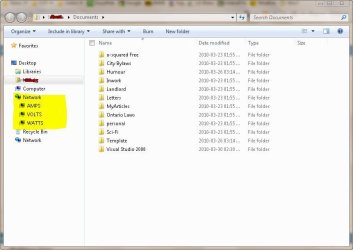
Capture.JPG

With network discovery (get list of computers) turned on and SSDP active (Find UPNP devices) and the Distributed Link Tracking client (track links over networks) running, simply opening a browser window will cause it to probe the network.... I currently have these services defeated and it's not waking everything up until I click on one of the host icons... (as it should be)... Odd thing is, even with network discovery off, it still finds the active computers on the net... ????

I'm wondering if someone can try a little test for me... Temporarily close your navigation pane (WE -> organize -> layout -> Nav. Pane) and see if opening a local folder that is shared wakes up other computers on your network.... I know it's a bit to ask but it would be really helpful at this point....


I currently have SSDP, Distributed links and Network discovery off... so far so good.

What a day!

 

My Computer

Computer Manufacturer/Model Number
Homebrew
OS
XP Pro SP3 X86 / Win7 Pro X86
CPU
Amd 64 x2 4200 (2.4ghz)
Motherboard
Asus M2N-MX SE Plus
Memory
Kingston DDR2 800 2gb
Graphics Card(s)
Nvidia GF-8400
Sound Card
Realtek on Motherboard
Monitor(s) Displays
Acer x-193bw
Screen Resolution
1440 x 900
Hard Drives
Western Digital 500g
PSU
350watt In-Win
Case
In-Win
Cooling
Air
Keyboard
yes
Mouse
yes
Internet Speed
5mpbs
Other Info
Also ASRock ION 330 as HTPC (on XP).
Acer Aspire as GP netbook (on XP).
That is encouraging! I will be watching your thread to see what else you come up with.

I am also wondering about your power settings. Are using sleep or hibernation? Do you have your hard drives spin down? Can you leave the offending computer up with only the monitor going to black so there is no change if the hard drive is accessed?

Cheers!
Robert
 

My Computer

OS
...
I found it... and it only took me 4 hours....

In my network adaptor settings...

Control Panel-> Device Manager -> Network Adaptor -> Properties

there is a setting called "Device Sleep on Disconnect".
Disabling that seems to have stopped the problem.


FWIW... The sheer level of clarity with which these options are named, never ceases to amaze me. :sarc:

I don't have this option on an: Intel(R) 82567LM-3 Gigabit network card.
 

My Computer

Computer type
PC/Desktop
Computer Manufacturer/Model Number
Dell OP7010
OS
Windows 7 Enterprise (x64); Windows Server 2008 R2 (x64)
Memory
16GB
Monitor(s) Displays
4 Dell 24" LCD
Screen Resolution
1280x1024
Keyboard
Dell
Mouse
Dell Optical
Internet Speed
40meg
Back
Top