Networking (to file share) between Windows 7 and Windows XP

I have the same problem with build 7068 ( only able to access network folders by typing address in)

Edit- how crazy , after just copying a shortcut to favorites, so I can access network files easier(than typin adres in). I go back to the Network, and I can see the LAN PC's.
No Idea if this build is bugged or not now, as it's fresh(10 minutes old)install.

Still interested in the setting up the below Netbeui... like the sound of better performance.

If you feel like it, you could try installing the netbeui protocol on all machines on the network, and then disable netbios in the Local Area Connection settings (you see it when you right click the tray icon.) It actually performs better, is more secure from people trying to enumerate your shares etc...too.

This is for XP, but it's very much the same for Vista and 7 (folder locations specifically). You could find the files needed many places easily on the net as well.

How to install NetBEUI on Windows XP

If you need me to explain the steps in greater detail, let me know.

What is netBEUI? >>>
What is NetBEUI? - a definition from Whatis.com

Do you know if I could still play LAN games with this workaround you mention?
Could you elaborate on how to go about this? it seems pretty interesting to use, even without this network bug. And would like to try it. Maybe start a new thread if it's not welcome/off topic in this one.
 

My Computer My Computer

At a glance

Windows 7i5 7504TB GSkillAti 5850
Computer Manufacturer/Model Number
mypc4me
OS
Windows 7
CPU
i5 750
Motherboard
Asus p7p55D Evo
Memory
4TB GSkill
Graphics Card(s)
Ati 5850
Sound Card
Audigy SE
Monitor(s) Displays
24" Acer
Screen Resolution
1900x1200
Hard Drives
SSD & Hybrid SSD
PSU
Corsair 750
Case
CM
Cooling
fans
Keyboard
keys
Mouse
tailess
Internet Speed
MB
Other Info
Sausages
Do you know if I could still play LAN games with this workaround you mention?
Could you elaborate on how to go about this? it seems pretty interesting to use, even without this network bug. And would like to try it. Maybe start a new thread if it's not welcome/off topic in this one.

Yes, you could still play them the same as always. I'm not 100% sure if this is the correct explanation, but is how I understand it>>> I'm not a big network gamer, but I *think* they use normal tcp/ip protocol to communicate. Not netbios or netbeui used for client/server communications of file and print sharing.

For any (or most, I dunno) Microsoft o.s. -

Place each of the two files where they need to be.
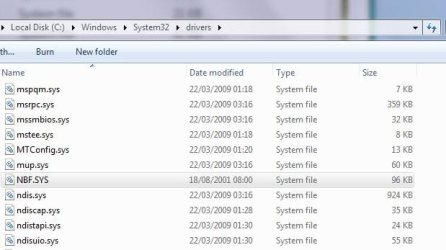
1) Nbf.sys goes to C:\Windows\System32\Drivers
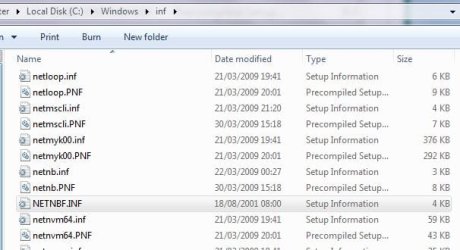
2) Place Netnbf.inf in folder C:\Windows\Inf

Here is a .zip containing those 2 files >>> http://www.mac-net.com/images/1024976.zip

now
Windows 7 instructions:
1) Right click the network tray icon.
2) Choose Open Network and Sharing Center
3) Click Local Area Connection
4) Click properties
5) Double left click Internet Protocol Version 4
6) Click Advanced
7) Go to WINS tab
9) Choose Disable NetBIOS over TCP/IP
10) OK your way out twice until you are back to the Properties tab.
11) Click Install
12) Click protocol
13) Click add
14) Choose netbeui, then ok
 

My Computer My Computer

At a glance

7600.20510 x86P4 550 3.4 GHz HT running at 3.5 GHzOCZ 2 GB(2x1GB) DDR400mHz running @ 414 mHzHIS Radeon HD 3850 IceQ 3 Turbo HDMI Dual DL-...
Computer Manufacturer/Model Number
self built
OS
7600.20510 x86
CPU
P4 550 3.4 GHz HT running at 3.5 GHz
Motherboard
MSI PM8M3-V (MS-7211 v1.x) Micro-ATX mainboard
Memory
OCZ 2 GB(2x1GB) DDR400mHz running @ 414 mHz
Graphics Card(s)
HIS Radeon HD 3850 IceQ 3 Turbo HDMI Dual DL-DVI AGP
Sound Card
MOTU Traveler firewire studio interface 192 kHz 24 bit
Monitor(s) Displays
22" widescreen Acer X223W LCD, 17" Compaq P75 CRT
Screen Resolution
1680x1050 and 1280x1024
Hard Drives
SATA I x2 WD, 400 GB and 120 GB, SATA 2 WD Caviar Black 1 TB
PSU
350W generic
Case
Cybertronpc, it glows blue
Cooling
stock cpu fan, Ice-Q 3 gpu and system, many case fans
Keyboard
Logitch Classical Keyboard 200
Mouse
Logitech Mediaplay cordless
Internet Speed
1792/448 kbits/sec
Other Info
SATA II PCI fake RAID adapter, 1 GB Readyboost, original ATI Remote Wonder (even works with WMC perfectly), Logitech Rumblepad 2 game controller x2
can't see XP pc or its printer from build 7000 pc

I have same problem.. but using build 7000 so my problem is probably similar to yours in that the build issue from 7048 was not the cause.. it must be something about my XP machine (perhaps McAfee filrewall) blocking my connection...
 

My Computer My Computer

At a glance

windows 7 build 7000 now... was VISTA3 GB
OS
windows 7 build 7000 now... was VISTA
Memory
3 GB
I ran into this problem with the 7068. I couldn't access my XP machine right from the start like I could with the previous builds. I think it's because this build creats a homegroup instead of giving you the option to make one, instead of having the access through user accounts and passwords which is more straight foward but probably not as secure.

I had to play with the settings switching between homegroups and user accounts in advanced sharing settings then all the sudden I could access my XP machine's file's.

I now have it set too "allow windows to manage home group connections". It all works again for me but I had to do some switching back and forth between the two settings and I had to remove my machine from homegroups and then add it again in order for it to work properly.

I'am pretty sure this has to do with another security layer which always ends up creating more problems than they solve. I hope they get this straightend out with the RC because it was a pain to get it working right. Hope this helps someone.
 

My Computer My Computer

At a glance

Windows 7 Ult, Windows 8.1 Pro,Q9650-4.275GHz, E8600 4.5GHz, E6750-3.8GHzG.Skill PC2 9600 1200Mhz 5 5 5 15 2TGTX480
Computer type
PC/Desktop
Computer Manufacturer/Model Number
Home built
OS
Windows 7 Ult, Windows 8.1 Pro,
CPU
Q9650-4.275GHz, E8600 4.5GHz, E6750-3.8GHz
Motherboard
Evga 780i FTW
Memory
G.Skill PC2 9600 1200Mhz 5 5 5 15 2T
Graphics Card(s)
GTX480
Sound Card
Asus Xonar D2
Monitor(s) Displays
HannsG
Screen Resolution
1680X1050
Hard Drives
GSkill Phoenix Pro 120GB SSD
PSU
ThermalTake Toughpower 1000Watt modular
Case
ThermalTake XaserV
Cooling
Xigmatek S1283
Keyboard
Logitech G15
Mouse
Logitech G9
Internet Speed
T1
Sorry torrentg, I seem to be having a problem downloading the .zip file. It shows as empty once downloed, after I right click -save as. Well not empty just cannot open archive, using 7zip or with windows extraction.

Just googled and found what I hope is the same 2 files.
Here:- NETBEUI in XP
Thank you, torrentg

A quick question. I gather I need to enable Netbeui on all the PC's on the LAN. Two are using XP, does the installation/setup, differ in any way on those PC's using XP? I know the site says Netbeui for XP, just want to double check.

Thanks again.
 

My Computer My Computer

At a glance

Windows 7i5 7504TB GSkillAti 5850
Computer Manufacturer/Model Number
mypc4me
OS
Windows 7
CPU
i5 750
Motherboard
Asus p7p55D Evo
Memory
4TB GSkill
Graphics Card(s)
Ati 5850
Sound Card
Audigy SE
Monitor(s) Displays
24" Acer
Screen Resolution
1900x1200
Hard Drives
SSD & Hybrid SSD
PSU
Corsair 750
Case
CM
Cooling
fans
Keyboard
keys
Mouse
tailess
Internet Speed
MB
Other Info
Sausages
lol when i posted the link to the files, it was a good link. They must have had lots of hits or something, didn't like it and disabled it. But ya, the .zip file you link to are the right ones and the same.

Yes, you have to install netbeui on all machines on the network. If you have netbeui on a machine and netbios on another, they definitely will not be able to file share.

No, the installation is same. There are only minor differences, such as the steps to get to where you install it after you placed the files correctly. Like in XP (I'm goin by memory here so...), you right click the tray icon and choose status I believe. Then follow Win 7 instructions from my previous post, starting at number 4.

Further, only in XP and/or Vista (not 7), you may go to the services page (services.msc) and disable the service TCP/IP Netbios Helper. This is not necessary, although I like doing this myself.
 

My Computer My Computer

At a glance

7600.20510 x86P4 550 3.4 GHz HT running at 3.5 GHzOCZ 2 GB(2x1GB) DDR400mHz running @ 414 mHzHIS Radeon HD 3850 IceQ 3 Turbo HDMI Dual DL-...
Computer Manufacturer/Model Number
self built
OS
7600.20510 x86
CPU
P4 550 3.4 GHz HT running at 3.5 GHz
Motherboard
MSI PM8M3-V (MS-7211 v1.x) Micro-ATX mainboard
Memory
OCZ 2 GB(2x1GB) DDR400mHz running @ 414 mHz
Graphics Card(s)
HIS Radeon HD 3850 IceQ 3 Turbo HDMI Dual DL-DVI AGP
Sound Card
MOTU Traveler firewire studio interface 192 kHz 24 bit
Monitor(s) Displays
22" widescreen Acer X223W LCD, 17" Compaq P75 CRT
Screen Resolution
1680x1050 and 1280x1024
Hard Drives
SATA I x2 WD, 400 GB and 120 GB, SATA 2 WD Caviar Black 1 TB
PSU
350W generic
Case
Cybertronpc, it glows blue
Cooling
stock cpu fan, Ice-Q 3 gpu and system, many case fans
Keyboard
Logitch Classical Keyboard 200
Mouse
Logitech Mediaplay cordless
Internet Speed
1792/448 kbits/sec
Other Info
SATA II PCI fake RAID adapter, 1 GB Readyboost, original ATI Remote Wonder (even works with WMC perfectly), Logitech Rumblepad 2 game controller x2
FWIW I never got UNC to work right in XP or XP64... so I reverted to my old tried and true since windows 95osr0 method:

set machine A and B on static IP addresses
(xp and newer) disable simple file sharing
enable file sharing with simple easy to remember names
(2000 and newer) set up properties so "authenticated users" are allowed access instead of the default
log in via \\IP (ex. \\192.168.0.10) or file://IP
When adding drive letter mappings, use the IP instead of UNC as well

this **ALWAYS** works for me, ever since win95osr0, as long as network connectivity and TCP/IP are set up properly.

Worked fine for me with a win7 x64 7057 (and 7068) client to an xp x64 sp3 server, and vice versa.

If this doesn't work, the problem is not in the sharing, it is either in networking hardware, drivers, or such!
 

My Computer My Computer

At a glance

Windows 7 Beta (and others, multiboot)Intel e1500 (Conroe core2duo 2.2Ghz, 800Mhz F...4x 2GB Kingston PC800 DDR2BFG GeForce 7900GS/OCE 256MB PCIE 1.0 x16
Computer Manufacturer/Model Number
Tifa (self built)
OS
Windows 7 Beta (and others, multiboot)
CPU
Intel e1500 (Conroe core2duo 2.2Ghz, 800Mhz FSB, 512KB L2)
Motherboard
Gigabyte GA-EP43-UD3L (P43/ICH10 chipset)
Memory
4x 2GB Kingston PC800 DDR2
Graphics Card(s)
BFG GeForce 7900GS/OCE 256MB PCIE 1.0 x16
Sound Card
Built in Realtek Azalia (192KHz @ 24 bit max)
Monitor(s) Displays
Acer AL2216W 22" 1680x1050 LCD, using DVI connector
Screen Resolution
1680x1050
Hard Drives
Seagate ST3320620AS 7200.10 320GB 16MB SATA2 HD
PSU
Silverstone ST400
Case
Ultra Wizard ATX (modded neg pressure single fan cooling)
Cooling
Scythe S-FLEX SFDB SFF21F 1500RPM 120MM (intel stock HSF)
Keyboard
Old IBM PS/2 104 key
Mouse
Microsoft Lasermouse 6000
Internet Speed
DSL 3Mbit/512kbit
Other Info
Intel PRO1000/GT PCI, 9K jumbo frames
RCA RT2500 Home Theatre Headunit for sound reproduction
Ya Jaqie, excellent post and basically describes what I do too after setting netbeui to be the default. Great advice for either netbios or netbeui. I also put machine names and ip addresses in the hosts file of each machine, which helps if a drive is going to be mapped by name.

So \\computernamehere\sharename will work as well as
\\localipaddress\sharename regardless.

And I also name the shares with a $ at the end to keep them hidden, and purposely not show on the network unless you happen to know the right name...i.e. you are admin.
 

My Computer My Computer

At a glance

7600.20510 x86P4 550 3.4 GHz HT running at 3.5 GHzOCZ 2 GB(2x1GB) DDR400mHz running @ 414 mHzHIS Radeon HD 3850 IceQ 3 Turbo HDMI Dual DL-...
Computer Manufacturer/Model Number
self built
OS
7600.20510 x86
CPU
P4 550 3.4 GHz HT running at 3.5 GHz
Motherboard
MSI PM8M3-V (MS-7211 v1.x) Micro-ATX mainboard
Memory
OCZ 2 GB(2x1GB) DDR400mHz running @ 414 mHz
Graphics Card(s)
HIS Radeon HD 3850 IceQ 3 Turbo HDMI Dual DL-DVI AGP
Sound Card
MOTU Traveler firewire studio interface 192 kHz 24 bit
Monitor(s) Displays
22" widescreen Acer X223W LCD, 17" Compaq P75 CRT
Screen Resolution
1680x1050 and 1280x1024
Hard Drives
SATA I x2 WD, 400 GB and 120 GB, SATA 2 WD Caviar Black 1 TB
PSU
350W generic
Case
Cybertronpc, it glows blue
Cooling
stock cpu fan, Ice-Q 3 gpu and system, many case fans
Keyboard
Logitch Classical Keyboard 200
Mouse
Logitech Mediaplay cordless
Internet Speed
1792/448 kbits/sec
Other Info
SATA II PCI fake RAID adapter, 1 GB Readyboost, original ATI Remote Wonder (even works with WMC perfectly), Logitech Rumblepad 2 game controller x2
Need a bit of help..
When I get to these steps..
11) Click Install
12) Click protocol
13) Click add
14) Choose netbeui

There is no netbeui to choose.
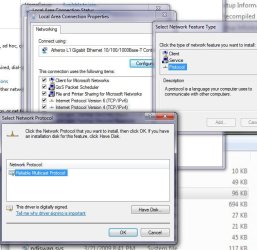
A multicast protocol or somthing, but no netbeui.
Do I need to use "Have disk"?
 

My Computer My Computer

At a glance

Windows 7i5 7504TB GSkillAti 5850
Computer Manufacturer/Model Number
mypc4me
OS
Windows 7
CPU
i5 750
Motherboard
Asus p7p55D Evo
Memory
4TB GSkill
Graphics Card(s)
Ati 5850
Sound Card
Audigy SE
Monitor(s) Displays
24" Acer
Screen Resolution
1900x1200
Hard Drives
SSD & Hybrid SSD
PSU
Corsair 750
Case
CM
Cooling
fans
Keyboard
keys
Mouse
tailess
Internet Speed
MB
Other Info
Sausages
If netbeui is not listed, then almost surely the .inf and possibly too, the .sys have not been placed in the correct folders. Have a look in the applicable folders and see that you placed them properly.


2.jpg

1.jpg
 

My Computer My Computer

At a glance

7600.20510 x86P4 550 3.4 GHz HT running at 3.5 GHzOCZ 2 GB(2x1GB) DDR400mHz running @ 414 mHzHIS Radeon HD 3850 IceQ 3 Turbo HDMI Dual DL-...
Computer Manufacturer/Model Number
self built
OS
7600.20510 x86
CPU
P4 550 3.4 GHz HT running at 3.5 GHz
Motherboard
MSI PM8M3-V (MS-7211 v1.x) Micro-ATX mainboard
Memory
OCZ 2 GB(2x1GB) DDR400mHz running @ 414 mHz
Graphics Card(s)
HIS Radeon HD 3850 IceQ 3 Turbo HDMI Dual DL-DVI AGP
Sound Card
MOTU Traveler firewire studio interface 192 kHz 24 bit
Monitor(s) Displays
22" widescreen Acer X223W LCD, 17" Compaq P75 CRT
Screen Resolution
1680x1050 and 1280x1024
Hard Drives
SATA I x2 WD, 400 GB and 120 GB, SATA 2 WD Caviar Black 1 TB
PSU
350W generic
Case
Cybertronpc, it glows blue
Cooling
stock cpu fan, Ice-Q 3 gpu and system, many case fans
Keyboard
Logitch Classical Keyboard 200
Mouse
Logitech Mediaplay cordless
Internet Speed
1792/448 kbits/sec
Other Info
SATA II PCI fake RAID adapter, 1 GB Readyboost, original ATI Remote Wonder (even works with WMC perfectly), Logitech Rumblepad 2 game controller x2
I've rechecked everything, and rebooted after to see if that was the problem. It was the same on this 7068 build and 7000 build.
Here's a few screens showing I have the same as you.
 

Attachments

  • 2Capture.JPG
    2Capture.JPG
    35.1 KB · Views: 85
  • 1Capture.JPG
    1Capture.JPG
    39.3 KB · Views: 77
  • 3Capture.JPG
    3Capture.JPG
    65.7 KB · Views: 135

My Computer My Computer

At a glance

Windows 7i5 7504TB GSkillAti 5850
Computer Manufacturer/Model Number
mypc4me
OS
Windows 7
CPU
i5 750
Motherboard
Asus p7p55D Evo
Memory
4TB GSkill
Graphics Card(s)
Ati 5850
Sound Card
Audigy SE
Monitor(s) Displays
24" Acer
Screen Resolution
1900x1200
Hard Drives
SSD & Hybrid SSD
PSU
Corsair 750
Case
CM
Cooling
fans
Keyboard
keys
Mouse
tailess
Internet Speed
MB
Other Info
Sausages
Double checked everything, can't see what could be different. Could it be the hardware I'm using?


Anyone else have the time to test this, even to just see if you have the option to Add the Netbeui protocol.
Would like to know if it's just me. :)
 
Last edited:

My Computer My Computer

At a glance

Windows 7i5 7504TB GSkillAti 5850
Computer Manufacturer/Model Number
mypc4me
OS
Windows 7
CPU
i5 750
Motherboard
Asus p7p55D Evo
Memory
4TB GSkill
Graphics Card(s)
Ati 5850
Sound Card
Audigy SE
Monitor(s) Displays
24" Acer
Screen Resolution
1900x1200
Hard Drives
SSD & Hybrid SSD
PSU
Corsair 750
Case
CM
Cooling
fans
Keyboard
keys
Mouse
tailess
Internet Speed
MB
Other Info
Sausages
Hmmm...everything seems well in your screenshots. Maybe the files you placed aren't the same as mine and correct after all.

Here's a link to what I use:

RapidShare: Easy Filehosting

Here's a screenshot of listing netBEUI:

a-1.jpg


Then all you need to do is click OK after clicking netBEUI and it will show as installed right above the Internet Protocol Version 6:

b.jpg


mshush
 

My Computer My Computer

At a glance

7600.20510 x86P4 550 3.4 GHz HT running at 3.5 GHzOCZ 2 GB(2x1GB) DDR400mHz running @ 414 mHzHIS Radeon HD 3850 IceQ 3 Turbo HDMI Dual DL-...
Computer Manufacturer/Model Number
self built
OS
7600.20510 x86
CPU
P4 550 3.4 GHz HT running at 3.5 GHz
Motherboard
MSI PM8M3-V (MS-7211 v1.x) Micro-ATX mainboard
Memory
OCZ 2 GB(2x1GB) DDR400mHz running @ 414 mHz
Graphics Card(s)
HIS Radeon HD 3850 IceQ 3 Turbo HDMI Dual DL-DVI AGP
Sound Card
MOTU Traveler firewire studio interface 192 kHz 24 bit
Monitor(s) Displays
22" widescreen Acer X223W LCD, 17" Compaq P75 CRT
Screen Resolution
1680x1050 and 1280x1024
Hard Drives
SATA I x2 WD, 400 GB and 120 GB, SATA 2 WD Caviar Black 1 TB
PSU
350W generic
Case
Cybertronpc, it glows blue
Cooling
stock cpu fan, Ice-Q 3 gpu and system, many case fans
Keyboard
Logitch Classical Keyboard 200
Mouse
Logitech Mediaplay cordless
Internet Speed
1792/448 kbits/sec
Other Info
SATA II PCI fake RAID adapter, 1 GB Readyboost, original ATI Remote Wonder (even works with WMC perfectly), Logitech Rumblepad 2 game controller x2
It's a no go, just not happening. Cannot get Netbeui to show up where it's supposed to.

Maybe it has somthing to do with these Atheros onboard nics. I just cannot get it to appear.
Thanks for your help torrentg, but I don't want to drive anyone crazy trying to fix this strange issue :D
 

My Computer My Computer

At a glance

Windows 7i5 7504TB GSkillAti 5850
Computer Manufacturer/Model Number
mypc4me
OS
Windows 7
CPU
i5 750
Motherboard
Asus p7p55D Evo
Memory
4TB GSkill
Graphics Card(s)
Ati 5850
Sound Card
Audigy SE
Monitor(s) Displays
24" Acer
Screen Resolution
1900x1200
Hard Drives
SSD & Hybrid SSD
PSU
Corsair 750
Case
CM
Cooling
fans
Keyboard
keys
Mouse
tailess
Internet Speed
MB
Other Info
Sausages
*sigh* just forget about the netbeui crap and try what I suggested.
 

My Computer My Computer

At a glance

Windows 7 Beta (and others, multiboot)Intel e1500 (Conroe core2duo 2.2Ghz, 800Mhz F...4x 2GB Kingston PC800 DDR2BFG GeForce 7900GS/OCE 256MB PCIE 1.0 x16
Computer Manufacturer/Model Number
Tifa (self built)
OS
Windows 7 Beta (and others, multiboot)
CPU
Intel e1500 (Conroe core2duo 2.2Ghz, 800Mhz FSB, 512KB L2)
Motherboard
Gigabyte GA-EP43-UD3L (P43/ICH10 chipset)
Memory
4x 2GB Kingston PC800 DDR2
Graphics Card(s)
BFG GeForce 7900GS/OCE 256MB PCIE 1.0 x16
Sound Card
Built in Realtek Azalia (192KHz @ 24 bit max)
Monitor(s) Displays
Acer AL2216W 22" 1680x1050 LCD, using DVI connector
Screen Resolution
1680x1050
Hard Drives
Seagate ST3320620AS 7200.10 320GB 16MB SATA2 HD
PSU
Silverstone ST400
Case
Ultra Wizard ATX (modded neg pressure single fan cooling)
Cooling
Scythe S-FLEX SFDB SFF21F 1500RPM 120MM (intel stock HSF)
Keyboard
Old IBM PS/2 104 key
Mouse
Microsoft Lasermouse 6000
Internet Speed
DSL 3Mbit/512kbit
Other Info
Intel PRO1000/GT PCI, 9K jumbo frames
RCA RT2500 Home Theatre Headunit for sound reproduction
what a big BUG !

Hi people,

i have the same problems like you.

So i was using 7000 and network was working...
then i install 7057 so it was start for problems....

  • unable to "connect" XP to Win.7 (inverse yes)
  • RDP working
  • default admin sharing not more allowed (c$)

ok so i reinstall (clean) the 7000 but the BUG STAY !!! :shock:
so of course i have delete all stored network password ((on XP machines)(under users accounts settings) because some times it's bug there. )

what is really strange in this bug you can still acces to this
folderi.gif


but when you want reach any folder you get this

errorb.gif


Could be the nodetype

To check open cmd prompt and type: ipconfig /all

Then scroll up to find your Host Name (Computer name) and the Node Type: a couple lines down.
.......
i have try your solution, but not working :cry:


FWIW I never got UNC to work right in XP or XP64... so I reverted to my old tried and true since windows 95osr0 method:

set machine A and B on static IP addresses
(xp and newer) disable simple file sharing.....
Since stoneage it's what i'm doing also... but in this case it's not working either ! :cry:

may be someone know how contact Win.7 devellopper to notice them this thing ?... (currently dw the 7068)
 

My Computer My Computer

At a glance

XP & Seven
OS
XP & Seven
Thats what i had. 7068 has fixed it all for me. Even done it as a upgrade and not a clean install.

Dave.
 

My Computer My Computer

At a glance

windows 7 HP 64bitAMD Athlon 64 X2 Dual Core 5600+ 2.80GHz4GBAsus ATI Radeon EAH2600XT HTDP Silent 256MB G...
OS
windows 7 HP 64bit
CPU
AMD Athlon 64 X2 Dual Core 5600+ 2.80GHz
Motherboard
Asus M2N-SLI Deluxe
Memory
4GB
Graphics Card(s)
Asus ATI Radeon EAH2600XT HTDP Silent 256MB GDDR3 HDTV/Dual
Sound Card
M-Audio 24/96
Monitor(s) Displays
DELL 23" widescreen monitor
Screen Resolution
1920x 1080
Hard Drives
3 x Samsung F1 Spinpoint
Case
Antec Quiet Mini Tower Case
Keyboard
Latest slim Apple keyboard
Internet Speed
5MB/s (50mb/s virgin broadband)
I think with lots of us having different experiences/issues with the same builds - must have somthing to do with the way it installs on different hardware configurations.
Well that's my guess as to what's happening.:p
 

My Computer My Computer

At a glance

Windows 7i5 7504TB GSkillAti 5850
Computer Manufacturer/Model Number
mypc4me
OS
Windows 7
CPU
i5 750
Motherboard
Asus p7p55D Evo
Memory
4TB GSkill
Graphics Card(s)
Ati 5850
Sound Card
Audigy SE
Monitor(s) Displays
24" Acer
Screen Resolution
1900x1200
Hard Drives
SSD & Hybrid SSD
PSU
Corsair 750
Case
CM
Cooling
fans
Keyboard
keys
Mouse
tailess
Internet Speed
MB
Other Info
Sausages

My Computer My Computer

At a glance

XP & Seven
OS
XP & Seven
Ive just tried to re create how i got it working and i think this is how i did it.
Im not using Home group at the moment and im sure there are easier ways fo doing it. This just worked for me.
Right click on the folder you want to share, go to properties and sharing. click Sharing and make sure you add "Everyone" to the list. Click share and go out of that tab. At this point my XP box could see the folder but wouldn't let me in. Go back to its properties and go to Security. Click on "Everyone" and then Edit and tick all the boxes that come up. Once i ok'ed all that i could then access my folder without any problems.
So it seems its a security issue and not a sharing issue.
This seems to work even if im using Home group.

Hope this helps.

Dave.
 

My Computer My Computer

At a glance

windows 7 HP 64bitAMD Athlon 64 X2 Dual Core 5600+ 2.80GHz4GBAsus ATI Radeon EAH2600XT HTDP Silent 256MB G...
OS
windows 7 HP 64bit
CPU
AMD Athlon 64 X2 Dual Core 5600+ 2.80GHz
Motherboard
Asus M2N-SLI Deluxe
Memory
4GB
Graphics Card(s)
Asus ATI Radeon EAH2600XT HTDP Silent 256MB GDDR3 HDTV/Dual
Sound Card
M-Audio 24/96
Monitor(s) Displays
DELL 23" widescreen monitor
Screen Resolution
1920x 1080
Hard Drives
3 x Samsung F1 Spinpoint
Case
Antec Quiet Mini Tower Case
Keyboard
Latest slim Apple keyboard
Internet Speed
5MB/s (50mb/s virgin broadband)
Back
Top