Networking woes (file & printer sharing)

INH

New member
Member
Local time
6:01 PM
Messages
19
I have searched the forums for a solution to this; didn't find any that I hadn't already tried, so I decided to post a new thread.

Ok, so I have a couple of issues with my home network. I have 4 machines networked on a wireless network. Router is a Linksys WRT54G with WPA encryption using TKIP (if that makes any difference). One machine is running Win 7, one is running, Vista, and the other two are running XP Home. Both of the XP computers are using old Linksys WMP11 PCI wireless adapters. I will refer to the computers as W7MACHINE, VISTAMACHINE, XPMACHINE1, AND XPMACHINE2.

1. Ok, so my first problem is kinda simple. I'm trying to share my profile folder on W7MACHINE (C:\Users\Me) over the network. I have it set to share, permissions give everybody full access, but none of the other machines can access it. They can see it, but when they try to access it they get an error telling them access is denied. Password-protected sharing is disabled, by the way. Why can't I access it?

2. The second problem is really the biggie. I have a Lexmark X5270 connected to XPMACHINE2, and I want to set up the other computers so they can print on it. XPMACHINE1 prints on it fine, no problems. Neither the Vista nor the Win 7 machine, however, can install it via the Add Printer -> Network Printer utility. Both W7MACHINE and VISTAMACHINE have the drivers installed on them, however, the company has not released drivers for Win 7 yet. When the printer is physically connected to W7MACHINE, it works fine with the Vista drivers. Whenever I try to add the printer via the Add Printer->Network Printer utility, however, I get an error saying that Windows could not access the printer (error 0x0000000d). So, I tried the method that I found here and a few other places of telling the computer it's on a local port, creating \\XPMACHINE2\Printer as the port, then trying to install. However, all this does is give me an interminable "installing printer..." dialog box, which I have let run for over an hour with no results. When I cancel it, I have to end the task via the Task Manager.
XPMACHINE2 also has a printer connected to it, an HP OfficeJet 4200 Series, which both the Win 7 and Vista computers can access, print on, etc. just fine. So, why can't I access the printer on the other computer? Is the printer too old? Is the computer too old?

3. My third problem isn't very important, but it's bugging me. When I go to the network map in Vista or Win 7, both XP machines are listed down at the bottom of the map because "Windows could not place the following discovered device(s) on the network map". I've heard this has to do with the Link-Layer Topology thing, but both XP computers are running SP3, which was supposed to include that fix. I've tried the method for fixing it found here, but they still don't show up.
Oh, occasionally, when viewing the network map from the Win 7 machine, the Vista machine isn't placed on the map either. *scratches head*

Hope somebody(s) can help me!
 

My Computer

Computer Manufacturer/Model Number
Compaq CQ50-215NR
OS
Windows 7
CPU
AMD Athlon Dual-Core QL-60 ~1.9GHz
Memory
3 GB
Graphics Card(s)
GeForce 8200M G
Monitor(s) Displays
Built-in LCD 1200x800
Hard Drives
160GB HDD
1. Ok, so my first problem is kinda simple. I'm trying to share my profile folder on W7MACHINE (C:\Users\Me) over the network. I have it set to share, permissions give everybody full access, but none of the other machines can access it. They can see it, but when they try to access it they get an error telling them access is denied. Password-protected sharing is disabled, by the way. Why can't I access it?

I'm gonna focus of 1) for now. So you created the C:\Users\Me share and in permissions tab u have Full Control for the Everyone group. What about the Security tab?

Also, try with actual user account names.
 

My Computer

Computer Manufacturer/Model Number
Lenovo ThinkPad T60
OS
Windows 7 Ultimate 64Bit
CPU
GenuineIntel Intel(R) Core(TM) DuoCore T2400 @ 1.83GHz
Motherboard
Intel(R) 82801G (ICH7 Family)
Memory
2.00 GB
Graphics Card(s)
Mobile Intel(R) 945 Express Chipset
Sound Card
SoundMAX Integrated Digital HD Audio
Monitor(s) Displays
ThinkPad Display
Screen Resolution
1400x1050
Hard Drives
100Gb SATA
Keyboard
Standard Keyboard
Mouse
HID-compliant Mouse
Internet Speed
Cable Broadband - 54Mbps
Other Info
Intel(R) PRO/1000 PL Network Connection
11a/b/g Wireless LAN Mini PCI Express Adapter
I had to uncheck Internet Protocol Version 6 (TCP/IPv6) in my Local Area Connection Properties. Yours would be the wireless properties.
 

My Computer

Computer Manufacturer/Model Number
MSI
OS
Windows 7 Professional 64bit
CPU
Intel Celeron 2.4 GH
Memory
4 GB
Graphics Card(s)
NVidia GeForce 9800GT
Sound Card
ATI HDMI Audio
Monitor(s) Displays
Acer S231HL Dual Monitors
Hard Drives
Hitachi 300GB ATA
Maxtor 300GB USB
Cooling
Standard
Keyboard
Logitech wireless
Mouse
Logitech wireless
Internet Speed
Cable
Your first 2 issues sound like NTFS permission problems - the "Security" tab. Like aem said.... you should try to create the same user accounts and passwords on all the machines. It really does make sharing a lot simpler.
 

My Computer

Computer Manufacturer/Model Number
ultraplanet - model 23
OS
Windows 7
CPU
P4 3.0 HT
Motherboard
Intel DQ965GF
Memory
4 gigs of Crucial DDR2
Graphics Card(s)
nVidia GeForce 7800GT 256MB 256-bit w/ ACCELS1 Rev 2
Sound Card
on board
Monitor(s) Displays
HP 2509m
Screen Resolution
1920x1080
Hard Drives
2x 320gb Seagate Barracuda's - SATA 3Gbit/s - RAID-0 array
PSU
650 watt
Case
Antec
Cooling
Cool Master
Keyboard
Logitech diNovo Media Desktop
Mouse
see keyboard
Internet Speed
comcast cable
Other Info
7 Ultimate and 7 Pro twice each at home - Gigabit on the Network - Tomato on the Linksys - I freely share my wireless with my neighbors (8-10 additional devices)
In the Permissions box under the Security tab, the "Everyone" group has full access. When I go to the Sharing tab and hit Advanced Sharing->Permissions, the "Everyone" group has full control. But it still doesn't work. Disabling IPv6 didn't work either.
 
Last edited:

My Computer

Computer Manufacturer/Model Number
Compaq CQ50-215NR
OS
Windows 7
CPU
AMD Athlon Dual-Core QL-60 ~1.9GHz
Memory
3 GB
Graphics Card(s)
GeForce 8200M G
Monitor(s) Displays
Built-in LCD 1200x800
Hard Drives
160GB HDD
The Everyone group alone might not be ideal in this environment. Try putting in actual account names, ie on W7 (which the share is on) add the account name which u use to log onto the w7 with, give it Full Control, same in Security tab. Then try connecting to that share from the other machines WITH the account of W7 you've added.
 

My Computer

Computer Manufacturer/Model Number
Lenovo ThinkPad T60
OS
Windows 7 Ultimate 64Bit
CPU
GenuineIntel Intel(R) Core(TM) DuoCore T2400 @ 1.83GHz
Motherboard
Intel(R) 82801G (ICH7 Family)
Memory
2.00 GB
Graphics Card(s)
Mobile Intel(R) 945 Express Chipset
Sound Card
SoundMAX Integrated Digital HD Audio
Monitor(s) Displays
ThinkPad Display
Screen Resolution
1400x1050
Hard Drives
100Gb SATA
Keyboard
Standard Keyboard
Mouse
HID-compliant Mouse
Internet Speed
Cable Broadband - 54Mbps
Other Info
Intel(R) PRO/1000 PL Network Connection
11a/b/g Wireless LAN Mini PCI Express Adapter
#2 - does the printer have wireless capabilities?
 

My Computer

Computer Manufacturer/Model Number
Lenovo ThinkPad T60
OS
Windows 7 Ultimate 64Bit
CPU
GenuineIntel Intel(R) Core(TM) DuoCore T2400 @ 1.83GHz
Motherboard
Intel(R) 82801G (ICH7 Family)
Memory
2.00 GB
Graphics Card(s)
Mobile Intel(R) 945 Express Chipset
Sound Card
SoundMAX Integrated Digital HD Audio
Monitor(s) Displays
ThinkPad Display
Screen Resolution
1400x1050
Hard Drives
100Gb SATA
Keyboard
Standard Keyboard
Mouse
HID-compliant Mouse
Internet Speed
Cable Broadband - 54Mbps
Other Info
Intel(R) PRO/1000 PL Network Connection
11a/b/g Wireless LAN Mini PCI Express Adapter
If I add permissions for a user, then I should log on as that user from the other machines? Ok. But what if I have password protected sharing turned off?

About the printer - no, it does not have wireless capabilities. It's just connected to XPMACHINE2, which is on the network. XPMACHINE2 is using an old Linksys WMP11 wireless-b card, if that makes any difference. I don't see why it should, though - the other printer (connected to XPMACHINE) prints fine off of win7 as a networked printer. On vista, I have to do the local port dodge in order to get it to print, but neither of those methods works for the printer on XPMACHINE2.
 

My Computer

Computer Manufacturer/Model Number
Compaq CQ50-215NR
OS
Windows 7
CPU
AMD Athlon Dual-Core QL-60 ~1.9GHz
Memory
3 GB
Graphics Card(s)
GeForce 8200M G
Monitor(s) Displays
Built-in LCD 1200x800
Hard Drives
160GB HDD
If I add permissions for a user, then I should log on as that user from the other machines? Ok. But what if I have password protected sharing turned off?

About the printer - no, it does not have wireless capabilities. It's just connected to XPMACHINE2, which is on the network. XPMACHINE2 is using an old Linksys WMP11 wireless-b card, if that makes any difference. I don't see why it should, though - the other printer (connected to XPMACHINE) prints fine off of win7 as a networked printer. On vista, I have to do the local port dodge in order to get it to print, but neither of those methods works for the printer on XPMACHINE2.

You don't log onto the other machine with the credentials u've added for the share. You use the credentials when you access the share. You might need to put in the share computer name then a \. eg

computershared\userid
password

Ok so the printer is cabled to XPMACHINE2. And it's recognised as a network printer due to XPMACHINE1 able to remote print to it, right? Would you know the IP of the printer?
 

My Computer

Computer Manufacturer/Model Number
Lenovo ThinkPad T60
OS
Windows 7 Ultimate 64Bit
CPU
GenuineIntel Intel(R) Core(TM) DuoCore T2400 @ 1.83GHz
Motherboard
Intel(R) 82801G (ICH7 Family)
Memory
2.00 GB
Graphics Card(s)
Mobile Intel(R) 945 Express Chipset
Sound Card
SoundMAX Integrated Digital HD Audio
Monitor(s) Displays
ThinkPad Display
Screen Resolution
1400x1050
Hard Drives
100Gb SATA
Keyboard
Standard Keyboard
Mouse
HID-compliant Mouse
Internet Speed
Cable Broadband - 54Mbps
Other Info
Intel(R) PRO/1000 PL Network Connection
11a/b/g Wireless LAN Mini PCI Express Adapter
IP? Are you referring to the local IP, or something? I didn't know that devices were given their own IP. I know the local IP of XPMACHINE2, but I don't know if the printer has its own, separate IP.

About the folder sharing: I got a bright idea and went and looked at my Public folder. It had a bunch of permissions (including permissions for BATCH, INTERACTIVE, and SERVICE) that my other folder didn't, so I decided to create permissions in C:\Users\Me to match those in C:\Users\Public, and give them all full control. When I add those permissions, they add fine until I hit "Apply". At that point, it pops up a dialog box saying "Applying permissions to C:\Users\Me\<various folders>\<various filenames>." However, it pops up a bunch of dialog boxes during the process saying, "An error occurred while applying security information to C:\Users\Me\<folder>. Access is denied." It gives me this error every single folder in C:\Users\Me, telling me that acess is denied. Now, I am the owner of this folder. I don't see why my access is denied.

By the way, I have encountered this problem before (access being denied). I couldn't just go in and delete my Windows.old folder; I had to actually do the whole Disk Cleanup thing. Would changing the permissions on my whole C: drive help? (When I go in to change the permissions for "Users" to full control, it tells me "You are about to change permissions for the root directory. This can result in unexpected access and security problems. Do you wish to continue." I thought I'd better ask you people before going through with it.)
 
Last edited:

My Computer

Computer Manufacturer/Model Number
Compaq CQ50-215NR
OS
Windows 7
CPU
AMD Athlon Dual-Core QL-60 ~1.9GHz
Memory
3 GB
Graphics Card(s)
GeForce 8200M G
Monitor(s) Displays
Built-in LCD 1200x800
Hard Drives
160GB HDD
Well, I've solved the sharing problem. It turns out all I had to do was turn off sharing on C:\Users\Me (by going to Properties, Sharing tab, Advanced Sharing, and unchecking the box). Possibly this was because my C:\Users folder was already shared?

Seems odd that if you share a subdirectory in a folder that's already shared, the subdirectory doesn't share properly. But w/e. That just leaves me with the printer problem and the little network map bug. Not that the network map bug is particularly important, it just annoys me on occasion. Sort of gives me the feeling that something isn't working properly, and that maybe this could cause problems in the future...
 

My Computer

Computer Manufacturer/Model Number
Compaq CQ50-215NR
OS
Windows 7
CPU
AMD Athlon Dual-Core QL-60 ~1.9GHz
Memory
3 GB
Graphics Card(s)
GeForce 8200M G
Monitor(s) Displays
Built-in LCD 1200x800
Hard Drives
160GB HDD
I do still need help with the printer problem, though - any ideas are appreciated! The network mapping thing doesn't really matter.
 

My Computer

Computer Manufacturer/Model Number
Compaq CQ50-215NR
OS
Windows 7
CPU
AMD Athlon Dual-Core QL-60 ~1.9GHz
Memory
3 GB
Graphics Card(s)
GeForce 8200M G
Monitor(s) Displays
Built-in LCD 1200x800
Hard Drives
160GB HDD
Depend on the printer, most nowadays comes with network capabilties and these will be given an IP when connected to the network. What is the model of the printer?
 

My Computer

Computer Manufacturer/Model Number
Lenovo ThinkPad T60
OS
Windows 7 Ultimate 64Bit
CPU
GenuineIntel Intel(R) Core(TM) DuoCore T2400 @ 1.83GHz
Motherboard
Intel(R) 82801G (ICH7 Family)
Memory
2.00 GB
Graphics Card(s)
Mobile Intel(R) 945 Express Chipset
Sound Card
SoundMAX Integrated Digital HD Audio
Monitor(s) Displays
ThinkPad Display
Screen Resolution
1400x1050
Hard Drives
100Gb SATA
Keyboard
Standard Keyboard
Mouse
HID-compliant Mouse
Internet Speed
Cable Broadband - 54Mbps
Other Info
Intel(R) PRO/1000 PL Network Connection
11a/b/g Wireless LAN Mini PCI Express Adapter
Lexmark X5270, connected to XPMACHINE2 via USB. Lexmark has not yet released Windows 7 drivers for it. However, when I physically connect my Win 7 machine to it, the Vista drivers work just fine. Its just over the network that it doesn't work.
 

My Computer

Computer Manufacturer/Model Number
Compaq CQ50-215NR
OS
Windows 7
CPU
AMD Athlon Dual-Core QL-60 ~1.9GHz
Memory
3 GB
Graphics Card(s)
GeForce 8200M G
Monitor(s) Displays
Built-in LCD 1200x800
Hard Drives
160GB HDD
Other than use sharing the printer through w7 Homegroup, connecting to the printer which is on the network with different OSs i can only think of adding it through tcp/ip. Your Xp/Vista machines need to be able to connect to it through and IP address or name.

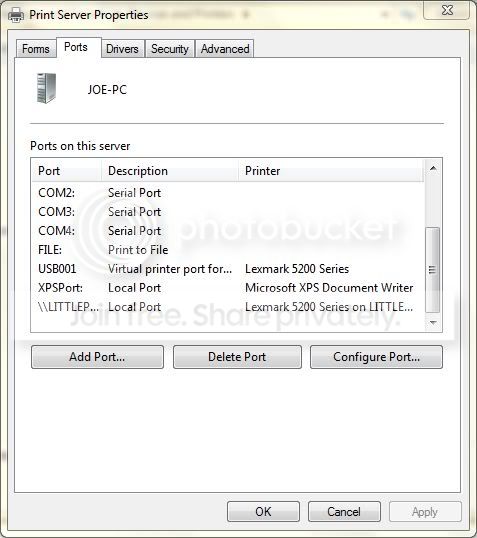
However i want to see a screenshot of your Printers and Faxes, USB the printer to your w7 machine, set it up and make sure it's working. Go into Devices and Printers, in Control Panel. Locate the printer which is listed under Printers and Fax. Highlight it. On top task bar click Print Server properties> Ports. Can you do a screenshot and show us?
 

My Computer

Computer Manufacturer/Model Number
Lenovo ThinkPad T60
OS
Windows 7 Ultimate 64Bit
CPU
GenuineIntel Intel(R) Core(TM) DuoCore T2400 @ 1.83GHz
Motherboard
Intel(R) 82801G (ICH7 Family)
Memory
2.00 GB
Graphics Card(s)
Mobile Intel(R) 945 Express Chipset
Sound Card
SoundMAX Integrated Digital HD Audio
Monitor(s) Displays
ThinkPad Display
Screen Resolution
1400x1050
Hard Drives
100Gb SATA
Keyboard
Standard Keyboard
Mouse
HID-compliant Mouse
Internet Speed
Cable Broadband - 54Mbps
Other Info
Intel(R) PRO/1000 PL Network Connection
11a/b/g Wireless LAN Mini PCI Express Adapter
printerscreen.jpg


Is this what you wanted?

I scrolled down so that the ports with actual printers "connected" to them were visible. (LITTLEPUP is XPMACHINE2, by the way - I've just been referring to them as XPMACHINE1 AND XPMACHINE2 for clarity's sake.)
 

My Computer

Computer Manufacturer/Model Number
Compaq CQ50-215NR
OS
Windows 7
CPU
AMD Athlon Dual-Core QL-60 ~1.9GHz
Memory
3 GB
Graphics Card(s)
GeForce 8200M G
Monitor(s) Displays
Built-in LCD 1200x800
Hard Drives
160GB HDD

My Computer

Computer Manufacturer/Model Number
Self-Built
OS
Win 7 RTM 7600 Ultimate 64-bit
CPU
E8500 SLAPK Q814A161
Motherboard
Gigabyte EP35-DS3R
Memory
4GB Gskill PI PC2-8500CL5D
Graphics Card(s)
XFX 8800GTS Extreme 640MB
Sound Card
Creative X-Fi XtremeGamer
Monitor(s) Displays
Samsung 213T
Screen Resolution
1600x1200
Hard Drives
1 x Western Digital SATA 500GB
1 x Maxtor SATA 320GB
Case
Antec Nine Hundred
Cooling
CPU: Xigmatek HDT-S1283
Keyboard
Saitek Eclipse
Mouse
Trackman Marble
Internet Speed
6 Mbps down cable
I have the Vista printer drivers on my Win 7 machine. Lexmark has not yet released drivers for Windows 7. The Lexmark website states that their Vista driver will work in a Windows 7 environment - true, when it's connected via USB. It's only when I try to connect over the network that I have trouble.
 

My Computer

Computer Manufacturer/Model Number
Compaq CQ50-215NR
OS
Windows 7
CPU
AMD Athlon Dual-Core QL-60 ~1.9GHz
Memory
3 GB
Graphics Card(s)
GeForce 8200M G
Monitor(s) Displays
Built-in LCD 1200x800
Hard Drives
160GB HDD
Your problem is one that the vista machine cannot connect/ping the printer, if the printer is actually ON the network (though direct connection to another machine or standalone networking) it can be connected to. Like all network printers you can connect to it from remote machine through "Adding a printer using a tcp/ip address or hostname". The key here is ip or hostname and i'm most certain this needs to be the case for you. If the printer doesn't have ANY networking capabilties then you might need to look for one that has so you can printer over the network.
 

My Computer

Computer Manufacturer/Model Number
Lenovo ThinkPad T60
OS
Windows 7 Ultimate 64Bit
CPU
GenuineIntel Intel(R) Core(TM) DuoCore T2400 @ 1.83GHz
Motherboard
Intel(R) 82801G (ICH7 Family)
Memory
2.00 GB
Graphics Card(s)
Mobile Intel(R) 945 Express Chipset
Sound Card
SoundMAX Integrated Digital HD Audio
Monitor(s) Displays
ThinkPad Display
Screen Resolution
1400x1050
Hard Drives
100Gb SATA
Keyboard
Standard Keyboard
Mouse
HID-compliant Mouse
Internet Speed
Cable Broadband - 54Mbps
Other Info
Intel(R) PRO/1000 PL Network Connection
11a/b/g Wireless LAN Mini PCI Express Adapter
Back
Top