Solved New and Mysterious File Folders Appearing on my Win 7 Computer

Maxxwire

New member
Guru
Local time
9:39 AM
Messages
1,251
2015-05-23_223026_1.jpg


A file folder of this type first showed up on the root of my computer's C drive about 3 months ago. Most recently one also appeared on the computer's attached SSD drive and that was when I began to become suspicious of the nature and origin of these empty folders with special permissions that return after they have been deleted.

Do any of you know or possibly speculate upon the source and purpose of these folders being created on my Win 7 computer over the last few months?
 

My Computer My Computer

At a glance

Windows 7 x64 Home PremiumIntel Core i7 930 @ 2.8 Ghz Socket 1366 LGA8 GB 1366 Mhz DDR3 (PC3-10700) RAMATI Radeon 5770 1 GB DDR5 RAM
Computer Manufacturer/Model Number
HP HPE 270f
OS
Windows 7 x64 Home Premium
CPU
Intel Core i7 930 @ 2.8 Ghz Socket 1366 LGA
Motherboard
Pegatron Truckee v1.04E41
Memory
8 GB 1366 Mhz DDR3 (PC3-10700) RAM
Graphics Card(s)
ATI Radeon 5770 1 GB DDR5 RAM
Sound Card
Realtech High Definition
Monitor(s) Displays
32" Sony Bravia
Screen Resolution
1366 X 768
Hard Drives
Intel 25nm 120 GB Series 320 SSD HD Tune- 265 MBps Read/ 130 MBps Write

LaCie 1TB + 1TB RAID 0 eSATA Drive HD Tune- 160 MBps Read/ 90 MBps Write
Keyboard
Logitech Illuminated
Mouse
Logitech MX Revolution
Internet Speed
36.4 Mbps Maximum on a 37 Mbps Motorola SB501 Modem

My Computer My Computer

At a glance

W7 Pro SP1 64biti78GBIntel HD Graphics
Computer type
Laptop
Computer Manufacturer/Model Number
Employer provided Dell Latitude
OS
W7 Pro SP1 64bit
CPU
i7
Memory
8GB
Graphics Card(s)
Intel HD Graphics
Hard Drives
crappy SSD
Antivirus
Employer mandated Symantec Endpoint Protection
Browser
Pale Moon 64bit, IE11 64bit & Chrome 64bit
Thank you for your timely and reassuring reply! I am still wondering why these folders are recreated each time after they have been removed? Are there additional installations occurring each time they reappear with a new name?
 

My Computer My Computer

At a glance

Windows 7 x64 Home PremiumIntel Core i7 930 @ 2.8 Ghz Socket 1366 LGA8 GB 1366 Mhz DDR3 (PC3-10700) RAMATI Radeon 5770 1 GB DDR5 RAM
Computer Manufacturer/Model Number
HP HPE 270f
OS
Windows 7 x64 Home Premium
CPU
Intel Core i7 930 @ 2.8 Ghz Socket 1366 LGA
Motherboard
Pegatron Truckee v1.04E41
Memory
8 GB 1366 Mhz DDR3 (PC3-10700) RAM
Graphics Card(s)
ATI Radeon 5770 1 GB DDR5 RAM
Sound Card
Realtech High Definition
Monitor(s) Displays
32" Sony Bravia
Screen Resolution
1366 X 768
Hard Drives
Intel 25nm 120 GB Series 320 SSD HD Tune- 265 MBps Read/ 130 MBps Write

LaCie 1TB + 1TB RAID 0 eSATA Drive HD Tune- 160 MBps Read/ 90 MBps Write
Keyboard
Logitech Illuminated
Mouse
Logitech MX Revolution
Internet Speed
36.4 Mbps Maximum on a 37 Mbps Motorola SB501 Modem
In your System Spec area for this forum, there is a field for Antivirus. You might want to fill that field in so that other members can know that answer without having to ask you :-)

So, what antivirus app are you using? The reason that I ask is: Microsoft Security Essentials (MSE) can create one of these folders with each signature file update. It depends on how you ask MSE to update.* MSE also leaves these folders behind at times.

*edit: If you download the relatively large (~150MB) manual update file, it makes a temp folder.

The folders should be randomly named so as to not interfere with other folders that already exists. If you leave them alone, you will probably just get more of them. Whatever app is creating them, probably does not reuse old folders. It probably creates a new one each time one is needed.

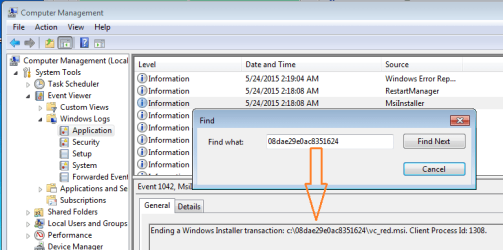
One way to maybe figure out what process made the folder is to:
Right click on the folder and select Rename from the context menu.
Copy the folder's random name into the Windows clipboard.

Open Microsoft's Management Console and load the Computer Management snap-in.
(e.g. Start > right click on Computer and select Manage from the context menu)

Open the left pane to the area shown below...
folder.png
...then select any entry in the right pane (after it loads).
Use Ctrl-F and paste to find an entry with that folder name.


That said, these are just temp folders. They might not be related to installations (but they probably are). There could be some app creating/using them and not removing them. If we can find the offending app, we might be able to encourage it (via settings) to use a specific temp folder instead of the root of various drives.
 
Last edited:

My Computer My Computer

At a glance

W7 Pro SP1 64biti78GBIntel HD Graphics
Computer type
Laptop
Computer Manufacturer/Model Number
Employer provided Dell Latitude
OS
W7 Pro SP1 64bit
CPU
i7
Memory
8GB
Graphics Card(s)
Intel HD Graphics
Hard Drives
crappy SSD
Antivirus
Employer mandated Symantec Endpoint Protection
Browser
Pale Moon 64bit, IE11 64bit & Chrome 64bit
Thank you for your detailed instructions on how to find out where these temp files are coming from. The next time one of them pops up I will use your suggestions to see if I can find out which app is creating them.
 

My Computer My Computer

At a glance

Windows 7 x64 Home PremiumIntel Core i7 930 @ 2.8 Ghz Socket 1366 LGA8 GB 1366 Mhz DDR3 (PC3-10700) RAMATI Radeon 5770 1 GB DDR5 RAM
Computer Manufacturer/Model Number
HP HPE 270f
OS
Windows 7 x64 Home Premium
CPU
Intel Core i7 930 @ 2.8 Ghz Socket 1366 LGA
Motherboard
Pegatron Truckee v1.04E41
Memory
8 GB 1366 Mhz DDR3 (PC3-10700) RAM
Graphics Card(s)
ATI Radeon 5770 1 GB DDR5 RAM
Sound Card
Realtech High Definition
Monitor(s) Displays
32" Sony Bravia
Screen Resolution
1366 X 768
Hard Drives
Intel 25nm 120 GB Series 320 SSD HD Tune- 265 MBps Read/ 130 MBps Write

LaCie 1TB + 1TB RAID 0 eSATA Drive HD Tune- 160 MBps Read/ 90 MBps Write
Keyboard
Logitech Illuminated
Mouse
Logitech MX Revolution
Internet Speed
36.4 Mbps Maximum on a 37 Mbps Motorola SB501 Modem
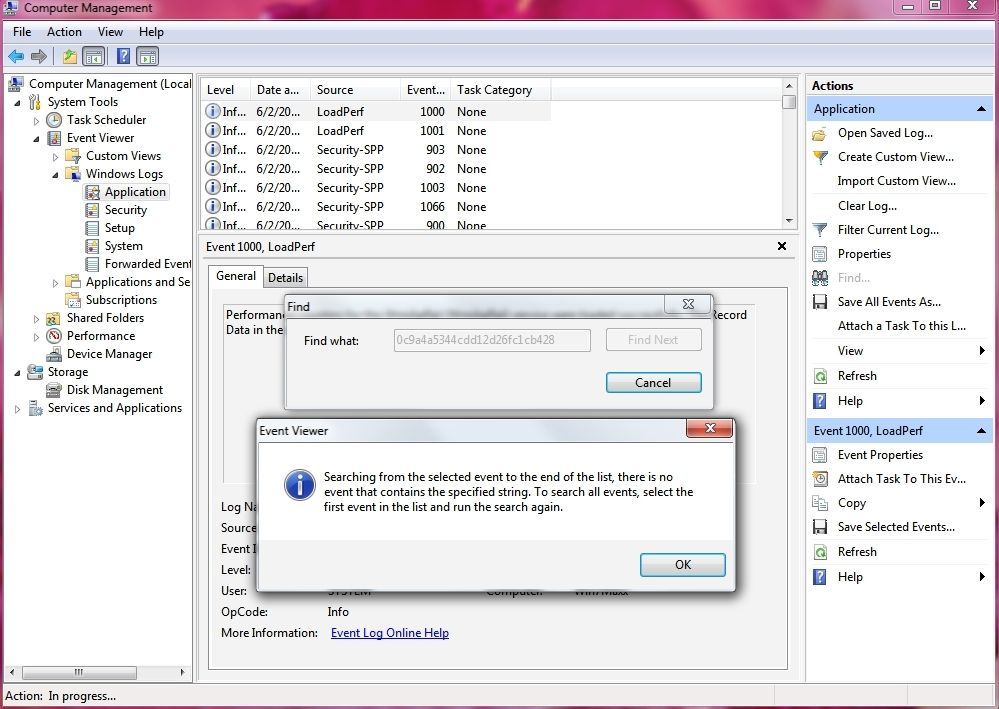
2015-06-02_230844.jpg


Another new file appeared today and so I followed the directions concerning how to determine the source of these folders which keep returning, but the find feature could not locate the file by it's name. Have I somehow made a mistake in the procedure?
 

My Computer My Computer

At a glance

Windows 7 x64 Home PremiumIntel Core i7 930 @ 2.8 Ghz Socket 1366 LGA8 GB 1366 Mhz DDR3 (PC3-10700) RAMATI Radeon 5770 1 GB DDR5 RAM
Computer Manufacturer/Model Number
HP HPE 270f
OS
Windows 7 x64 Home Premium
CPU
Intel Core i7 930 @ 2.8 Ghz Socket 1366 LGA
Motherboard
Pegatron Truckee v1.04E41
Memory
8 GB 1366 Mhz DDR3 (PC3-10700) RAM
Graphics Card(s)
ATI Radeon 5770 1 GB DDR5 RAM
Sound Card
Realtech High Definition
Monitor(s) Displays
32" Sony Bravia
Screen Resolution
1366 X 768
Hard Drives
Intel 25nm 120 GB Series 320 SSD HD Tune- 265 MBps Read/ 130 MBps Write

LaCie 1TB + 1TB RAID 0 eSATA Drive HD Tune- 160 MBps Read/ 90 MBps Write
Keyboard
Logitech Illuminated
Mouse
Logitech MX Revolution
Internet Speed
36.4 Mbps Maximum on a 37 Mbps Motorola SB501 Modem
As you found out, not all installers will write that random path to the Windows Event logs. Look at the time that the folder with the random name was created. See if the folder creation time corresponds with events in the logs named Application, Setup or System.

It might not be an app installer that is creating these folders. It might be some minor update process. What antivirus product are you using?
 

My Computer My Computer

At a glance

W7 Pro SP1 64biti78GBIntel HD Graphics
Computer type
Laptop
Computer Manufacturer/Model Number
Employer provided Dell Latitude
OS
W7 Pro SP1 64bit
CPU
i7
Memory
8GB
Graphics Card(s)
Intel HD Graphics
Hard Drives
crappy SSD
Antivirus
Employer mandated Symantec Endpoint Protection
Browser
Pale Moon 64bit, IE11 64bit & Chrome 64bit
Hi you might just show what you have installed,
Click Start and type in the search box,
msconfig
Click on the suggestion on top or hit the Enter key,
Go to the Startup section and take some screen shots for a complete list,
Go to the Services section and on the bottom left Check the box to Hide All Microsoft services,
Repeat the screen shots,
Cheers.
 

My Computer My Computer

At a glance

Win-7-Pro64bit 7-H-Prem-64biti7-5930K 2nd i9-9940x both water blocked VRM'...Trident-z 3200C14 2nd Trident-z 3600C16EVGA 1080ti ftw3 2nd Titan Xp both water blocked
Computer type
PC/Desktop
Computer Manufacturer/Model Number
Custom assembled by me :}
OS
Win-7-Pro64bit 7-H-Prem-64bit
CPU
i7-5930K 2nd i9-9940x both water blocked VRM's too
Motherboard
ASUS SABERTOOTH X99 2nd ASUS x299 Apex
Memory
Trident-z 3200C14 2nd Trident-z 3600C16
Graphics Card(s)
EVGA 1080ti ftw3 2nd Titan Xp both water blocked
Sound Card
Built-in Realtek
Monitor(s) Displays
1-AOC G2460PG 24"G-Sync 144Hz/ 2nd 1-ASUS VG248QE 24" 144Hz
Screen Resolution
1920 x 1080 144Hz
Hard Drives
2-Samsung M.2 Evo & Evo Plus
2-Samsung 850 EVO 500GB SSD's/ 3-2.5 W.D. Black 1tb-&3-1tb/3-3.5 WD Black 1tb hdd's
PSU
EVGA SuperNOVA 1000-P2 2nd 1200-P2
Case
2-Corsair Obsidian Series 450D Black ATX Mid Tower
Cooling
Custom water loops
Keyboard
Logitech G710+/ 2nd Logitech G910
Mouse
2-RedDragon M901 Perdition 16400 dpi Gaming mouse = wired
Internet Speed
Comcast Ping 19ms 89.31mbps download speed 6.12mbps upload
Antivirus
Malwarebytes Pro/ Superantispyware Pro
Browser
FireFox & Pale moon
Other Info
2nd ASUS X299 Apex/Intel i9-9940x with Custom water loop/7H-Prem-x64/Corsair 450D case/Ram Trident-z 3600C16 4x8gb / Samsung970Evo plus 500gb SSD/Dual ssd EZ swap evo/PSU EVGA SuperNova 1200w-P2 80+Platinum/GPU Titan Xp /8-ML-140 on push-pull on 2-280GTX rads
It might not be an app installer that is creating these folders. It might be some minor update process. What antivirus product are you using?

I am currently using Malwarebytes 2.1.6.1022 along with MSE. It had occurred to me that the folder in question may have been created by MSE when I manually updated it directly through windows update which was very close to the time that the mysterious folder was created. Today there was another MSE update included along with 3 other updates having to do with upgrading to Win 10. I deleted the existing folder to find out if another would be created my the MSE update, but no new folder appeared. I've had this Win 7 computer for almost 5 years and whatever is creating and recreating this folder it just started it a little over 3 months ago. The mystery continues...
 

My Computer My Computer

At a glance

Windows 7 x64 Home PremiumIntel Core i7 930 @ 2.8 Ghz Socket 1366 LGA8 GB 1366 Mhz DDR3 (PC3-10700) RAMATI Radeon 5770 1 GB DDR5 RAM
Computer Manufacturer/Model Number
HP HPE 270f
OS
Windows 7 x64 Home Premium
CPU
Intel Core i7 930 @ 2.8 Ghz Socket 1366 LGA
Motherboard
Pegatron Truckee v1.04E41
Memory
8 GB 1366 Mhz DDR3 (PC3-10700) RAM
Graphics Card(s)
ATI Radeon 5770 1 GB DDR5 RAM
Sound Card
Realtech High Definition
Monitor(s) Displays
32" Sony Bravia
Screen Resolution
1366 X 768
Hard Drives
Intel 25nm 120 GB Series 320 SSD HD Tune- 265 MBps Read/ 130 MBps Write

LaCie 1TB + 1TB RAID 0 eSATA Drive HD Tune- 160 MBps Read/ 90 MBps Write
Keyboard
Logitech Illuminated
Mouse
Logitech MX Revolution
Internet Speed
36.4 Mbps Maximum on a 37 Mbps Motorola SB501 Modem
The folder in your original post has 32 random characters. MSE creates temp folders with 32 random characters too - but only when certain parts of MSE require updates (scanning engines vs. definitions). You did not see another temp folder because MSE did not need to make one today.

The folder should go away after the update(s) completes. Perhaps something has changed recently that is causing some of them to be left behind. Maybe the change was on Microsoft's side or maybe Malwarebytes has changed and is preventing the rapid creation & deletion of certain folders. Maybe those that use MSE & MBAM could let us know if they see these folders too. Even the automatic updates can create these folders. I've seen computers with 3 or 4 of these folders. I just delete them.


> I deleted the existing folder to find out if another would be created my the MSE update, but no new folder appeared.
While it does not hurt to delete them, they do not get reused. A new one (with a different name) will be created the next time one is needed.


If you want to see one of these folders, use Internet Explorer to download and run one or two of MSE's manual update files. Visit this webpage:
https://www.microsoft.com/security/portal/definitions/adl.aspx
Scroll to the bottom section named "Network Inspection System updates".
See the image in step two.
Take note of all of the version info on that "About" screen.

Scroll back up to the section named "Manually download the latest updates".
Click on the applicable link to download the manual update file. (~150MB)
Select Run. Do not select Save.....
That makes the file download to and run from IE's Temporary Internet Files (TIF) folder. Running from there should cause the installer to create one of these temp folders. The installer might create a temp folder no matter where it is run from. I'm just guessing that running from the TIF folder gives you the best shot at seeing a random folder being created. That said, if no updates are required, the temp folder might be create and deleted too fast for you to see via Windows Explorer. You might need to run Process Monitor to capture the sub-second even.

The manual update file does not make any screens for you to see or interact with. It is kind of hard to know when it has finished. If updates are applied, it may animate MSE's icon in the system tray (notification area). [I do not use MSE and I cannot test MSE inside a virtual machine right now. So all of this is from memory.] After you run that manual update file, check the "About" screen again to see if any of the numbers have changed.

Also, you might want to download/run the manual update file for the Network Inspection System. I'm not sure if the NIS updates are a part of the larger file that you just downloaded above. You tell us :-)
 

My Computer My Computer

At a glance

W7 Pro SP1 64biti78GBIntel HD Graphics
Computer type
Laptop
Computer Manufacturer/Model Number
Employer provided Dell Latitude
OS
W7 Pro SP1 64bit
CPU
i7
Memory
8GB
Graphics Card(s)
Intel HD Graphics
Hard Drives
crappy SSD
Antivirus
Employer mandated Symantec Endpoint Protection
Browser
Pale Moon 64bit, IE11 64bit & Chrome 64bit
The folder in your original post has 32 random characters. MSE creates temp folders with 32 random characters too - but only when certain parts of MSE require updates (scanning engines vs. definitions). The folder should go away after the update(s) completes. Perhaps something has changed recently that is causing some of them to be left behind. Maybe the change was on Microsoft's side.

I first noticed the appearance of one of these folders just after a patch Tuesday update about 3 months ago so as you pointed out these empty files could very well be a result of recent changes in the way that MSE handles it's temp files.

Thank you very much for all of the time and effort that you have put into helping me to find the source of these folders that were being created on my Win 7 computer as well as it's external SSD drive. I want you to know that I genuinely appreciate all of the intricately detailed and very helpful information that you have so knowledgeably posted in response to my inquiry.
 

My Computer My Computer

At a glance

Windows 7 x64 Home PremiumIntel Core i7 930 @ 2.8 Ghz Socket 1366 LGA8 GB 1366 Mhz DDR3 (PC3-10700) RAMATI Radeon 5770 1 GB DDR5 RAM
Computer Manufacturer/Model Number
HP HPE 270f
OS
Windows 7 x64 Home Premium
CPU
Intel Core i7 930 @ 2.8 Ghz Socket 1366 LGA
Motherboard
Pegatron Truckee v1.04E41
Memory
8 GB 1366 Mhz DDR3 (PC3-10700) RAM
Graphics Card(s)
ATI Radeon 5770 1 GB DDR5 RAM
Sound Card
Realtech High Definition
Monitor(s) Displays
32" Sony Bravia
Screen Resolution
1366 X 768
Hard Drives
Intel 25nm 120 GB Series 320 SSD HD Tune- 265 MBps Read/ 130 MBps Write

LaCie 1TB + 1TB RAID 0 eSATA Drive HD Tune- 160 MBps Read/ 90 MBps Write
Keyboard
Logitech Illuminated
Mouse
Logitech MX Revolution
Internet Speed
36.4 Mbps Maximum on a 37 Mbps Motorola SB501 Modem
Case Closed

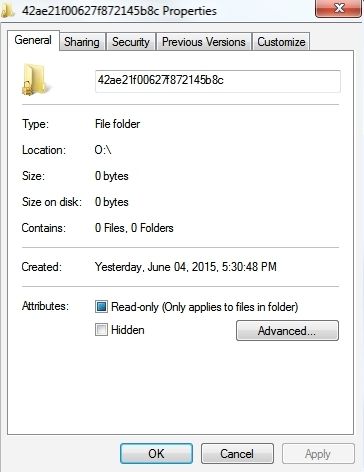
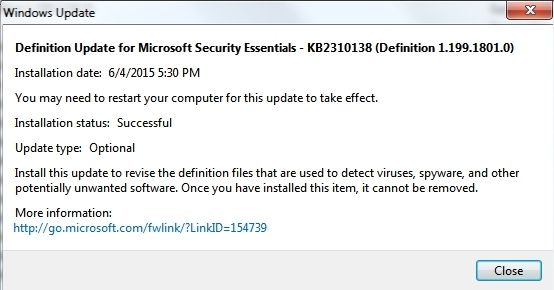
2015-06-05_101323.jpg


2015-06-05_101213.jpg


UsernameIssues- Thank you again for all of your help in tracking down the source of the mysterious folders which had been appearing on the internal and attached drive of my computer. The above documentation provides sufficient confirmation for me to know that the files were indeed being created by MSE as you had suggested all along.
 

My Computer My Computer

At a glance

Windows 7 x64 Home PremiumIntel Core i7 930 @ 2.8 Ghz Socket 1366 LGA8 GB 1366 Mhz DDR3 (PC3-10700) RAMATI Radeon 5770 1 GB DDR5 RAM
Computer Manufacturer/Model Number
HP HPE 270f
OS
Windows 7 x64 Home Premium
CPU
Intel Core i7 930 @ 2.8 Ghz Socket 1366 LGA
Motherboard
Pegatron Truckee v1.04E41
Memory
8 GB 1366 Mhz DDR3 (PC3-10700) RAM
Graphics Card(s)
ATI Radeon 5770 1 GB DDR5 RAM
Sound Card
Realtech High Definition
Monitor(s) Displays
32" Sony Bravia
Screen Resolution
1366 X 768
Hard Drives
Intel 25nm 120 GB Series 320 SSD HD Tune- 265 MBps Read/ 130 MBps Write

LaCie 1TB + 1TB RAID 0 eSATA Drive HD Tune- 160 MBps Read/ 90 MBps Write
Keyboard
Logitech Illuminated
Mouse
Logitech MX Revolution
Internet Speed
36.4 Mbps Maximum on a 37 Mbps Motorola SB501 Modem
You are welcome. Now let's hope that these folders will start going away as they should.

I should probably check in on some of the MSE users that I support. They might have lots of these abandoned folders :-(
 

My Computer My Computer

At a glance

W7 Pro SP1 64biti78GBIntel HD Graphics
Computer type
Laptop
Computer Manufacturer/Model Number
Employer provided Dell Latitude
OS
W7 Pro SP1 64bit
CPU
i7
Memory
8GB
Graphics Card(s)
Intel HD Graphics
Hard Drives
crappy SSD
Antivirus
Employer mandated Symantec Endpoint Protection
Browser
Pale Moon 64bit, IE11 64bit & Chrome 64bit
Actually I have never seen more than one of these folders at a time. Originally there was one on the root of my C drive that remained there for several months. One day I decided to delete it (because I could) and a singular second file appeared on my attached drive which I became concerned about. As I mentioned before each time I would delete the file another one would appear a few days later, but there was never more than one file at a time on the drive. Thanks to your help and guidance I was finally able to identify the mysterious folder as being created by MSE which was a great relief to me.
 

My Computer My Computer

At a glance

Windows 7 x64 Home PremiumIntel Core i7 930 @ 2.8 Ghz Socket 1366 LGA8 GB 1366 Mhz DDR3 (PC3-10700) RAMATI Radeon 5770 1 GB DDR5 RAM
Computer Manufacturer/Model Number
HP HPE 270f
OS
Windows 7 x64 Home Premium
CPU
Intel Core i7 930 @ 2.8 Ghz Socket 1366 LGA
Motherboard
Pegatron Truckee v1.04E41
Memory
8 GB 1366 Mhz DDR3 (PC3-10700) RAM
Graphics Card(s)
ATI Radeon 5770 1 GB DDR5 RAM
Sound Card
Realtech High Definition
Monitor(s) Displays
32" Sony Bravia
Screen Resolution
1366 X 768
Hard Drives
Intel 25nm 120 GB Series 320 SSD HD Tune- 265 MBps Read/ 130 MBps Write

LaCie 1TB + 1TB RAID 0 eSATA Drive HD Tune- 160 MBps Read/ 90 MBps Write
Keyboard
Logitech Illuminated
Mouse
Logitech MX Revolution
Internet Speed
36.4 Mbps Maximum on a 37 Mbps Motorola SB501 Modem
If we knew why the automatic deletion sometimes fails, then maybe we could make sense out of why you see one at a time and I've seen 3 different folders in one month on one computer.
 

My Computer My Computer

At a glance

W7 Pro SP1 64biti78GBIntel HD Graphics
Computer type
Laptop
Computer Manufacturer/Model Number
Employer provided Dell Latitude
OS
W7 Pro SP1 64bit
CPU
i7
Memory
8GB
Graphics Card(s)
Intel HD Graphics
Hard Drives
crappy SSD
Antivirus
Employer mandated Symantec Endpoint Protection
Browser
Pale Moon 64bit, IE11 64bit & Chrome 64bit
Back
Top