New Aomei Backupper - Great free imaging program

SIW2

YTS GEEK
Guru
VIP
SF Team
Local time
6:28 PM
Messages
16,784
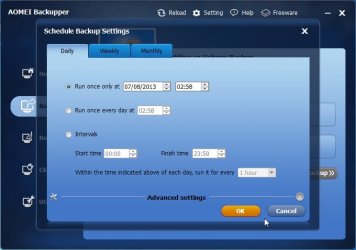
New version 1.5 Supports scheduling now:
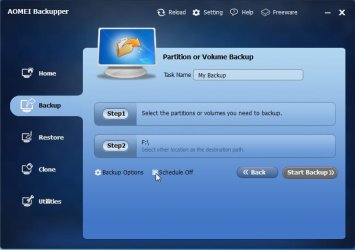
AB1.jpg

AB2.jpg

NAS Supported

GPT & UEFI Boot Supported

Dynamic Volumes Supported

Incremental & Differential Backups

Encryption and Compression

Image File Checker and Mount to a virtual partition.

Comment Backups and Splitting Backups

Create Bootable Rescue Media usb or cd

http://www.backup-utility.com/free-backup-software.html?from=patoolbar

Fantastic free backup software.
 

My Computers

System One System Two

  • Computer type
    PC/Desktop
    OS
    7 X64
    CPU
    i5 8400
    Motherboard
    gigabyte b365m ds3h
    Memory
    2x8gb 3200mhz
    Hard Drives
    various
    PSU
    pure power 11 400w cm
    Case
    Coolermaster
    Cooling
    cryorig m9i
  • Computer type
    PC/Desktop
    OS
    7x64
    CPU
    g5400
    Motherboard
    ga b365m ds3h
    Memory
    8gb ddr4 2400
    PSU
    xfx pro 450w
I've been giving AOMEI a trial run for a week now. My verdict so far: Big Thumbs Up. The UI is so neat, so sweet. Backups and restores are simple, fast, problem free. And now there's a scheduling feature to complete the package. I am turning into an AOMEI fanboy. lol
 

My Computer

OS
Windows 7 Home Premium x64
The Aomei partition manager is good, too.

Will upload my winpe maker soon.

You need the 7SP1 dvd to make it. I have only done the 64 bit so far.

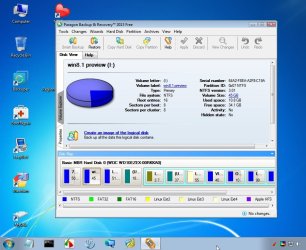
It takes a few mins and looks like this:

PE3-X64.jpg

PE3-X64-2.jpg
 

My Computers

System One System Two

  • Computer type
    PC/Desktop
    OS
    7 X64
    CPU
    i5 8400
    Motherboard
    gigabyte b365m ds3h
    Memory
    2x8gb 3200mhz
    Hard Drives
    various
    PSU
    pure power 11 400w cm
    Case
    Coolermaster
    Cooling
    cryorig m9i
  • Computer type
    PC/Desktop
    OS
    7x64
    CPU
    g5400
    Motherboard
    ga b365m ds3h
    Memory
    8gb ddr4 2400
    PSU
    xfx pro 450w
SIW2:

Thank you for this referral.

I previously used RestoreIT and ShadowProtect... was looking for a reliable alternative.

Installed Aomei Backupper. Ran it. No issue of any kind.

Appreciate the details in your post.

Alan
 

My Computer

Computer type
Laptop
Computer Manufacturer/Model Number
Gateway EC5801u LX.WFC02.001 Notebook PC
OS
Windows 7 Home Premium 64bit
CPU
Intel Core 2 Duo SU7300 1.2GHz
Motherboard
?
Memory
8 GB DDR3
Graphics Card(s)
Intel® Graphics Media Accelerator 4500MHD
Screen Resolution
1366 x 768
Hard Drives
500 GB 5400 RPM
Mouse
G700s Rechargeable Gaming Mouse
Internet Speed
30 MBPS
Antivirus
MS Security Essentials
Browser
Pale Moon
Other Info
Just a basic business laptop. ;)
Some folks say Aomei can screw up on the restore. I've tested it with 3 restores and everything looks fine (I think!). Has anyone here run into problems?
 

My Computer

OS
Windows 7 Home Premium x64
I have used it plenty of times, works fine for me.

I suppose the 2 most well known free versions up to now have been macrium and paragon. They are both good. Paragon offers more functions, but doesn't have a built in winpe making thing. Macrium does, but it needs to d/l waik components.

Aomei does it all.
 

My Computers

System One System Two

  • Computer type
    PC/Desktop
    OS
    7 X64
    CPU
    i5 8400
    Motherboard
    gigabyte b365m ds3h
    Memory
    2x8gb 3200mhz
    Hard Drives
    various
    PSU
    pure power 11 400w cm
    Case
    Coolermaster
    Cooling
    cryorig m9i
  • Computer type
    PC/Desktop
    OS
    7x64
    CPU
    g5400
    Motherboard
    ga b365m ds3h
    Memory
    8gb ddr4 2400
    PSU
    xfx pro 450w
Well, I did another backup/restore test today. Looks good. It does take less time to backup than to restore (10 minutes vs. 17 minutes). No biggie!
 

My Computer

OS
Windows 7 Home Premium x64
It's simple to me; if SIW2 recommends it I surly will try it.
 

My Computer

Computer type
PC/Desktop
Computer Manufacturer/Model Number
Home made Desktop
OS
Windows 10 Pro. 64/ version 1709 Windows 7 Pro/64
CPU
Intel i7-6800K @ 4.3
Motherboard
ASUS X-99 Deluxe II
Memory
Corsair Platinum 16 gig @2400
Graphics Card(s)
EVGA GTX 1070 OC
Monitor(s) Displays
Asus 27" LED LCD/VE278Q
Screen Resolution
1920-1080 or 1280-720 HDMI
Hard Drives
INTEL SSD 730-240 Gb Sata 3.0/
PSU
EVGA Platium 1200W
Case
Phanteks Luxe Tempered Glass 8 fans/ one radiator
Cooling
XSPC/ Water Cooled CPU
Keyboard
Das 4 Professional
Mouse
Logitech M705/MX Anywhere 2-S
Internet Speed
100 mbits
Antivirus
Microsoft Security Essentials/ Malwarebytes Premium 3.0/ SAS
Browser
I.E. 11 default/Firefox/ ISP Time Warner Cable/Spectrum
Other Info
LG BluRay Burner/
Sound system-KLipsch-THX/
Icy Dock ssd Hot Swap bays.
Back
Top