
Solved New build started going to windows repair on startup, but reboot works

Reseil

New member
Local time
3:06 PM
Messages
6
Interesting dilemma started occurring. Long post, but weird circumstances require details.

Been working on a custom build for a client. Everything is going great up until it's deliver to the customer time (of course). I purchased 160GB WD blues for OS (going to set up in RAID 1), but found out I got some bad drives. Working fine for a couple weeks with no issues, but bad blocks started popping up, so ran them through the WD diags and they failed.

Having not had much luck with WD Blue series, I decide to go with WD Red's for the OS. I put a RAID 5 array and a separate RAID 1 for backup storage in the machine, all using WD Red's and they really work well. Research online said they are good for OS drives, so picked up a couple 1TB's and imaged the existing 160GB partition to one of the 1TB Red drives. I decided not to kick off the mirror on the OS drive until the customer was happy with the setup. Once satisfied, the plan was to perform one final image, then kick off the RAID 1 and handle all future support via remote.

This was last night and this morning I shut the box down, no issues. Fast forward to getting it hooked up onsite and it says it can start, so it goes into Windows repair. I let it run for 2 hours and it gets nowhere, so I put in a Win7 install disc and see if the repair works from DVD. Goes into the same never ending repair cycle, so I just hard reset it and when it gave me option for repair or start normally, I choose the latter. Amazingly, it boots to desktop. Check eventvwr and no errors at all, so I'm hoping it's a fluke. Restart the box from OS and it goes into the same Windows repair loop, but another hard reset and it boots to desktop again. Repeated this a few more times just to replicate the issue and same thing every time. Cold boot or restart from OS and it goes into the repair loop, but a hard reset will put it at the desktop.. every time. So I'm figuring bad drive, which doesn't make much sense with the symptoms, but I figure it can't hurt at this point. so I image it real fast, pop another 1TB Red in from a different batch and pull the image back down. Reset button from the TI Image screen and it boots. Restart from OS, it goes into the same repair loop.

I'm at a loss at this point. I'm hoping it's just the Red drives, but it really doesn't make sense if they are the problem. I'm going back onsite to check it again soon, but figured I'd pass this one to the gurus to see if they'd seen it before. Tons of searching for an answer hasn't yielded any results and I've never seen this before in any of my travels.

Gigabyte Z87X-UD5H with latest BIOS
Windows 7 Professional x64
Western Digital 1TB NAS Red Drives in RAID mode

It literally started presenting right after I dropped the working image onto the new drives, but only after it went through a bit of travel (albeit securely and without any incidents). Will report back after trying some WD Black drives I used for testing some of the images off of it that I know work, but hoping that someone has maybe seen this before in the interim.
 

My Computer My Computer

At a glance

Windows 7 Professional x64
Computer type
PC/Desktop
OS
Windows 7 Professional x64
May I ask why you're using dated RAID, for what benefit to your client? All we see here are problems with RAID which offers no appreciable benefit I've seen and isn't even redundant since most users lose all data if they lose one drive. You certainly don't need it for size nowadays.

If you'll post back a screenshot of Disk Management - Post a Screen Capture Image we can look over the config to see if it anything is obvious.

I'd also run a few Startup Repairs from Disk to see if it finds anything. I'd also run a Disk Check and HD Diagnostic
 
The problem isn't RAID related to clarify. The config is all based on customer request, so it is what it is. If the arrays were part of the equation here, I'd be considering them as a factor. I could replicate the issue with and without the raid drives connected.

The issue is a single OS drive in this bizarre loop. I've not mirrored it yet, so definitely something else other than RAID.

Drives all look fine from a disk management perspective. All the eventvwr logs are clean. The interesting thing I noticed is that there were no entries for an unexpected reboot, so the failed boots never got to that point. I forced at least a half dozen hard reboots, but none popped on the logs. I'll try the startup repairs from disk again to see if that yields any results. I let the first attempt go 2 hours before I started digging in, and the other attempt about 30 minutes. Do you recommend a certain amount of time to let them run without finding any issues?

Will run the WD diags on the drive. The issue followed the image to another drive, so I didn't think both would be bad. Will also try to drop a known working image on some different drives to see if it follows.

Do you think it could be BIOS related? I flashed to the newest version, but it was before this presented, so not sure if it could "flake out" as it were. If it helps, I did notice an extra soft reset while it was going through the boot process which seemed out of sorts. Meaning it would post, run through the typical startup actions, then soft reset once right when I would typically expect it to fire up the OS. It's upon this subsequent bootup it fails and attempts to repair the failed startup. Sorry for leaving that piece out. I've been going over the sequence to see if I can narrow down the fail point.

I defer to anyone that has had success with the repair features on Win7 as to how long you should wait before assuming it's just not going to work. I've not had much experience with it.

Thanks for the quick response.:D
 

My Computer My Computer

At a glance

Windows 7 Professional x64
Computer type
PC/Desktop
OS
Windows 7 Professional x64
I asked to see Disk Management, not whether you thought it was okay. We tend to see things others don't after reading tens of thousands of them.

If the problem is with Win7 installed to a single HD, then unplug all other HD's to see if prob persists, if so do the repairs and tests with only it plugged in. If not, add back each HD or data array to see which is affecting it.

Startup Repair running so long could point to a failing HD, so do the maker's HD Diagnostic and full Disk Check.

Be sure you are running Startup Repair from disk and not the autostarted one which depends on System files that might be awry.

I'd also run SFC /SCANNOW Command
 
Went back onsite today and the issue is cleared. Have absolutely no idea what the issue may have been or may still be. I pulled some more images of the OS drive while there, so going to do some more testing as to possible root cause. I tried at least a dozen times to get the symptom to reoccur, but nada.

I did fail to mention I'm quite familiar with NT and hardware, so while I appreciate the expertise, I did explain my steps to eliminate what I could at the time. At this point, I am in agreement with you as to it likely being hardware related and not OS.

I asked to see Disk Management, not whether you thought it was okay. We tend to see things others don't after reading tens of thousands of them.

If the problem is with Win7 installed to a single HD, then unplug all other HD's to see if prob persists, if so do the repairs and tests with only it plugged in. If not, add back each HD or data array to see which is affecting it.

I stated that I replicated the issue with and WITHOUT the other drives connected, so there's that. I guess if you could discern something out of looking at a screen grab of a single volume in disk management, I need to brush up.

Startup Repair running so long could point to a failing HD, so do the maker's HD Diagnostic and full Disk Check.

Be sure you are running Startup Repair from disk and not the autostarted one which depends on System files that might be awry.

I'd also run SFC /SCANNOW Command

Manufacturers diags pending still until off hours this weekend. SFC completed. Will run it through the startup fix from media just to see if it locates anything when I go back onsite. Since the issue cleared, I wanted to check some other things instead of letting the machine run through the check from disc.

I'll mark this as resolved, but still not sure at all what the issue was. Most bizarre case I've seen as of late. Not a single event in the logs indicating a failed bootup or an unexpected restart is the strangest piece. This is the first time I actually hit the wall hard enough to go looking for outside resources to throw in their input.

I appreciate the input and suggestions for sure.
 

My Computer My Computer

At a glance

Windows 7 Professional x64
Computer type
PC/Desktop
OS
Windows 7 Professional x64
We needed to see Disk Mgmt with all volumes plugged in as it says in tutorial. Often this is enough to see the problem, another reason why this is the top tech site on the web. We have the top experts in every field here to learn from.

Please come back and see us when you'd like to coooperate, not debate us and withhold key pieces of the puzzle because you don't think we need them or want to pretend you are too advanced for us.
 
As a matter of professionalism, you sir.. need work. I'd like to think someone with 40k posts would be able to at least absorb what troubleshooting has been done already and what is relevant to the issue :rolleyes:. Instead, you immediately go into condescending mode and imply the poster is some form of uncooperative, antagonistic, know it all?. Seriously, go back and read the posts. It's all there. I just wanted to see if anyone recognized the symptoms.
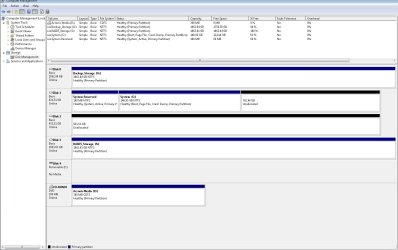
I would definitely like to hear from some of the other top experts, because you aren't showing any skills here other than running through A+ grade level suggestions.

That said, I'm gonna bite since I don't believe you have any idea on this one (and the fact you seriously come off as some form of angry cartoon character.) Here's the disk management screen. If you can pull root cause out of this, I will buy you a cookie and bow to your superior intellect.
 

Attachments

  • Untitled.jpg
    Untitled.jpg
    124.1 KB · Views: 13

My Computer My Computer

At a glance

Windows 7 Professional x64
Computer type
PC/Desktop
OS
Windows 7 Professional x64
I would have the WIn7 HD in Disk0 position.

The solution to your problem is likely in the many other steps I suggested which you haven't completed yet, since these have solved similar issues when they've come up over the years.

I'm sorry you feel I didn't provide help the way you wanted, but we have certain procedures here which always work best, and tend to bridle when they are ignored.

I'll ask some others to look at your thread since you're not satisfied with my help.

Unsubscribed.
 
I will pass on this one. :huh:
 

My Computer My Computer

At a glance

Windows 7 Ultimate X64 SP1Intel i5-2550K, Differing ~4.4-4.8GHz No buil...16GB G.Skill Sniper 1866MHz @ 2133MHz 2x8GBASUS GTX650TIB-DC2OC-2GD5, (650TI Boost)
Computer type
PC/Desktop
Computer Manufacturer/Model Number
Home Built Desktop By DataTech
OS
Windows 7 Ultimate X64 SP1
CPU
Intel i5-2550K, Differing ~4.4-4.8GHz No built in GPU
Motherboard
ASUS P8Z68-V PRO/GEN3
Memory
16GB G.Skill Sniper 1866MHz @ 2133MHz 2x8GB
Graphics Card(s)
ASUS GTX650TIB-DC2OC-2GD5, (650TI Boost)
Sound Card
Onboard Realtek 5-1
Monitor(s) Displays
Samsung P2570HD
Screen Resolution
1920x1080
Hard Drives
Samsung 840 Pro 256GB SSD for OS, 500GB Seagate Constellation (Enterprise drive) for Data
PSU
Corsair HX650W
Case
Inwin Dragon Rider
Cooling
Hyper 212 EVO w/two Noctua fans, push-pull, @1300 RPM
Keyboard
E-Z Eyes, bright yellow keys with large characters
Mouse
steelseries SENSEI Laser Pro Gaming
Internet Speed
48-51Mbs Mbs down, 11 Mbs up Xfinity Cable
Antivirus
Norton Internet Security 2013
Browser
IE 10, Opera, Pale Moon if needed
Other Info
4 case fans, LG BluRay-RE, ASUS DVD-RW, Mr. Fusion power supply, 1.21 gigawatts.
You say you moved the old partition from a disk to another in the posts above. Is that correct?

I'm another system builder, and most of the times when I move an OS to another disk I image the entire disk.
And if it fails I image the whole old disk sector-by-sector (any self-respecting imaging program can do it if needed).
All times I tried to move a single partition with the OS on it the result was a fubar with similar issues like booting only some times or giving random errors at boot and trying to boot-repair without success (I generally have very little faith in boot-repair), and I had to restart from scratch.

Another interesting piece of info is that mobo-controlled raids are a pain in the backside unless you are working with server hardware, it isn't the first time the bios's RAID controller module is worthless or too buggy.
In some extreme cases I had to resort to BIOS modding to swap the crappy bios RAID module with a working one, with the guidance found in this forum. Which is also a good place to ask your question too, being mostly RAID-oriented.
 

My Computer My Computer

At a glance

Win 7 Pro 64-bit 7601AMD Phenom 9650 QuadCore, revision DR-B35 GB yes I run 2x 2GB and 1x 1GB, different b...NVIDIA GeForce 9800 GT 512 Mb, unknown manufa...
Computer type
PC/Desktop
Computer Manufacturer/Model Number
custom built
OS
Win 7 Pro 64-bit 7601
CPU
AMD Phenom 9650 QuadCore, revision DR-B3
Motherboard
ASUS M4A78
Memory
5 GB yes I run 2x 2GB and 1x 1GB, different brand, spank me.
Graphics Card(s)
NVIDIA GeForce 9800 GT 512 Mb, unknown manufacturer.
Sound Card
Crappy Realtek Integrated Audio
Monitor(s) Displays
Fujitsu Siemens P19-3P
Screen Resolution
1280 x 1024 x 32 bits @ 60 Hz Oh yeah, 4:3 rocks!
Hard Drives
(1) MAXTOR S TM3320613AS SATA Disk Device (2) STM35004 18AS SATA Disk Device (3) TOSHIBA USB 2.5"-HDD
PSU
whatever, around 450w
Case
Scavenged from old company PC, 10+ years old
Cooling
CPU fan, GPU fan, case fan, nothing fancy
Keyboard
Microsoft, PS/2, white.
Mouse
Optical, logitec.
Internet Speed
effective max speeds: 70-ish kB/s down 30-ish kB/s up
Antivirus
Avira, free edition.
Browser
Firefox with FXChrome to make it look like Google Chrome :P
Other Info
Was discarded by previous owner due to "horrible performance".
Was running Win Xp from a IDE drive. Yeah. Was a pain.
SATA II drive and Win7 and it zips away! Yay!
The original OS was installed on a smaller test drive (160GB) with the intention of moving it to a new 160GB when I had the best image. I went through several clean installs before coming up with that perfect one. This was not a sector by sector image, but since I'd tested it across multiple drive types to make sure it worked, I was happy with it being the one to use. The brand new 160GB I ultimately put it on started throwing bad block errors, so I ran it, the intended mirror drive, and the spare I ordered through factory diags and 2/3 failed. Since smaller drives are hard to find, I decided to go with larger drives and just keep the original partition size. Customer wants WD only, and I've found Blue is terrible for mirroring, so I'm either going black or red. Red won out based on some good articles I found. I pulled that original image to the new drive with it's original partition size, so yes to your question about moving it.

I got the system to the point where both arrays were stable and the base apps were installed. No issues at all, so imaged it again. I deliver the system to the site, and when I fire it up, it goes into the loop described. I check all the hardware, connections.. all the typical stuff and everything looks good. Since I could get the system to boot with a hard reset, I left it up and researched the issue to find nothing that matched the symptoms.

Fast forward and the issue clears magically. I do everything I can think of to try and replicate it.. nothing. I tested known good images with different drives, old images with different drives.. still nothing. I did this testing with and without the arrays attached on every scenario, so that just isn't part of this issue.

I've run the WD diags on all the drives currently in the machine and they all passed. The system is running fine with no issues, no errors in logs, arrays are happy, customer is happy and my wallet is happy.

I've only read about BIOS modding, but never had the guts to mess with it. Since I couldn't replicate the issue with the arrays connected (and disabled in BIOS), and the fact that it worked perfectly when I left to deliver it, all I can think of is something happened in transit somehow cleared when it "settled" onsite. I spoke to another guy and he said temperature changes can cause weird stuff, but with nothing to go on, that just sounds weak.

Long winded posts aside, I'm as stumped as I've ever been. I was hoping to find something borked so at least I could fix it and move on. You raise a valid point about the sector by sector imaging though. I've used it in the past, but it just seems to take up more space and yield the same results, so I shy away from it unless an image fails in testing. I'm not sure if it matters on this one, but if it reoccurs, that's a viable next step to troubleshooting, especially since I still have the original install on the 160GB drive I used to build the image.

Do you think maybe doing a sector by sector image of that and testing with it would be a good use of time? If nothing else, maybe a bit of peace of mind? :D
 

My Computer My Computer

At a glance

Windows 7 Professional x64
Computer type
PC/Desktop
OS
Windows 7 Professional x64
Maybe I didn't explain the question well enough. Cloning/imaging a partition and cloning/imaging a whole drive are two different options on all self-respecting software I used.
Either can be moved to any sized drive as long as the actual data would fit. The sector-by-sector copy is another option I rarely use myself, but was necessary sometimes as nothing else was stable.

What of the two bolded options did you choose when you made that disk image?

I usually clone/image the whole disk, because all the times I clone/image OS partitions only it becomes unstable or unreliable in similar ways to your issues.

all I can think of is something happened in transit somehow cleared when it "settled" onsite.
BIOS-controlled raids can be flaky like that. May work or not depending on unknown reasons. Most common is that unless both drives are exactly the same model and size it acts weird.
I suppose it's because the mobo manufacturers add that as an afterthought and don't thoughly test the code.

Never had these issues with (decent) RAID cards. Which would be my first choice for any RAID.

Bios modding is relatively dangerous and I'm not keen on frying boards for lulz, but can do it if no other choice is available *chough* mini-itx gaming board *cough* or if customer asks for it. Although swapping a RAID module is relatively easy, as far as bios modding goes.

Bottom line: if you managed to solve it somehow and everyone is happy it could have been a one-time event caused by whatever (yeah it happens to everyone), if it eventually stops working again, you have something to blame and a possible solution.
 

My Computer My Computer

At a glance

Win 7 Pro 64-bit 7601AMD Phenom 9650 QuadCore, revision DR-B35 GB yes I run 2x 2GB and 1x 1GB, different b...NVIDIA GeForce 9800 GT 512 Mb, unknown manufa...
Computer type
PC/Desktop
Computer Manufacturer/Model Number
custom built
OS
Win 7 Pro 64-bit 7601
CPU
AMD Phenom 9650 QuadCore, revision DR-B3
Motherboard
ASUS M4A78
Memory
5 GB yes I run 2x 2GB and 1x 1GB, different brand, spank me.
Graphics Card(s)
NVIDIA GeForce 9800 GT 512 Mb, unknown manufacturer.
Sound Card
Crappy Realtek Integrated Audio
Monitor(s) Displays
Fujitsu Siemens P19-3P
Screen Resolution
1280 x 1024 x 32 bits @ 60 Hz Oh yeah, 4:3 rocks!
Hard Drives
(1) MAXTOR S TM3320613AS SATA Disk Device (2) STM35004 18AS SATA Disk Device (3) TOSHIBA USB 2.5"-HDD
PSU
whatever, around 450w
Case
Scavenged from old company PC, 10+ years old
Cooling
CPU fan, GPU fan, case fan, nothing fancy
Keyboard
Microsoft, PS/2, white.
Mouse
Optical, logitec.
Internet Speed
effective max speeds: 70-ish kB/s down 30-ish kB/s up
Antivirus
Avira, free edition.
Browser
Firefox with FXChrome to make it look like Google Chrome :P
Other Info
Was discarded by previous owner due to "horrible performance".
Was running Win Xp from a IDE drive. Yeah. Was a pain.
SATA II drive and Win7 and it zips away! Yay!
Acronis TI, whole disk.

I'm to the point where I am just going to call it a one off and let it go. I didn't "solve" anything, which is what kind of irks me. Since I didn't do anything and it could be replicated when it was occurring, but not on return visit, I hate not knowing root cause.

I do appreciate the input for sure.
 

My Computer My Computer

At a glance

Windows 7 Professional x64
Computer type
PC/Desktop
OS
Windows 7 Professional x64
Back
Top