
New but not a newby; question about memory usage

RayTheRat

Juggrernaught
Member
Local time
9:42 AM
Messages
36
Location
The western High Desert
I've been working with different types of computers since 1966. I've built many of my own systems and now I have a rather large system running Win7 Pro

As it shows in my sig, I have a 2 x quad-core system with 16 gig registered RAM.

I've noticed in Resource Monitor it seems to only use 8 gig and marks 8 gig as "Standby", even when I have the box loaded down with processes.

Is 8 gig the max that can be accessed by "normal" processes? Is there a tweak I can make to allow all memory to be used? Btw, there's 8 gig assigned to each CPU. It's on a Tyan Thunder N3600B mobo.

I'd appreciate any insight on this.
 

My Computer My Computer

Computer Manufacturer/Model Number
Home Built
OS
Windows 7 Pro 64-bit
CPU
2 x Opteron quad-core
Motherboard
TYAN Thunder N3600B Dual processor mobo
Memory
16 gig buffered
Graphics Card(s)
Radeon 4890 feeding my compnent stereo system. Sounds great
Sound Card
M-Audio Delta Audiophile
Monitor(s) Displays
Acer 24", Acer 21"
Screen Resolution
1980x1050 & 1680x1050
Hard Drives
Internal:

OCZ 60 gig SSD
2 x WD 1tb
1 WD 1.5tb
1 WD 320 GB

External:

3 x WD Mybook 1TB
PSU
Corsair 900w
Case
Coolermaster HAF 932
Cooling
Many fans, liquid cooling on the way but likely in November
Keyboard
Saitek red backlit
Mouse
Logitek USB
Internet Speed
Way too slow for a DSL line
Other Info
This is a build that was in progress but got pressed into service because of the need for large photo editing capability.

More will be revealed after "car season" (race cars, Salt Flats, etc.) is over in October. That's when the serious tweaking will start.

See Build Diary here:
http://www.raytherat.com/dreadnought/Welcome.html
I've been working with different types of computers since 1966. I've built many of my own systems and now I have a rather large system running Win7 Pro

As it shows in my sig, I have a 2 x quad-core system with 16 gig registered RAM.

I've noticed in Resource Monitor it seems to only use 8 gig and marks 8 gig as "Standby", even when I have the box loaded down with processes.

Is 8 gig the max that can be accessed by "normal" processes? Is there a tweak I can make to allow all memory to be used? Btw, there's 8 gig assigned to each CPU. It's on a Tyan Thunder N3600B mobo.

I'd appreciate any insight on this.


Ray

Go into msconfig and look for a "max mem" setting. It should be unchecked. Might as well check for max cpu, it too should be unchecked.

Let us know if you need help

Ken
 

My Computer My Computer

Computer Manufacturer/Model Number
HP Pavillion dv-7 1005 Tx
OS
Win 8 Release candidate 8400
CPU
[email protected]
Memory
4 gigs
Graphics Card(s)
Nvidia 9600M
Sound Card
HD built-in
Monitor(s) Displays
17" Wxga
Screen Resolution
1440x900
Cooling
none
Internet Speed
45Mb down 5Mb up
Nope. Not that I saw. I looked into the MS Developer's data and there and in numerous other places on the web the limit for W7 Pro 64-bit is stated to be 192 GB.

I didn't find any info on any way to change a virtual limit or anything of that nature.

I ran a program (Winutilities) which may or may not be accurate, but it showed 8.8 gig available ram. If that's the case, it's not ignoring the ram on one of the CPUs; if it was, it'd only show 8 gig...or so I'd think.

Well, I'm still in the tuning phase of this system. I'd hoped to have another month or so to tweak it (and add liquid cooling to the CPUs) but my second career as a photographer and webmaster interfered and forced me to put it into service last week since I have a backlog of work that needs to be done. Ohh...my first career was as a financial systems programmer/analyst. Heart disease cut that short a little before I was ready to retire. Seems like everything's arriving early these days except spring and mail.


Thanks,
 

My Computer My Computer

Computer Manufacturer/Model Number
Home Built
OS
Windows 7 Pro 64-bit
CPU
2 x Opteron quad-core
Motherboard
TYAN Thunder N3600B Dual processor mobo
Memory
16 gig buffered
Graphics Card(s)
Radeon 4890 feeding my compnent stereo system. Sounds great
Sound Card
M-Audio Delta Audiophile
Monitor(s) Displays
Acer 24", Acer 21"
Screen Resolution
1980x1050 & 1680x1050
Hard Drives
Internal:

OCZ 60 gig SSD
2 x WD 1tb
1 WD 1.5tb
1 WD 320 GB

External:

3 x WD Mybook 1TB
PSU
Corsair 900w
Case
Coolermaster HAF 932
Cooling
Many fans, liquid cooling on the way but likely in November
Keyboard
Saitek red backlit
Mouse
Logitek USB
Internet Speed
Way too slow for a DSL line
Other Info
This is a build that was in progress but got pressed into service because of the need for large photo editing capability.

More will be revealed after "car season" (race cars, Salt Flats, etc.) is over in October. That's when the serious tweaking will start.

See Build Diary here:
http://www.raytherat.com/dreadnought/Welcome.html
Post a screenshot of resmon.exe memory's tab and the summary screen of HWInfo32.
 

My Computer My Computer

Computer Manufacturer/Model Number
Sony Vaio Z46GDU
OS
Windows 7 Ultimate x86-64
CPU
[email protected] 1066MHz FSB
Motherboard
Sony branded
Memory
6GB DDR3 1066MHz
Graphics Card(s)
9300M GS 256MB Dedicated (Speed) + Intel4500MHD (Stamina)
Sound Card
Realtek HD Audio
Monitor(s) Displays
13.1' WXGA
Screen Resolution
1600x900
Hard Drives
320GB 7200RPM w/ 16MB cache
Internet Speed
1MB/s
Sure. Here they are. I'm surprised to see the 2.4 ghz clock speed. I thought I'd set that to 3.0...but then my memory problems are why I had to retire, so....

Well, anyway, here they are.
 

Attachments

  • hwinfo32.jpg
    hwinfo32.jpg
    104.9 KB · Views: 25
  • resmon1.jpg
    resmon1.jpg
    100.5 KB · Views: 16

My Computer My Computer

Computer Manufacturer/Model Number
Home Built
OS
Windows 7 Pro 64-bit
CPU
2 x Opteron quad-core
Motherboard
TYAN Thunder N3600B Dual processor mobo
Memory
16 gig buffered
Graphics Card(s)
Radeon 4890 feeding my compnent stereo system. Sounds great
Sound Card
M-Audio Delta Audiophile
Monitor(s) Displays
Acer 24", Acer 21"
Screen Resolution
1980x1050 & 1680x1050
Hard Drives
Internal:

OCZ 60 gig SSD
2 x WD 1tb
1 WD 1.5tb
1 WD 320 GB

External:

3 x WD Mybook 1TB
PSU
Corsair 900w
Case
Coolermaster HAF 932
Cooling
Many fans, liquid cooling on the way but likely in November
Keyboard
Saitek red backlit
Mouse
Logitek USB
Internet Speed
Way too slow for a DSL line
Other Info
This is a build that was in progress but got pressed into service because of the need for large photo editing capability.

More will be revealed after "car season" (race cars, Salt Flats, etc.) is over in October. That's when the serious tweaking will start.

See Build Diary here:
http://www.raytherat.com/dreadnought/Welcome.html
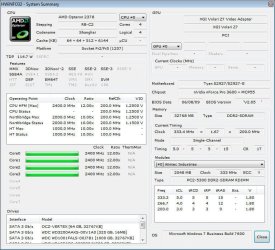
That looks OK - strange that HWInfo reports 32GB though. Do the modules all match up in the program?
 

My Computer My Computer

Computer Manufacturer/Model Number
Sony Vaio Z46GDU
OS
Windows 7 Ultimate x86-64
CPU
[email protected] 1066MHz FSB
Motherboard
Sony branded
Memory
6GB DDR3 1066MHz
Graphics Card(s)
9300M GS 256MB Dedicated (Speed) + Intel4500MHD (Stamina)
Sound Card
Realtek HD Audio
Monitor(s) Displays
13.1' WXGA
Screen Resolution
1600x900
Hard Drives
320GB 7200RPM w/ 16MB cache
Internet Speed
1MB/s
I'm not sure what you mean by "in the program." In resmon, the total amount is shown correctly.

Could you clarify that a little?

Thanks,
 

My Computer My Computer

Computer Manufacturer/Model Number
Home Built
OS
Windows 7 Pro 64-bit
CPU
2 x Opteron quad-core
Motherboard
TYAN Thunder N3600B Dual processor mobo
Memory
16 gig buffered
Graphics Card(s)
Radeon 4890 feeding my compnent stereo system. Sounds great
Sound Card
M-Audio Delta Audiophile
Monitor(s) Displays
Acer 24", Acer 21"
Screen Resolution
1980x1050 & 1680x1050
Hard Drives
Internal:

OCZ 60 gig SSD
2 x WD 1tb
1 WD 1.5tb
1 WD 320 GB

External:

3 x WD Mybook 1TB
PSU
Corsair 900w
Case
Coolermaster HAF 932
Cooling
Many fans, liquid cooling on the way but likely in November
Keyboard
Saitek red backlit
Mouse
Logitek USB
Internet Speed
Way too slow for a DSL line
Other Info
This is a build that was in progress but got pressed into service because of the need for large photo editing capability.

More will be revealed after "car season" (race cars, Salt Flats, etc.) is over in October. That's when the serious tweaking will start.

See Build Diary here:
http://www.raytherat.com/dreadnought/Welcome.html
HWInfo32 lists 32GB, in the app, can you select the modules and see if they are correctly identified? Everything looks OK though.
 

My Computer My Computer

Computer Manufacturer/Model Number
Sony Vaio Z46GDU
OS
Windows 7 Ultimate x86-64
CPU
[email protected] 1066MHz FSB
Motherboard
Sony branded
Memory
6GB DDR3 1066MHz
Graphics Card(s)
9300M GS 256MB Dedicated (Speed) + Intel4500MHD (Stamina)
Sound Card
Realtek HD Audio
Monitor(s) Displays
13.1' WXGA
Screen Resolution
1600x900
Hard Drives
320GB 7200RPM w/ 16MB cache
Internet Speed
1MB/s
Back
Top