New computer and my old hard drives aren't showing up.

Mckeekeekee

New member
Local time
11:48 AM
Messages
3
Hey so the story is, it was time for an upgrade and I got a barebundle package from Novatech. I installed windows 7 on a brand new hard drive and then afterwards I plugged in my 2 old sata hard drives which were bought at Novatech and when they came with that computer like 3 or 4 years ago they came as two 250gig hard drives merged together.

They are showing up in my computer like this:
47663_10150331443345321_539100320_15701783_6468912_n.jpg


Then I googled the problem and I came to this forum :) and somebody had a similar but not the same problem, I thought to cut time I'd show you what my Disk Management looks like:
154995_10150331443305321_539100320_15701781_883954_n.jpg


Does anybody know how I can access those two merged hard drives? Would be so amazing seeing as I have years of photography, games and work on them :(
 

My Computer My Computer

At a glance

Windows 7
OS
Windows 7
Bootup using a live linux distro and check if the data in the hard drives shows up or not. If it does then it is an issue with windows 7, else probably the sectors are corrupt which means there is no possible bay (except opening the hard disk and using a magnetic data reader), which means you have to format your hard disk.
 

My Computer My Computer

At a glance

Windows 7 Professional 64-bitAMD Phenom II X6 1050TGSkill Trident 1600 MHz 4 GB KitMSi N580GTX Lightning Edition
Computer Manufacturer/Model Number
`
OS
Windows 7 Professional 64-bit
CPU
AMD Phenom II X6 1050T
Motherboard
M4A87TD-m EVO\USB3
Memory
GSkill Trident 1600 MHz 4 GB Kit
Graphics Card(s)
MSi N580GTX Lightning Edition
Sound Card
On board
Monitor(s) Displays
dell ST2210 22" Full HD
Screen Resolution
1920x1080
Hard Drives
WD Caviar Green 1TB @ 3 GBps
WD Black Caviar 1TB @ 6 GBps
PSU
Cooler Master GX750
Case
CoolerMaster HAF922
Cooling
Stock
Keyboard
Logitech Classic Keyboard
Mouse
Logitech MX518
Internet Speed
BSNL unlimited @ 512 kbps
I actually think the problem lies with Disk 1 or E: if you see it says primary partision aswell I think it's something to do with that, I think that Disk 1 and Disk 2 are primary partitions for my old computer. I think the two old hard drives are conflicting with the first one. That's what it looks like because if you look Disk 1 (not 0) says primary partition.
 

My Computer My Computer

At a glance

Windows 7
OS
Windows 7
the issue wiht primary partitions come when they are all on a single hard disk.
In that case, you can make upto 4 primary partitions on a single HD. even if you try, you cant make more.
Even I have 3 HDDs and all of then have multiple partitions so having 3 HDDs should not be the problem here, unless they are Seagate.
I have seen this before my self too. Sometimes windows cant read some of the Seagate HDDs if they are connected at the same time. I cant use my seagate ext. without disconnecting the internal Seagate HDD.

Hope it was of some help to you.
 

My Computer My Computer

At a glance

Windows 7 Professional 64-bitAMD Phenom II X6 1050TGSkill Trident 1600 MHz 4 GB KitMSi N580GTX Lightning Edition
Computer Manufacturer/Model Number
`
OS
Windows 7 Professional 64-bit
CPU
AMD Phenom II X6 1050T
Motherboard
M4A87TD-m EVO\USB3
Memory
GSkill Trident 1600 MHz 4 GB Kit
Graphics Card(s)
MSi N580GTX Lightning Edition
Sound Card
On board
Monitor(s) Displays
dell ST2210 22" Full HD
Screen Resolution
1920x1080
Hard Drives
WD Caviar Green 1TB @ 3 GBps
WD Black Caviar 1TB @ 6 GBps
PSU
Cooler Master GX750
Case
CoolerMaster HAF922
Cooling
Stock
Keyboard
Logitech Classic Keyboard
Mouse
Logitech MX518
Internet Speed
BSNL unlimited @ 512 kbps
when you say "merged together", do you mean they were in a RAID array? from your disk management screenshot, it appears disk 2 is empty, but it doesnt show up in "my computer" because you need to assign it a drive letter.
what operating system was installed on the old drive(s)? were they in RAID0?
 

My Computer My Computer

At a glance

windows 7 ultimate 64bitIntel Core2 Extreme x9000 2.8GHZ4Gig2 NVidia GeForce 8800M GTX (SLi)
Computer Manufacturer/Model Number
Alienware AREA-51 M17x
OS
windows 7 ultimate 64bit
CPU
Intel Core2 Extreme x9000 2.8GHZ
Motherboard
Asus P965 Intel chipset
Memory
4Gig
Graphics Card(s)
2 NVidia GeForce 8800M GTX (SLi)
Sound Card
onboard
Monitor(s) Displays
17in. built-in, 47in JVC LCD
Screen Resolution
1080p
Hard Drives
2 250Gig Hitachi (RAID 0) @ 7200RPM
Case
17in. laptop
Mouse
touchpad, Logitech Anywhere Mouse cordless laser
Internet Speed
cable
Actually, we need more information before we can do much to help you. You stated the 2 250 Gig HDs were merged together, which suggests to me that you had them 'striped' to get 500 gigs of disk space. The problem is, you did not tell us how they were 'merged together'. Also, if it was done with a RAID setup via hardware or via software.

The drawback with an old RAID setup is that when you redo your system, you have the potential of breaking an old raid setup and possibly destroying your old data. More so if the RAID setup was done via the operating system, as the OS is the one that controls how to access those disks for the information and by destroying to OS, there is a high potential of irrecoverable loss of how the RAID Striping was done.

The worst case scenario I can state is that you might have lost all your data, especially if you had Windows 7 try to repartition or redo those drives.

One possible chance you CAN try, but no guarantees you can recover data is to use a Ubuntu Live CD, see if it will see the stripped partitions and then copy said data onto an external drive.

One thing to note for the future, and this is also for other people. You never really want to have a RAID 0 (Two disks 'merged' to make a larger disk) or try to setup a new system and try and keep a RAID 0 Striped set as there is always a chance of accidentally muxing up the data by making wrong choices or the OS having the potential of also messing with the data. You should always backup the data you want from that disk setup to an external setup.

Further more, you really do not want to use RAID 0 setup for 'critical' data. RAID 0 is great for performance, however, striping the Data across multiple disks, while it increases your speed of access, it also increases your chance of data failure if a disk fails due to lack of data redundancy. RAID 0 is best for scratch disk use where you don't care if you lose the data, but in this day and age, most people don't use RAID 0 setups anymore.
 

My Computer My Computer

At a glance

Windows 7 Ultimate x64 and Home Premium x64Intel i7 960 (3.2 GHz Quad Core)12 Gigs (Triple Channel)Alienware OEM nVidia GTX 560 Ti (1.25 Gig)
Computer Manufacturer/Model Number
Alienware Area 51 Desktop and Dell Inspirion 17R (N7010)
OS
Windows 7 Ultimate x64 and Home Premium x64
CPU
Intel i7 960 (3.2 GHz Quad Core)
Motherboard
Alienware Intel based X58
Memory
12 Gigs (Triple Channel)
Graphics Card(s)
Alienware OEM nVidia GTX 560 Ti (1.25 Gig)
Sound Card
Creative Labs X-Fi Titanium
Monitor(s) Displays
Samsung PX2370 LED 23" Monitor
Screen Resolution
1920x1080
Hard Drives
2 320 Gig SATA in Raid 1 Configuration (System/App)
1 1 Tera SATA (Games)
1 1 Tera SATA (Data/Music/Videos)
PSU
750 Watt Power Supply
Case
Alienware Area 51 Desktop
Cooling
Liquid Cooled
Keyboard
Logitech G510
Mouse
Microsoft Trackball Explorer
Internet Speed
Cable
Keiichi25 gave you some good advice there. If your drives were merged together in a RAID (more specifically, JBOD), then the quickest and easiest way of getting the data back would be to put both those hard drives back into the original machine in the same configuration that they where originally in in, backup the data, then put the hard disk back into your new machine.

The only other option would be to use the R-Studio Data Recovery Software. It allows you to create a "virtual raid" during data recovery scanning. I had to do this myself several years ago when I had 3 hard drives in JBOD, and I had to replace a failed motherboard with one that did not support JBOD. I managed to get about 90% or so of my data back.


I noticed on your screenshot (a little fuzzy, but still visible, so next time don't resize your screenshots), but your "Disk 2" is showing up as "unallocated". Here's is how you can fix that:

[warn2]The following procedure will greatly minimize your chances of recovering anything usfull from the drive, regardless of what data recovery methods you use. Follow the procedues explained below only when you are happy that you have got what you need off the drives.[/warn2]

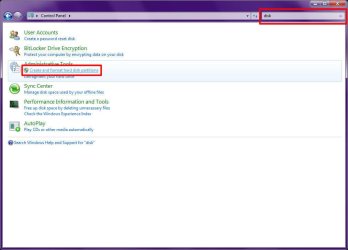
1) Open "Control Panel"
2) Type "disk" (without quotes) in the search box
3) Under "Administrative Tools", click "Create and format hard disk partitions"
Image01.jpg

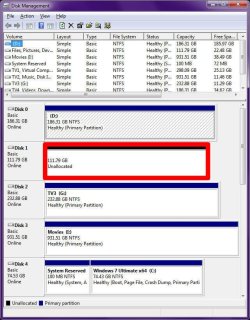
4) Find the "Unallocated" drive in Disk Management
Image02.jpg

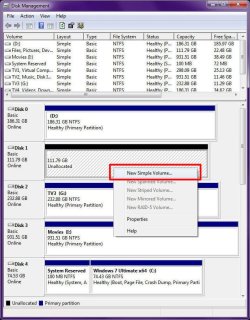
5) Right-Click the unallocated disk, then click "New Simple Volume..."
Image03.jpg

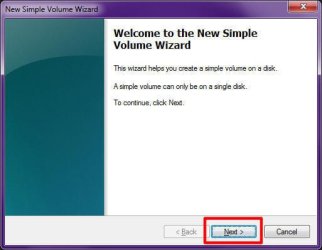
6) Click Next in the "New Simple Volume Wizard"
Image04.jpg

7) Specify the size of the volume (partition) you want to create. The default value is all available space, then click "Next"
Image05.jpg

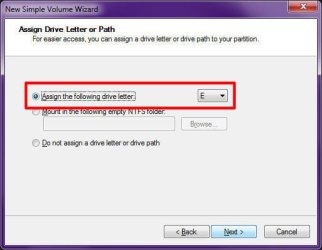
8) Specify the drive letter you want to assign to the drive, then click "Next"
Image06.jpg

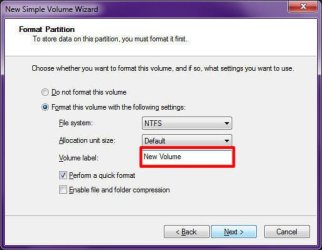
9) Type a volume label for the drive, then click "Next"
Image07.jpg

10) Review your settings, then click "Finish"
Image08.jpg

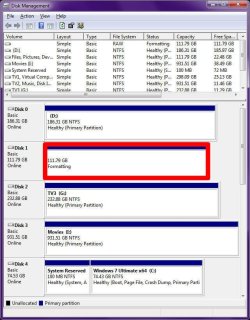
11) The drive will take a few seconds to format
Image09.jpg

12) The drive is formatted and ready to use. You can now close "Disk Management" and all other Control Panel windows.
Image10.jpg
 

My Computer My Computer

At a glance

Windows 7 Professional 32-bit SP1AMD A4/A63.00GB EDOVMware SVGA 3D
Computer type
PC/Desktop
Computer Manufacturer/Model Number
Virtual Machine
OS
Windows 7 Professional 32-bit SP1
CPU
AMD A4/A6
Motherboard
Intel Corporation 440BX Desktop Reference Platform
Memory
3.00GB EDO
Graphics Card(s)
VMware SVGA 3D
Sound Card
High Definition Audio Device
Monitor(s) Displays
Generic Non-PnP Monitor on VMware SVGA 3D
Screen Resolution
1440x900
Hard Drives
1 x 60GB VMware Virtual SATA Hard Drive ATA Device
Antivirus
Kaspersky Total Security
Sorry for the late reply, I've just been busy actually trying to find a solution. You guys, I have to say are awesome for being so helpful, even though it's not actually of any use to me :( Because:

The computer which the two old hard drives were put on died, basically the power supply started cutting off from time to time, I knew that it was going to die out soon anyway. It did eventually but what sucks is that the motherboard K.O'ed at the same time :'( That's why I got a new barebundle machine to put the old hard drives in, and then I found out that if I wanted to install any new O.S that the hard drives would have to be formatted, that's what I don't want to do: Format the drives. I have Yearsssss of work and photography on that stuff, I think I would be really really screwed if I lost all of that, I'm planning to try and sell some of my photos and then work on selling my stuff would be from those files... I got a new hard drive and thought that getting a new hd and new os and then use those two old hard drives combined as like secondary drives. Anyway sounds like I'm really ****ed, I reckon I need to call up the company which I bought the computer from (Novatech) and see if they have a solution to that because I know they still put two hard drives together for complete computers.
 

My Computer My Computer

At a glance

Windows 7
OS
Windows 7
Last edited:
there may be another way..
connect your hard drives and in the bios select raid setup for them or whatever mode you used to 'merge' them.
then botup using a linux livecd like ubuntu.
this way you wont have to install any new os and you'll, hopefully, be able to access the data on your hard disks

hope it helps you out..!!!!!
 

My Computer My Computer

At a glance

Windows 7 Professional 64-bitAMD Phenom II X6 1050TGSkill Trident 1600 MHz 4 GB KitMSi N580GTX Lightning Edition
Computer Manufacturer/Model Number
`
OS
Windows 7 Professional 64-bit
CPU
AMD Phenom II X6 1050T
Motherboard
M4A87TD-m EVO\USB3
Memory
GSkill Trident 1600 MHz 4 GB Kit
Graphics Card(s)
MSi N580GTX Lightning Edition
Sound Card
On board
Monitor(s) Displays
dell ST2210 22" Full HD
Screen Resolution
1920x1080
Hard Drives
WD Caviar Green 1TB @ 3 GBps
WD Black Caviar 1TB @ 6 GBps
PSU
Cooler Master GX750
Case
CoolerMaster HAF922
Cooling
Stock
Keyboard
Logitech Classic Keyboard
Mouse
Logitech MX518
Internet Speed
BSNL unlimited @ 512 kbps
This thread should serve as a hard lesson to anyone that has important files on a hard drive. To be blunt, if you only have one copy of something, then you obviously do not care about it. Your hard drive WILL fail or become corrupt...it's not a matter of "if," but "when." YOU MUST BACKUP CRITICAL DATA!
 

My Computer My Computer

At a glance

Windows 7 Ultimate RTM (Technet)3.00 gigahertz Intel Core2 Duo E84004GBATI Radeon X1950 Pro
Computer Manufacturer/Model Number
Custom
OS
Windows 7 Ultimate RTM (Technet)
CPU
3.00 gigahertz Intel Core2 Duo E8400
Motherboard
ASUSTeK Computer INC. P5K/EPU Rev 1.xx
Memory
4GB
Graphics Card(s)
ATI Radeon X1950 Pro
Sound Card
Built in HD Audio
Monitor(s) Displays
22" Gateway LCD
Screen Resolution
1920 x 1200
Hard Drives
ST3160023A [Hard drive] (160.04 GB) -- drive 0, rev 8.01, ST3500630AS [Hard drive] (500.11 GB) -- drive 2, rev 3.AAK
ST3500630AS [Hard drive] (500.11 GB) -- drive 1, rev 3.AAK
Keyboard
Logitech G11
Mouse
Microsoft Wireless Laser Mouse 5000
Internet Speed
13.44 Mbps
This thread should serve as a hard lesson to anyone that has important files on a hard drive. To be blunt, if you only have one copy of something, then you obviously do not care about it. Your hard drive WILL fail or become corrupt...it's not a matter of "if," but "when." YOU MUST BACKUP CRITICAL DATA!

+1 MacGyvr, your preach'n to the preacher here, you just can't stress it enough:cool:
 

My Computer My Computer

At a glance

Windows 7 Home Premium 64 bitIntel Core 2 quad Extreme Q9770 @ 3.2 GHz4x2 GB Muskin 1600 MHz ramNVidia GTX 250
Computer Manufacturer/Model Number
Dell XPS 730
OS
Windows 7 Home Premium 64 bit
CPU
Intel Core 2 quad Extreme Q9770 @ 3.2 GHz
Memory
4x2 GB Muskin 1600 MHz ram
Graphics Card(s)
NVidia GTX 250
Sound Card
Soundblaster X-Fi Fatality Champion
Monitor(s) Displays
2 Dell 2007WFP Ultrascans
Screen Resolution
3360 x 1050
Hard Drives
WD Black 1TB sata, 2-WD Black 500 sata, 2-Seagate 500 Go external
PSU
1000 Watt
Cooling
air
Keyboard
MS Natrual Keyboard Pro
Mouse
Logitech Wireless Trackball
Internet Speed
DSL Elite
Back
Top