
You are using an out of date browser. It may not display this or other websites correctly.
You should upgrade or use an alternative browser.
You should upgrade or use an alternative browser.
New Computer Getting Slower By The Day
- Thread starter AlexBSOD
- Start date

- Local time
- 1:28 PM
- Messages
- 12,011
For McAfee, try this:
How to uninstall or reinstall supported McAfee consumer products using the McAfee Consumer Products Removal tool (MCPR.exe)
I can only assume that your still high number of processes is due to certain programs you have installed. I have 30 programs installed and have never seen over 60 processes, regardless of how long my PC has been running.
How to uninstall or reinstall supported McAfee consumer products using the McAfee Consumer Products Removal tool (MCPR.exe)
I can only assume that your still high number of processes is due to certain programs you have installed. I have 30 programs installed and have never seen over 60 processes, regardless of how long my PC has been running.
My Computer
- Computer type
- PC/Desktop
- Computer Manufacturer/Model Number
- Ignatz Special; 4 speed manual gearbox; factory air conditioning; one of one
- OS
- Windows 7 Home Premium SP1, 64-bit
- CPU
- Intel Skylake i5-6600K, not overclocked
- Motherboard
- AsRock Z170M Extreme 4, micro ATX
- Memory
- 8 GB HyperX DDR4-2666 (2 x 4 GB)
- Graphics Card(s)
- none; graphics are integrated on CPU
- Sound Card
- onboard: Realtek ALC1150; external: USB Behringer UF0-202
- Monitor(s) Displays
- Dell S2340M 23 inch IPS
- Screen Resolution
- 1600 x 900
- Hard Drives
- System: Crucial MX100 series SSD, 128 GB;
Data: Samsung Spinpoint 103SJ, 1 TB;
Backup: WD Caviar Green WD30EZRX-00D8PB0, 3 TB
- PSU
- Rosewill SilentNight 500 watt fanless, semi-modular
- Case
- Antec Solo II
- Cooling
- Noctua NH-U12S; Noctua F12 intake, Noctua S12A exhaust
- Keyboard
- Microsoft 200 6JH-00001 USB
- Mouse
- Dell or Microsoft optical wired; USB
- Antivirus
- Microsoft Security Essentials and Malwarebytes Premium
- Browser
- Pale Moon
- Other Info
- All fans PWM; speeds at idle: CPU circa 500 rpm; intake circa 600 rpm; exhaust circa 600 rpm; CPU temps 27 idle and 47 C load in a warm room (27 C/81 F) when running Intel Extreme Tuning Utility stress test.

JMH
Banned
- Local time
- 4:28 AM
- Messages
- 6,448
FYI
Re the McAfee Removal Tool.
Read through this carefully.
How to uninstall or reinstall supported McAfee consumer products using the McAfee Consumer Products Removal tool (MCPR.exe)
Re the McAfee Removal Tool.
Read through this carefully.
How to uninstall or reinstall supported McAfee consumer products using the McAfee Consumer Products Removal tool (MCPR.exe)
My Computer
- Computer Manufacturer/Model Number
- LAPTOP. HP Pavilion dv7-4010TX .
- OS
- Win 7 Ultimate 64-bit. SP1.
- CPU
- Intel i7 -720QM.[1.6GHz Turbo Boost 2.8GHz. 6MB Cache.]
- Memory
- 8 DDR 3 RAM. 1066MHZ
- Graphics Card(s)
- ATI 1024 MB. DDR3. Radeon HD5650
- Monitor(s) Displays
- 17.3" High Definition Brightview LCD. LED Backlit.
- Screen Resolution
- 1600 x 900.
- Hard Drives
- 640GB
- Case
- Laptop / notebook.
- Mouse
- Logitech Anywhere mouse. MX.
- Internet Speed
- ADSL [ but too slow ]
- Local time
- 1:28 PM
- Messages
- 12,011
That's appalling, but I guess not surprising when you consider the source.
Have you tried to uninstall after a boot into safe mode (should be accessible from a menu if you tap F8 during boot)?
Have you tried to uninstall after a boot into safe mode (should be accessible from a menu if you tap F8 during boot)?
My Computer
- Computer type
- PC/Desktop
- Computer Manufacturer/Model Number
- Ignatz Special; 4 speed manual gearbox; factory air conditioning; one of one
- OS
- Windows 7 Home Premium SP1, 64-bit
- CPU
- Intel Skylake i5-6600K, not overclocked
- Motherboard
- AsRock Z170M Extreme 4, micro ATX
- Memory
- 8 GB HyperX DDR4-2666 (2 x 4 GB)
- Graphics Card(s)
- none; graphics are integrated on CPU
- Sound Card
- onboard: Realtek ALC1150; external: USB Behringer UF0-202
- Monitor(s) Displays
- Dell S2340M 23 inch IPS
- Screen Resolution
- 1600 x 900
- Hard Drives
- System: Crucial MX100 series SSD, 128 GB;
Data: Samsung Spinpoint 103SJ, 1 TB;
Backup: WD Caviar Green WD30EZRX-00D8PB0, 3 TB
- PSU
- Rosewill SilentNight 500 watt fanless, semi-modular
- Case
- Antec Solo II
- Cooling
- Noctua NH-U12S; Noctua F12 intake, Noctua S12A exhaust
- Keyboard
- Microsoft 200 6JH-00001 USB
- Mouse
- Dell or Microsoft optical wired; USB
- Antivirus
- Microsoft Security Essentials and Malwarebytes Premium
- Browser
- Pale Moon
- Other Info
- All fans PWM; speeds at idle: CPU circa 500 rpm; intake circa 600 rpm; exhaust circa 600 rpm; CPU temps 27 idle and 47 C load in a warm room (27 C/81 F) when running Intel Extreme Tuning Utility stress test.

- Local time
- 4:28 PM
- Messages
- 293
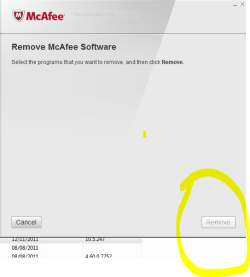
I cant remove it, the remove button cannot be clicked... look at the pic..
I wonder if you need to change the permissions on your user account, are the using the admin account? If not you need to .
My Computer
- Computer Manufacturer/Model Number
- hp pavilion 6680t
- OS
- win 7 home premium 64 bit
- CPU
- core i5 760
- Motherboard
- iona (from MSI)
- Memory
- 6 gb
- Graphics Card(s)
- ati 5450
- Sound Card
- real tek 888

Hello there, sorry that I late but I was sleeping. 
As legacy said, are you Administrator of the pc ? Do you have permissions to remove software ?
Also, if MCAfee remove tool can't help you try to remove it in Safe Mode, or using Revo Uninstaller.
As legacy said, are you Administrator of the pc ? Do you have permissions to remove software ?
Also, if MCAfee remove tool can't help you try to remove it in Safe Mode, or using Revo Uninstaller.
My Computer
- Computer type
- PC/Desktop
- Computer Manufacturer/Model Number
- Custom Build
- OS
- Windows 10 Pro x64
- CPU
- Intel Core i5 4440 @Stock
- Motherboard
- Gigabyte Z97 D3H
- Memory
- 4 x 4GB HyperX Fury DDR3
- Graphics Card(s)
- Gigabyte GTX 1050Ti O4G
- Sound Card
- Integrated
- Monitor(s) Displays
- Dell P2417H
- Screen Resolution
- 1920 x 1080
- Hard Drives
- Samsung EVO 850 120GB / Toshiba DT01ACA050 1TB 7200prm 32MB
- PSU
- Riotoro Onyx 750W
- Case
- NZXT H500 Black-Red
- Cooling
- Stock CPU + NZXT 120mm + 2x120mm red fans
- Keyboard
- Modecom Volcano Lanparty
- Mouse
- Asus ROG Gladius / DeepCool E-Pad Plus
- Internet Speed
- DOCSIS 50/3 Mbit
- Browser
- Google Chrome
- Other Info
- Asus K55VJ(i5 3210M, GT635M / 2GB, 8GB DDR3, 500GB HDD)

- Local time
- 3:28 PM
- Messages
- 1,652
Running more than one anti-virus is really bad and I expect at the root of your problem. Try booting to safe mode to remove Mcafee as mentioned.
My Computer
- Computer type
- PC/Desktop
- Computer Manufacturer/Model Number
- Home built (GeneO industries)/Model 4
- OS
- Windows 10 Pro. EFI boot partition, full EFI boot
- CPU
- i7 4770k 4.4GHz (44-44-43-43 turbo) @ 1.248V
- Motherboard
- ASUS Maximus VI Hero
- Memory
- 16GB (8GBx2) @2200 MHz G.skill Sniper 10-11-10-30-1, 1.6V
- Graphics Card(s)
- MSI GTX 970 Gaming 4G
- Sound Card
- Onboard SupremeFX Audio
- Monitor(s) Displays
- NEC Spectraview 2490WUXi-SV
- Screen Resolution
- 1920 x 1200
- Hard Drives
- Samsung 850 Pro 256GB (OS), Samsung 2x 128GB 840 Pro SSD in RAID0, 3x WD Blue 6Gb/s 1TB RAID0, WD 2TB Black external USB 3.0, 2TB WD20EARS Green external USB 3.0, 2x 500GB Seagate and 1 750 GB external USB, 1x 350GB external USB3
- PSU
- Seasonic X-850 (2012 KM3 model)
- Case
- Fractal Design Define R4
- Cooling
- NH-D14, NF-F12, NF-A15; NF-P14, NF-P12,NF-A14, S12A PWM
- Keyboard
- Cooler Master Storm Quickfire Rapid - Brown
- Mouse
- Logitech G602
- Internet Speed
- 126.4 Mb/s down, 24.3 Mb/s up
- Other Info
- USB 3.0 x8 , SATA III x8, eSATA, USB 2.0 x6. Samsung DVD R/W drive.
WEI: CPU 7.8, Memory 7.9, Graphics 7.9, Disk 7.9
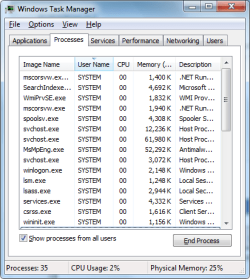
Ok, I found something weird, when i start up my computer and check processes i get a reasonable amount ( On my side ) ~30, but when i hit the show processes from all users, i get like 85~, whats going on?
My Computer
- OS
- Windows 7 x64
When you open Task Manager and click on column UserName you'll see who have started that process... 
My Computer
- Computer type
- PC/Desktop
- Computer Manufacturer/Model Number
- Custom Build
- OS
- Windows 10 Pro x64
- CPU
- Intel Core i5 4440 @Stock
- Motherboard
- Gigabyte Z97 D3H
- Memory
- 4 x 4GB HyperX Fury DDR3
- Graphics Card(s)
- Gigabyte GTX 1050Ti O4G
- Sound Card
- Integrated
- Monitor(s) Displays
- Dell P2417H
- Screen Resolution
- 1920 x 1080
- Hard Drives
- Samsung EVO 850 120GB / Toshiba DT01ACA050 1TB 7200prm 32MB
- PSU
- Riotoro Onyx 750W
- Case
- NZXT H500 Black-Red
- Cooling
- Stock CPU + NZXT 120mm + 2x120mm red fans
- Keyboard
- Modecom Volcano Lanparty
- Mouse
- Asus ROG Gladius / DeepCool E-Pad Plus
- Internet Speed
- DOCSIS 50/3 Mbit
- Browser
- Google Chrome
- Other Info
- Asus K55VJ(i5 3210M, GT635M / 2GB, 8GB DDR3, 500GB HDD)
Similar threads
- Replies
- 13
- Views
- 3K

- Replies
- 3
- Views
- 3K
- Replies
- 15
- Views
- 3K

- Replies
- 21
- Views
- 5K
- Replies
- 4
- Views
- 3K
