New computer won't detect Epson Workforce 610 on wireless network

jenesaisquoi

New member
Local time
12:30 AM
Messages
1
I've been using an Epson Workforce 610 printer using a wireless connection for a few years without problem using a desktop running Windows XP and a laptop running Windows 7 32 bit Home Professional. I just got a new desktop that runs Windows 7 64 bit Home Professional. I needed a different driver for the 64 bit system, which I found and downloaded on the Epson site, and everything installed fine. But, during setup when the new computer attempted to detect the printer on the wireless network, it gave me a message that the printer could not be found. The printer is detected by two other computers on the network and works with them just fine.

As far as I can tell, this is not a network problem since the new computer recognizes and uses the same wireless network to connect to the internet, and the printer shows it is connected to the network with a strong signal. Plus, it is able to communicate with two other computers wirelessly. I have tried rebooting both the computer and the printer and uninstalling and reinstalling the drivers with no success. Any ideas? Epson's site doesn't have any information on this problem. Is there something that has to be enabled in Windows 7 that I'm not aware of?
 

My Computer My Computer

OS
Windows 7 64 bit Home Premium
I have same problem just purchased wireless Epson xp 310 printer, connected with my WiFi, but when adding printer to Acer WIN 7 PC, the PC will not recognize the printer. Would security be preventing this recognition, so disabled Avast, and tried again, again, same result, PC does not recognize printer.
 

My Computer My Computer

Computer type
PC/Desktop
Computer Manufacturer/Model Number
HP p6 Pavilion
OS
win 7 - 64
CPU
Intel(R) Pentium(R) CPU G860 @ 3.00GH2
Motherboard
Foxconn 2ABF
Memory
6G
Graphics Card(s)
Intel(R) HD Graphics
Sound Card
(1) Realtek High Definition Audio (2) USB Audio Device
Antivirus
norton security suite
Browser
IE 11.0.9600,16428
Well I can only start by asking you both for some system specs as it is almost impossible to work without knowing what you have in the machines.

http://www.sevenforums.com/tutorials/180324-system-info-see-your-system-specs.html

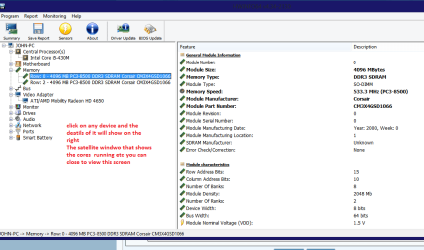
If you want to find specifics for drivers use this HWiNFO, HWiNFO32/64 - Download

shut the "satellite" window of and click on the left hand side on the devices to get the correct brands etc as personally I am a not a great fan of the Windows feature of updating drivers as this sounds very much like a driver problem. See pic

First of all though you both could try this to eliminate the really simple stuff

http://www.sevenforums.com/tutorials/1538-sfc-scannow-command-system-file-checker.html

http://www.sevenforums.com/tutorials/433-disk-check.html
 

Attachments

  • HW INFO X.PNG
    HW INFO X.PNG
    31 KB · Views: 0

My Computer My Computer

Computer type
PC/Desktop
Computer Manufacturer/Model Number
Own build (new) Desk1 / Asus ROG Win 7 / Desk2 1st build
OS
Desk1 7 Home Prem / Desk2 10 Pro / Main lap Asus ROG 10 Pro 2 laptop Toshiba 7 Pro Asus P2520 7 & 10
CPU
Desk1 i5 3750K / Laptop i7 GTX 860M / Desk2 i5 2500
Motherboard
Desk1 Asus P877-V / Desk2 Gigabyte H67 UD3H / Laptop ?
Memory
Desk1 8GB (1866) / Desk2 16GB (1333) / Laptop 8Gb DDR3
Graphics Card(s)
Desk 1& 2NVidia GTX 650 & Laptops on board Intel
Sound Card
Desk 1 & 2 -XONAR DG Realtek High Def audio Laptop
Monitor(s) Displays
Desk 1 Benq HD 2450 / Desk2 Philips 24" / Laptop 17.5"
Screen Resolution
1920x1080 D1 & D2 & Laptop 1
Hard Drives
Desk1 Samsung 120GB 830 SSD
Asus ROG 256GB 850 Pro SSD
Desk2 Samsung 840 256 SSD
Toshiba 120GB EVO
PSU
Desk 1 Corsair HX 1050/ Laptop ? / Desk 2 Corsair HX 650
Case
Desk 1 Cooler HAF XM ? Toshiba laptop / Desk2 Coolermaster
Cooling
Fans on all Desk1 -2 Desk2 - all Coolermasters 5 Laptop ?
Keyboard
Desk 1 MS Sidewinder X6 Desk 2 MS Sidewinder X 4
Mouse
Desk 1&2 - Gigabyte MS 900 gamer - laptop - Logitec wireless
Internet Speed
ADSL2+
Other Info
One other Desktop (tester) and spare Toshba laptop both with SSD's
Running Kaspersky 2016 ISS on all machines config'd identically
Logitec audio stereo systems on each machine (x3)
Canon MG5250MFC
Router/modem TP-Link running WPA2SK
Back
Top