New free system imaging program

SIW2

YTS GEEK
Guru
VIP
SF Team
Local time
5:50 PM
Messages
16,784
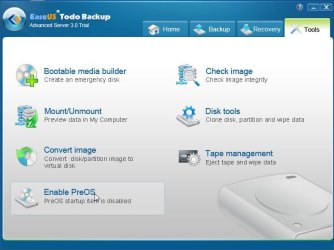
Easeus have released Todo v3 free version.

It can create winpe 3 boot media for you.

It will burn it to a cd , or put it on a flash drive for you.

It can also add it as a boot menu entry.

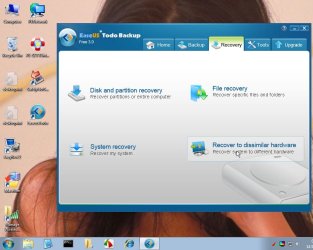
Most surprising is that Recover to dissimilar hardware also comes with the free version.

That is more than other free image apps. are offering.

EaseUS Todo Backup Free - world's best free all-in-one backup & recovery software.
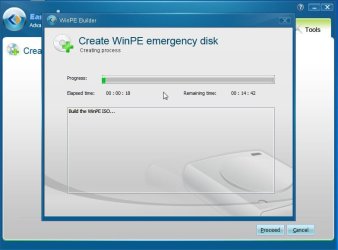
TB3.jpg

TB4.jpg
 

My Computers

System One System Two

  • Computer type
    PC/Desktop
    OS
    7 X64
    CPU
    i5 8400
    Motherboard
    gigabyte b365m ds3h
    Memory
    2x8gb 3200mhz
    Hard Drives
    various
    PSU
    pure power 11 400w cm
    Case
    Coolermaster
    Cooling
    cryorig m9i
  • Computer type
    PC/Desktop
    OS
    7x64
    CPU
    g5400
    Motherboard
    ga b365m ds3h
    Memory
    8gb ddr4 2400
    PSU
    xfx pro 450w
That could be interesting. I wonder if WinPE has USB 3.0 support? Restore from external should be a lot faster if you can run at USB 3.0 speed. I'm using Macrium and at the moment I have to boot from USB stick then load the USB 3.0 driver manually if I want USB 3.0 speed. A bit of a kludge.

edit: looks like Macrium 5 now has USB 3.0 support in both the Linux and WinPE boot discs. At least according to the features page. But they want $22.50 to upgrade from 4.2 paid std version.

I got the Macrium 5 trial. The Linux boot should have USB 3.0 support. I'm not going to test it tonight though. The Macrium Free edition 5 should be out in awhile. I bet they use the same Linux boot CD for it or maybe one version behind, when that is released. But I expect it to have USB 3.0 support as there's been a lot of clamor for it on the Macrium forums.

edit2: the product you mention I looked at the instructions how to make the WinPE disc. It's version 3.0 not the latest 3.1. Also they make you download WAIK(which is a GB download) so it looks like you either don't get the full WinPE or they are somehow kludging it.
 
Last edited:

My Computer

Computer Manufacturer/Model Number
HP Media Center
OS
Windows 7 32 bit
CPU
AMD 5200+ dual core
Memory
2 GB
Graphics Card(s)
NVidia GeForce 6150SE 128 MB
Monitor(s) Displays
CRT
Screen Resolution
1280x1024
Hard Drives
500 GB Sata internal :

SIIG USB 3.0 docking stations w/WD Caviar Black 6 Gb/s drives
Keyboard
PS/2
Mouse
PS/2 Wheel Mouse
Other Info
SIIG USB 3.0 PCIexpress card.
You need to add usb 3 drivers to the pe3 image.

Easy to do it with dism.


looks like Macrium 5 now has USB 3.0 support in both the Linux and WinPE boot discs.

Macrium must have added the drivers already in the paid version download - because they aren't in the macrium pe3 you can run off if you d'l WAIK.


To make a macrium pe3 boot media:

You can use my little app from within win 7 and you don't need WAIK

d/l and install trial version of macrium 5 - any edition - server edition if you like - doesn't matter.

Run my little app and it will make a pe3 disc for you- it will also install renesas usb3 drivers.

http://www.sevenforums.com/tutorials/73828-imaging-free-macrium-37.html
 

My Computers

System One System Two

  • Computer type
    PC/Desktop
    OS
    7 X64
    CPU
    i5 8400
    Motherboard
    gigabyte b365m ds3h
    Memory
    2x8gb 3200mhz
    Hard Drives
    various
    PSU
    pure power 11 400w cm
    Case
    Coolermaster
    Cooling
    cryorig m9i
  • Computer type
    PC/Desktop
    OS
    7x64
    CPU
    g5400
    Motherboard
    ga b365m ds3h
    Memory
    8gb ddr4 2400
    PSU
    xfx pro 450w
I run it from command prompt and it burns the CD?
Are you talking about RunMeAsAdminV2?

edit: in any case the Linux boot cd claims USB 3.0 support. That's all I need. If it doesn't work then I'll investigate further. :)
 

My Computer

Computer Manufacturer/Model Number
HP Media Center
OS
Windows 7 32 bit
CPU
AMD 5200+ dual core
Memory
2 GB
Graphics Card(s)
NVidia GeForce 6150SE 128 MB
Monitor(s) Displays
CRT
Screen Resolution
1280x1024
Hard Drives
500 GB Sata internal :

SIIG USB 3.0 docking stations w/WD Caviar Black 6 Gb/s drives
Keyboard
PS/2
Mouse
PS/2 Wheel Mouse
Other Info
SIIG USB 3.0 PCIexpress card.
Thanks, I'm going to give this a try. i used their older version as it would also image Server based systems.
 

My Computer

Computer Manufacturer/Model Number
Self-Built in July 2009
OS
Windows 7 Ultimate x64
CPU
Intel Q9550 2.83Ghz OC'd to 3.40Ghz
Motherboard
Gigabyte GA-EP45-UD3R rev. 1.1, F12 BIOS
Memory
8GB G.Skill PI DDR2-800, 4-4-4-12 timings
Graphics Card(s)
EVGA 1280MB Nvidia GeForce GTX570
Sound Card
Realtek ALC899A 8 channel onboard audio
Monitor(s) Displays
23" Acer x233H
Screen Resolution
1920x1080
Hard Drives
Intel X25-M 80GB Gen 2 SSD
Western Digital 1TB Caviar Black, 32MB cache. WD1001FALS
PSU
Corsair 620HX modular
Case
Antec P182
Cooling
stock
Keyboard
ABS M1 Mechanical
Mouse
Logitech G9 Laser Mouse
Internet Speed
15/2 cable modem
Other Info
Windows and Linux enthusiast. Logitech G35 Headset.
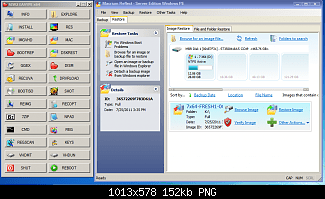
This is the app. for making Macrium pe3 media View attachment 170112

It makes this

MACRIUM-EASYPE.png


Here is the Todo app. in one of my custom pe builds

TODO-IN-CUSTOM-PE.jpg


- see
 

My Computers

System One System Two

  • Computer type
    PC/Desktop
    OS
    7 X64
    CPU
    i5 8400
    Motherboard
    gigabyte b365m ds3h
    Memory
    2x8gb 3200mhz
    Hard Drives
    various
    PSU
    pure power 11 400w cm
    Case
    Coolermaster
    Cooling
    cryorig m9i
  • Computer type
    PC/Desktop
    OS
    7x64
    CPU
    g5400
    Motherboard
    ga b365m ds3h
    Memory
    8gb ddr4 2400
    PSU
    xfx pro 450w
  • Like
Reactions: mjf
Hmmmmmmmm, I just tried the Linux boot CD from Macrium 5. Does not recognize my SIIG USB 3.0 card. So looks like I'm sticking with 4.2 unless they come out with a fix.

I already have WinPE 2.0 on a USB key where I can manually load the SIIG USB 3.0 Windows driver. That's all I need.
 
Last edited:

My Computer

Computer Manufacturer/Model Number
HP Media Center
OS
Windows 7 32 bit
CPU
AMD 5200+ dual core
Memory
2 GB
Graphics Card(s)
NVidia GeForce 6150SE 128 MB
Monitor(s) Displays
CRT
Screen Resolution
1280x1024
Hard Drives
500 GB Sata internal :

SIIG USB 3.0 docking stations w/WD Caviar Black 6 Gb/s drives
Keyboard
PS/2
Mouse
PS/2 Wheel Mouse
Other Info
SIIG USB 3.0 PCIexpress card.
Thus far I really like what I see with the new FREE version of EaseUS ToDo Backup 3 Free;

What's so great about it;
  1. 1 click system image, couldn't be easier
  2. file level backup and restore
  3. ability to do full backups, differential backups and incremental backups
  4. hardware independent restore (I haven't tested this yet)
  5. disk and partition cloning ability
  6. It's free for business use on workstations
  7. 1 button addition to the Windows startup menu for quick recoveries

And the other features that it offers
  • Various levels of compressioin
  • Password Protection
  • Encryption
  • File Splitting
  • Backup priority levels
  • Email Notifications
  • Ability to offsite the backup copy to an FTP server
  • Throttling for the offsite copy
 

My Computer

Computer Manufacturer/Model Number
Self-Built in July 2009
OS
Windows 7 Ultimate x64
CPU
Intel Q9550 2.83Ghz OC'd to 3.40Ghz
Motherboard
Gigabyte GA-EP45-UD3R rev. 1.1, F12 BIOS
Memory
8GB G.Skill PI DDR2-800, 4-4-4-12 timings
Graphics Card(s)
EVGA 1280MB Nvidia GeForce GTX570
Sound Card
Realtek ALC899A 8 channel onboard audio
Monitor(s) Displays
23" Acer x233H
Screen Resolution
1920x1080
Hard Drives
Intel X25-M 80GB Gen 2 SSD
Western Digital 1TB Caviar Black, 32MB cache. WD1001FALS
PSU
Corsair 620HX modular
Case
Antec P182
Cooling
stock
Keyboard
ABS M1 Mechanical
Mouse
Logitech G9 Laser Mouse
Internet Speed
15/2 cable modem
Other Info
Windows and Linux enthusiast. Logitech G35 Headset.
I downloaded it and ran it last night. Seems to work OK, with little interaction required. I made a boot disk and was able to boot from it and go a couple of steps into the recovery process without any issues.

I wasn't clear on the distinction between "system backup" and "disk and partition backup", so I ran both. The resulting images were virtually identical--within a few hundred bytes, so I am guessing both simply made an image of C alone?? I don't have any other partitions on my boot drive.

PParks: I did not see any configuration option for compression levels. Can you advise how to do that? In fact, I saw very little in the way of configuration choices.

I may keep it around to use, alternating with Macrium. I'd just as soon get rid of Acronis, which has never been completely confidence-inspiring.
 

My Computer

Computer type
PC/Desktop
Computer Manufacturer/Model Number
Ignatz Special; 4 speed manual gearbox; factory air conditioning; one of one
OS
Windows 7 Home Premium SP1, 64-bit
CPU
Intel Skylake i5-6600K, not overclocked
Motherboard
AsRock Z170M Extreme 4, micro ATX
Memory
8 GB HyperX DDR4-2666 (2 x 4 GB)
Graphics Card(s)
none; graphics are integrated on CPU
Sound Card
onboard: Realtek ALC1150; external: USB Behringer UF0-202
Monitor(s) Displays
Dell S2340M 23 inch IPS
Screen Resolution
1600 x 900
Hard Drives
System: Crucial MX100 series SSD, 128 GB;
Data: Samsung Spinpoint 103SJ, 1 TB;
Backup: WD Caviar Green WD30EZRX-00D8PB0, 3 TB
PSU
Rosewill SilentNight 500 watt fanless, semi-modular
Case
Antec Solo II
Cooling
Noctua NH-U12S; Noctua F12 intake, Noctua S12A exhaust
Keyboard
Microsoft 200 6JH-00001 USB
Mouse
Dell or Microsoft optical wired; USB
Antivirus
Microsoft Security Essentials and Malwarebytes Premium
Browser
Pale Moon
Other Info
All fans PWM; speeds at idle: CPU circa 500 rpm; intake circa 600 rpm; exhaust circa 600 rpm; CPU temps 27 idle and 47 C load in a warm room (27 C/81 F) when running Intel Extreme Tuning Utility stress test.
When you click on "system backup", you are choosing a 1 button simple backup....no options, no choices, it just images all physical drives on your system.

You can manually go into "disk and partition" backup if you want to do the same thing, but specify options. When you go this route, down at the bottom will be an options button and you can set all of those things that I mentioned.

These should be cooled
--Novice automatic mode
--Advanced mode.
 

My Computer

Computer Manufacturer/Model Number
Self-Built in July 2009
OS
Windows 7 Ultimate x64
CPU
Intel Q9550 2.83Ghz OC'd to 3.40Ghz
Motherboard
Gigabyte GA-EP45-UD3R rev. 1.1, F12 BIOS
Memory
8GB G.Skill PI DDR2-800, 4-4-4-12 timings
Graphics Card(s)
EVGA 1280MB Nvidia GeForce GTX570
Sound Card
Realtek ALC899A 8 channel onboard audio
Monitor(s) Displays
23" Acer x233H
Screen Resolution
1920x1080
Hard Drives
Intel X25-M 80GB Gen 2 SSD
Western Digital 1TB Caviar Black, 32MB cache. WD1001FALS
PSU
Corsair 620HX modular
Case
Antec P182
Cooling
stock
Keyboard
ABS M1 Mechanical
Mouse
Logitech G9 Laser Mouse
Internet Speed
15/2 cable modem
Other Info
Windows and Linux enthusiast. Logitech G35 Headset.
When you click on "system backup", you are choosing a 1 button simple backup....no options, no choices, it just images all physical drives on your system.

You can manually go into "disk and partition" backup if you want to do the same thing, but specify options. When you go this route, down at the bottom will be an options button and you can set all of those things that I mentioned.

Thanks for the info on the "options" button--I had missed it the first time through.

I just did another "system backup" and also a "disk and partition" backup of the C drive alone.

I then mounted both images. I can't see a difference in them. In both cases, only my C drive was shown among the mounted files.

I have 3 separate hard drives, each with a single partition:

C: SSD containing Windows only
D: spinner containing all data
E: spinner containing data backup

Unless I am totally confused (always a possibility), the "system backup" choice does not include D and E and appears to be identical to a "disk and partition" backup of C alone.
 

My Computer

Computer type
PC/Desktop
Computer Manufacturer/Model Number
Ignatz Special; 4 speed manual gearbox; factory air conditioning; one of one
OS
Windows 7 Home Premium SP1, 64-bit
CPU
Intel Skylake i5-6600K, not overclocked
Motherboard
AsRock Z170M Extreme 4, micro ATX
Memory
8 GB HyperX DDR4-2666 (2 x 4 GB)
Graphics Card(s)
none; graphics are integrated on CPU
Sound Card
onboard: Realtek ALC1150; external: USB Behringer UF0-202
Monitor(s) Displays
Dell S2340M 23 inch IPS
Screen Resolution
1600 x 900
Hard Drives
System: Crucial MX100 series SSD, 128 GB;
Data: Samsung Spinpoint 103SJ, 1 TB;
Backup: WD Caviar Green WD30EZRX-00D8PB0, 3 TB
PSU
Rosewill SilentNight 500 watt fanless, semi-modular
Case
Antec Solo II
Cooling
Noctua NH-U12S; Noctua F12 intake, Noctua S12A exhaust
Keyboard
Microsoft 200 6JH-00001 USB
Mouse
Dell or Microsoft optical wired; USB
Antivirus
Microsoft Security Essentials and Malwarebytes Premium
Browser
Pale Moon
Other Info
All fans PWM; speeds at idle: CPU circa 500 rpm; intake circa 600 rpm; exhaust circa 600 rpm; CPU temps 27 idle and 47 C load in a warm room (27 C/81 F) when running Intel Extreme Tuning Utility stress test.
I haven't tried this app yet, but it sounds like it works like Acronis.

Meaning, the "System backup" just Images the partition the OS is installed. With no options to configure, just a quick backup.

If the OS is installed on a disc on its own, this obviously works, but you could also opt for the Disc/Partion Image.
A Partiton Image of C, would be the same as the Auto System backup.

But the Disc Image will image the entire disc, Including the System reserved (if there is one) and all other partitons, as well as the disc signature.
This is my perfered method for my OS drive.
So this method might have a image thats just slightly bigger.


And it does sound as if its leaving out librarys that are located on other drives. Which, IMHO, is a good thing. Simply because you can back those up seprately. If like me, they probably do not need to backed up nearly as often as the OS does.


Of course this is open to correction, as Im basing this on my experience of Acronis. It sounds like it works the same though.


How is this app overall if compared directly to Acronis?
 

My Computer

Computer Manufacturer/Model Number
Custom (Self Build)
OS
Windows 7 Home Premium 64bit
CPU
Intel Core i7 2700k
Motherboard
eVGA P67 SLI
Memory
8GB Mushkin Redline Ridgebacks @1866
Graphics Card(s)
EVGA GTX570 SC
Sound Card
XiFi Titanium HD
Monitor(s) Displays
LG W2453V
Screen Resolution
1920x1080
Hard Drives
Intel 320 80GB -- Intel X25-V 40GB --WD Black 1TB x2 -- WD Blue 640GB
PSU
Seasonic x750
Case
Corsair 600T SE White
Cooling
eVGA Superclocked CPU Cooler
Keyboard
Saitek Cyborg
Antivirus
Kaspersky
Browser
IE
Other Info
LG BD/DVD
Wishmaster:

I'd guess the verdict is not in primarily because we don't have any info on problems or failed restore attempts, etc.

Superficially it appears better than Acronis: it's free, probably a better designed interface, seems to take less time to make an image, few limitations that would affect a home user, and no history (yet, that I know of) of failures.

I don't have any "reserved" partitions of any kind, so I can't tell you how it handles them. I would assume they would show up and need to be checked when doing a "disk and partition" backup.

A "system backup" requires all most no interaction with the user--you just choose a destination for the image.

Tentatively, I am going to use it, pending any feedback regarding issues. And get rid of Acronis (the free version available from WD and Seagate).

Of course, you never know about these apps until crunch time when you have a catastrophe.
 

My Computer

Computer type
PC/Desktop
Computer Manufacturer/Model Number
Ignatz Special; 4 speed manual gearbox; factory air conditioning; one of one
OS
Windows 7 Home Premium SP1, 64-bit
CPU
Intel Skylake i5-6600K, not overclocked
Motherboard
AsRock Z170M Extreme 4, micro ATX
Memory
8 GB HyperX DDR4-2666 (2 x 4 GB)
Graphics Card(s)
none; graphics are integrated on CPU
Sound Card
onboard: Realtek ALC1150; external: USB Behringer UF0-202
Monitor(s) Displays
Dell S2340M 23 inch IPS
Screen Resolution
1600 x 900
Hard Drives
System: Crucial MX100 series SSD, 128 GB;
Data: Samsung Spinpoint 103SJ, 1 TB;
Backup: WD Caviar Green WD30EZRX-00D8PB0, 3 TB
PSU
Rosewill SilentNight 500 watt fanless, semi-modular
Case
Antec Solo II
Cooling
Noctua NH-U12S; Noctua F12 intake, Noctua S12A exhaust
Keyboard
Microsoft 200 6JH-00001 USB
Mouse
Dell or Microsoft optical wired; USB
Antivirus
Microsoft Security Essentials and Malwarebytes Premium
Browser
Pale Moon
Other Info
All fans PWM; speeds at idle: CPU circa 500 rpm; intake circa 600 rpm; exhaust circa 600 rpm; CPU temps 27 idle and 47 C load in a warm room (27 C/81 F) when running Intel Extreme Tuning Utility stress test.
Tried Todo Backup last week on Win7-64 and WinXP-32 machines. After creating images for each machine on USB2.0 HD, created bootable CD for each machine. Both CD's failed to boot on their respective machines. Searched Easus Forums, many having same problem. For some, it locks computer, others, it just hangs. Most say it's a memory management problem, and to type command "MEM 2GB" at Linux command prompt, or something like that. Tried all variations, nothing worked.

No problem with Macrium. Won't use Todo until issues are resolved. What good is a backup, if the Bootable Media won't boot?

I can always get DOS to boot & run Symantec Ghost Enterprise 8.2. Just trying to move away from DOS, but it always seems to work.
 

My Computer

Computer type
PC/Desktop
Computer Manufacturer/Model Number
Dell Inspiron 660
OS
Windows 7 Home Premium 64bit
CPU
Intel Core i3-3240
Motherboard
Dell 084J0R
Memory
8GB DDR3 SDRAM
Graphics Card(s)
EVGA GeForce GT 620
Sound Card
Intel Panther Point PCH High Definition Audio
Monitor(s) Displays
Acer G205HV
Screen Resolution
1600 x 900
Hard Drives
Sandisk SSD 64GB SDSSDP064G
Seagate HDD 1TB ST1000DM003-1CH162
PSU
Dell 300W
Case
Dell Inspiron
Keyboard
Logitech Wireless K320/B350
Mouse
Microsoft
Internet Speed
25Mbps/4Mbps
Antivirus
Avast
Browser
Mozilla Firefox
Wishmaster:

I'd guess the verdict is not in primarily because we don't have any info on problems or failed restore attempts, etc.

Superficially it appears better than Acronis: it's free, probably a better designed interface, seems to take less time to make an image, few limitations that would affect a home user, and no history (yet, that I know of) of failures.

I don't have any "reserved" partitions of any kind, so I can't tell you how it handles them. I would assume they would show up and need to be checked when doing a "disk and partition" backup.

A "system backup" requires all most no interaction with the user--you just choose a destination for the image.

Tentatively, I am going to use it, pending any feedback regarding issues. And get rid of Acronis (the free version available from WD and Seagate).

Of course, you never know about these apps until crunch time when you have a catastrophe.


Very true, and thanks for the input.

Think I'll go ahead & give it a try as well.
 

My Computer

Computer Manufacturer/Model Number
Custom (Self Build)
OS
Windows 7 Home Premium 64bit
CPU
Intel Core i7 2700k
Motherboard
eVGA P67 SLI
Memory
8GB Mushkin Redline Ridgebacks @1866
Graphics Card(s)
EVGA GTX570 SC
Sound Card
XiFi Titanium HD
Monitor(s) Displays
LG W2453V
Screen Resolution
1920x1080
Hard Drives
Intel 320 80GB -- Intel X25-V 40GB --WD Black 1TB x2 -- WD Blue 640GB
PSU
Seasonic x750
Case
Corsair 600T SE White
Cooling
eVGA Superclocked CPU Cooler
Keyboard
Saitek Cyborg
Antivirus
Kaspersky
Browser
IE
Other Info
LG BD/DVD
Unless I am totally confused (always a possibility), the "system backup" choice does not include D and E and appears to be identical to a "disk and partition" backup of C alone.

I'm sure that is the case, and you aren't crazy. I've only tested on a box that contained a single C drive. Probably most home users would have a single drive setup as well and this one click backup would suffice. My home system (where I presently run Acronis) has an 80GB SSD for the OS and all applications. I have a spinner drive in this box, but it's just internet downloads and scratch stuff....so I don't include it anyway when I do images. Whenever I restore an image, all I want is the C drive. My actual data is stored on a file server at my house...which is backed up separately.

I'll test in a little bit to ensure that it gets the system reserved partitions and such.
 

My Computer

Computer Manufacturer/Model Number
Self-Built in July 2009
OS
Windows 7 Ultimate x64
CPU
Intel Q9550 2.83Ghz OC'd to 3.40Ghz
Motherboard
Gigabyte GA-EP45-UD3R rev. 1.1, F12 BIOS
Memory
8GB G.Skill PI DDR2-800, 4-4-4-12 timings
Graphics Card(s)
EVGA 1280MB Nvidia GeForce GTX570
Sound Card
Realtek ALC899A 8 channel onboard audio
Monitor(s) Displays
23" Acer x233H
Screen Resolution
1920x1080
Hard Drives
Intel X25-M 80GB Gen 2 SSD
Western Digital 1TB Caviar Black, 32MB cache. WD1001FALS
PSU
Corsair 620HX modular
Case
Antec P182
Cooling
stock
Keyboard
ABS M1 Mechanical
Mouse
Logitech G9 Laser Mouse
Internet Speed
15/2 cable modem
Other Info
Windows and Linux enthusiast. Logitech G35 Headset.
I got the Macrium 5 trial. The Linux boot should have USB 3.0 support. I'm not going to test it tonight though. The Macrium Free edition 5 should be out in awhile. I bet they use the same Linux boot CD for it or maybe one version behind, when that is released. But I expect it to have USB 3.0 support as there's been a lot of clamor for it on the Macrium forums.

edit2: the product you mention I looked at the instructions how to make the WinPE disc. It's version 3.0 not the latest 3.1. Also they make you download WAIK(which is a GB download) so it looks like you either don't get the full WinPE or they are somehow kludging it.
I made the pe disk via the download. I think this inconvenience may be a licensing constraint imposed by MS.
Anyway the pe disk works fine EXCEPT I cannot get the Renesa usb3 drivers accepted when make the pe disk. Yet they are accepted and can be loaded after you boot the pe disk!

I might try the DISM suggestion to add them.
 

My Computer

Computer type
PC/Desktop
Computer Manufacturer/Model Number
Own build
OS
Windows 7x64 Home Premium SP1
CPU
Intel i7 2600k
Motherboard
ASUS P8Z68 Deluxe
Memory
G.Skill Ripjaws (DDR3-1600) 2x4GB
Graphics Card(s)
Nvidia GeForce GTS 450; Intel HD Graphics 3000(GT2+)
Monitor(s) Displays
Dell Ultrasharp IPS panel U2311H, Samsung SyncMaster P2350
Screen Resolution
1920x1080
Hard Drives
Samsung 850 Pro SSD 256GB, Samsung SSD 840 120GB, Seagates 1TB Barracuda ST31000528AS x2
PSU
Seasonic M12II 520W
Case
Lian Li Lancool PC-K60
Cooling
Case: 1x120mm, 3x140mm CPU: Hyper 212+
Keyboard
Logitech MK520 (wireless)
Mouse
Logitech MK520
Internet Speed
6-7 Mbps
Antivirus
Norton Security Premium, Malwarebytes on 2 (MSE on 3rd PC)
Browser
FireFox
Other Info
Audio: Logitech Z523 2.1
Test results thus far:

Grabbed a Dell E6400 Laptop at work. Core 2 Duo 2.4Ghz CPU and 4GB of RAM. Since 160GB hard drive, 7,200 RPM. Installed Windows 7 Enterprise 64bit from USB key to it.

Total disk size after install, and download of EaseUsToDoBackup version 3 and installation of said sofware was 15,717.303.368 bytes.

Ran the 1 button press backup job (which did grab my C drive, and my System Reserved Partition) to my eSATA external drive
--Job took 2:28 seconds to backup. 4.734,436KB resulting output file.

Ran the backup manually, specified HIGH COMPRESSION with MEDIUM PRIORITY,
--Job took 6:30 seconds to backup, 3,732,976KB resulting output file.

Booted from the standard recovery media (is a bit slow, but works) and restored the 1 button push backup file
--Job took 4:45 seconds to restore.

Booted back into Windows 7 no problems at all.

edit: I'm in the process of burning the Windows PE version of the recovery media and will try that.

Edit: Windows PE version worked as well. Probably took a bit longer to start, presented by drive letters a bit nicer, but the overall restore process took 6:21 seconds versus 4:45 with the standard recovery media.
 

My Computer

Computer Manufacturer/Model Number
Self-Built in July 2009
OS
Windows 7 Ultimate x64
CPU
Intel Q9550 2.83Ghz OC'd to 3.40Ghz
Motherboard
Gigabyte GA-EP45-UD3R rev. 1.1, F12 BIOS
Memory
8GB G.Skill PI DDR2-800, 4-4-4-12 timings
Graphics Card(s)
EVGA 1280MB Nvidia GeForce GTX570
Sound Card
Realtek ALC899A 8 channel onboard audio
Monitor(s) Displays
23" Acer x233H
Screen Resolution
1920x1080
Hard Drives
Intel X25-M 80GB Gen 2 SSD
Western Digital 1TB Caviar Black, 32MB cache. WD1001FALS
PSU
Corsair 620HX modular
Case
Antec P182
Cooling
stock
Keyboard
ABS M1 Mechanical
Mouse
Logitech G9 Laser Mouse
Internet Speed
15/2 cable modem
Other Info
Windows and Linux enthusiast. Logitech G35 Headset.
I got the Macrium 5 trial. The Linux boot should have USB 3.0 support. I'm not going to test it tonight though. The Macrium Free edition 5 should be out in awhile. I bet they use the same Linux boot CD for it or maybe one version behind, when that is released. But I expect it to have USB 3.0 support as there's been a lot of clamor for it on the Macrium forums.

edit2: the product you mention I looked at the instructions how to make the WinPE disc. It's version 3.0 not the latest 3.1. Also they make you download WAIK(which is a GB download) so it looks like you either don't get the full WinPE or they are somehow kludging it.
I made the pe disk via the download. I think this inconvenience may be a licensing constraint imposed by MS.
Anyway the pe disk works fine EXCEPT I cannot get the Renesa usb3 drivers accepted when make the pe disk. Yet they are accepted and can be loaded after you boot the pe disk!

I might try the DISM suggestion to add them.

I was just disappointed the Linux boot didn't work hands off. Afaik (and a system builder guy may correct me if I'm wrong) all the USB 3.0 stuff is NEC with an NEC driver. So I would think if the Linux kernel with USB 3.0 works for motherboard USB 3.0 it should work for SIIG express card. I have WinPE 2.0 and can load the SIIG driver manually using drvload. It's just a pain having to fish it out during a restore.

Just seems like Macrium 5 is different than Macrium 4.2 in that the GUI is shifted around a bit and an upgrade now costs $$. Looks marketing rather than technical.

edit: btw didn't mean to turn it into a Macrium thread. So I'll quit bitchin' :)
 
Last edited:

My Computer

Computer Manufacturer/Model Number
HP Media Center
OS
Windows 7 32 bit
CPU
AMD 5200+ dual core
Memory
2 GB
Graphics Card(s)
NVidia GeForce 6150SE 128 MB
Monitor(s) Displays
CRT
Screen Resolution
1280x1024
Hard Drives
500 GB Sata internal :

SIIG USB 3.0 docking stations w/WD Caviar Black 6 Gb/s drives
Keyboard
PS/2
Mouse
PS/2 Wheel Mouse
Other Info
SIIG USB 3.0 PCIexpress card.

My Computer

Computer type
PC/Desktop
Computer Manufacturer/Model Number
Own build
OS
Windows 7x64 Home Premium SP1
CPU
Intel i7 2600k
Motherboard
ASUS P8Z68 Deluxe
Memory
G.Skill Ripjaws (DDR3-1600) 2x4GB
Graphics Card(s)
Nvidia GeForce GTS 450; Intel HD Graphics 3000(GT2+)
Monitor(s) Displays
Dell Ultrasharp IPS panel U2311H, Samsung SyncMaster P2350
Screen Resolution
1920x1080
Hard Drives
Samsung 850 Pro SSD 256GB, Samsung SSD 840 120GB, Seagates 1TB Barracuda ST31000528AS x2
PSU
Seasonic M12II 520W
Case
Lian Li Lancool PC-K60
Cooling
Case: 1x120mm, 3x140mm CPU: Hyper 212+
Keyboard
Logitech MK520 (wireless)
Mouse
Logitech MK520
Internet Speed
6-7 Mbps
Antivirus
Norton Security Premium, Malwarebytes on 2 (MSE on 3rd PC)
Browser
FireFox
Other Info
Audio: Logitech Z523 2.1
Back
Top