New free system imaging program

Worth noting is that the PE version of the recovery disks gives you more functionality in the EaseUs product when you boot from it. Namely, you can boot from the cd, and actually run a backup of the machine instead of just a recovery.

This can be nice for
1). Linux machines where the software doesn't run natively
2). Backing up a machine which won't boot to get the data off it before a format and reinstall.
 

My Computer

Computer Manufacturer/Model Number
Self-Built in July 2009
OS
Windows 7 Ultimate x64
CPU
Intel Q9550 2.83Ghz OC'd to 3.40Ghz
Motherboard
Gigabyte GA-EP45-UD3R rev. 1.1, F12 BIOS
Memory
8GB G.Skill PI DDR2-800, 4-4-4-12 timings
Graphics Card(s)
EVGA 1280MB Nvidia GeForce GTX570
Sound Card
Realtek ALC899A 8 channel onboard audio
Monitor(s) Displays
23" Acer x233H
Screen Resolution
1920x1080
Hard Drives
Intel X25-M 80GB Gen 2 SSD
Western Digital 1TB Caviar Black, 32MB cache. WD1001FALS
PSU
Corsair 620HX modular
Case
Antec P182
Cooling
stock
Keyboard
ABS M1 Mechanical
Mouse
Logitech G9 Laser Mouse
Internet Speed
15/2 cable modem
Other Info
Windows and Linux enthusiast. Logitech G35 Headset.
Namely, you can boot from the cd, and actually run a backup of the machine instead of just a recovery.

This can be nice for
1). Linux machines where the software doesn't run natively
2). Backing up a machine which won't boot to get the data off it before a format and reinstall.

Macrium within the mini XP environment of the Hirens Boot CD does the same. You can make as well as restore (x32 or x64bit) Macrium images. It has worked fine for me.
 

My Computer

Computer type
PC/Desktop
Computer Manufacturer/Model Number
Own build
OS
Windows 7x64 Home Premium SP1
CPU
Intel i7 2600k
Motherboard
ASUS P8Z68 Deluxe
Memory
G.Skill Ripjaws (DDR3-1600) 2x4GB
Graphics Card(s)
Nvidia GeForce GTS 450; Intel HD Graphics 3000(GT2+)
Monitor(s) Displays
Dell Ultrasharp IPS panel U2311H, Samsung SyncMaster P2350
Screen Resolution
1920x1080
Hard Drives
Samsung 850 Pro SSD 256GB, Samsung SSD 840 120GB, Seagates 1TB Barracuda ST31000528AS x2
PSU
Seasonic M12II 520W
Case
Lian Li Lancool PC-K60
Cooling
Case: 1x120mm, 3x140mm CPU: Hyper 212+
Keyboard
Logitech MK520 (wireless)
Mouse
Logitech MK520
Internet Speed
6-7 Mbps
Antivirus
Norton Security Premium, Malwarebytes on 2 (MSE on 3rd PC)
Browser
FireFox
Other Info
Audio: Logitech Z523 2.1
Hi mj,

The instructions are pretty simple.

To make a Macrium pe3 disc on 7 x64 - you don't need WAIK .

Just d/l the small app. Attachment 170112

Ther is 7-zip file inside

Un 7-zip it onto your windows 7 drive ( e.g. C: ).

You will see an exe called RunMeAsAdminV2.exe.

Rt click it and run as admin.

It will make the pe3 shown in the picture for you - usb3.0 drivers already included.


[I could make a similar one for Easeus - but you would need access to 32 bit winpe - it won't run in native 64 bit pe.]


This is the app. for making Macrium pe3 media View attachment 170112

It makes this

View attachment 170114


Here is the Todo app. in one of my custom pe builds

View attachment 170115


- see
Some instructions would help
 
Last edited:

My Computers

System One System Two

  • Computer type
    PC/Desktop
    OS
    7 X64
    CPU
    i5 8400
    Motherboard
    gigabyte b365m ds3h
    Memory
    2x8gb 3200mhz
    Hard Drives
    various
    PSU
    pure power 11 400w cm
    Case
    Coolermaster
    Cooling
    cryorig m9i
  • Computer type
    PC/Desktop
    OS
    7x64
    CPU
    g5400
    Motherboard
    ga b365m ds3h
    Memory
    8gb ddr4 2400
    PSU
    xfx pro 450w
One question.....

Does ToDo store the data in a special format that only it can see, or does it use ZIP compression, or just the files themselves backed up in a tree structure?

Thanks!
 

My Computer

Computer Manufacturer/Model Number
Gateway DX4720-03
OS
Windows 7 64bit
CPU
Pentium dual-core E5200(2.50GHz) 2MB L2 Cache 2MB FSB 800MHz
Memory
4 GB of DDR2 667/800 MHz SDRAM
Graphics Card(s)
NVIDIA GeForce 7100 Integrated Graphics
Sound Card
8-Channel (7.1) High Definition Audio
Monitor(s) Displays
Gateway 19'' flat-screen monitor
Screen Resolution
1024 X 768
Hard Drives
640GB SATA II, 16MB Cache 7200 RPM
500GB Parallel ATA hard disk 5400 RPM
Case
16.34" x 7.09" x 11.22" 24.25 lbs
Keyboard
Premium Multimedia Keyboard
Mouse
USB Optical 2-Button Wheel Mouse
Internet Speed
Cable Internet Road Runner
Other Info
18X DVD+/-R/RW SuperMulti Drive featuring Labelflash Technology

10/100/1000 Mbps Ethernet LAN

300W

Card Reader - 15-in-1 High Speed Digital Media Card Reader w/Smart Copy Button
Compact Flash I & II, IBM Microdrive, Secure Digital (SD & Mini SD), Multi Media Card (MMC, MMC Plus, RS-MMC, and MMC Mobile), Memory Stick (MS, MS Duo, MS Pro, and MS Pro Duo), xD-Picture Card, SmartMedia Card
One question.....

Does ToDo store the data in a special format that only it can see, or does it use ZIP compression, or just the files themselves backed up in a tree structure?

Thanks!

It backs up into a .PBD file. It can be compressed..by default it would be. You would need the software to mount it and restore it.
 

My Computer

Computer Manufacturer/Model Number
Self-Built in July 2009
OS
Windows 7 Ultimate x64
CPU
Intel Q9550 2.83Ghz OC'd to 3.40Ghz
Motherboard
Gigabyte GA-EP45-UD3R rev. 1.1, F12 BIOS
Memory
8GB G.Skill PI DDR2-800, 4-4-4-12 timings
Graphics Card(s)
EVGA 1280MB Nvidia GeForce GTX570
Sound Card
Realtek ALC899A 8 channel onboard audio
Monitor(s) Displays
23" Acer x233H
Screen Resolution
1920x1080
Hard Drives
Intel X25-M 80GB Gen 2 SSD
Western Digital 1TB Caviar Black, 32MB cache. WD1001FALS
PSU
Corsair 620HX modular
Case
Antec P182
Cooling
stock
Keyboard
ABS M1 Mechanical
Mouse
Logitech G9 Laser Mouse
Internet Speed
15/2 cable modem
Other Info
Windows and Linux enthusiast. Logitech G35 Headset.
Did some performance testing and file size comparisons. I did a backup of one of my Windows 7 boxes, which had approx 33.5GB of stuff installed on C.

Acronis True Image 2010:
Normal Compression Level: 4:55 seconds, resulting in 14,762,836KB output file
High Compression level: 7:45 seconds, resulting in 13,456,570KB output file

EaseUS ToDoBackup Free v.3
Normal Compression Level: 4:54 seconds, resulting in 16,398,548KB output file
High Compression Level: 14:15 seconds, resulting in 13,454,536KB output file.

So, overall, Acronis seems to compress better and faster...but it's also not free.
 

My Computer

Computer Manufacturer/Model Number
Self-Built in July 2009
OS
Windows 7 Ultimate x64
CPU
Intel Q9550 2.83Ghz OC'd to 3.40Ghz
Motherboard
Gigabyte GA-EP45-UD3R rev. 1.1, F12 BIOS
Memory
8GB G.Skill PI DDR2-800, 4-4-4-12 timings
Graphics Card(s)
EVGA 1280MB Nvidia GeForce GTX570
Sound Card
Realtek ALC899A 8 channel onboard audio
Monitor(s) Displays
23" Acer x233H
Screen Resolution
1920x1080
Hard Drives
Intel X25-M 80GB Gen 2 SSD
Western Digital 1TB Caviar Black, 32MB cache. WD1001FALS
PSU
Corsair 620HX modular
Case
Antec P182
Cooling
stock
Keyboard
ABS M1 Mechanical
Mouse
Logitech G9 Laser Mouse
Internet Speed
15/2 cable modem
Other Info
Windows and Linux enthusiast. Logitech G35 Headset.
The instructions are pretty simple. To make a Macrium pe3 disc on 7 x64 - you don't need WAIK .

Just d/l the small app. Attachment 170112 It will make the pe3
LATEST: No joy. It boots, I get the cute desktop and your GUI buttons, and when I try to start Macrium I get its splash screen and its enumeration of my disk drives, but then the splash screen goes away and... nothing appears--the Macrium screen does not appear. Maybe only works with 5? I'm using Free 4.3 build 3775 (latest I think). The other apps you included do all work afaict.
-------------------------------------------
Wow if this works it's akin to magic SIW2--I came here to say "what do I do with the ISO directory it made" but then got a pop-up and it made an .iso for me! :o

I'll just say to others the execution of RunMeAsAdminV2.exe involves multiple steps, takes a long time, and culminates in the creation of an .iso file and an offer to burn to disc! I tried testing with QEMU (I use XBOOT for all my bootup .iso images on a USB stick) but it must not know to emulate 64-bit programs I guess. I need to boot my USB3.0 PC (that didn't work before w/Macrium Linux boot disc) to see about this.

In the meantime I'll ask: I thought WinPE needed to be bought from MS or something? In any case if this works it's WILDLY BETTER than downloading a couple gigabytes from MS!!! Thanks in advance SIW2!
 
Last edited:

My Computer

Computer type
Laptop
Computer Manufacturer/Model Number
Dell Latitude E6540 Laptop
OS
Windows 7 Professional 64bit
CPU
Intel Core i7 4600M @ 2.90GHz
Motherboard
Dell Inc. 0CYT5F (SOCKET 0)
Memory
16.0GB Dual-Channel DDR3 @ 797MHz (11-11-11-28)
Graphics Card(s)
Intel HD Graphics 4600 (Dell) 2048MB ATI AMD Radeon HD 8790M
Sound Card
Realtek High Definition Audio
Monitor(s) Displays
HP ZR30w (2560x1600@60Hz)
Hard Drives
256GB LITEONIT LMT-256M6M-41 mm SATA (SSD)
1TB Samsung SSD 860 EVO mSATA SATA (SSD)
2TB USB 3.0 USB Device
115GB SanDisk Ultra Fit USB
Other Info
Multiple Dell E-Port Plus II Port Replicator/Docking Stations 0Y72NH USB 3.0 + 130W AC Adapters
Yes, It only works with v5.

You can install the trial macrium v5 and the app. will make the pe3 disc from that.
 

My Computers

System One System Two

  • Computer type
    PC/Desktop
    OS
    7 X64
    CPU
    i5 8400
    Motherboard
    gigabyte b365m ds3h
    Memory
    2x8gb 3200mhz
    Hard Drives
    various
    PSU
    pure power 11 400w cm
    Case
    Coolermaster
    Cooling
    cryorig m9i
  • Computer type
    PC/Desktop
    OS
    7x64
    CPU
    g5400
    Motherboard
    ga b365m ds3h
    Memory
    8gb ddr4 2400
    PSU
    xfx pro 450w
Yes, It only works with v5.
Ah, I figured as much. Too bad, but thanks for confirming so fast!

Don't wanna buy v5 though; I'd just made a few images w/4.2 before realizing its boot disc didn't work w/my USB3.0 drive.
 

My Computer

Computer type
Laptop
Computer Manufacturer/Model Number
Dell Latitude E6540 Laptop
OS
Windows 7 Professional 64bit
CPU
Intel Core i7 4600M @ 2.90GHz
Motherboard
Dell Inc. 0CYT5F (SOCKET 0)
Memory
16.0GB Dual-Channel DDR3 @ 797MHz (11-11-11-28)
Graphics Card(s)
Intel HD Graphics 4600 (Dell) 2048MB ATI AMD Radeon HD 8790M
Sound Card
Realtek High Definition Audio
Monitor(s) Displays
HP ZR30w (2560x1600@60Hz)
Hard Drives
256GB LITEONIT LMT-256M6M-41 mm SATA (SSD)
1TB Samsung SSD 860 EVO mSATA SATA (SSD)
2TB USB 3.0 USB Device
115GB SanDisk Ultra Fit USB
Other Info
Multiple Dell E-Port Plus II Port Replicator/Docking Stations 0Y72NH USB 3.0 + 130W AC Adapters
You don't need to buy it.

Install Trial version of Macrium v5.

Do the RunMeAsAdminv2.exe - like you did before.

The boot disc you get does not expire.

Then reinstall the free Macrium v4.

Macrium v4 and v5 are interchangeable - the engine is the same - they work with each others images.
 

My Computers

System One System Two

  • Computer type
    PC/Desktop
    OS
    7 X64
    CPU
    i5 8400
    Motherboard
    gigabyte b365m ds3h
    Memory
    2x8gb 3200mhz
    Hard Drives
    various
    PSU
    pure power 11 400w cm
    Case
    Coolermaster
    Cooling
    cryorig m9i
  • Computer type
    PC/Desktop
    OS
    7x64
    CPU
    g5400
    Motherboard
    ga b365m ds3h
    Memory
    8gb ddr4 2400
    PSU
    xfx pro 450w

My Computer

Computer type
Laptop
Computer Manufacturer/Model Number
Dell Latitude E6540 Laptop
OS
Windows 7 Professional 64bit
CPU
Intel Core i7 4600M @ 2.90GHz
Motherboard
Dell Inc. 0CYT5F (SOCKET 0)
Memory
16.0GB Dual-Channel DDR3 @ 797MHz (11-11-11-28)
Graphics Card(s)
Intel HD Graphics 4600 (Dell) 2048MB ATI AMD Radeon HD 8790M
Sound Card
Realtek High Definition Audio
Monitor(s) Displays
HP ZR30w (2560x1600@60Hz)
Hard Drives
256GB LITEONIT LMT-256M6M-41 mm SATA (SSD)
1TB Samsung SSD 860 EVO mSATA SATA (SSD)
2TB USB 3.0 USB Device
115GB SanDisk Ultra Fit USB
Other Info
Multiple Dell E-Port Plus II Port Replicator/Docking Stations 0Y72NH USB 3.0 + 130W AC Adapters
very nice

Thanks SIW2 this is something that I have been looking for I really like the preOS start-up that's my preferred choice but also made a bootable usb. It also supports the A8N-SLI old board which is hard to find a program that does that. Macrium just would not work for me and Acronis just is just to bulky and slow, but this is just right..:D
 

My Computer

Computer Manufacturer/Model Number
Alienware
OS
Windows 7 Ultimate x64
CPU
I7
Motherboard
GA-X58-USB3
Memory
6 x 1.5V DDR3 DIMM sockets supporting up to 24 GB of system
Graphics Card(s)
GeForce GTX 580
Sound Card
Realtek ALC892 codec 2/4/5.1/7.1-channel
Monitor(s) Displays
NEC Display Solutions E321 Black 32"
Screen Resolution
1366 x 768
Hard Drives
OCZ Colossus LT Series OCZSSD2-1CLSLT1T 3.5" 1TB SATA II MLC Internal Solid State Drive
PSU
XFX Black Edition XPS-850W-BES 850W ATX12V
Case
Antec
Cooling
Zalman
Keyboard
Microsoft
Mouse
Microsoft
Hi there
Works great (The EASUS product -- I've had bad experience with Macrium in the past and I think it also uses the MS VSS (Volume shadowing system) which can cause a lot of grief if like me you keep uour OS partition fairly small and separate from your DATA partitions).

I've been using a really old version of acronis server for backup (V9) --had to change the name to TI.exe to overcome the "compatability error" message when running on W7. I never liked the later versions of Acronis.

I'm not to worried about USB 3 support yet --I'm sure it will come out with upgrades later.

I'll "stress test" this and then I'll change --BTW the stand alone boot disk doesn't have any problems with backing up W2K3 SERVER either.

Cheers
jimbo
 

My Computer

Computer type
PC/Desktop
Computer Manufacturer/Model Number
Custom built, several laptops HP/ASUS
OS
Linux CENTOS 7 / various Windows OS'es and servers
CPU
Intel i7 Intel i5
Memory
8GB, 16GB
Graphics Card(s)
On Motherboard
Sound Card
Realtek HD audio
Monitor(s) Displays
Apple Cinema display, Samsung LCD
Screen Resolution
1920 X 1080
Hard Drives
4 X 1TB SATA
Mouse
Toshiba wireless laser
Internet Speed
> 20MB up
In looking at the EaseUS backup software comparison, the only diff between Free and the $39 Workstation is a snapshot capability. I dunno what they mean by a "snapshot" but it sorta looks like Windows System Restore?

Is there an image mount capability i.e. allowing access to files in the image backup?

Program almost looks too good to be true.

P.S. I've had Acronis True Image since v1 and it seems they may finally have their act fully together with ATI Home 2010. Lots less "noise" about problems than in recent past versions. Now the noise level is up again with ATIH 2011...
 

My Computer

Computer type
Laptop
Computer Manufacturer/Model Number
Dell Latitude E6540 Laptop
OS
Windows 7 Professional 64bit
CPU
Intel Core i7 4600M @ 2.90GHz
Motherboard
Dell Inc. 0CYT5F (SOCKET 0)
Memory
16.0GB Dual-Channel DDR3 @ 797MHz (11-11-11-28)
Graphics Card(s)
Intel HD Graphics 4600 (Dell) 2048MB ATI AMD Radeon HD 8790M
Sound Card
Realtek High Definition Audio
Monitor(s) Displays
HP ZR30w (2560x1600@60Hz)
Hard Drives
256GB LITEONIT LMT-256M6M-41 mm SATA (SSD)
1TB Samsung SSD 860 EVO mSATA SATA (SSD)
2TB USB 3.0 USB Device
115GB SanDisk Ultra Fit USB
Other Info
Multiple Dell E-Port Plus II Port Replicator/Docking Stations 0Y72NH USB 3.0 + 130W AC Adapters
Max:

Yes, you can navigate to individual files in the image.

I've switched to EaseUS and Macrium instead of Acronis and Macrium. We'll see how it goes.

I have not yet done a restore with EaseUS, but I did make a boot disc and was able to boot from it and access all drives as well as the image file.
 

My Computer

Computer type
PC/Desktop
Computer Manufacturer/Model Number
Ignatz Special; 4 speed manual gearbox; factory air conditioning; one of one
OS
Windows 7 Home Premium SP1, 64-bit
CPU
Intel Skylake i5-6600K, not overclocked
Motherboard
AsRock Z170M Extreme 4, micro ATX
Memory
8 GB HyperX DDR4-2666 (2 x 4 GB)
Graphics Card(s)
none; graphics are integrated on CPU
Sound Card
onboard: Realtek ALC1150; external: USB Behringer UF0-202
Monitor(s) Displays
Dell S2340M 23 inch IPS
Screen Resolution
1600 x 900
Hard Drives
System: Crucial MX100 series SSD, 128 GB;
Data: Samsung Spinpoint 103SJ, 1 TB;
Backup: WD Caviar Green WD30EZRX-00D8PB0, 3 TB
PSU
Rosewill SilentNight 500 watt fanless, semi-modular
Case
Antec Solo II
Cooling
Noctua NH-U12S; Noctua F12 intake, Noctua S12A exhaust
Keyboard
Microsoft 200 6JH-00001 USB
Mouse
Dell or Microsoft optical wired; USB
Antivirus
Microsoft Security Essentials and Malwarebytes Premium
Browser
Pale Moon
Other Info
All fans PWM; speeds at idle: CPU circa 500 rpm; intake circa 600 rpm; exhaust circa 600 rpm; CPU temps 27 idle and 47 C load in a warm room (27 C/81 F) when running Intel Extreme Tuning Utility stress test.
Hi there
For Virtual mounting of ISO's I use Alcohol Free edition -- these will even mount nrg (Nero image) files when other virtual disk mounting software fails.

Download from here

Alcohol 52% FE - Free software downloads and software reviews - CNET Download.com

(I use this program a lot as well to mount Virtual DVD's cloned via AnyDVD to watch DVD's stored as ISO's on a HDD instead of carrying around DVD's).

Cheers
jimbo
 

My Computer

Computer type
PC/Desktop
Computer Manufacturer/Model Number
Custom built, several laptops HP/ASUS
OS
Linux CENTOS 7 / various Windows OS'es and servers
CPU
Intel i7 Intel i5
Memory
8GB, 16GB
Graphics Card(s)
On Motherboard
Sound Card
Realtek HD audio
Monitor(s) Displays
Apple Cinema display, Samsung LCD
Screen Resolution
1920 X 1080
Hard Drives
4 X 1TB SATA
Mouse
Toshiba wireless laser
Internet Speed
> 20MB up
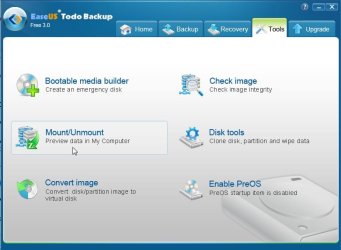
Mount function is under the TOOLS Tab


TODO-MOUNT.jpg

This is very impressive for a free app. Macrium is a little faster, but the features you get with free TODO are unbeatable.

Other imaging app. makers need to respond.
 

My Computers

System One System Two

  • Computer type
    PC/Desktop
    OS
    7 X64
    CPU
    i5 8400
    Motherboard
    gigabyte b365m ds3h
    Memory
    2x8gb 3200mhz
    Hard Drives
    various
    PSU
    pure power 11 400w cm
    Case
    Coolermaster
    Cooling
    cryorig m9i
  • Computer type
    PC/Desktop
    OS
    7x64
    CPU
    g5400
    Motherboard
    ga b365m ds3h
    Memory
    8gb ddr4 2400
    PSU
    xfx pro 450w

My Computer

Computer Manufacturer/Model Number
HP Media Center
OS
Windows 7 32 bit
CPU
AMD 5200+ dual core
Memory
2 GB
Graphics Card(s)
NVidia GeForce 6150SE 128 MB
Monitor(s) Displays
CRT
Screen Resolution
1280x1024
Hard Drives
500 GB Sata internal :

SIIG USB 3.0 docking stations w/WD Caviar Black 6 Gb/s drives
Keyboard
PS/2
Mouse
PS/2 Wheel Mouse
Other Info
SIIG USB 3.0 PCIexpress card.
Mount function is under the TOOLS Tab


View attachment 171234

This is very impressive for a free app. Macrium is a little faster, but the features you get with free TODO are unbeatable.

Other imaging app. makers need to respond.

Seems like they are working on the USB 3.0 support. They claim on their forum that there "are too many different USB 3.0 drivers" to support them all. I though everything was rented from NEC? Even my SIIG card has NEC chip and drivers.

Edit: I tried the Linux boot CD. It came up and recognized my drives in the USB 3.0 Docks!! Yay!!! Now I have to try making a backup image. Good deal!! :)
 

My Computer

Computer Manufacturer/Model Number
HP Media Center
OS
Windows 7 32 bit
CPU
AMD 5200+ dual core
Memory
2 GB
Graphics Card(s)
NVidia GeForce 6150SE 128 MB
Monitor(s) Displays
CRT
Screen Resolution
1280x1024
Hard Drives
500 GB Sata internal :

SIIG USB 3.0 docking stations w/WD Caviar Black 6 Gb/s drives
Keyboard
PS/2
Mouse
PS/2 Wheel Mouse
Other Info
SIIG USB 3.0 PCIexpress card.
Haven't made one for 32 bit yet.

Will get around to it when I can .

If you are using 32 bit win 7 - you are in luck - there will the option to include tons of stuff.

Not just macrium v5 , but also easeus TODO new free v3 will run beautifully, as well as apps. like paragon, partition wizard, Easeus partition master, easeus data recovery wizard, MT data recovery, etc.

Any requests as to the apps you want to have ion your pe3 media?
 

My Computers

System One System Two

  • Computer type
    PC/Desktop
    OS
    7 X64
    CPU
    i5 8400
    Motherboard
    gigabyte b365m ds3h
    Memory
    2x8gb 3200mhz
    Hard Drives
    various
    PSU
    pure power 11 400w cm
    Case
    Coolermaster
    Cooling
    cryorig m9i
  • Computer type
    PC/Desktop
    OS
    7x64
    CPU
    g5400
    Motherboard
    ga b365m ds3h
    Memory
    8gb ddr4 2400
    PSU
    xfx pro 450w
Back
Top